Ọja Pariview
The PUSOKEI B75 Motherboard CPU Set is designed for desktop computing, offering a robust platform with an integrated Intel Core i5-3470 CPU, DDR3 memory, and essential connectivity options. This set provides a stable and efficient foundation for various computing tasks.
Awọn ẹya pataki:
- Ipese Agbara Iduroṣinṣin: Features a 3-phase power supply design with modular and large cooling for improved stability and heat dissipation, ensuring reliable operation even under heavy loads.
- Efficient Memory: Supports DDR3 channel memory, accommodating up to 32GB modules for high-speed performance and ample storage capacity for multitasking and resource-intensive applications.
- High-Speed Storage Interface: Supports ME PCIE X4 M.2 SSD, offering a theoretical bandwidth of up to 4GB per second for fast data transfer speeds, enabling quick access to fileàwọn ètò àti àwọn ètò.
- Multiple Interface Expansion: Equipped with 4 USB 3.0 ports and 6 USB 2.0 ports, providing ample connectivity options for a wide range of peripherals.
- Integrated Chipsets & Easy Assembly: Includes integrated sound and network chipsets for convenient audio and network connections. The set comes with an i5-3470 CPU, 8GB DDR3 module, and a cooling fan, ensuring excellent compatibility and simplifying the assembly process.
Eto ati fifi sori
Awọn eroja To wa:
- 1 x DDR3 Motherboard (with built-in battery)
- 1 x Baffle
- 1 x SATA Cable
- 1 x Ilana itọnisọna
- 1 x I5-3470 CPU (pre-installed)
- 2 x 4GB DDR3 Memory Modules (pre-installed)
- 1 x CPU Cooling Fan (pre-installed)
Awọn igbesẹ fifi sori ẹrọ:
Before beginning installation, ensure your workspace is clean and static-free. It is recommended to wear an anti-static wrist strap.
- Mura modaboudu: Carefully remove the motherboard from its anti-static packaging. The CPU, memory, and cooling fan are typically pre-installed in this set.
- Fi I/O Shield sori ẹrọ: Insert the included I/O shield into the corresponding opening in your computer case from the inside.
- Modaboudu Oke: Align the motherboard with the standoffs in your computer case and secure it with screws.
- So agbara: So asopo agbara ATX 24-pin ati asopo agbara Sipiyu 4-pin lati ipese agbara rẹ si modaboudu.
- Connect Storage: Use the provided SATA cable to connect your storage devices (HDD/SSD) to the SATA ports on the motherboard.
- Awọn Agbeegbe Sopọ: Connect front panel USB, audio, and power/reset switch cables from your case to the appropriate headers on the motherboard.
- Fi Kaadi Awọn aworan sori ẹrọ (Aṣayan): If using a dedicated graphics card, insert it into the PCI-E X16 slot and secure it. Connect any necessary PCI-E power cables from your power supply.
- Awọn ayẹwo Ipari: Ṣayẹwo gbogbo awọn asopọ lẹẹmeji ṣaaju pipade apoti kọnputa rẹ.

Image: The PUSOKEI B75 Motherboard with the Intel Core i5-3470 CPU and cooling fan pre-installed.
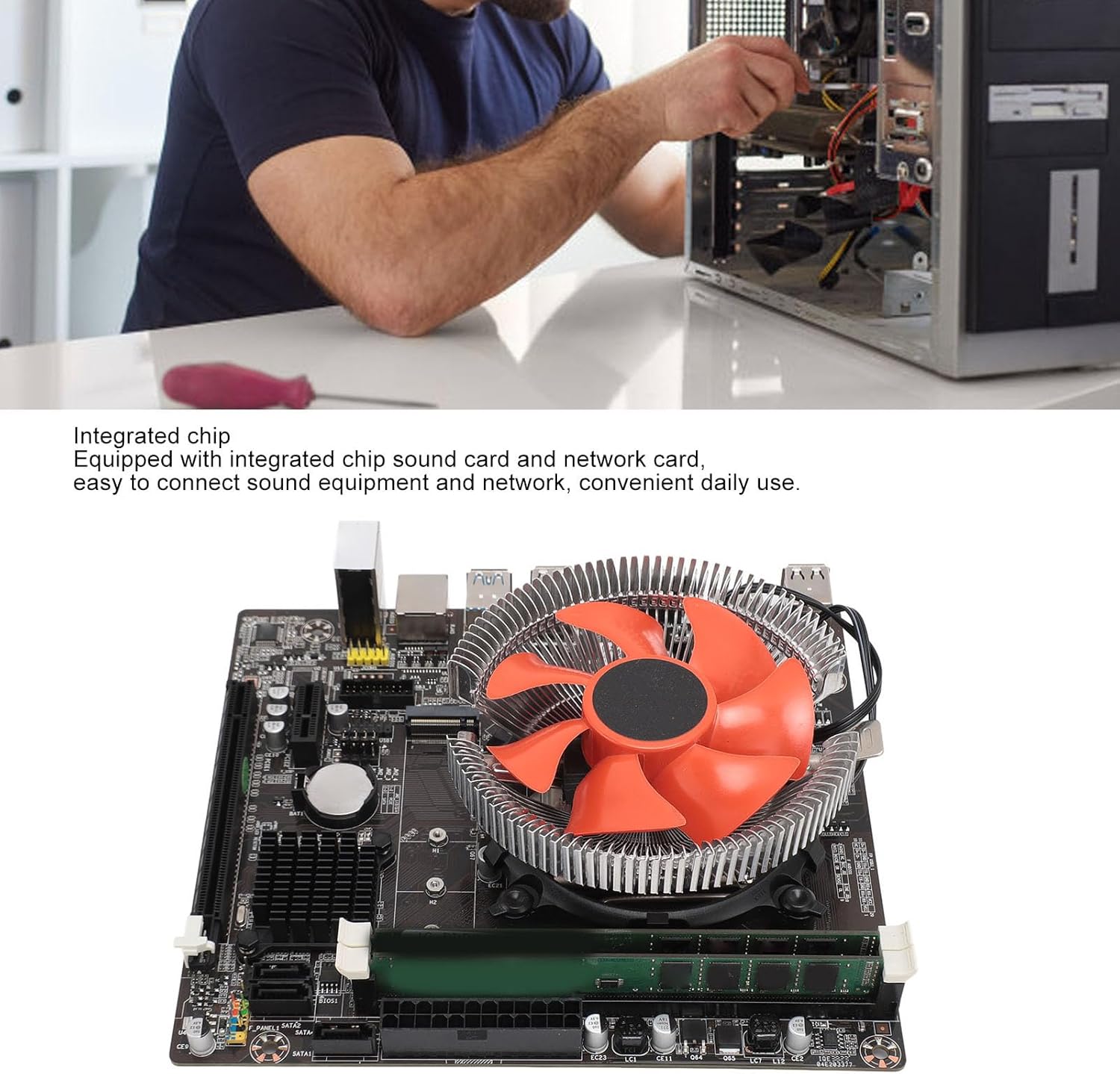
Aworan: Isunmọ view of the integrated chip sound card and network card on the motherboard, highlighting connectivity features.
Video: A demonstration of the PUSOKEI B75 Motherboard CPU Set, showcasing its components and features.
Awọn ilana Iṣiṣẹ
Once the motherboard is correctly installed and all components are connected, power on your system. The motherboard's BIOS (Basic Input/Output System) will initiate the boot process. You may need to access the BIOS setup to configure boot order, system time, and other settings, especially after a new installation.
- Iwọle si BIOS: Typically, press the 'Del' or 'F2' key repeatedly during startup to enter the BIOS setup utility. Refer to the included instruction manual for specific key presses.
- Fifi sori ẹrọ eto iṣẹ: Follow the instructions for your chosen operating system (e.g., Windows 10) to install it on your primary storage device.
- Fifi sori Awakọ: After OS installation, install all necessary drivers for the motherboard's chipsets, audio, network, and any discrete graphics cards. Drivers are usually available on the manufacturer's webojula.
Video: A general product demonstration video, illustrating the functionality and features of a motherboard.
Itoju
Regular maintenance helps ensure the longevity and optimal performance of your motherboard and system components.
- Yiyọ eruku kuro: Periodically clean dust from the CPU cooler, case fans, and motherboard components using compressed air. Ensure the system is powered off and unplugged before cleaning.
- Iṣakoso USB: Ensure all cables are neatly routed and secured to prevent obstruction of airflow and accidental disconnections.
- Awọn imudojuiwọn BIOS/UEFI: Check the PUSOKEI website for BIOS/UEFI updates. Updates can improve compatibility, stability, and performance. Follow the update instructions carefully to avoid system damage.
- Awọn Iṣayẹwo Ẹka: Occasionally check all connections (power, SATA, USB) to ensure they are secure.
Laasigbotitusita
If you encounter issues with your PUSOKEI B75 Motherboard CPU Set, refer to the following common troubleshooting steps:
- Ko si Agbara/Ko si bata:
- Rii daju pe gbogbo awọn kebulu agbara (24-pin ATX, 4-pin CPU) ti sopọ ni aabo.
- Rii daju pe ipese agbara n ṣiṣẹ ni deede.
- Check front panel connections (power switch).
- Awọn oran Ifihan:
- Rí i dájú pé a so àtẹ ìṣàfihàn náà mọ́ fídíò tó tọ́ (motherboard tàbí graphic card).
- Check video cable connections.
- If using a discrete graphics card, ensure it is properly seated and powered.
- Olufẹ Ko Yiyi:
- Verify the CPU fan is correctly connected to the CPU_FAN header.
- Check for any physical obstructions preventing the fan from spinning. (As noted in customer feedback, sometimes fins can be slightly bent).
- Aisedeede/iparun eto:
- Ensure RAM modules are correctly seated in their slots.
- Ṣàyẹ̀wò iwọn otutu CPU àti GPU láti dẹ́kun ìgbóná jù.
- Ṣe imudojuiwọn awọn awakọ ati BIOS si awọn ẹya tuntun.
Imọ ni pato

Image: Diagram showing the approximate dimensions of the motherboard, 115mm x 115mm.
| Ẹka | Sipesifikesonu |
|---|---|
| Nkan Iru | CPU Motherboard Set |
| Ohun elo | PCB |
| Mainboard Chip | Integrated Chip Sound Card or Network Card, Integrated Core Graphics Card |
| Chipset akọkọ | for B75 |
| Sound Chipset | Integrated 6 Channel Sound Chipset |
| Sipiyu Socket | LGA 1155 |
| Sipiyu tí a ṣe àtìlẹ́yìn | I5 3470 (included) |
| Iranti Iru | DDR3 1600, 1333, 1066 MHZ |
| Iho iranti | 2 × DDR3 (included) |
| Maks Memory Agbara | 32 GB |
| PCI E X16 Graphics Card Slot | 1 |
| PCI E X1 Slot | 1 |
| USB2.0 Pins | 1 ẹgbẹ |
| USB3.0 Pins | 1 ẹgbẹ |
| M.2 Iho | 1 x NVME or NGFF Convertible |
| Awọn atọkun SATA | 3 |
| RJ45 Network Interface | 1 |
| Ni wiwo VGA | 1 |
| HD Multimedia Interface (HD Output) | 1 |
| USB 2.0 Interfaces | 4 |
| USB 3.0 Interfaces | 2 |
| Agbara Ipese Interface | 1 x 4 Pin, 1 x 24 Pin |
| Ipo Ipese Agbara | 3 Ipele |
| Sipiyu Series | i5 3470, 3rd Generation Series |
| Sipiyu Igbohunsafẹfẹ | 3.2GHz |
| Nọmba ti Cores | Awọn ohun kohun mẹrin |
| Nọmba ti Awọn ila | Four Threads |
| Levels 3 Cache | 6MB |
| Agbara Apẹrẹ Gbona (TDP) | 77W |
| Ese Eya | for HD Graphics 2500 |
| Memory Capacity (included) | 4GB x 2 |
| Cooler Size | Nǹkan bíi 115 x 115 x 58mm / 4.5 x 4.5 x 2.3in |
| Ohun elo Radiator | Aluminiomu |
| Iyara Fan | 2200 ± 10% RPM |
Atilẹyin ọja ati Support
For warranty information and technical support, please refer to the documentation included with your product or visit the official PUSOKEI webojula. Tọju iwe-ẹri rira rẹ fun awọn ẹtọ atilẹyin ọja.
Awọn ero aabo ni afikun le wa fun rira lọtọ lati faagun agbegbe kọja atilẹyin ọja boṣewa.


