Ọrọ Iṣaaju
The NOYAFA NF-859G is a versatile network cable tester designed for comprehensive network cable testing. It integrates multiple functions including wire detection, alignment testing, crimping testing, PoE detection, visual fault location (VFL), and an LED flashlight. This manual provides detailed instructions for the proper setup, operation, maintenance, and troubleshooting of your device.
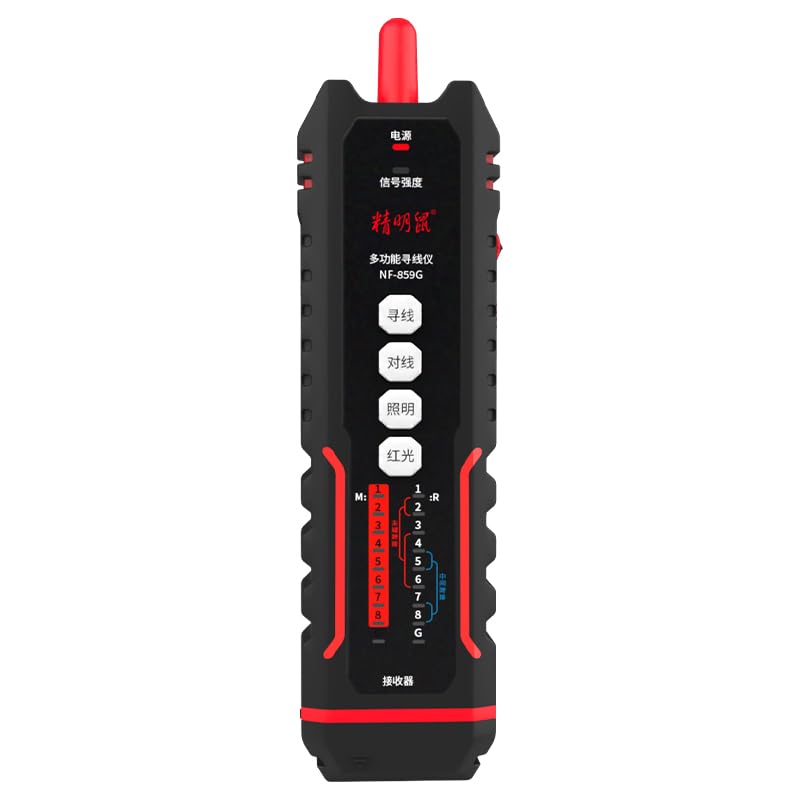
Image: The NOYAFA NF-859G Network Cable Tester, showing the main unit and the receiver.
Ṣeto
Unpacking ati Ibẹrẹ Ayewo
Carefully unpack the NOYAFA NF-859G Network Cable Tester. Verify that all components are present and undamaged. The package should include:
- Main Tester Unit
- Receiver (auxiliary machine)
- Afowoyi Olumulo (iwe-ipamọ yii)
- Akiyesi: Ko si awọn batiri ati pe o gbọdọ ra lọtọ.
Fifi sori batiri
- Locate the battery compartment on the main tester unit and the receiver.
- Ṣii ideri iyẹwu batiri naa.
- Insert the required batteries, ensuring correct polarity (+/-). The device uses a 3.7V lithium polymer battery.
- Pa ideri batiri naa ni aabo.
Awọn ilana Iṣiṣẹ
The NOYAFA NF-859G offers various testing modes. Familiarize yourself with the device's interface before operation.
Waya erin Išė
This function allows for tracing and locating cables. It supports both anti-interference mode and ordinary mode.
- Connect the cable to be traced to the main unit's appropriate port (RJ45/RJ11).
- Select the wire detection mode on the main unit.
- Use the receiver to trace the cable. The receiver will emit an audible signal when near the cable.
- Switch between anti-interference mode and ordinary mode as needed for optimal tracing in different environments.
Alignment Test (Cable Mapping)
Perform local and remote alignment tests to check for open circuits, short circuits, cross-overs, and split pairs in network cables.
- For local alignment test, connect both ends of the cable to the main unit.
- For remote alignment test, connect one end of the cable to the main unit and the other end to the receiver.
- Initiate the alignment test. The display will show the wiring status of the cable.
Crimping igbeyewo
Verify the proper crimping of RJ11 and RJ45 connectors.
- Insert the crimped RJ11 or RJ45 connector into the corresponding port on the main unit.
- Select the crimping test function. The device will indicate if the crimping is correct or if there are faults.
PoE (Power over Ethernet) Detection
Identify the power supply wire core and detect mid-span or end-span PoE configurations.
- Connect the network cable with PoE to the main unit.
- Activate the PoE detection function. The device will display information about the PoE type and power status.
Wiwa Aṣiṣe wiwo (VFL)
The integrated 20mw red light function helps locate breaks and bends in fiber optic cables.
- Connect the fiber optic cable to the VFL port.
- Activate the VFL. A red laser light will be emitted.
- Observe the cable for light leakage, which indicates a fault.
- Caution: Avoid direct eye exposure to the laser light.
Ina filaṣi LED
The built-in LED flashlight provides illumination in dark working environments.
- Press the dedicated flashlight button to turn it on or off.
Itoju
Proper maintenance ensures the longevity and accuracy of your NOYAFA NF-859G Network Cable Tester.
- Ninu: Lo asọ asọ ti o gbẹ lati nu ẹrọ naa. Ma ṣe lo abrasive ose tabi epo.
- Ibi ipamọ: Tọju ẹrọ naa ni itura, aye gbigbẹ kuro lati orun taara ati awọn iwọn otutu to gaju. Ti o ba wa ni ipamọ fun awọn akoko ti o gbooro sii, yọ awọn batiri kuro lati yago fun jijo.
- Rirọpo Batiri: Replace batteries when the low battery indicator appears. Always use the specified battery type (3.7V lithium polymer).
- Mimu: Yago fun sisọ ẹrọ naa silẹ tabi fifisilẹ si awọn ipa to lagbara.
Laasigbotitusita
This section addresses common issues you might encounter with your NOYAFA NF-859G.
| Isoro | Owun to le Fa | Ojutu |
|---|---|---|
| Ẹrọ naa ko ṣiṣẹ. | Awọn batiri kekere tabi okú; fifi sori batiri ti ko tọ. | Check battery indicator. Replace batteries or ensure they are installed with correct polarity. |
| Inaccurate cable test results. | Damaged test cable; incorrect test mode selected; dirty connectors. | Use a known good test cable. Ensure the correct test mode (e.g., alignment test) is selected. Clean connectors. |
| Wire tracing signal is weak or absent. | Cable is shielded; interference from other cables; low battery on receiver. | Switch to anti-interference mode. Ensure receiver batteries are charged. Try tracing in a less congested area. |
| VFL red light is dim or not working. | Low battery; VFL port obstruction; internal fault. | Check battery level. Ensure VFL port is clean and unobstructed. If problem persists, contact support. |
Awọn pato
Key technical specifications for the NOYAFA NF-859G Network Cable Tester:
- Nọmba awoṣe: NF-859G
- Brand: NOYAFA
- Orukọ Agbo: Nẹtiwọki USB Cable
- Imọ-ẹrọ Asopọmọra: Àjọlò
- Orisun Agbara: Battery Powered (3.7V lithium polymer battery)
- Awọn eroja to wa: Main Tester Unit, Receiver (auxiliary machine)
- VFL Output Power: 20mw (Red Light Function)
- Wire Detection Modes: Anti-interference mode, Ordinary mode
- Awọn asopọ ti o ni atilẹyin: RJ45, RJ11
- Awọn oriṣi USB ti o ni atilẹyin: CAT5, CAT6, CAT5E, CAT6A
- Ìwọ̀n Nkan: 420 g
- Awọn iwọn idii: 28.8 x 16.6 x 5.3 cm
- Àwọ̀: Dudu
- Olupese: NOYAFA
Atilẹyin ọja ati Support
For warranty information or technical support, please refer to the official NOYAFA webaaye tabi kan si olupin agbegbe rẹ. Tọju iwe-ẹri rira rẹ bi ẹri rira fun awọn iṣeduro atilẹyin ọja.
Olupese: NOYAFA
Ọjọ Akọkọ Wa: Oṣu Kẹsan Ọjọ 22, Ọdun 2024
Fun iranlọwọ siwaju sii, jọwọ ṣabẹwo si NOYAFA Brand Store on Amazon.


