1. Ti pariview
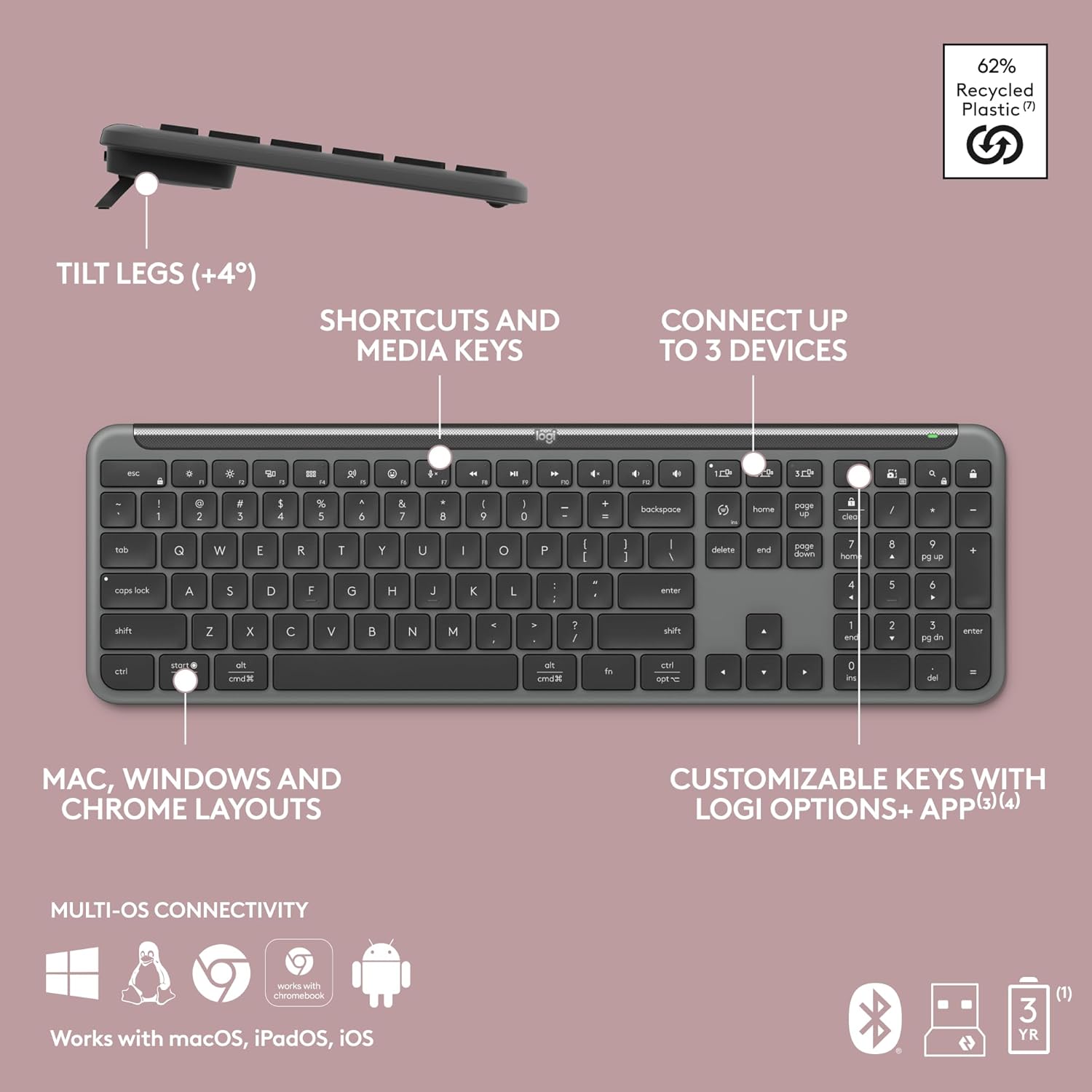
The Logitech Signature Slim Wireless Keyboard K950 is designed for seamless multi-device typing, offering a sleek design and quiet operation. It allows users to effortlessly switch between a computer, tablet, and phone with a single tap. The keyboard features customizable keys via the Logi Options+ App, providing enhanced control and efficiency. Its laptop-style typing experience ensures comfort, while its durable construction includes recycled plastic, reflecting a commitment to sustainability. Connectivity is versatile, supporting both Bluetooth and the Logi Bolt USB receiver, with an impressive battery life of up to 36 months.
Key Awọn ẹya ara ẹrọ
- Iyipada Ẹrọ pupọ: Effortlessly switch typing between your computer, tablet, or phone with a single tap.
- Awọn bọtini isọdi: Utilize the Logi Options+ App (available on Windows and macOS) to customize keys and create shortcuts for enhanced productivity.
- Sleek Design & Durable Build: A full-size wireless Bluetooth keyboard with a familiar laptop-style typing feel, constructed with recycled plastic.
- Titẹ idakẹjẹ: Designed for discreet and quiet operation, minimizing disturbance to others.
- Asopọmọra Wapọ: Connects wirelessly via Bluetooth or the included Logi Bolt USB receiver, compatible with Windows, macOS, Chrome OS, Linux, iPadOS, iOS, and Android.
- Igbesi aye batiri gigun: Enjoy up to 36 months of battery life, ensuring prolonged use without frequent recharging.
- Integrated Shortcuts: Features one-tap, out-of-the-box functions for common tasks like music playback, mute/unmute, snipping tool, and volume control.

2. Eto Itọsọna
2.1 Ṣíṣí àpótí àti Ìṣètò Àkọ́kọ́
Follow these steps to set up your Logitech Signature Slim K950 Wireless Keyboard:
- Ṣayẹwo Awọn akoonu Package: Ensure all components are present. The package typically includes the Logitech Signature Slim K950 Wireless Keyboard, a Logi Bolt USB receiver, and a USB cable.
- Agbara Tan: Locate the power switch on the keyboard and slide it to the 'ON' position. The keyboard uses AAA batteries, which are usually pre-installed or included in the packaging.
- Connect via Logi Bolt USB Receiver:
- Pulọọgi Logi Bolt USB olugba sinu ibudo USB ti o wa lori kọnputa rẹ.
- The keyboard should automatically connect. If not, press and hold one of the Easy-Switch keys (1, 2, or 3) for 3 seconds until the LED blinks rapidly, then release. The keyboard will attempt to pair.
- Sopọ nipasẹ Bluetooth:
- Rii daju pe Bluetooth ti ṣiṣẹ lori ẹrọ rẹ (kọmputa, tabulẹti, tabi foonu).
- Press and hold one of the Easy-Switch keys (1, 2, or 3) for 3 seconds until the LED blinks rapidly.
- On your device, go to Bluetooth settings and select 'Logitech K950' from the list of available devices to pair.
- Fi sori ẹrọ Awọn aṣayan Logi+ App (Ti ṣeduro): Ṣe igbasilẹ ati fi sori ẹrọ Awọn aṣayan Logi + App lati ọdọ Logitech osise webAaye (logitech.com/software/logi-options-plus.html) to unlock full customization features for your keyboard.
3. Awọn ilana Iṣiṣẹ
3.1 Olona-Device Yipada
The K950 keyboard allows you to connect and switch between up to three different devices (e.g., computer, tablet, smartphone). Use the dedicated Easy-Switch keys located above the numeric keypad to seamlessly transition your typing.
- Tẹ awọn Irọrun-Yipada bọtini 1 to connect to your first paired device.
- Tẹ awọn Irọrun-Yipada bọtini 2 to connect to your second paired device.
- Tẹ awọn Irọrun-Yipada bọtini 3 to connect to your third paired device.

3.2 Customizable Keys and Shortcuts
Enhance your workflow by customizing the keyboard's function keys and creating personalized shortcuts using the Logi Options+ App. This app provides advanced control over your keyboard's functionality.
- Download Logi Options+: If you haven't already, download and install the Logi Options+ App from Logitech's official webojula.
- Assign Functions: Within the app, you can reassign functions to various keys, including media controls, application shortcuts, and custom macros.
- Pre-programmed Shortcuts: The keyboard comes with pre-programmed shortcuts for common tasks such as playing music, muting/unmuting, using the snipping tool, and controlling volume.

3.3 Quiet Typing Experience
The Logitech Signature Slim K950 is engineered for a quiet typing experience, minimizing noise and allowing for greater focus in any environment.

3.4 Multi-OS Compatibility
The keyboard is designed to work seamlessly across various operating systems, including Windows, macOS, Chrome OS, Linux, iPadOS, and iOS. It automatically adapts its layout to the connected operating system.

4. Itọju ati Itọju
4.1 Ninu rẹ Keyboard
To ensure the longevity and optimal performance of your keyboard, regular cleaning is recommended:
- Agbara Pa: Always turn off the keyboard before cleaning.
- Yiyọ eruku kuro: Lo agolo afẹ́fẹ́ tí a ti fún ní ìfúnpọ̀ láti fẹ́ eruku àti ìdọ̀tí kúrò láàárín àwọn kọ́kọ́rọ́ náà.
- Isọdanu Oju: Gently wipe the keycaps and keyboard surface with a soft, lint-free cloth lightly dampfi omi tàbí omi ìwẹ̀nùmọ́ díẹ̀ tí kò ní bàjẹ́. Yẹra fún ọrinrin púpọ̀ jù.
- Yago fun Kemikali lile: Do not use strong solvents, alcohol, or abrasive cleaners, as these can damage the keyboard's finish and key legends.
4.2 batiri Management
The Logitech Signature Slim K950 is designed for extended battery life. When the battery level is low, the LED indicator on the keyboard will signal the need for charging.
- Gbigba agbara: Connect the keyboard to a USB power source (e.g., computer USB port, USB wall adapter) using the provided USB cable.
- Igbesi aye batiri: The keyboard can last up to 36 months on a single set of batteries, depending on usage.
5. Laasigbotitusita
5.1 Wọpọ Oran ati Solusan
| Isoro | Owun to le Fa | Ojutu |
|---|---|---|
| Keyboard ko sopọ/dahun. | Low battery, incorrect Easy-Switch channel, receiver issue, Bluetooth interference. |
|
| Àwọn kọ́kọ́rọ́ náà máa ń lẹ̀ mọ́ tàbí wọn kì í dáhùn. | Debris under keys, physical damage. |
|
| Keyboard layout is incorrect. | Operating system settings, Logi Options+ settings. |
|
| Aye batiri ti kuru ju ti a reti lọ. | Heavy usage, frequent backlighting, old batteries. |
|
6. Imọ ni pato
| Ẹya ara ẹrọ | Sipesifikesonu |
|---|---|
| Brand | Logitech |
| Nọmba awoṣe | 920-012424 |
| Asopọmọra Technology | Bluetooth, USB (Logi Bolt) |
| Apejuwe Keyboard | Ẹ̀yà ara |
| Nọmba ti Awọn bọtini | 108 |
| Ibamu System isẹ | Multi-OS (Windows, macOS, Chrome OS, Linux, iPadOS, iOS, Android) |
| Àwọ̀ | Lẹẹdi |
| Iwọn Nkan | 1.51 iwon |
| Package Mefa | 17.72 x 6.06 x 1.14 inches |
| Orisun agbara | Battery Powered (up to 36 months battery life) |
| Ohun elo | Ṣíṣíàkì (píṣíàtíkì tí a túnlo lẹ́yìn oníbàárà tó kéré jù 48% tí a fọwọ́ sí) |
7. Atilẹyin ọja ati Support
7.1 atilẹyin ọja Alaye
The Logitech Signature Slim K950 Wireless Keyboard is covered by Logitech's standard manufacturer warranty. For specific details regarding warranty terms, duration, and coverage, please refer to the warranty card included with your product or visit the official Logitech support webojula.
7.2 Onibara Support
For technical assistance, troubleshooting, or any product-related inquiries, please contact Logitech Customer Support:
- Atilẹyin Ayelujara: Ṣabẹwo si Atilẹyin Logitech website for FAQs, drivers, software downloads, and community forums: support.logi.com
- Ibi iwifunni: Specific contact numbers or email support options may vary by region. Please check the Logitech support website for the most up-to-date contact details for your location.


