1. Ifihan
This user manual provides essential information for the safe and efficient operation of your Anern 4200W Hybrid Solar Inverter. This all-in-one pure sine wave inverter integrates solar energy storage and charging, capable of producing stable AC sine waves. It features a 120A MPPT solar charge controller with optimized MPPT technology for up to 98% efficiency. Please read this manual thoroughly before installation and use.

Figure 1: Anern 4.2KW Hybrid Solar Inverter, showing the main unit and included Wi-Fi module.
2. Key Awọn ẹya ara ẹrọ
- Apẹrẹ Gbogbo-ni-Ọkan: Integrates solar energy storage, charging, and AC output functions.
- High-Efficiency MPPT Controller: Features a 120A MPPT solar charge controller with up to 98% efficiency.
- Ijade Sine Wave Pure: Provides stable and high-quality AC power suitable for various household and office loads, including sensitive electronics.
- Abojuto latọna jijin: Equipped with an LCD screen and 4 LED indicators for dynamic system data display. Supports Wi-Fi/GPRS remote monitoring (Wi-Fi module included).
- Awọn ọna gbigba agbara lọpọlọpọ: Offers 4 optional charging modes: Solar, Solar & Utility, Solar First.
- Flexible Output Modes: Provides 3 output modes: Solar First, Utility First, SBU mode.
- Ṣaja Batiri Smart: Designed with an intelligent battery charger to optimize battery performance and extend battery life.
- Aabo ti o ni kikun: Includes protection against overcharge, overheating, short circuits, overcurrent, low voltage, ati apọju.
- Ibamu gbooro: Compatible with various battery types and generator power.

Figure 2: Illustration of the inverter's multiple protection features, including overcurrent, low voltage, short circuit, overheating, and overload protection.
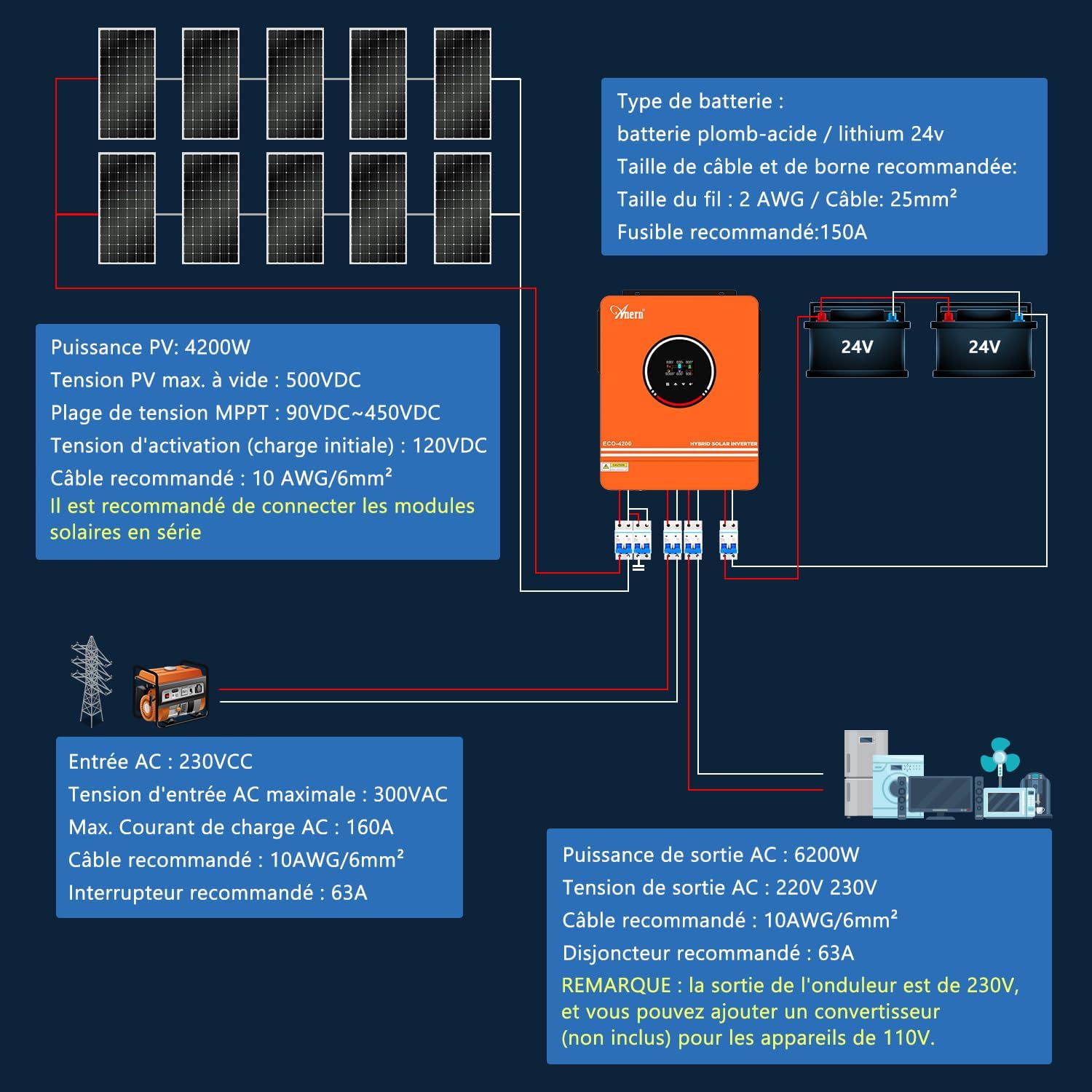
Figure 3: The inverter supports Wi-Fi monitoring, allowing system operation to be controlled and viewed via a mobile phone (iOS/Android).

Figure 4: The inverter supports various battery types including GEL, AGM, FLD, and Lithium. Note: The inverter can be used without batteries. If using a lithium battery, ensure it is configured as "User-defined" in program 05. It can only connect to a BMS PACE, not BMS from other manufacturers. The inverter cannot communicate with other battery brands.

Figure 5: The inverter offers three charge modes (Solar Priority, Solar + Utility, Solar-Battery) and two output modes (Solar First, Utility First) to meet diverse user application requirements.
3. Eto ati fifi sori
3.1 Awọn iṣọra aabo
- Ensure all connections are secure and correct before powering on the unit.
- Fifi sori yẹ ki o ṣe nipasẹ oṣiṣẹ oṣiṣẹ.
- Má ṣe fi inverter hàn sí òjò, yìnyín, ìfọ́nrán, tàbí omi èyíkéyìí.
- Rii daju pe fentilesonu to peye ni ayika ẹrọ oluyipada lati ṣe idiwọ igbona.
- Always disconnect all power sources (PV, battery, AC) before performing any maintenance or wiring.
3.2 Ọja Loriview ati Awọn isopọ
Familiarize yourself with the inverter's components and connection points.

olusin 6: Ọja loriview showing the front and rear panels with labeled components:
- Ifihan LCD
- Ifihan ipo
- Atọka fifuye
- Atọka aṣiṣe
- Awọn bọtini iṣẹ
- Tan/Pa Yipada
- AC igbewọle
- Ijade akọkọ
- Ijade keji
- Iṣagbewọle batiri
- PV igbewọle
- Ohun elo egboogi-ekuru
- RS-232 communication Connection / Wi-Fi connection
3.3 Wiring aworan atọka
The following diagrams illustrate the recommended wiring for the inverter with solar panels, batteries, and AC loads.
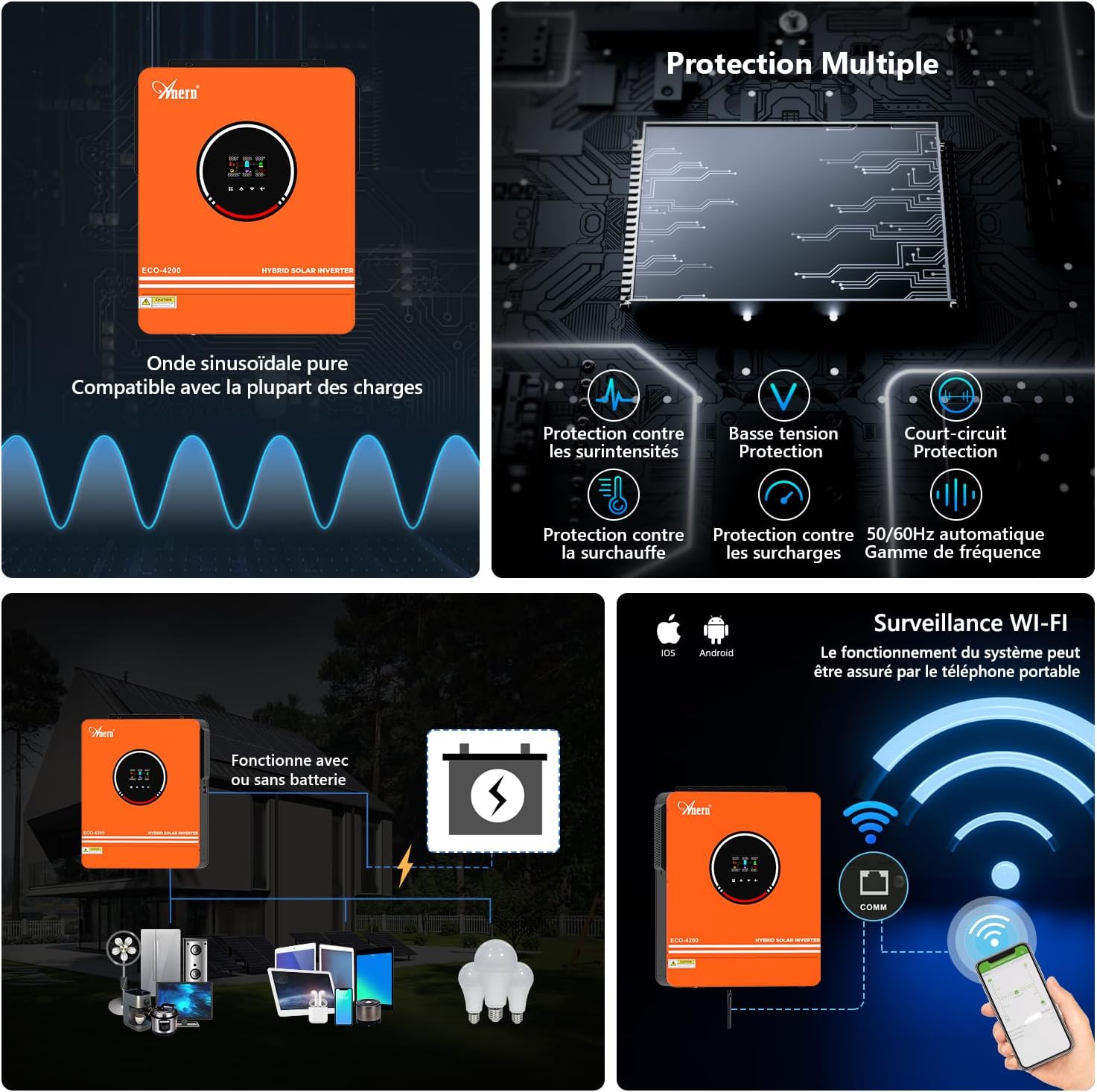
Figure 7: Detailed connection diagram for the hybrid solar inverter. This diagram shows connections for solar panels (PV input), battery bank (24V), AC input (230V), and AC output (230V) to household appliances. Recommended cable sizes and fuse ratings are indicated.
- Iru Batiri: Lead-acid / Lithium 24V
- Recommended Cable & Terminal Size: 2 AWG / Cable: 25mm²
- Fusi ti a ṣeduro: 150A
- Agbara PV: 4200W
- Max PV Ṣii Circuit Voltage: 500VDC
- MPPT Voltage Ibiti: 90VDC ~ 450VDC
- Ibẹrẹ Voltage (Initial Charging): 120VDC
- Recommended PV Cable: 10 AWG / 6mm² (It is recommended to connect solar modules in series.)
- Iṣawọle AC: 230V AC
- Max AC Input Voltage: 300V AC
- Max AC Charging Current: 160A
- Recommended AC Input Cable: 10 AWG / 6mm²
- Recommended AC Input Breaker: 63A
- AC wu Power: 4200W
- AC wu Voltage: 220V / 230V
- Recommended AC Output Cable: 10 AWG / 6mm²
- Recommended AC Output Breaker: 63A
- AKIYESI: The output of the inverter is 230V. You can add a converter (not included) for 110V devices.

Figure 8: System diagram illustrating the integration of the Anern AN-SCI-ECO-4200 hybrid inverter with solar panels, external battery packs, utility grid/generator, and various home appliances. The diagram also shows the Wi-Fi monitoring capability via the PVguarder APP or Web ni wiwo.
4. Awọn ilana Iṣiṣẹ
4.1 Titan / Pa a
- To power on, ensure all connections are correct, then switch on the AC input breaker (if connected), followed by the battery breaker, and finally the inverter's ON/OFF switch.
- To power off, reverse the sequence: turn off the inverter's ON/OFF switch, then the battery breaker, and finally the AC input breaker.
4.2 Ifihan LCD ati Awọn bọtini Iṣẹ
The LCD display provides real-time operational data. Use the function keys (refer to Figure 6, item 5) to navigate through menus and adjust settings.
- Ifihan LCD: Shows system parameters such as input voltage, iwọn didun ti o wujadetage, battery status, load percentage, and error codes.
- Status Indicators (LEDs): Provide quick visual cues for operational status.
- Awọn bọtini iṣẹ: Used for menu navigation, setting adjustments, and confirming selections.
4.3 Operating Modes Configuration
The inverter supports various charging and output modes, configurable via the LCD display settings.
- Awọn ọna gbigba agbara:
- Iyanju Oorun: Solar power is prioritized for charging batteries and powering loads.
- Solar + Utility: Both solar and utility power are used for charging and powering loads.
- Solar-Battery: Solar power charges the battery, and the battery powers the loads.
- Awọn ọna Ijade:
- Oòrùn Àkọ́kọ́: Solar power is prioritized for loads.
- Àkọ́kọ́ Ohun Èlò: Utility power is prioritized for loads.
- SBU Mode (Solar-Battery-Utility): A fi agbara oorun si ipo pataki, lẹhinna batiri, lẹhinna lilo.
4.4 Wi-Fi Monitoring Setup
The included Wi-Fi module allows for remote monitoring and control. Refer to the separate Wi-Fi module manual for detailed setup instructions, including connecting to the PVguarder APP or Web ni wiwo.
5. Itọju
- Ninu igbagbogbo: Keep the inverter clean and free from dust. Use a dry cloth to wipe the exterior. Ensure ventilation openings are not blocked.
- Ayẹwo Asopọmọra: Lokọọkan ṣayẹwo gbogbo awọn asopọ itanna fun wiwọ ati awọn ami ti ibajẹ.
- Ilera Batiri: Bojuto batiri voltage and performance regularly. Follow battery manufacturer's guidelines for maintenance.
- Awọn ipo Ayika: Ensure the inverter operates within its specified temperature and humidity ranges.
6. Laasigbotitusita
Apá yìí fún wa ní ìdáhùn sí àwọn ìṣòro tó wọ́pọ̀. Fún àwọn ìṣòro tí a kò kọ síbí, jọ̀wọ́ kan sí olùrànlọ́wọ́ oníbàárà.
| Isoro | Owun to le Fa | Ojutu |
|---|---|---|
| Inverter not powering on. | Ko si asopọ batiri, iwọn batiri kekeretage, AC input not connected, or ON/OFF switch off. | Ṣayẹwo awọn asopọ batiri ati voltage. Ensure AC input is connected and breakers are on. Turn on the inverter's ON/OFF switch. |
| Ko si iṣẹ AC. | Overload, short circuit, low battery, or incorrect output mode setting. | Reduce load. Check for short circuits in wiring. Recharge battery. Verify output mode settings on LCD. |
| PV charging not working. | Insufficient solar input, PV connection error, or MPPT controller fault. | Check solar panel connections and ensure adequate sunlight. Verify PV input voltage lori LCD. |
| Inverter making unusual noise. | Normal fan operation under load, or potential internal fault. | Some fan noise is normal. If noise is excessive or unusual, power off the unit and contact support. |
7. Imọ ni pato
| Paramita | Iye |
|---|---|
| Brand | Anern |
| Orukọ awoṣe | AN-SCI-ECO-4200W with WIFI |
| Àwọ̀ | ọsan |
| Agbara | 4.2 KW |
| Agbara Batiri | 120 Amp-hours (Charge Controller) |
| Orisun agbara | Agbara oorun ati batiri |
| Niyanju Lilo | Ile |
| Awọn irinše to wa | Wi-Fi Modulu |
| Awọn iwọn Ọja (L x W x H) | 52L x 45W x 21.5H cm (approx. 20.5L x 17.7W x 8.5H inches) |
| Lapapọ Power iÿë | 1 |
| Max PV Ṣii Circuit Voltage | 450VDC |
| Iye ti o ga julọ ti PV | 6200W |
| Max PV No-Load Voltage | 500VDC |
| Agbara gbigba agbara PV to pọ julọ | 120A |
| Ti won won Jade Lọwọlọwọ | 44.3A |
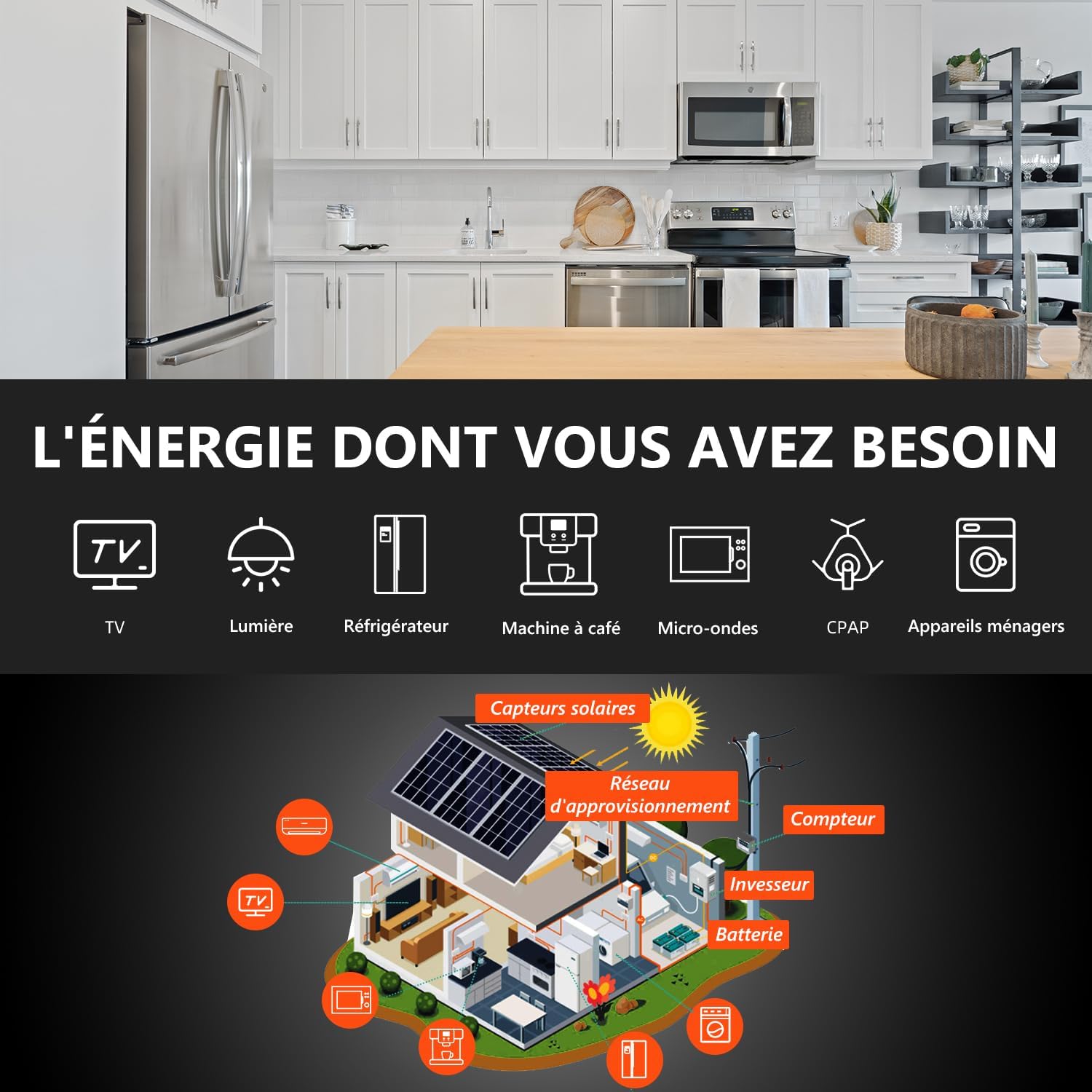
Figure 9: Product dimensions, showing height (420mm / 16.5"), width (350mm / 13.77"), and depth (110mm / 4.33").
8. Atilẹyin ọja ati Support
Ọja yi wa pẹlu kan Atilẹyin Ọdun 1 Lodi si Awọn abawọn Olupese. For any issues, technical support, or warranty claims, please contact the seller directly. Ensure you have your purchase details and product model number ready when contacting support.
Fun iranlọwọ siwaju, o tun le ṣabẹwo si Anern Store on Amazon.


