Noble Noble FoKus Prestige

Noble FoKus Prestige Headphones User Manual

Model: FoKus Prestige

Àmì ìtajà: Ọlọ́lá

1. Eto

1.1 Unboxing ati Ni ibẹrẹ idiyele

Your Noble FoKus Prestige headphones come with the following components:

  • Awọn agbekọri (Osi ati ọtun)
  • Ngba agbara Case (x1)
  • USB Charging Case (x1)
  • Ear Tips (x6 pairs)
  • Ilana itọnisọna (x1)
  • Apo ipamọ (x1)

Before first use, ensure the charging case and earbuds are fully charged. A 15-minute charge provides up to 70 minutes of playback time. A full charge offers approximately 10 hours of battery life per charge for the earbuds.
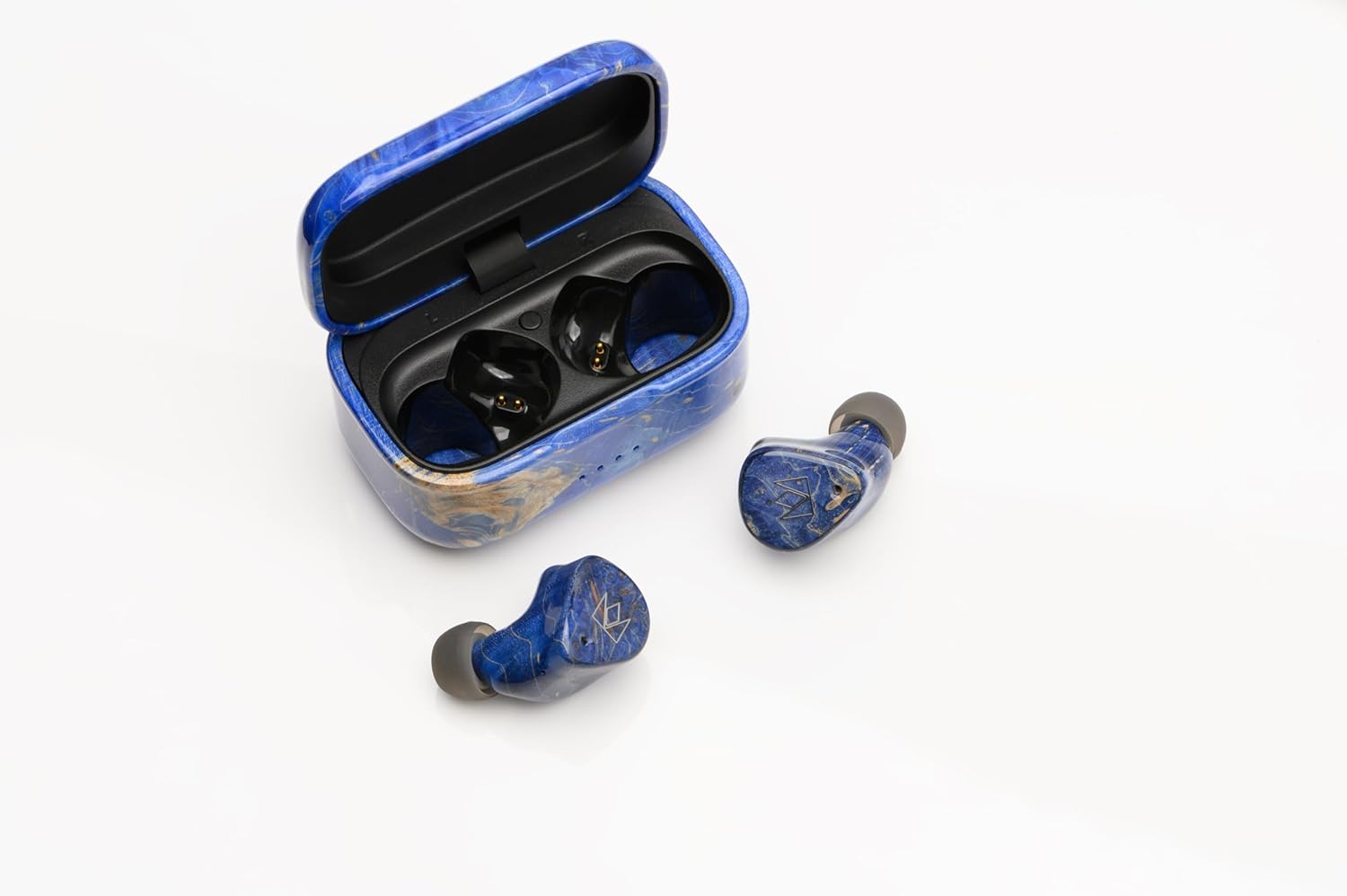
Noble FoKus Prestige earbuds in their charging case, showing the USB-C port.

Image: Noble FoKus Prestige earbuds securely placed within their elegant charging case, ready for charging via the USB-C port located at the back.

1.2 Sisopọ Bluetooth

The Noble FoKus Prestige utilizes Bluetooth 5.2 and Qualcomm TrueWireless Mirroring technology for stable and efficient connectivity. To pair your earbuds with a Bluetooth-enabled device:

  1. Ṣii apoti gbigba agbara. Awọn agbekọri yoo tẹ ipo isọpọ sii laifọwọyi.
  2. On your device (smartphone, PC, laptop, tablet), navigate to the Bluetooth settings.
  3. Select "Noble FoKus Prestige" from the list of available devices.
  4. Nígbà tí o bá ti sopọ̀ mọ́ ara rẹ, o máa gbọ́ ìfìdí ohùn múlẹ̀.

For optimal performance, ensure your device's Bluetooth is enabled and within range.

Video: An official product video demonstrating the Noble FoKus Prestige Headphones, showcasing their design and features relevant to setup and use.

2. Awọn ilana Iṣiṣẹ

2.1 Awọn iṣakoso ati Awọn iṣẹ

The FoKus Prestige earbuds feature intuitive touch controls for managing playback, calls, and voice assistants:

  • Sisisẹsẹhin orin: Tap once to play/pause, double-tap for next track, triple-tap for previous track.
  • Isakoso ipe: Tap once to answer/end call, long press to reject call.
  • Oluranlọwọ ohun: Long press to activate Siri or Google Assistant.
  • Iṣakoso iwọn didun: Ṣatunṣe iwọn didun taara lati ẹrọ ti o sopọ.

The earbuds also support Qualcomm cVc noise-cancelling technology for clear phone calls.

2.2 Audio Performance

The FoKus Prestige headphones are engineered for high-resolution audio, featuring a hybrid 3-driver configuration: an 8.2mm Dynamic driver and two Knowles Balanced Armature drivers. This combination delivers rich bass, clear mids, and detailed highs across a frequency range of 20 Hz - 20,000 Hz, with an impedance of 32 Ohm.

For a personalized listening experience, the Noble FoKus app allows for sound customization with its Wizard-tuned sound signature.

Pair of Noble FoKus Prestige earbuds in blue, showcasing apẹrẹ ergonomic wọn.

Image: A pair of Noble FoKus Prestige earbuds, highlighting their ergonomic shape and premium blue finish, designed for a secure and comfortable in-ear fit.

3. Itọju

To ensure the longevity and optimal performance of your Noble FoKus Prestige headphones, follow these maintenance guidelines:

  • Ninu: Regularly wipe the earbuds and charging case with a soft, dry cloth. For the ear tips, remove them and clean with a mild soap solution if necessary, ensuring they are completely dry before reattaching.
  • Ibi ipamọ: When not in use, store the earbuds in their charging case. Use the provided storage bag for added protection during travel.
  • Yago fun Ọrinrin: The earbuds are not water-resistant. Avoid exposure to excessive moisture, sweat, or liquids.
  • Ibudo gbigba agbara: Handle the USB-C charging port with care to prevent damage.

4. Laasigbotitusita

If you encounter issues with your Noble FoKus Prestige headphones, refer to the following common solutions:

  • Earbuds Not Pairing Together: If only one earbud connects or they fail to pair with each other, try placing both earbuds back into the charging case, close the lid, wait a few seconds, then open the lid again. This often resets their connection.
  • Awọn oran Asopọmọra: If the Bluetooth connection is inconsistent, ensure the earbuds are fully charged and within range of your device. Try forgetting the device in your Bluetooth settings and re-pairing.
  • Awọn iṣoro gbigba agbara: If the charging port is finicky or not charging, ensure the USB-C cable is fully inserted and the port is free of debris. Try a different USB-C cable and power source.
  • Poor Sound Quality/Seal: Experiment with the different sizes of ear tips provided to find the best fit for your ears. A proper seal is crucial for optimal sound performance and bass response.
  • Ko si Ohun: Check the volume levels on both your device and the earbuds. Ensure the earbuds are correctly paired and selected as the audio output on your device.

If problems persist, consult the Noble FoKus app for further diagnostics or visit the Noble Audio support webojula.

5. Awọn pato

Ẹya ara ẹrọ Ẹ̀kúnrẹ́rẹ́
Orukọ awoṣe Noble FoKus ti o niyi
Asopọmọra Technology Ailokun (Bluetooth 5.2)
Audio Driver Type Hybrid Driver (8.2mm Dynamic + 2 Knowles Balanced Armature)
Igbesi aye batiri 10 Hours (earbuds per charge)
Gbigba agbara yara 15 min. charge for up to 70 min. playback
Iwọn Igbohunsafẹfẹ 20 Hz - 20,000 Hz
Ipalara 32 ohm
Ọna Iṣakoso Touch, Voice (Siri/Google)
Ariwo Iṣakoso Adaptive Noise Cancellation (cVc for calls)
Ohun elo Plastic (with CNC machined wooden body and case)
Àwọ̀ Buluu
Iwọn Nkan 9.1 iwon
UPC 198168403570

6. Atilẹyin ọja ati Support

Noble Audio stands behind the quality of its products. For detailed warranty information, please refer to the official Noble Audio webaaye tabi kaadi atilẹyin ọja ti o wa pẹlu ọja rẹ.

Awọn ero aabo iyan wa fun agbegbe ti o gbooro sii:

  • 2-odun Idaabobo Eto
  • 3-odun Idaabobo Eto
  • Idaabobo pipe ( ṣiṣe alabapin oṣooṣu)

For technical support, product inquiries, or service requests, please visit the official Noble Audio support channels or contact their customer service directly.

Awọn iwe aṣẹ ti o jọmọ - Noble FoKus ti o niyi

Ṣaajuview Noble Fokus Ijagunmolu Otitọ Alailowaya Alailowaya Sitẹrio Earphone Ilana Itọsọna
Itọsọna itọnisọna pipe fun Noble Fokus Triumph Awọn ohun afetigbọ Sitẹrio Alailowaya Alailowaya, iṣeto ibora, sisopọ, iṣẹ ṣiṣe, awọn pato, ati awọn ikilọ ailewu.
Ṣaajuview Ìwé Àfọwọ́kọ Olùlò Noble Sceptre Bluetooth Codec & RF Signal Enhancer
Ìwé ìtọ́ni olùlò fún Noble Sceptre, Bluetooth Codec àti RF Signal Enhancer. Kọ́ bí a ṣe lè sopọ̀ mọ́ ara wa, lo Noble Fokus App, ṣàkóso àwọn codecs ohùn, mú kí eré ṣiṣẹ́, àti ṣe àtúnṣe firmware.
Ṣaajuview Ìwé Ìtọ́sọ́nà Olùlò Àwọn Agbọ́rọ̀ Aláìlókùn Noble FoKus Amadeus True Wireless Stereo
Ìwé ìtọ́ni tó péye fún àwọn agbekọri sitẹrio alailowaya Noble FoKus Amadeus, tó bo ìṣètò, ìsopọ̀, àwọn ìṣàkóso, àwọn ẹ̀yà ara, àwọn ìlànà, àti ìwífún nípa ààbò.
Ṣaajuview Noble FALCON MAX Itọsọna Alailowaya Sitẹrio Earbuds otitọ
Itọnisọna pipe fun Noble FALCON MAX Awọn Earbuds Sitẹrio Alailowaya Alailowaya, iṣeto ibora, sisopọ, awọn iṣẹ, gbigba agbara, awọn pato, ati awọn ikilọ ailewu.
Ṣaajuview Ìwé Ìtọ́sọ́nà Olùlò Àwọn Agbọ́rọ̀ Aláìlókùn Noble FoKus Rex5 True Wireless Stereo
Ìwé ìtọ́ni tó péye fún Noble FoKus Rex5 True Wireless Stereo Earphones, tó ní àwọn ẹ̀yà ara ẹ̀rọ, iṣẹ́, ìsopọ̀, àwọn ìṣàkóso, àwọn ìlànà pàtó, àti ìwífún nípa ààbò.
Ṣaajuview Noble Fokus Apollo User Manual - Wireless Bluetooth Headphones
Detailed user manual for the Noble Fokus Apollo headphones, covering setup, Bluetooth pairing, button functions, charging, connectivity options, troubleshooting, and safety guidelines.