1. Ifihan
Thank you for choosing the CREWORKS 38x38CM 8-in-1 Heat Press Machine. This versatile machine is designed for transferring designs onto various materials such as T-shirts, mugs, hats, and plates. This manual provides essential information for safe operation, setup, and maintenance to ensure optimal performance and longevity of your heat press.
2. Awọn ilana aabo
Please read all safety warnings and instructions carefully before operating the machine. Failure to follow these instructions may result in electric shock, fire, or serious injury.
- Aabo Itanna: Rii daju pe ẹrọ naa ti sopọ si iṣan agbara ti ilẹ pẹlu fol to tọtage (230V) ati wattage (1400W). Do not operate with wet hands or in damp conditions. Disconnect power before cleaning or servicing.
- Ewu Ooru: The heating platen and accessories reach high temperatures (up to 250°C). Avoid direct contact with hot surfaces. Use heat-resistant gloves when handling materials during and after pressing.
- Idena sisun: The rubber-coated handle is designed to prevent accidental burns during operation. Always use the handle to open and close the press.
- Afẹfẹ: Operate the machine in a well-ventilated area to dissipate any fumes that may be released during the heat transfer process.
- Tiipa aifọwọyi: For added safety, the machine will automatically shut down after 30 minutes of inactivity.
- Awọn ọmọde ati awọn ohun ọsin: Keep children and pets away from the machine during operation and when it is cooling down.
- Ilẹ Iduroṣinṣin: Place the heat press on a stable, heat-resistant surface capable of supporting its weight (approximately 18.4 kg / 40.5 lbs).
3. Package Awọn akoonu
Daju pe gbogbo awọn nkan ti a ṣe akojọ rẹ si isalẹ wa ninu package rẹ:
- 1 x Ẹrọ Titẹ Ooru (Ẹka akọkọ)
- 1 x Cup Press Attachment
- 4 x Cup Accessories (for 275, 325, 350, 500ml cups)
- 2 x Plate Press Attachments (12.5 cm and 15.5 cm)
- 1 x Cap/Hat Press Attachment
- 1 x Ilana itọnisọna

Image 3.1: The CREWORKS 8-in-1 Heat Press Machine with its included attachments for cups, hats, and plates.
4. irinše Loriview
Familiarize yourself with the main components of your heat press machine:
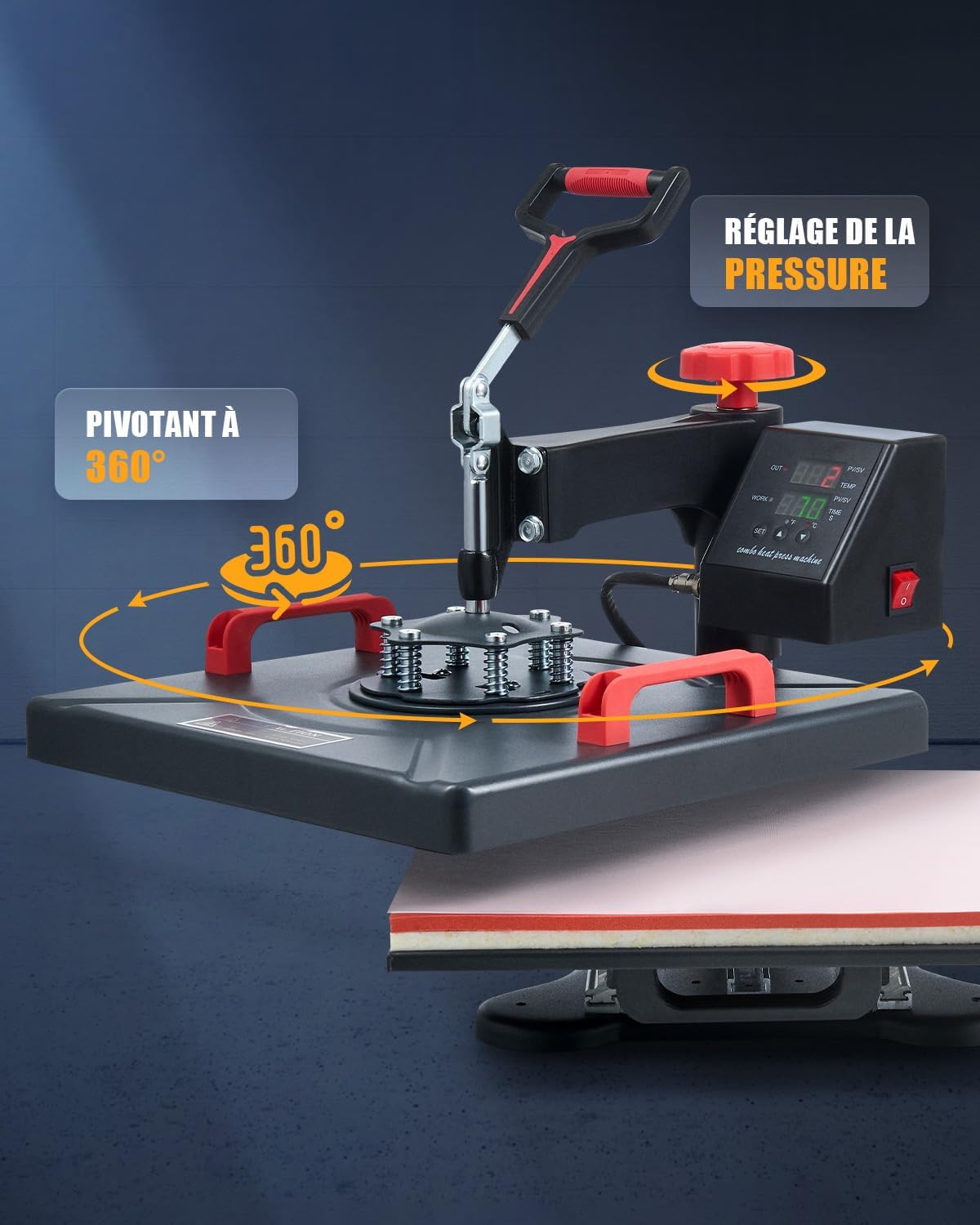
Image 4.1: Labeled diagram of the heat press machine's main parts.
- Imudani ti o ga: Used to raise and lower the heating platen.
- Bọtini Atunṣe: Controls the pressure applied by the heating platen.
- Ibi iwaju alabujuto: Digital display for setting temperature and time.
- Agbara Yi pada: Tan ẹrọ naa tan ati pa.
- Platen Handle: Used to slide the lower platen in and out.
- Platen: The main heating surface (38x38 cm).
- Foam Mat: Provides even pressure and heat distribution.
- Awo ipilẹ: Supports the lower platen and attachments.
- Support Foot: Stabilizes the machine.
5. Eto
Follow these steps to set up your heat press machine:
- Ṣii silẹ: Ni ifarabalẹ yọ gbogbo awọn paati kuro ninu apoti. Ṣayẹwo fun eyikeyi bibajẹ nigba irekọja.
- Ibi: Place the main unit on a sturdy, level, and heat-resistant surface. Ensure adequate space around the machine for ventilation and safe operation.
- Fifi sori Asomọ:
- Platen Plate: The main 38x38 cm platen is typically pre-installed.
- Mug Tẹ: Attach the mug press accessory to the designated port on the side of the machine. Secure it firmly.
- Hat Press: Replace the flat platen with the hat press attachment by unscrewing the securing bolts, removing the flat platen, and installing the hat press.
- Awo Tẹ: Similar to the hat press, replace the flat platen with the appropriate plate press attachment (12.5 cm or 15.5 cm).
- Asopọ agbara: Plug the power cord into a grounded electrical outlet. Ensure the power switch is in the 'OFF' position before plugging in.
6. Awọn ilana Iṣiṣẹ
6.1 Ipilẹ isẹ
- Agbara Tan: Flip the power switch to the 'ON' position. The control panel will illuminate.
- Eto iwọn otutu:
- Press the 'SET' button once. The 'TEMP' indicator will flash.
- Use the 'UP' and 'DOWN' arrow buttons to adjust the desired temperature (range: 0-250°C).
- Press 'SET' again to confirm.
- Akoko Eto:
- After setting the temperature, press 'SET' again. The 'TIME' indicator will flash.
- Use the 'UP' and 'DOWN' arrow buttons to adjust the desired time (range: 1-999 seconds).
- Press 'SET' a third time to confirm and exit the setting mode. The machine will begin heating to the set temperature.
- Ẹka ìwọ̀ntúnwọ̀nsì: The control panel allows switching between Celsius (°C) and Fahrenheit (°F). Refer to the control panel for the specific button to toggle this setting.

Aworan 6.1: alaye view of the LED control panel for temperature and time settings. Recommended temperatures for chemical fibers (160°C), cotton garments (170°C), and ceramic cups (200°C) are shown.
6.2 Titẹ Atunse
The pressure adjustment knob (red knob on top) allows you to fine-tune the pressing force. Turn clockwise to increase pressure and counter-clockwise to decrease pressure. Adjust pressure based on the thickness of your material and transfer type. A firm, even pressure is crucial for successful transfers.

Image 6.2: Illustration of the 360° swivel function and the pressure adjustment knob.
Iṣẹ́ yíyípo 6.3 360°
The heating platen is equipped with a 360-degree swivel function. This allows you to rotate the heating element away from the lower platen, providing a safer and more convenient workspace for placing and arranging your materials and designs without direct contact with the hot platen.
6.4 Heat Distribution
The machine features two heating tubes within the platen to ensure even heat distribution across the entire 38x38 cm surface. This uniform heating is essential for consistent and high-quality transfers on various materials like chemical fibers, ceramics, and cotton.

Image 6.3: Diagram illustrating the double heating tube design for uniform heat distribution.
6.5 General Heat Transfer Process
- Mura Apẹrẹ: Print your design onto appropriate transfer paper.
- Ṣaaju ooru: Turn on the machine and set the desired temperature and time according to your transfer material and design specifications. Allow the machine to reach the set temperature.
- Mura Nkan: Place the item (T-shirt, mug, hat, plate) onto the appropriate attachment. For flat items, ensure it is centered on the lower platen. For garments, a quick pre-press (5-10 seconds) can remove moisture and wrinkles.
- Apẹrẹ Ipo: Carefully place your transfer design onto the item, ensuring it is correctly aligned. Secure with heat-resistant tape if necessary.
- Tẹ: Swing the heating platen over the item (if using swivel function) and lower the handle to apply pressure. The timer will start automatically.
- Yọ Nkan kuro: Once the timer sounds, raise the handle and swing the heating platen away. Carefully remove the item using heat-resistant gloves.
- Peel Transfer: Follow the instructions for your specific transfer paper (hot peel, warm peel, or cold peel).
7. Itọju
- Ninu: Regularly clean the heating platen and silicone pad with a soft, damp cloth when the machine is cool and unplugged. Do not use abrasive cleaners or solvents.
- Ibi ipamọ: Tọju ẹrọ naa ni agbegbe gbigbẹ, ti ko ni eruku nigbati ko si ni lilo.
- Ayewo: Lojoojumọ, ṣayẹwo gbogbo awọn okun waya ati awọn asopọ fun ibajẹ tabi ibajẹ.
8. Laasigbotitusita
- Ẹrọ ti ko ni agbara: Check the power cord connection and ensure the power switch is in the 'ON' position. Verify the electrical outlet is functional.
- Uneven Heat Transfer: Ensure the pressure is evenly distributed across the platen. Check if the silicone pad is flat and free of debris. Allow sufficient pre-heating time.
- Temperature/Time Not Setting: Ensure you are pressing the 'SET' button correctly to cycle through and confirm settings. Refer to section 6.1.
- Transfer Not Sticking/Fading: Verify that the correct temperature, time, and pressure settings are used for your specific transfer material and item. Ensure the item is clean and dry.
9. Awọn pato
| Ẹya ara ẹrọ | Sipesifikesonu |
|---|---|
| Ti won won Agbara | 1400W |
| Voltage | 230 Volts |
| O pọju. Iwọn otutu | 250°C (482°F) |
| Ibiti akoko | 1-999 aaya |
| Platen Surface Area | 38 x 38 cm (15 x 15 inches) |
| Cup Accessories Sizes | 275ml, 325ml, 350ml, 500ml |
| Plate Press Dimensions | 12.5 cm (5 inches), 15.5 cm (6 inches) |
| Apapọ iwuwo | 18.4 kg (40.5 lbs) |
| Ohun elo | Metal, Aluminum, Silicone |
10. Atilẹyin ọja ati Support
For warranty information, technical support, or service inquiries, please contact CREWORKS customer service through the retailer where the product was purchased or visit the official CREWORKS website. Please have your product model number (38x38CM 8-in-1) and ASIN (B0CTMGZ3RV) available when contacting support.


