1. Ifihan
The Waveshare Cat-1/GSM/GPRS/GNSS HAT is a versatile communication module designed for Raspberry Pi and other host devices like Arduino and STM32. Based on the A7670E module, it provides robust LTE Cat-1, 2G (GSM/GPRS/EDGE) communication, and GNSS (GPS, BeiDou, GLONASS) positioning capabilities. This HAT is ideal for a wide range of IoT applications, including remote monitoring, POS systems, industrial routers, and location-based services.
It supports various network protocols such as TCP/IP, HTTP(s), MQTT(s), FTP(s), and SSL, ensuring flexible connectivity. Additionally, it features Text-to-Speech (TTS) functionality and an onboard audio jack for voice communication and sound recording.
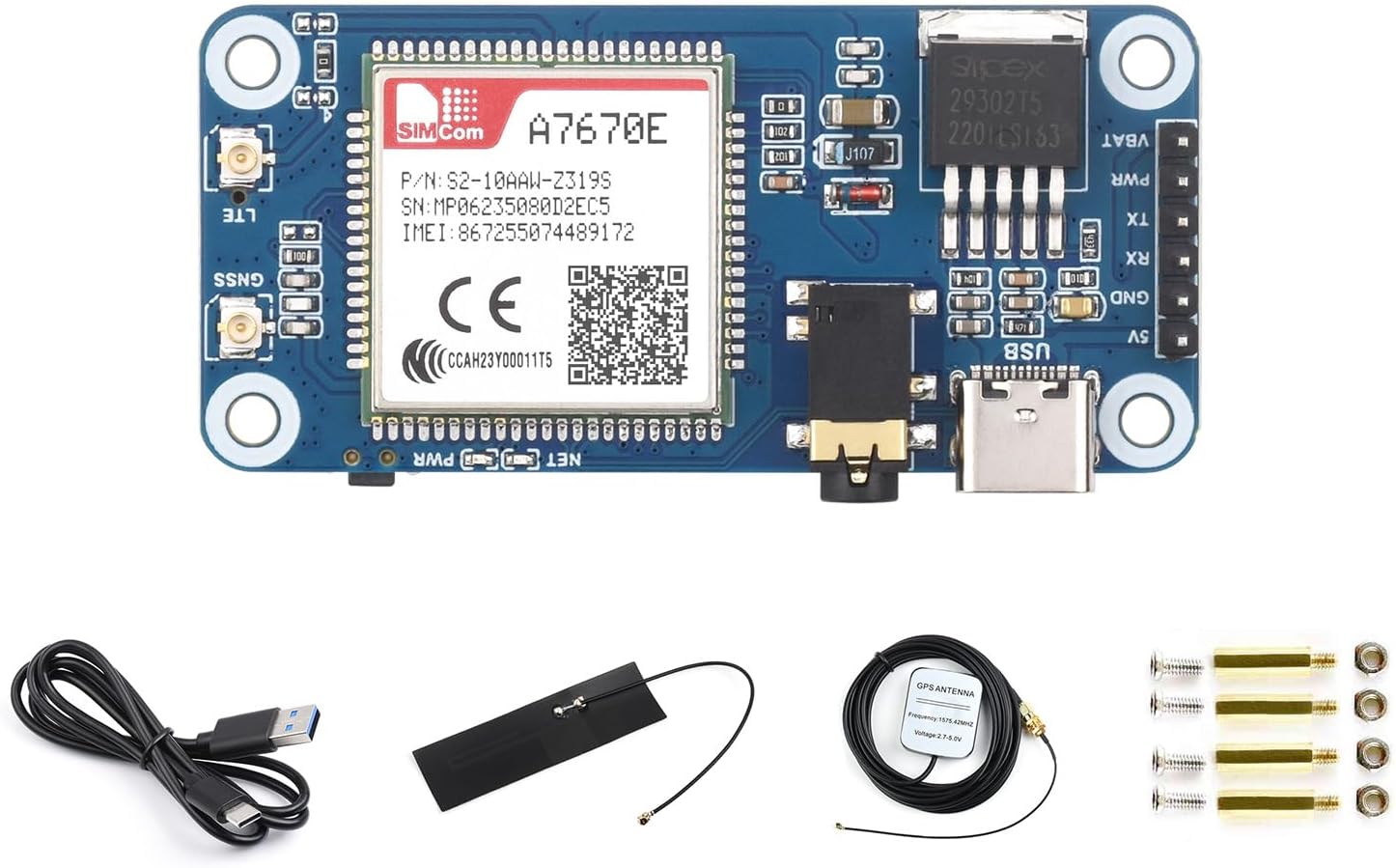
Figure 1.1: Waveshare Cat-1/GSM/GPRS/GNSS HAT with accessories.
2. Package Awọn akoonu
Jọwọ rii daju pe gbogbo awọn nkan ti a ṣe akojọ rẹ si isalẹ wa ninu package rẹ:
- A7670E Cat-1/GNSS HAT x1
- USB-A si okun USB-C x1
- FPC Antenna x1
- Eriali GPS x1
- Àpò àwọn skru x1

Nọmba 2.1: Alaye view ti awọn akoonu ti package.
3. Awọn ẹya Ọja
The A7670E Cat-1/GNSS HAT offers a comprehensive set of features for various embedded applications:
- Broad Network Compatibility: Supports LTE-TDD, LTE-FDD, GSM, GPRS, and EDGE, with data rates up to 10Mbps downlink and 5Mbps uplink.
- Operating System and Protocol Support: Compatible with Windows and Linux. Supports TCP/IP, HTTP(s), MQTT(s), FTP(s), and SSL.
- Positioning Capabilities: Features GPS, BeiDou, and GLONASS support, along with LBS base station positioning for accurate geolocation.
- Voice and Audio Functions: Includes Text-to-Speech (TTS) for converting text to spoken words and an onboard 3.5mm audio jack for sound recording and telephone calls.
- Easy Integration and Expansion: Equipped with a standard Raspberry Pi 40PIN GPIO extension header for seamless integration. Also includes a SIM card slot, onboard USB interface for AT command testing, and 2x LED indicators for status monitoring.

Olusin 3.1: Pariview of the A7670E Cat-1/GNSS HAT features.
4. Eto ati fifi sori
The A7670E Cat-1/GNSS HAT is designed for easy integration with Raspberry Pi boards and other compatible host devices.
4.1 Connecting to Raspberry Pi
- Rí i dájú pé Raspberry Pi rẹ ti pa.
- Carefully align the 40PIN GPIO header of the HAT with the corresponding pins on your Raspberry Pi.
- Gently press the HAT onto the GPIO header until it is securely seated.
- Insert a compatible SIM card into the SIM card slot. The module supports both 1.8V and 3V SIM cards.
- Connect the FPC antenna to the LTE antenna connector and the GPS antenna to the GNSS antenna connector on the HAT.
- Optionally, connect the USB-C cable to the HAT's USB port for AT command testing and network applications.
- Power on your Raspberry Pi.

Figure 4.1: Connecting the HAT to Raspberry Pi boards.
5. Awọn ilana Iṣiṣẹ
5.1 Network Communication (Dial-Up)
The module supports dial-up networking on both Windows and Linux operating systems. Data rates are up to 10Mbps (downlink) and 5Mbps (uplink) for LTE Cat-1, up to 236.8Kbps (downlink) for EDGE, and up to 85.6Kbps (downlink) for GPRS.
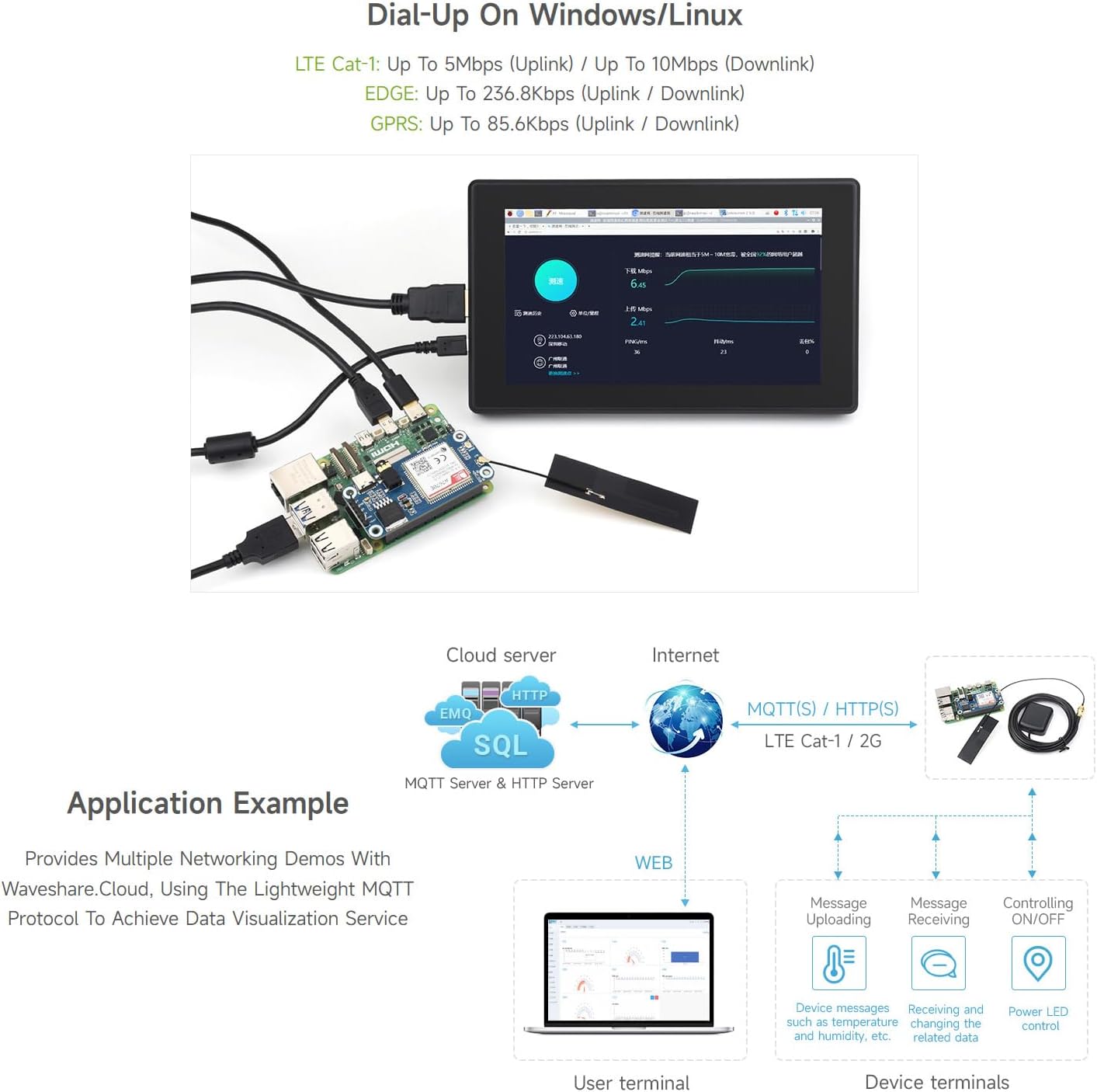
Olusin 5.1: Example of dial-up networking setup.
5.2 Ipò GNSS
The A7670E HAT integrates GPS, BeiDou, and GLONASS for accurate global navigation satellite system positioning. It also supports LBS (Location Based Service) base station positioning, providing location information even when satellite signals are weak or unavailable.
5.3 Telephone Call & SMS Support
The module allows for making telephone calls and sending SMS messages using AT commands. The onboard 3.5mm audio jack facilitates audio input and output for calls and listening to TTS output.

Figure 5.2: Comprehensive communication and positioning capabilities.
6. Awọn pato
| Ẹka | Paramita | Apejuwe |
|---|---|---|
| Igbohunsafẹfẹ Band | LTE ologbo-1 | LTE-FDD: B1, B3, B5, B7, B8, B20 |
| 2G | GSM/GPRS/EDGE: 900/1800 MHz | |
| GNSS | GPS, BeiDou, GLONASS | |
| SMS and Audio | SMS | Supported types: MT, MO, CB, Text, PDU |
| Audio ẹya-ara | Standard 3.5mm audio jack for audio input/output | |
| Omiiran | Ibi ti ina elekitiriki ti nwa | 5V (via USB port or 5V pinheader), 3.7 ~ 4.2V (via VBAT pinheader, supports 3.7V Li-ion battery power input) |
| Iwọn iṣẹtage | 3.3V | |
| Awọn iwọn | 65 × 30.5 mm | |
| Iwọn | 2.82 iwon (isunmọ 80g) |
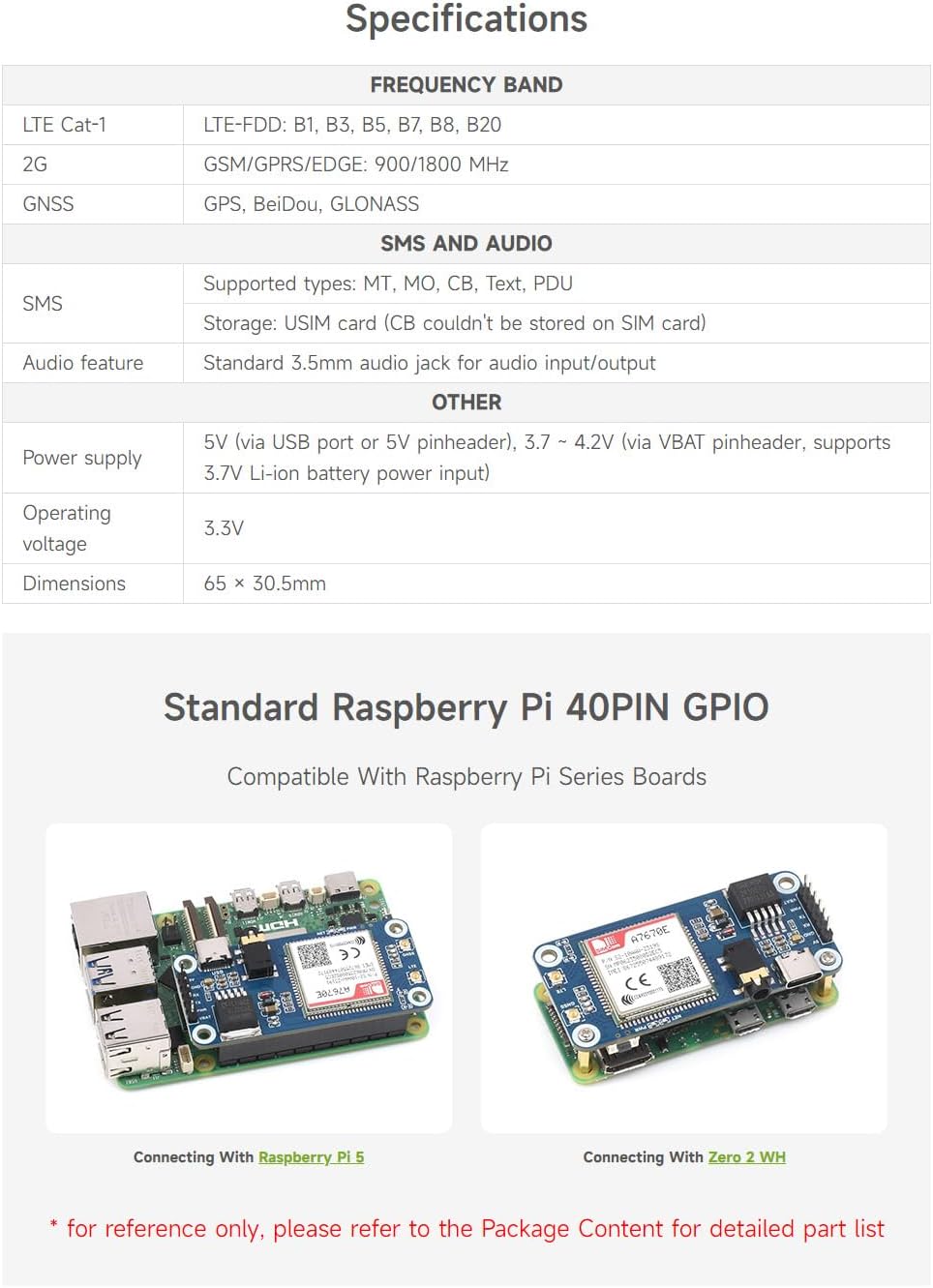
Figure 6.1: Summary of technical specifications.
7. Ohun elo Eksamples & Cloud Support
The A7670E Cat-1/GNSS HAT is highly suitable for various IoT and embedded applications, especially when combined with Waveshare.Cloud for data visualization and management.
7.1 General Application Example
The module can be used to upload device messages (e.g., temperature, humidity data) to a cloud server via MQTT(S) or HTTP(S). It can also receive messages for controlling devices or retrieving related data, enabling remote monitoring and control.

Figure 7.1: Typical application example with cloud communication.
7.2 Waveshare.Cloud Support
Waveshare.Cloud provides tutorials and demos for quick setup of smart IoT solutions. It offers large-screen data visualization displays to meet diverse application scenarios, such as smart garden solutions, server performance monitoring, and IoT GPS mobile positioning.

Olusin 7.2: Examples of Waveshare.Cloud data visualization.
8. Pinout Definition and Dimensions
8.1 Pinout Definition
The HAT utilizes the standard Raspberry Pi 40PIN GPIO header. Key pins for module operation include:
- 5V: 5V agbara igbewọle
- GND: Ilẹ
- RXD: Module UART RX
- TXD: Module UART TX
- P4: Module ON/OFF control (keep high level for >2.5s to turn on/off)

Figure 8.1: Pinout definition for the A7670E Cat-1/GNSS HAT.
8.2 Awọn iwọn ila ila
The compact design of the HAT ensures it fits well within various projects. The module dimensions are 65mm x 30.5mm.

Figure 8.2: Outline dimensions of the module.
9. Laasigbotitusita
If you encounter issues with your Waveshare Cat-1/GSM/GPRS/GNSS HAT, consider the following common troubleshooting steps:
- Ko si Agbara/Awọn LED Pipa: Ensure the HAT is correctly seated on the Raspberry Pi's GPIO header. Check the power supply to your Raspberry Pi. Verify the 5V power input to the HAT.
- Ko si Isopọ Nẹtiwọọki: Confirm the SIM card is correctly inserted and activated with a valid plan. Check antenna connections (LTE and GNSS). Verify network coverage in your area. Ensure the module is powered on (P4 pin control).
- GNSS Not Working: Ensure the GPS antenna is connected and placed in an open area with clear sky view. Check for any obstructions.
- AT Commands Not Responding: Verify the USB connection or UART wiring. Ensure correct baud rate and serial port settings in your terminal software.
- Awọn ọrọ sọfitiwia: Refer to the official Waveshare documentation and development resources for specific drivers, libraries, and example code for your operating system (Raspberry Pi OS, Windows, Linux).
For further assistance, please visit the Waveshare official webaaye tabi kan si atilẹyin imọ-ẹrọ wọn.
10. Itọju
To ensure the longevity and optimal performance of your Waveshare Cat-1/GSM/GPRS/GNSS HAT, follow these maintenance guidelines:
- Mu pẹlu Itọju: Yẹra fún jíjá tàbí fífi ohun èlò náà sílẹ̀ fún ìpayà ara.
- Jeki mimọ: Use a soft, dry cloth to clean the module. Avoid using liquids or abrasive cleaners.
- Awọn ipo Ayika: Operate and store the module within its specified temperature and humidity ranges. Avoid extreme temperatures, direct sunlight, and high humidity.
- Ina Aimi: Take precautions against electrostatic discharge (ESD) when handling the module, as electronic components are sensitive to static.
- Awọn imudojuiwọn famuwia: Periodically check the Waveshare official website for any available firmware updates for the A7670E module to ensure the best performance and compatibility.


