Ọrọ Iṣaaju
This manual provides essential information for the safe and efficient operation of your Mistral 46-inch Blade-Free Fan with Air Purifier, Model MBFAP460. This appliance combines powerful airflow with advanced air purification technology, featuring a DC motor turbo system, HEPA13 filtration, and UV sterilization. Please read these instructions thoroughly before use and retain them for future reference.
Awọn Itọsọna Aabo
Lati dinku eewu ina, mọnamọna, tabi ipalara, nigbagbogbo tẹle awọn iṣọra aabo ipilẹ wọnyi:
- Rii daju pe ipese agbara voltage baamu aami igbelewọn lori ohun elo naa.
- Do not operate the appliance with a damaged cord or plug. If damaged, contact qualified service personnel.
- Keep the appliance away from water or other liquids. Do not immerse any part of the appliance in water.
- Unplug the appliance from the power outlet before cleaning, performing maintenance, or when not in use.
- Do not insert fingers or foreign objects into any openings of the appliance.
- Ohun elo yii wa fun lilo inu ile nikan.
- Ṣe abojuto awọn ọmọde lati rii daju pe wọn ko ṣere pẹlu ohun elo.
Package Awọn akoonu
Jẹrisi pe gbogbo awọn ohun kan wa ninu package:
- Mistral Blade-Free Fan with Air Purifier Main Unit
- Isakoṣo latọna jijin
- HEPA13 Filter (pre-installed or separate)
- Afowoyi Olumulo (iwe-ipamọ yii)
Ṣeto
The Mistral MBFAP460 requires minimal assembly. Follow these steps to prepare your unit for operation:
- Ṣii silẹ: Ni ifarabalẹ yọ gbogbo awọn paati kuro ninu apoti. Ṣe idaduro apoti fun ibi ipamọ iwaju tabi gbigbe.
- Àsopọ̀ Ìpìlẹ̀ (tí ó bá yàtọ̀): If the base is separate, align it with the main unit and secure it according to the markings. Ensure it clicks into place or is fastened securely.
- Fifi sori ẹrọ Filter: If the HEPA13 filter is not pre-installed, locate the filter compartment (usually at the base or rear of the unit), remove the cover, insert the filter with the correct orientation, and replace the cover.
- Ibi: Place the fan on a firm, level surface, ensuring adequate space around the unit for optimal airflow and purification.

olusin 1: Iwaju view of the Mistral MBFAP460 Blade-Free Fan with Air Purifier.
Awọn ilana Iṣiṣẹ
Your Mistral MBFAP460 can be operated using the control panel on the unit or the included remote control.
Ibi iwaju alabujutoview

Figure 2: Close-up of the control panel, showing the digital display and touch-sensitive buttons for various functions.
Isẹ ipilẹ
- Titan/Apapa: Tẹ bọtini agbara (U) on the control panel or remote to turn the unit on or off.
- Air Modes: Cycle through the 5 available air modes: Auto, Turbo, Sleep, Natural, and Normal. Each mode adjusts fan speed and purification settings for different environments.
- Oscillation: Activate or deactivate the automatic left-right oscillation feature. Select from 30, 60, 90, or 120-degree oscillation angles to distribute air across a wider area.
- Idaabobo UV: The unit features UV sterilization to kill up to 99.99% of most viruses, airborne bacteria, and mold. This function operates automatically with the air purification system.
- Atọka Rirọpo Ajọ: The control panel will display an indicator when the HEPA13 filter requires replacement. Refer to the Maintenance section for instructions.
Itoju
Regular maintenance ensures optimal performance and longevity of your Mistral MBFAP460.
Ninu Unit
- Yọọ kuro ni gbogbo igba ṣaaju ṣiṣe mimọ.
- Mu ese ita gbangba pẹlu asọ, damp asọ. Ma ṣe lo abrasive ose tabi epo.
- Rii daju pe ko si omi ti o wọ inu awọn paati inu.
HEPA13 Filter Replacement
The HEPA13 filter removes up to 99.97% of allergens, pollutants, and dust as small as 0.3 microns. Replace the filter when the filter replacement indicator illuminates on the control panel.
- Yọọ ohun elo kuro ni iṣan agbara.
- Locate the filter compartment, usually at the base of the unit.
- Ṣii ideri iyẹwu àlẹmọ.
- Yọ àlẹmọ atijọ kuro ki o si sọ ọ daradara.
- Insert a new Mistral HEPA13 replacement filter, ensuring correct orientation.
- Pa ideri iyẹwu àlẹmọ naa ni aabo.
- Plug in the unit and reset the filter indicator (refer to specific instructions in the full manual if a reset button is present).
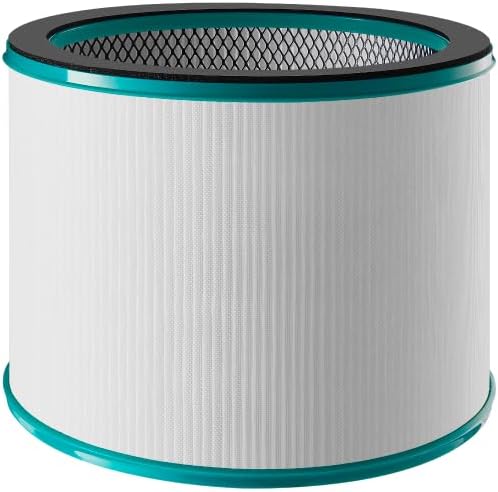
Figure 3: Mistral HEPA13 replacement filter, essential for maintaining air purification efficiency.
Laasigbotitusita
If you encounter issues with your Mistral MBFAP460, consult the following table for common problems and solutions.
| Isoro | Owun to le Fa | Ojutu |
|---|---|---|
| Ẹka ko ni tan-an. | No power supply. Power cord not securely plugged in. | Check if the power cord is firmly plugged into a working outlet. Ensure the power switch (if any) is on. |
| Alailagbara tabi ko si ṣiṣan afẹfẹ. | Air intake/outlet blocked. Filter is dirty or clogged. | Ensure no obstructions are blocking the air intake or outlet. Check and replace the HEPA13 filter if dirty. |
| Ariwo dani nigbati isẹ. | Unit not on a level surface. Foreign object inside. | Place the unit on a stable, level surface. Unplug and carefully inspect for any foreign objects. |
| Filter replacement indicator remains on after filter change. | Atọka àlẹmọ ko tunto. | Refer to the full manual for specific instructions on how to reset the filter replacement indicator. |
Ti iṣoro naa ba wa lẹhin igbiyanju awọn iṣeduro wọnyi, jọwọ kan si atilẹyin alabara.
Awọn pato
| Ẹya ara ẹrọ | Ẹ̀kúnrẹ́rẹ́ |
|---|---|
| Awoṣe | MBFAP460 |
| Brand | MISTRAL |
| Ọja Mefa | 38D x 35.8W x 116.2H sẹntimita |
| Iwọn Nkan | 5.5 kilo |
| Orisun agbara | Okun Itanna |
| Ọna Iṣakoso | Latọna jijin |
| Àlẹmọ Iru | HEPA13 |
| Patiku idaduro Iwon | 0.3 Micron |
| Pakà Area Ideri | 700 Square Ẹsẹ |
| Pataki Awọn ẹya ara ẹrọ | DC Motor Turbo System, UV Sterilisation, 5 Air Modes, Auto Oscillation |
| Apejọ ti a beere | Bẹẹni |
| Ifọwọsi Agbara Star | Bẹẹni |
Atilẹyin ọja ati Support
This product comes with a manufacturer's warranty. Please refer to the warranty card included in your package for specific terms and conditions. For technical support, replacement parts, or service inquiries, please contact Mistral customer service through their official webaaye tabi alaye olubasọrọ ti a pese ninu iwe atilẹyin ọja rẹ.