1. Ifihan
Thank you for choosing the AREBOS 43-liter compressor cooler. This manual provides essential information for the safe and efficient operation, maintenance, and troubleshooting of your device. Please read these instructions carefully before use and retain them for future reference.
2. Awọn ilana aabo
To ensure safe operation, please observe the following guidelines:
- Rii daju pe ipese agbara ibaamu voltage specified on the cooler's rating label.
- Do not operate the cooler if the power cord is damaged. Contact qualified service personnel for repairs.
- Jeki awọn kula kuro lati ooru awọn orisun ati orun taara.
- Ensure adequate ventilation around the cooler to prevent overheating. Do not block ventilation openings.
- Do not immerse the cooler in water or expose it to heavy rain.
- Unplug the cooler before cleaning or performing any maintenance.
- Ohun elo yii kii ṣe ipinnu fun lilo nipasẹ awọn eniyan (pẹlu awọn ọmọde) pẹlu idinku ti ara, imọlara tabi awọn agbara ọpọlọ, tabi aini iriri ati imọ, ayafi ti wọn ba ti fun wọn ni abojuto tabi itọnisọna nipa lilo ohun elo nipasẹ eniyan ti o ni iduro fun aabo wọn.
- Ma ṣe fi awọn nkan ibẹjadi pamọ gẹgẹbi awọn agolo aerosol pẹlu itọka ina ninu ohun elo yii.
3. Ọja Ipariview
The AREBOS 43-liter compressor cooler is designed for versatile use, offering efficient cooling, freezing, and heating capabilities. It features a robust construction and intuitive controls.

Image: The AREBOS 43-liter compressor cooler, showcasing its main unit, digital control panel, and connectivity with a smartphone application.
Awọn eroja pataki:
- Ibi iwaju alabujuto: Digital display and buttons for temperature adjustment and mode selection.
- Ibudo USB: For charging mobile devices.
- Awọn igbewọle agbara: 12/24V DC and 230V AC connections.
- Awọn imudani: Ese fun rorun ọkọ.
- Ideri: Adaptable opening direction.
- Imọlẹ LED inu inu: For visibility inside the cooler.
- Pulọọgi Sisan: Fun irọrun fifa omi kuro.

Aworan: Alaye view of the cooler's LCD control panel and the corresponding mobile application interface for remote temperature management.
4. Eto
4.1 Ṣiṣii silẹ
- Fara yọ kula kuro ninu apoti rẹ.
- Inspect the cooler for any signs of damage. If damaged, do not use and contact your retailer.
- Yọ gbogbo awọn ohun elo iṣakojọpọ kuro ki o si sọ wọn nù ni ifojusọna.
4.2 Asopọ agbara
The cooler supports multiple power sources:
- 12/24V DC (Car/Truck): Connect the provided 2.2m DC cable to the cooler's DC input and then to your vehicle's cigarette lighter socket.
- 230V AC (Household): Connect the provided 2.5m AC cable to the cooler's AC input and then to a standard wall outlet.
- Ibudo Agbara To Gbe/Pẹpẹ Oorun: The cooler can also be powered by compatible portable power stations or solar panels via DC input.

Image: The cooler demonstrating its versatile power connection options, including a car adapter, standard wall plug, and compatibility with portable solar power setups.
4.3 Ni ibẹrẹ Cleaning
Ṣaaju lilo akọkọ, fi ipolowo nu awọn oju inu ati ita ti itutu naaamp cloth and mild detergent. Ensure it is completely dry before connecting to power.
5. Isẹ
5.1 Titan / Pa a
Press the power button on the control panel to turn the cooler on or off. The LCD display will illuminate when the unit is active.
5.2 Atunṣe iwọn otutu
You can adjust the temperature using the control panel or the dedicated smartphone application.
- Ibi iwaju alabujuto: Lo awọn bọtini '+' ati '-' lati ṣeto iwọn otutu ti o fẹ. Ifihan naa yoo fi awọn iwọn otutu lọwọlọwọ ati awọn ti a fojusi han.
- Ohun elo Iṣakoso: Download the AREBOS app from your smartphone's app store. Connect your cooler via Bluetooth. The app allows for remote temperature setting, mode selection, and monitoring.
5.3 Mode Selection (Max/Eco)
Itutu naa ni awọn ipo iṣiṣẹ meji:
- Ipo Max: Provides rapid cooling or heating for quicker temperature changes.
- Ipo ECO: Optimizes energy consumption for extended operation, ideal for battery-powered use.
5.4 Cool and Heat Function
This cooler can maintain temperatures from -20°C to 20°C, allowing for both cooling/freezing and warming of contents.

Image: The cooler's dual functionality is depicted, showing it keeping items cold in a summer outdoor setting and warm in a winter snowy environment.
5.5 Okun gbigba agbara USB
A USB port is located on the control panel for convenient charging of mobile devices.
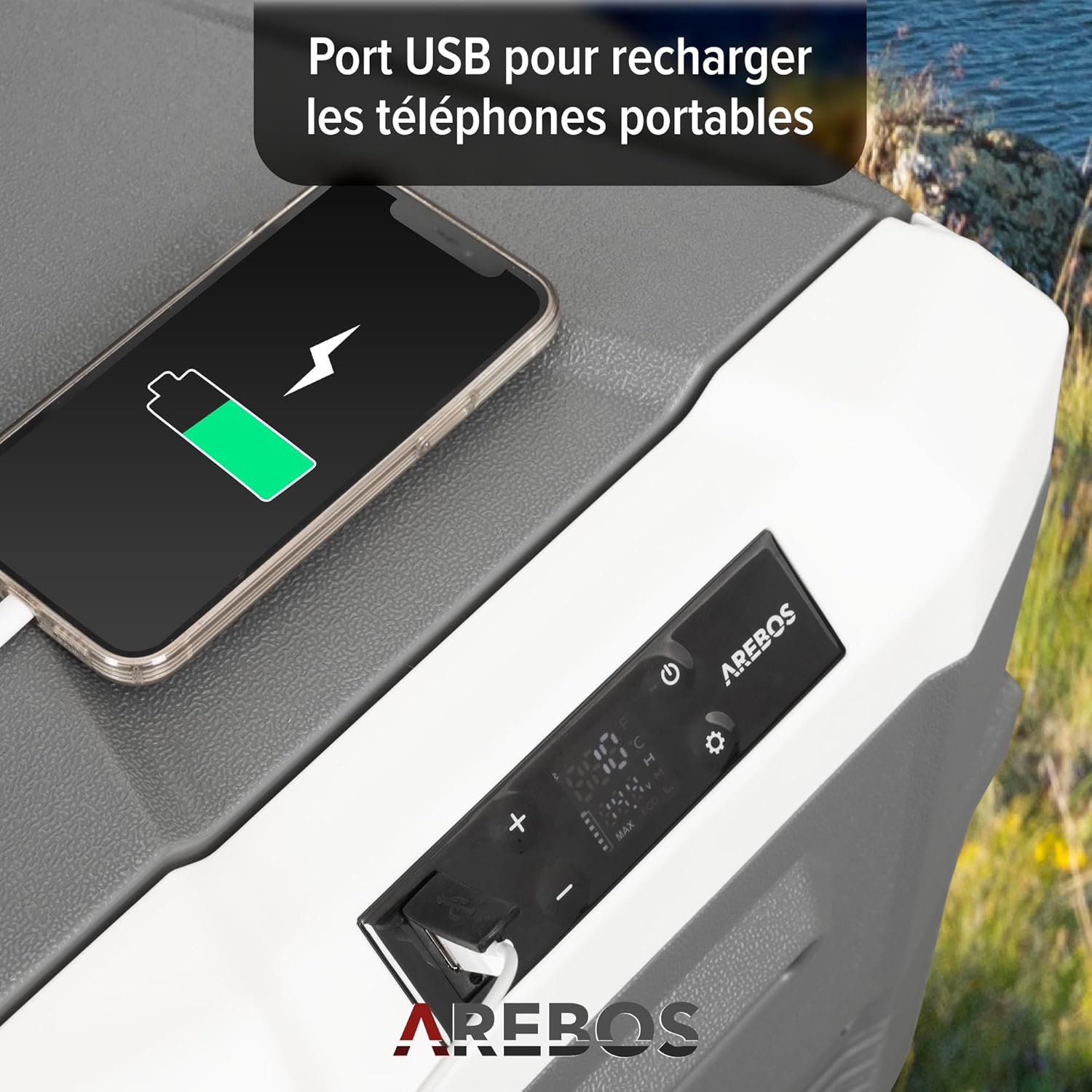
Image: A smartphone is shown connected to the cooler's integrated USB port, indicating its capability to charge external devices.
5.6 Adaptable Lid Opening
The cooler's lid can be opened from either side or completely removed for convenience. Refer to the product diagram for specific instructions on changing the lid's opening direction.
6. Itọju
6.1 Ninu
- Máa yọ páìpù ìtútù náà kúrò kí o tó sọ ọ́ di mímọ́.
- Pa inu ati ode nu pẹlu ipolowoamp asọ ati ki o kan ìwọnba, ti kii-abrasive detergent.
- Do not use harsh chemicals or abrasive cleaners, as they can damage the surfaces.
- Rí i dájú pé gbogbo ojú ilẹ̀ gbẹ kí o tó tún so agbára pọ̀ mọ́ ara wọn.
6.2 Sisọ Omi
The cooler is equipped with an integrated drain plug for easy removal of condensed water or melted ice.

Aworan: A alaye view of the cooler's interior, highlighting the integrated drain plug for convenient water removal.
6.3 Ibi ipamọ
When not in use for extended periods, ensure the cooler is clean and dry. Store it in a cool, dry place with the lid slightly ajar to prevent odors and mildew.
7. Laasigbotitusita
If you encounter issues with your AREBOS compressor cooler, refer to the following table for common problems and solutions:
| Isoro | Owun to le Fa | Ojutu |
|---|---|---|
| Atutu ko tan. | No power supply; damaged power cord; faulty power outlet. | Ṣàyẹ̀wò àwọn ìsopọ̀ agbára; gbìyànjú ọ̀nà ìjáde mìíràn; ṣàyẹ̀wò okùn agbára fún ìbàjẹ́. |
| Cooler kò jẹ́ kí ó tutù dáadáa. | Temperature setting too high; ventilation blocked; excessive ambient temperature; lid not closed properly. | Lower the temperature setting; ensure clear ventilation; move cooler to a cooler environment; ensure lid is securely closed. |
| Unusual noise from the cooler. | Cooler not on a level surface; fan obstruction. | Place cooler on a flat, stable surface; check for any obstructions around the fan. |
| Koodu aṣiṣe han. | Aṣiṣe inu pato. | Tọkasi itọnisọna olumulo ni kikun fun awọn itumọ koodu aṣiṣe kan pato tabi kan si atilẹyin alabara. |
If the problem persists after attempting these solutions, please contact AREBOS customer support.
8. Awọn pato
Technical specifications for the AREBOS Compressor Cooler 43 Liters (Model AR-HE-KK40A):
| Ẹya ara ẹrọ | Sipesifikesonu |
|---|---|
| Brand | Àwọn Árébósì |
| Nọmba awoṣe | AR-HE-KK40A |
| Agbara | 43 liters |
| Àwọ̀ | Anthracite |
| Ohun elo | Ṣíṣípààkì (Kunststoff) |
| Ohun elo idabobo | Fomu Polyurethane |
| Awọn iwọn Ọja (L x W x H) | 61.8 x 37.6 x 51.4 cm |
| Iwọn Nkan | 13 kilo |
| Iwọn otutu | -20°C si 20°C |
| Pataki Awọn ẹya ara ẹrọ | Portable, Compressor Cooling System, App Control, LCD Touch Screen, Quiet Operation, Lockable & Adjustable Lid Opening, LED Interior Lighting, USB Port, AC/DC Connectivity, Drain Screw, Cool & Heat Function |
| Awọn irinše to wa | 1x 12/24V (DC) Cable (2.2m), 1x AC Connection Cable (2.5m), 1x User Manual |
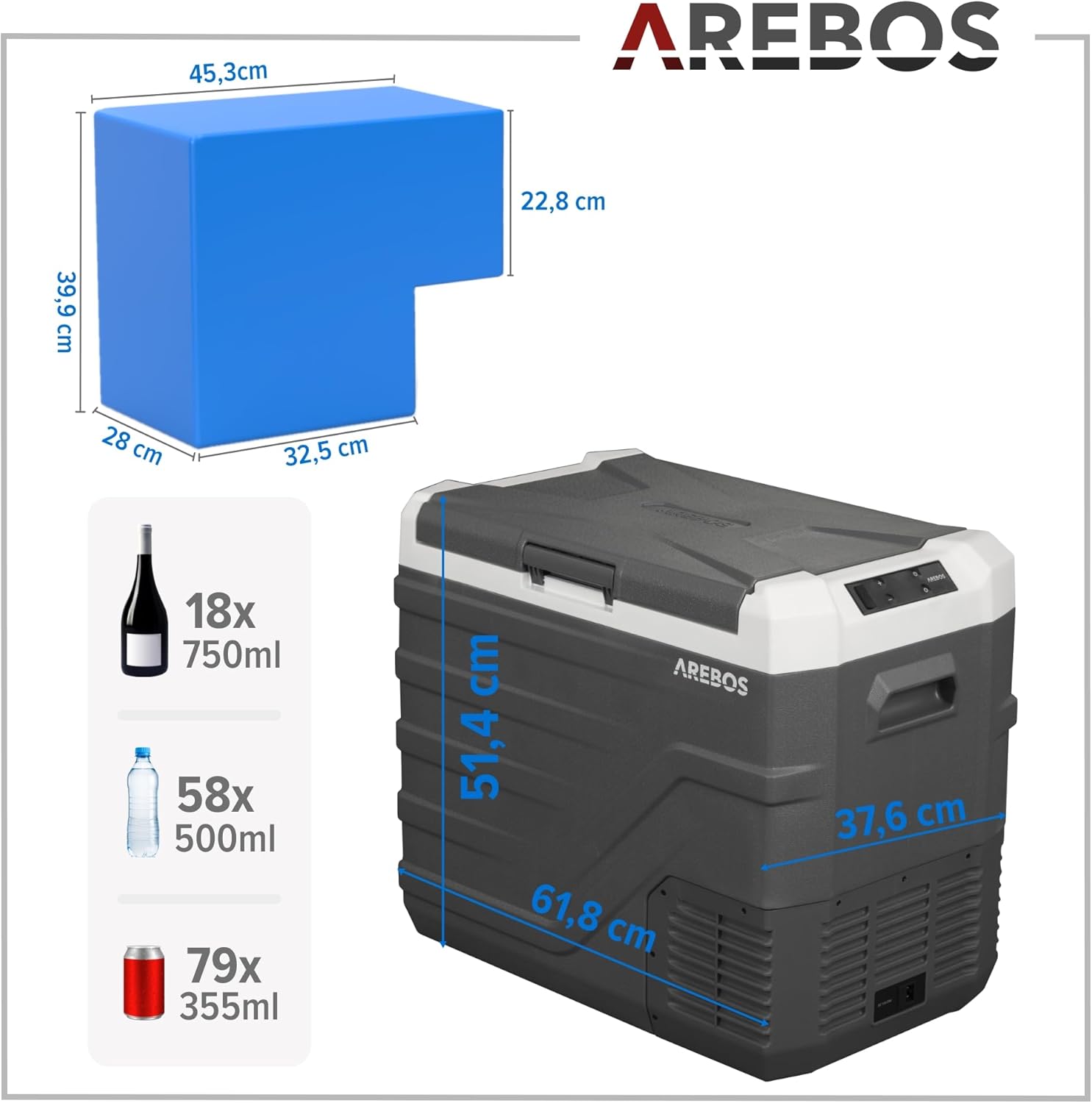
Image: Visual representation of the cooler's external dimensions and internal capacity, indicating how many bottles or cans it can hold.
9. Atilẹyin ọja ati Support
AREBOS products are manufactured with quality and reliability in mind. For warranty information, please refer to the terms and conditions provided at the time of purchase or contact your retailer. For technical support or inquiries, please reach out to the manufacturer, AREBOS, directly through their official channels.


