1. Ifihan
This manual provides instructions for the safe operation, maintenance, and troubleshooting of your FLEX 24V Brushless Cordless 1/2-Inch Hammer Drill Turbo Mode Kit, model FX1271T-2B. Please read this manual thoroughly before using the tool to ensure proper and safe operation.
The FLEX FX1271T-2B is a powerful 24V brushless cordless hammer drill designed for demanding drilling and driving applications. It features a 1/2-inch full-metal ratcheting chuck, two-speed settings, a Turbo Mode for increased speed, and an anti-kickback safety feature. This kit includes the drill, a 2.5Ah Lithium-Ion Battery, a 5.0Ah Lithium-Ion Battery, and a 160W Fast Charger.
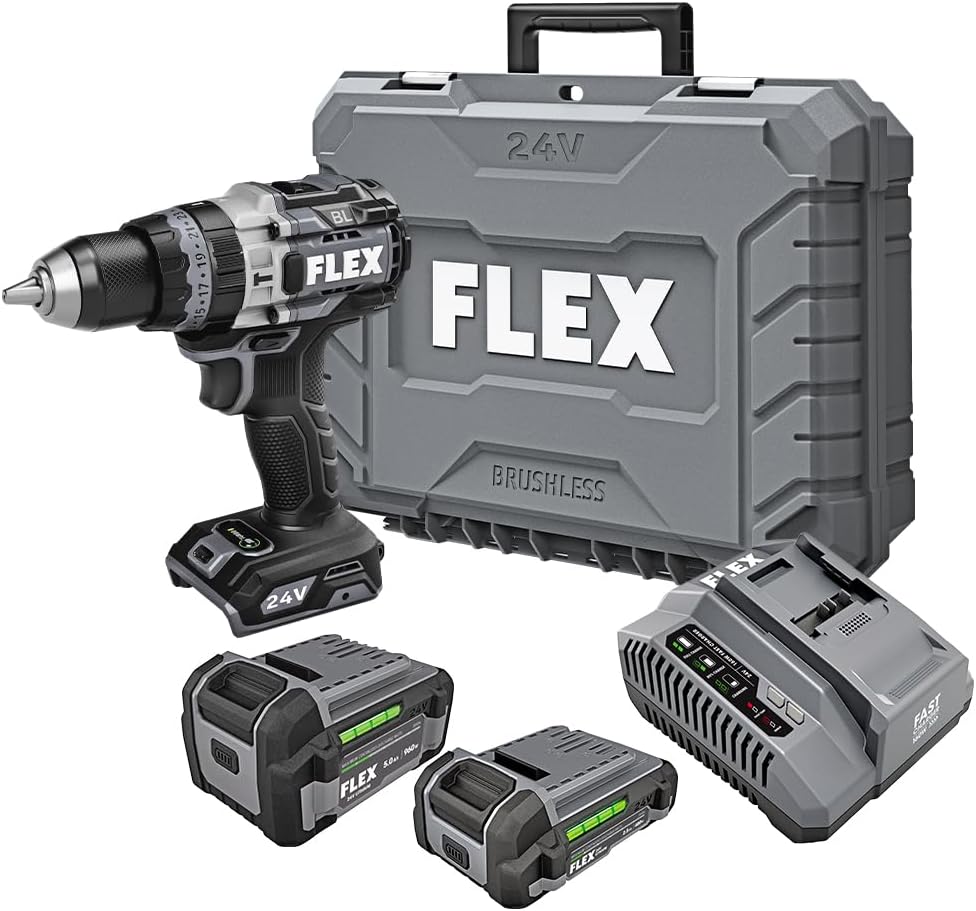
Figure 1: FLEX 24V Brushless Cordless 1/2-Inch Hammer Drill Kit (FX1271T-2B) including drill, two batteries, charger, and carrying case.
2. Gbogbogbo Abo ilana
IKILO: Ka gbogbo awọn ikilọ aabo, awọn itọnisọna, awọn apejuwe, ati awọn pato ti a pese pẹlu irinṣẹ agbara yii. Ikuna lati tẹle gbogbo awọn ilana ti a ṣe akojọ si isalẹ le ja si mọnamọna, ina, ati/tabi ipalara nla.
2.1 Aabo Agbegbe Iṣẹ
- Jeki agbegbe iṣẹ mọ ki o si tan daradara. Awọn agbegbe idamu tabi awọn agbegbe dudu n pe awọn ijamba.
- Ma ṣe ṣiṣẹ awọn irinṣẹ agbara ni awọn bugbamu bugbamu, gẹgẹbi niwaju awọn olomi ina, gaasi, tabi eruku. Awọn irinṣẹ agbara ṣẹda awọn ina ti o le tan eruku tabi eefin.
- Pa awọn ọmọde ati awọn alafojusi kuro lakoko ti o nṣiṣẹ ohun elo agbara kan. Awọn idamu le fa ki o padanu iṣakoso.
2.2 Itanna Abo
- Awọn pilogi irinṣẹ agbara gbọdọ baramu iṣan. Maṣe yi plug naa pada ni ọna eyikeyi. Ma ṣe lo awọn pilogi ohun ti nmu badọgba eyikeyi pẹlu awọn irinṣẹ agbara ilẹ (ti ilẹ). Awọn pilogi ti a ko yipada ati awọn iÿë ti o baamu yoo dinku eewu ina-mọnamọna.
- Yago fun olubasọrọ ara pẹlu ilẹ tabi ilẹ roboto, gẹgẹ bi awọn paipu, imooru, awọn sakani, ati firiji. Ewu ti o pọ si ti mọnamọna ina mọnamọna ti ara rẹ ba wa ni ilẹ tabi ti ilẹ.
- Ma ṣe fi awọn irinṣẹ agbara han si ojo tabi awọn ipo tutu. Omi ti nwọle ọpa agbara yoo mu eewu ti mọnamọna mọnamọna pọ si.
2.3 Ti ara ẹni Aabo
- Nigbagbogbo wọ aabo oju. Lo awọn gilaasi aabo, awọn gilaasi, tabi apata oju.
- Wọ aabo igbọran nigbati o nṣiṣẹ ọpa fun awọn akoko ti o gbooro sii.
- Mura daradara. Maṣe wọ aṣọ ti ko ni tabi ohun ọṣọ. Pa irun ati aṣọ rẹ kuro lati awọn ẹya gbigbe.
- Duro ni iṣọra, wo ohun ti o n ṣe, ati lo ọgbọn ti o wọpọ nigbati o nṣiṣẹ ohun elo agbara kan.
2.4 Irinṣẹ Lilo ati Itọju
- Maṣe fi agbara mu ohun elo agbara. Lo ohun elo agbara ti o pe fun ohun elo rẹ.
- Ge asopọ batiri kuro lati ohun elo agbara ṣaaju ṣiṣe eyikeyi awọn atunṣe, yiyipada awọn ẹya ẹrọ, tabi titoju awọn irinṣẹ agbara.
- Tọju awọn irinṣẹ agbara laišišẹ ni arọwọto awọn ọmọde ati ma ṣe gba awọn eniyan ti ko mọ pẹlu ohun elo agbara tabi awọn ilana wọnyi lati ṣiṣẹ ohun elo agbara naa.
- Ṣetọju awọn irinṣẹ agbara ati awọn ẹya ẹrọ. Ṣayẹwo fun aiṣedeede tabi abuda awọn ẹya gbigbe, fifọ awọn ẹya, ati eyikeyi ipo miiran ti o le ni ipa lori iṣẹ irinṣẹ agbara.
2.5 Batiri Lilo ati Itọju
- Gba agbara nikan pẹlu ṣaja pato nipasẹ olupese. Ṣaja ti o dara fun iru idii batiri kan le ṣẹda eewu ina nigba lilo pẹlu idii batiri miiran.
- Lo awọn irinṣẹ agbara nikan pẹlu awọn idii batiri ti a pinnu pataki. Lilo eyikeyi awọn akopọ batiri miiran le ṣẹda eewu ipalara ati ina.
- Nigbati idii batiri ko ba si ni lilo, tọju rẹ kuro ni awọn ohun elo irin miiran, bii awọn agekuru iwe, awọn owó, awọn bọtini, eekanna, awọn skru tabi awọn ohun elo irin kekere miiran, ti o le ṣe asopọ lati ebute kan si ekeji. Kikuru awọn ebute batiri papọ le fa ina tabi ina.
- Labẹ awọn ipo ilokulo, omi le jade kuro ninu batiri naa; yago fun olubasọrọ. Ti olubasọrọ ba waye lairotẹlẹ, fọ pẹlu omi. Ti oju omi ba kan si oju, ni afikun wa iranlọwọ iṣoogun. Omi ti o jade kuro ninu batiri le fa ibinu tabi sisun.
3. Awọn irinše To wa
Your FLEX 24V Brushless Cordless 1/2-Inch Hammer Drill Kit (FX1271T-2B) includes the following items:
- FLEX 24V Brushless Cordless 1/2-Inch Hammer Drill
- (1) FLEX 24V 2.5Ah Lithium-Ion Battery (FX0111-1)
- (1) FLEX 24V 5.0Ah Lithium-Ion Battery (FX0121-1)
- FLEX 160W Fast Charger
- Oluranlọwọ Handle
- Ọran gbigbe

Figure 2: The FLEX Advantage highlights the included 2.5Ah and 5.0Ah Lithium-Ion batteries, emphasizing their power, runtime, and fast charging capabilities.
4. Eto ati Ibẹrẹ Lilo
4.1 Ngba agbara si Batiri naa
- So 160W Fast Charger pọ mọ ibudo agbara boṣewa kan.
- Gbe idii batiri naa sori ṣaja titi yoo fi tẹ si aaye.
- The charger's indicator lights will show the charging status. A fully charged battery will be indicated by a solid green light.
- Ni kete ti o ti gba agbara ni kikun, yọ batiri kuro lati ṣaja.
4.2 Fifi Batiri naa sii
- Align the battery pack with the battery port on the base of the drill handle.
- Fi batiri naa sinu ibudo titi ti yoo fi tiipa mọ ipo rẹ daradara. Rii daju pe o wa ni kikun lati ṣe idiwọ fun yiyọ kuro lairotẹlẹ lakoko iṣẹ.
- Lati yọ batiri kuro, tẹ bọtini itusilẹ (awọn) ni awọn ẹgbẹ ti idii batiri naa ki o si rọra yọ jade.
4.3 So Imudani Iranlọwọ
For improved control and safety, especially during high-torque applications or hammer drilling, attach the auxiliary handle.
- Loosen the auxiliary handle clamp nipa a yiyi o counter-clockwise.
- Slide the handle over the front of the drill body, positioning it to your preferred angle.
- Mu clamp by rotating it clockwise until the handle is securely fastened.

Figure 3: The drill with the auxiliary handle attached, providing enhanced control and stability, particularly when the anti-kickback feature engages.
4.4 Installing Drill Bits or Accessories
- Ensure the drill is off and the battery is removed for safety.
- Grip the rear collar of the 1/2-inch full-metal ratcheting chuck and rotate the front collar counter-clockwise to open the chuck jaws.
- Insert the drill bit or accessory fully into the chuck jaws.
- Rotate the front collar clockwise to tighten the chuck jaws firmly around the bit. The ratcheting mechanism will provide an audible click when securely tightened.
- Gently pull on the bit to ensure it is properly secured.

Figure 4: Detail of the 1/2-inch full-metal ratcheting chuck, designed for secure bit retention and durability.
5. Awọn ilana Iṣiṣẹ
5.1 Agbara Titan / Pa ati Iṣakoso Iyara
- Nfa Yipada: Squeeze the trigger switch to turn the drill on. Release it to turn the drill off.
- Iyara Ayipada: The trigger switch is pressure-sensitive, allowing for variable speed control. Pressing the trigger further increases the speed.
- Ayanfẹ siwaju/Yipada: Located above the trigger, push the selector left for forward rotation (drilling/driving) and right for reverse rotation (removing screws). Center position locks the trigger for safety.
5.2 Gear Selection (2-Speed)
The drill features a 2-speed gearbox for optimal performance across various applications.
- Jia 1 (Iyara Kekere, Yiyi Gaju): Slide the gear selector switch to position '1'. Ideal for driving screws, drilling large holes, or applications requiring maximum torque.
- Jia 2 (Iyára Gíga, Ìyípo Ìsàlẹ̀): Slide the gear selector switch to position '2'. Suitable for fast drilling of smaller holes in wood or metal.
NOTE: Always ensure the drill is stopped before changing gear settings to prevent damage to the gearbox.
5.3 Mode Selection (Drill, Drive, Hammer Drill)
Rotate the collar behind the chuck to select the desired operating mode:
- Ipo Liluho (Aami Lilu): For drilling holes in wood, metal, and plastics.
- Drive Mode (Screw Icon): For driving screws. The clutch settings (numbered ring) allow you to adjust the torque to prevent over-driving screws or damaging materials.
- Ipo Liluho Hammer (Aami Hammer): For drilling into masonry, brick, and concrete. This mode combines rotary action with a hammering motion.
5.4 Ipo Turbo
The Turbo Mode button, located on top of the drill, provides an immediate increase in speed for faster results when needed.
- Tẹ awọn TURBO button during operation to engage maximum speed.
- Release the button to return to the previously selected speed setting.

Figure 5: The Turbo Mode button, when pressed, provides increased speed for rapid task completion.
5.5 Anti-Kickback Feature
The drill is equipped with an advanced anti-kickback braking technology. If the drill bit binds during operation, the system will detect the sudden rotational force and rapidly stop the motor to reduce the risk of kickback and potential injury.
5.6 Integrated LED Light
An LED light is integrated into the drill to illuminate the work area, improving visibility in dimly lit conditions. The light activates when the trigger is pressed.

Figure 6: The integrated LED light provides illumination for improved visibility in dark work environments.
5.7 Drilling into Masonry (Hammer Drill Mode)
When drilling into masonry, brick, or concrete:
- Select Hammer Drill Mode.
- Ensure the auxiliary handle is securely attached and held firmly with both hands.
- Use appropriate masonry drill bits.
- Apply steady, firm pressure to the drill, allowing the hammering action to break up the material.

Figure 7: The FLEX hammer drill in action, demonstrating its capability to drill into tough materials with 1,400 in-lbs of torque.
6. Itọju
6.1 Ninu
- Nigbagbogbo ge asopọ idii batiri ṣaaju ṣiṣe eyikeyi ninu tabi itọju.
- Lo fẹlẹ rirọ tabi afẹfẹ fisinuirindigbindigbin lati nu eruku ati idoti kuro ninu awọn ṣiṣi atẹgun.
- Pa ile irinṣẹ nu pẹlu ipolowoamp asọ. Maṣe lo awọn kẹmika ti o lewu tabi awọn afọmọ abrasive.
- Jeki awọn ẹrẹkẹ chuck di mimọ ati laisi idoti lati rii daju didi bit to dara.
6.2 Ibi ipamọ
- Tọju ohun elo, awọn batiri, ati ṣaja ni itura, aye gbigbẹ, kuro lati oorun taara ati ọrinrin.
- Ensure batteries are partially charged (not fully depleted or fully charged for long-term storage) before storing.
- Store the tool in its carrying case to protect it from damage.
7. Laasigbotitusita
| Isoro | Owun to le Fa | Ojutu |
|---|---|---|
| Liluho ko bẹrẹ. | Batiri ko gba agbara tabi fi sori ẹrọ ni aibojumu. Forward/Reverse selector in center (locked) position. | Charge battery and ensure it is securely installed. Move selector to forward or reverse position. |
| Isonu ti agbara nigba isẹ. | Gbigba agbara batiri jẹ kekere. Idaabobo apọju ti mu ṣiṣẹ. | Saji si batiri. Reduce pressure on the tool; allow it to cool down. |
| Bit yo ni Chuck. | Kò fi bẹ́ẹ̀ dì í mú dáadáa. Chuck jaws jẹ idọti tabi wọ. | Retighten chuck firmly. Mọ Chuck jaws. Ti iṣoro naa ba wa, chuck le nilo rirọpo. |
| Gbigbọn pupọ tabi ariwo. | Damaged or bent drill bit. Awọn paati alaimuṣinṣin. | Replace drill bit. Check for loose screws or parts. If problem persists, discontinue use and contact service. |
8. Awọn pato
| Ẹya ara ẹrọ | Ẹ̀kúnrẹ́rẹ́ |
|---|---|
| Nọmba awoṣe | FX1271T-2B |
| Voltage | 24 Volts |
| Iwọn Chuck | 1/2-inch |
| Iru Chuck | Full-Metal Ratcheting |
| O pọju Torque | 1400 inch iwon |
| Iyara Yiyipo ti o pọju | 2500 RPM |
| Nọmba ti Awọn iyara | 2 |
| Agbara Batiri (pẹlu) | 2.5 Ah, 5.0 Ah Lithium-Ion |
| Charger Type (Included) | 160W Yara Ṣaja |
| Pataki Awọn ẹya ara ẹrọ | Turbo Mode, Anti-Kickback, LED Light, Brushless Motor |
| Iwọn Nkan | 15.37 poun (Apo) |
| Ọja Mefa | 7.2"L x 4"W x 10"H (Tool) |
| Agbara Liluho (Igi) | 2 inches |
| Agbara Liluho (irin) | 2 inches |
9. Atilẹyin ọja ati Support
9.1 Atilẹyin ọja igbesi aye FLEX Lopin
This FLEX tool is protected by the FLEX Limited Lifetime Warranty. To qualify for this warranty, you must register your new FLEX tool, battery, or charger within 30 days of purchase through December 31, 2025. Registration can be completed at registermyFLEX.com.
Please refer to the official FLEX website or your product packaging for full terms and conditions of the warranty.
9.2 Onibara Support
For technical assistance, replacement parts, or warranty claims, please contact FLEX customer support. Contact information can typically be found on the FLEX official webaaye tabi lori apoti ọja rẹ.
When contacting support, please have your model number (FX1271T-2B) and purchase date available.


