1. Ifihan
Thank you for choosing the Philips 196074 SF100-SCT-T-G2 Outdoor Flood LED Fixture. This manual provides essential information for the safe installation, operation, and maintenance of your new LED floodlight. Please read these instructions thoroughly before installation and retain them for future reference.
This fixture is designed for outdoor use, providing powerful and efficient illumination with selectable lumen output and color temperature options. It features a durable construction and an integrated photocell for automatic operation.
2. Awọn ilana aabo
IKILO: Lati dinku eewu iku, ipalara ti ara ẹni, tabi ibajẹ ohun-ini lati ina, mọnamọna ina, awọn ẹya ti o ṣubu, gige / abrasions, ati awọn eewu miiran, ka gbogbo awọn ikilọ ati awọn ilana ti o wa pẹlu ati lori apoti imuduro ati gbogbo awọn akole imuduro.
- Installation must be performed by a qualified electrician in accordance with all applicable national and local electrical codes.
- Ge asopọ agbara kuro ni fiusi tabi fifọ Circuit ṣaaju fifi sori ẹrọ tabi iṣẹ.
- Rii daju pe ipese voltage is compatible with the fixture's requirements (120 to 347V AC).
- Do not handle energized fixtures with wet hands or when standing on wet or damp awọn ipele.
- Use only UL-approved wire for connections.
- This fixture is rated IP65 for protection against dust and water jets. Do not submerge.
- Do not look directly into the operating LED light source.
3. Package Awọn akoonu
Daju pe gbogbo awọn paati wa ati ti ko bajẹ ṣaaju tẹsiwaju pẹlu fifi sori ẹrọ.
- Philips 196074 SF100-SCT-T-G2 Outdoor Flood LED Fixture (1 unit)
- Yoke/Trunnion Mount (pre-attached or separate)
- Installation Hardware (screws, washers, nuts)
- Ilana Afowoyi (iwe yii)
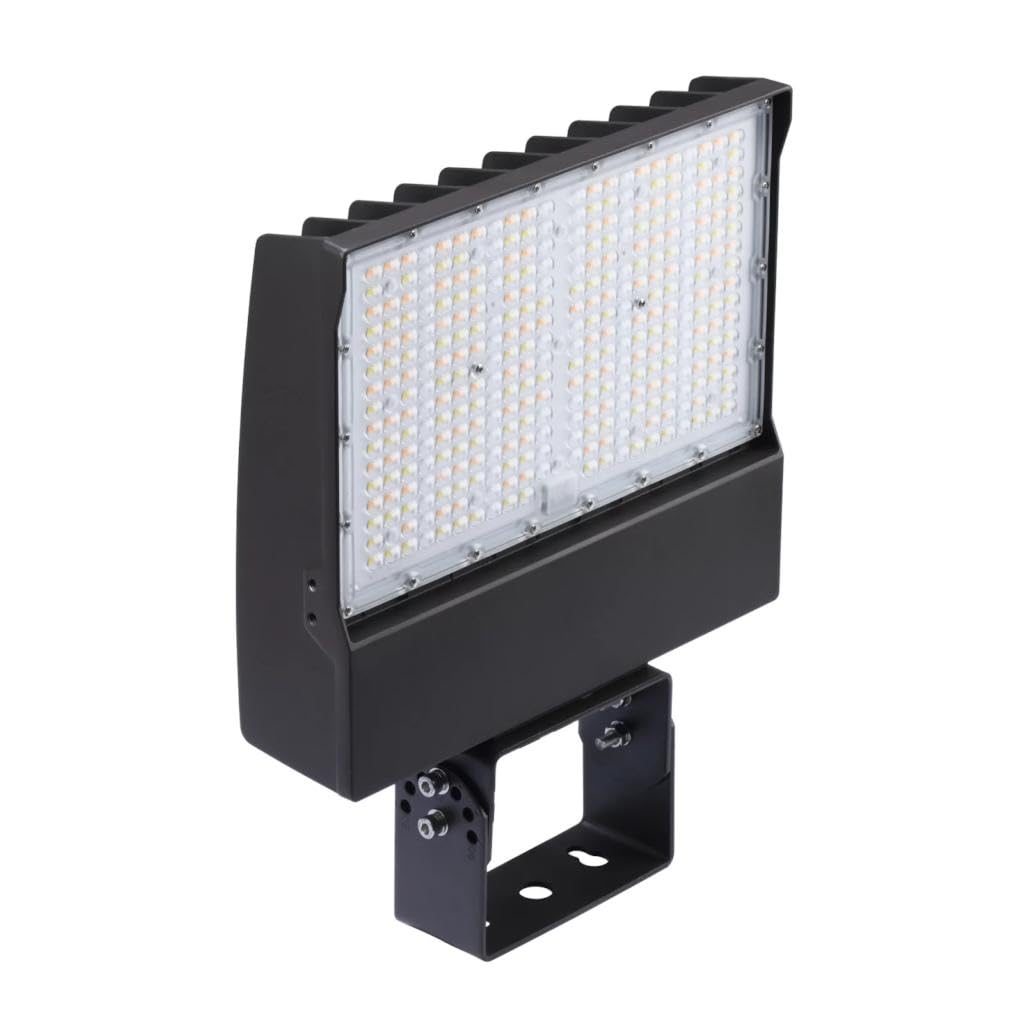
Image 1: Philips 196074 Flood LED Fixture with included mounting hardware. The fixture is a rectangular bronze unit with an integrated LED panel and a U-shaped yoke mount.
4. Eto ati fifi sori
This fixture is designed for ground, pole, or wall mounting using the provided yoke/trunnion mount.
4.1 Pre-Fifi sori
- Pa agbara: Ensure power to the installation area is disconnected at the circuit breaker or fuse box.
- Select mounting location: Choose a sturdy surface capable of supporting the fixture's weight. Ensure adequate clearance for light distribution.
- Mura onirin: Run appropriate electrical wiring (120-347V AC) to the chosen mounting location.
4.2 Iṣagbesori imuduro
- Position the yoke/trunnion mount against the desired surface. Mark the drilling points.
- Lu awaoko ihò bi samisi.
- Secure the yoke/trunnion mount to the surface using the provided hardware. Ensure it is firmly attached.
- Adjust the angle of the fixture as needed and tighten the pivot bolts on the yoke to secure its position.
4.3 Itanna Asopọ
- Open the wiring compartment on the fixture (if applicable) or access the wiring leads.
- Connect the fixture's black wire to the supply's live/hot wire.
- Connect the fixture's white wire to the supply's neutral wire.
- Connect the fixture's green or bare copper wire to the supply's ground wire.
- Ensure all connections are secure using UL-approved wire connectors.
- Close and seal the wiring compartment to maintain the IP65 rating.
5. Awọn ilana Iṣiṣẹ
The Philips 196074 fixture features selectable lumen output and color temperature, along with an integrated photocell for automatic dusk-to-dawn operation.
5.1 Lumen and Color Temperature Selection
Before powering on the fixture, locate the selector switches on the side or back of the unit. These switches allow you to choose the desired lumen output and color temperature.
- Lumen Output Options: 9,540 lm, 12,320 lm, 14,800 lm
- Awọn aṣayan iwọn otutu awọ: 3000K (Warm White), 4000K (Cool White), 5000K (Daylight)
Set the switches to your preferred combination. Changes made while the fixture is powered may not take effect immediately or may require a power cycle.
5.2 Photocell Operation
The integrated photocell automatically turns the fixture ON at dusk and OFF at dawn. Ensure the photocell sensor is not obstructed by objects, dirt, or debris, as this can interfere with its operation.
Once power is restored to the fixture, it will operate according to the photocell's light detection. There is no manual override for the photocell unless specified in advanced models (not applicable to this model).
6. Itọju
The Philips 196074 LED Flood Fixture requires minimal maintenance. Regular cleaning and inspection will ensure optimal performance and longevity.
- Ninu: Máa fọ lẹ́ńsì àti ilé náà lẹ́ẹ̀kọ̀ọ̀kan pẹ̀lú ohun rírọ̀, damp cloth. Do not use abrasive cleaners or solvents, as these can damage the finish or lens. Ensure power is off before cleaning.
- Ayewo: Annually inspect the fixture for any signs of damage, loose wiring, or corrosion. Ensure mounting hardware remains secure.
- Awọn LED: The LED light source is integrated and not user-replaceable. Do not attempt to open the sealed LED compartment.
7. Laasigbotitusita
If you experience issues with your fixture, refer to the following troubleshooting guide:
| Isoro | Owun to le Fa | Ojutu |
|---|---|---|
| Ohun elo ko ni tan -an. | Ko si ipese agbara. Asopọ onirin ti ko tọ. Photocell detecting too much light. | Ṣayẹwo Circuit fifọ / fiusi. Verify all electrical connections are secure (power off first). Ensure photocell is not obstructed and it is dark enough for activation. |
| Fixture stays on during the day. | Photocell obstructed or faulty. | Clean photocell sensor. Ensure no external light source is shining directly on the photocell. |
| Ijade ina kere ju ti a reti lọ. | Lumen selection switch set to lower output. | Verify the lumen selection switch is set to the desired output (power off first). |
| Iwọn awọ ti ko tọ. | Color temperature selection switch set incorrectly. | Verify the color temperature selection switch is set to the desired setting (power off first). |
If the problem persists after attempting these solutions, contact Philips customer support.
8. Awọn pato
| Ẹya ara ẹrọ | Ẹ̀kúnrẹ́rẹ́ |
|---|---|
| Nọmba awoṣe | 196074 |
| Nọmba apakan | SF100-SCT-T-G2-10-PCB-BZ |
| Brand | Philips |
| Iru | Outdoor Flood LED Fixture |
| Lumen Output (Selectable) | 9,540 lm, 12,320 lm, 14,800 lm |
| Fixture Wattage | 150 W |
| Voltage | 120 to 347V AC |
| Light Distribution Shape | 110 iwọn |
| Fixture Sensor Type | Photocell |
| Iṣagbesori Location | Ground, Pole, Wall |
| Oke Iru | Yoke/Trunnion |
| Color Temperature (Selectable) | 3000K, 4000K, 5000K |
| Fixture Housing Color | Idẹ |
| Fixture Lens Material | Polycarbonate |
| IP Rating | IP65 |
| Iwọn Nkan | 8 iwon |
| UPC | 190096196074 |
9. Atilẹyin ọja ati Support
Philips products are manufactured to the highest quality standards. For information regarding warranty coverage, please refer to the warranty card included with your product or visit the official Philips lighting webojula.
For technical support, troubleshooting assistance, or to inquire about replacement parts, please contact Philips customer service:
- Webojula: www.lighting.philips.com
- Foonu: Refer to your regional Philips support contact information.
Please have your model number (196074) and part number (SF100-SCT-T-G2-10-PCB-BZ) available when contacting support.


