Ọrọ Iṣaaju
Thank you for choosing the Reobiux Security Camera Outdoor with Dual Lens. This advanced security system is designed to provide comprehensive surveillance for your home or business, featuring 2.5K/6MP resolution, auto-tracking, human detection, color night vision, and two-way audio. This manual will guide you through the setup, operation, and maintenance of your new security cameras.

Image: Two Reobiux outdoor security cameras, showcasing their design and the accompanying mobile application interface.
Ohun ti o wa ninu Apoti
Jọwọ ṣayẹwo awọn akoonu ti package farabalẹ. Ti awọn ohun kan ba nsọnu tabi bajẹ, kan si atilẹyin alabara.
- Reobiux Security Cameras (2 units)
- Itọsọna olumulo
- Apo dabaru fifi sori ẹrọ
- Power Cables (10-foot)

Àwòrán: Àwòrán gbogbo àwọn ohun tí a fi sínú àpò ọjà náà.
Ọja Pariview
The Reobiux security camera features a unique dual-lens design for comprehensive coverage and advanced monitoring capabilities.

Image: Detailed diagram illustrating the fixed and rotating lenses, along with the 355° pan and 90° tilt functionality of the camera.
Awọn eroja pataki:
- Lẹnsi ti o wa titi: Provides a stable view of a primary area.
- Rotating Lens: Offers broader coverage with 355° pan and 90° tilt capabilities.
- Awọn LED infurarẹẹdi: For clear night vision in low light.
- Awọn Iyanju: For full-color night vision and alarm illumination.
- Gbohungbohun: Fun titẹ sii ohun ati ibaraẹnisọrọ ọna meji.
- Agbọrọsọ: Fun ohun ti o jade ati ibaraẹnisọrọ ọna meji.
- Eriali: For stable Wi-Fi connectivity.
- Ipilẹ iṣagbesori: Fun fifi sori ni aabo.
Eto Itọsọna
1. App Download and Account Registration
- Activate Permissions: Ensure Bluetooth and 2.4GHz Wi-Fi are enabled on your smartphone.
- Ṣe igbasilẹ ohun elo naa: Scan the QR code below or search for "iCSee" in the App Store (iOS) or Google Play Store (Android).
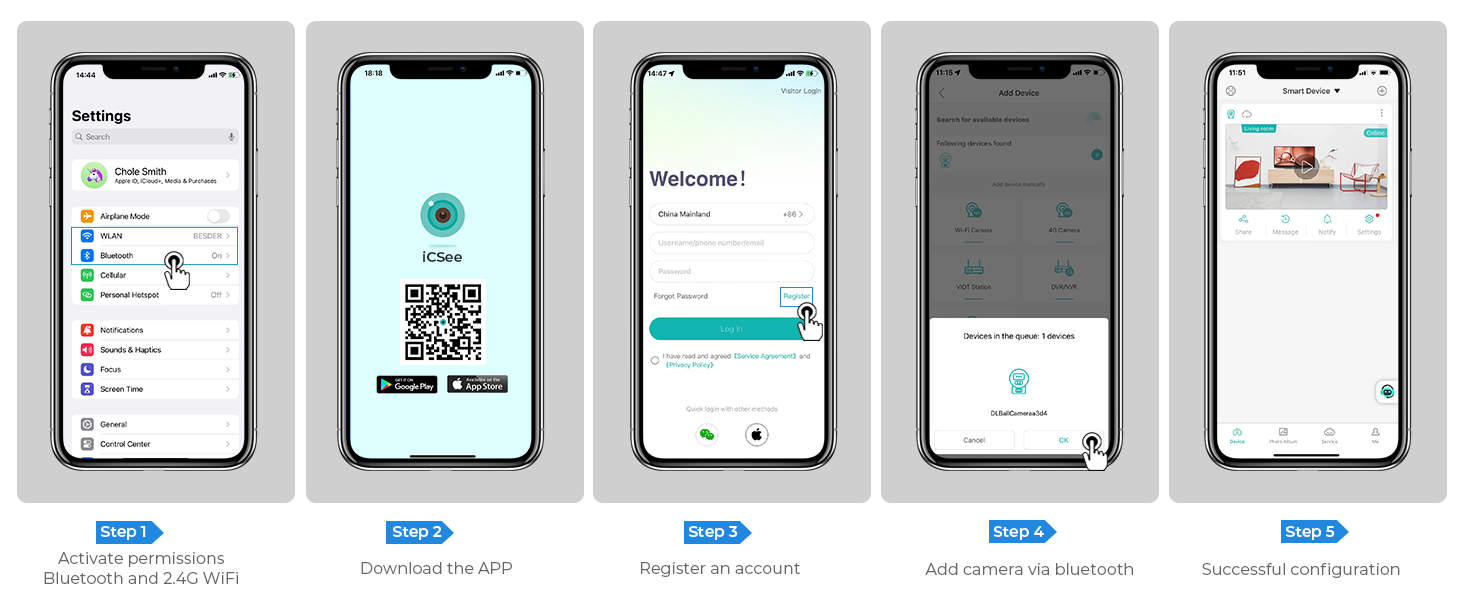
Image: Step-by-step guide for app download, account registration, and device configuration.
Alternatively, download the iCSee app directly from: http://d.xmeye.net/CSee
- Forukọsilẹ akọọlẹ kan: Open the iCSee app and follow the on-screen instructions to register a new account.
- Add Camera via Bluetooth: Once logged in, select "Add Device" and choose to add the camera via Bluetooth. The app will guide you through the pairing process.
- Successful Configuration: After successful pairing, your camera will be ready for use.
2. Agbara kamẹra
So okùn agbára tí a pèsè mọ́ ibudo agbára tí kámẹ́rà náà ń lò, lẹ́yìn náà, so ó mọ́ ibi tí iná mànàmáná ti wà. Kámẹ́rà náà yóò tan iná náà, yóò sì bẹ̀rẹ̀ ìtòlẹ́sẹẹsẹ ìbẹ̀rẹ̀ rẹ̀.
3. Network Connection Options
- Asopọ Wi-Fi: The camera supports 2.4GHz Wi-Fi networks only. During app setup, select your Wi-Fi network and enter the password.
- Àsopọ̀ Cable Ethernet: For a more stable connection, you can connect the camera directly to your router using an Ethernet cable.
- Aaye Ibùdó Ti ara ẹni: In situations where Wi-Fi is unavailable, the camera can also connect via a personal hotspot from your smartphone.
4. Iṣagbesori Kamẹra
The camera is designed for both indoor and outdoor use and can be ceiling-mounted. Choose a location that provides optimal viewing angles and is within range of your Wi-Fi network or Ethernet connection.
- Samisi Awọn aaye Liluho: Use the mounting template (if provided) or the camera base to mark the drilling points on the desired surface.
- Awọn iho iho: Drill holes at the marked points. Insert wall anchors if mounting on drywall or masonry.
- Ṣe aabo ipilẹ: Attach the camera's mounting base to the surface using the provided screws.
- So Kamẹra naa: Securely attach the camera unit to the mounted base.

Image: The camera installed outdoors, highlighting its robust IP66 waterproof design suitable for various weather conditions.
Awọn ilana Iṣiṣẹ
1. Gbe View ati Sisisẹsẹhin
Access the iCSee app to view gbe footage from your cameras. You can switch between the fixed and rotating lens views. The app also allows you to review foo ti o ti gbasilẹtage stored on the SD card or cloud.

Image: The dual-screen feature in the iCSee app, displaying simultaneous views from the fixed and rotating lenses.
2. Pan, Tilt, ati Digital Zoom
Use the iCSee app to remotely control the rotating lens. You can pan the camera 355° horizontally and tilt it 90° vertically to cover a wide area. The camera also supports 5x digital zoom to view awọn alaye.

Aworan: Ohun oke view demonstrating the camera's extensive 355° pan and 90° tilt range, covering a large residential area.
3. Motion Tracking and Human Detection
The camera is equipped with advanced motion tracking. When human motion is detected, the rotating lens will automatically track the subject's movement. You will receive real-time alerts on your smartphone via the iCSee app, capturing images or video of the activity.

Image: The camera's alarm features, including real-time push notifications, siren, and light activation upon detecting suspicious activity.
4. Audio-Ona Meji
With the built-in microphone and speaker, you can communicate with visitors or deter intruders directly through the iCSee app from anywhere.

Image: Illustration of the two-way audio function, allowing communication with individuals near the camera.
5. Night Iran Awọn ọna
The camera offers three night vision modes, selectable via the app, to ensure clear visibility up to 30 meters (98 feet) in various lighting conditions:
- Iran Alẹ-kikun: Utilizes built-in spotlights to provide vivid, full-color images even in complete darkness.
- Iran Alẹ Infurarẹẹdi: Uses infrared LEDs for clear black-and-white images in low-light conditions.
- Ìran Ọlọ́gbọ́n: Yipada laifọwọyi laarin infurarẹẹdi ati awọn ipo awọ kikun ti o da lori išipopada ti a rii tabi awọn ipo ina.

Image: Visual comparison of infrared night vision and full-color night vision capabilities at night.
6. Awọn aṣayan ipamọ
- Kaadi SD Micro: Supports up to 128GB micro SD card for local storage of recordings. (Card not included)
- Ibi ipamọ awọsanma: Optional cloud storage service available for secure, remote access to your video recordings.
7. Smart Home Integration
The Reobiux camera is compatible with NVR systems for continuous recording and can be integrated with Amazon Alexa for convenient voice control.

Image: The camera's compatibility with smart home devices like Amazon Alexa for voice-controlled viewing.
Itoju
- Ninu: Fi awọ ara ati lẹnsi kamẹra ati ara rẹ nu deedee pẹlu asọ rirọ, damp asọ lati yọ eruku ati idoti. Maṣe lo awọn kẹmika ti o lewu tabi awọn afọmọ abrasive.
- Awọn imudojuiwọn famuwia: Check the iCSee app periodically for firmware updates to ensure optimal performance and security.
- Ibi ti ina elekitiriki ti nwa: Rí i dájú pé okùn agbára náà so pọ̀ dáadáa, kò sì bàjẹ́.
- Awọn ipo Ayika: While IP66 rated, avoid prolonged exposure to extreme temperatures outside the operating range (-20°C to 55°C) or direct high-pressure water jets.
Laasigbotitusita
| Isoro | Owun to le Fa | Ojutu |
|---|---|---|
| Kamẹra aisinipo/Ko le sopọ si Wi-Fi | Ọ̀rọ̀ ìpamọ́ Wi-Fi tí kò tọ́; Kámẹ́rà jìnnà jù sí rọ́wọ́ọ̀tì; Nẹ́ẹ̀tìwọ́ọ̀kì Wi-Fi 5GHz tí a ti lò; Ìdènà nẹ́ẹ̀tìwọ́ọ̀kì. |
|
| Didara aworan ti ko dara | Lẹ́ǹsì tó dọ̀tí; Ìmọ́lẹ̀ tó pọ̀ tó; Àwọn ìṣòro ìpele ìpele nẹ́tíwọ́ọ̀kì. |
|
| Wiwa išipopada ko ṣiṣẹ | Detection sensitivity too low; Detection zone not set correctly; Obstructions in view. |
|
| Awọn ọran ohun afetigbọ ọna meji | Gbohungbohun/agbọrọsọ ti dakẹ ninu app; Iwọn didun kere ju; Idaduro nẹtiwọọki. |
|
Awọn pato
| Ẹya ara ẹrọ | Ẹ̀kúnrẹ́rẹ́ |
|---|---|
| Nọmba awoṣe | A9Q-2PCS |
| Ipinnu fidio | 2.5K/6MP (2048p) |
| Ipinnu Iduro ti o munadoko | 3 MP |
| Awọn lẹnsi | Dual Lens (Fixed and Rotating) |
| Pan / Tẹ Range | Pan 355°, Pulọọgi 90° |
| Digital Sisun | 5x |
| Ibiti Iran Night | Titi de awọn mita 30 (98 ẹsẹ) |
| Awọn ọna Iran Iran | Full-color, Infrared, Smart Vision |
| Asopọmọra | 2.4GHz Wi-Fi, Ethernet, Bluetooth, ONVIF, RTSP |
| Awọn aṣayan ipamọ | Micro SD Kaadi (to 128GB), Ibi ipamọ awọsanma |
| Ohun | Ohun Ona Meji (Miki ti a ṣe sinu & Agbọrọsọ) |
| Wiwa | Human Detection, Motion Tracking |
| Awọn itaniji | Real-time App Notifications, Siren, Light Alarm |
| Resistance Oju ojo | IP66 mabomire |
| Orisun agbara | Ina mọnamọna ti o ni okun (12 Volts, 3 Watts) |
| Awọn iwọn otutu ti nṣiṣẹ | Titi di 55°C |
| Awọn iwọn (L x W x H) | 5.88 x 4.68 x 6.2 inches |
| Iwọn | 2.75 iwon |
| Awọn ẹrọ ibaramu | Smartphone, Tablet, Laptop, NVR Systems, Amazon Alexa |
| Ọna Iṣakoso | iCSee App |
Atilẹyin ọja ati Support
Reobiux provides dedicated customer support for its products. For any technical assistance, warranty claims, or inquiries, please contact our 24/7 online customer support team. Refer to your purchase documentation for specific warranty terms and conditions.

Image: Reobiux customer support representative ready to assist.


