1. Ifihan
Welcome to the ACwO DwOTS Fire user manual. These innovative earbuds offer a unique dual-style design, providing both in-ear and half-in-ear options within a single charging case. Designed for versatility and high-quality audio, the DwOTS Fire earbuds feature advanced connectivity, extended battery life, and intuitive controls to enhance your listening experience.

Image: ACwO DwOTS Fire earbuds showcasing both half-in-ear and in-ear styles from a single case.
2. Ohun ti o wa ninu Apoti
Jọwọ rii daju pe gbogbo awọn ohun kan wa ninu apo rẹ:
- 2 x Set of Wireless Earbuds (one in-ear, one half-in-ear)
- 1 x Type-C Fast Charging Cable
- 4 x Extra Earmuffs (for in-ear style)
- 1 x Kaadi atilẹyin ọja
- 1 x Scan Me Card

Image: The ACwO DwOTS Fire earbuds and charging case.
3. Eto ati Sisopọ
3.1 Ibẹrẹ Ibẹrẹ
- Rii daju pe awọn agbekọri ti gba agbara.
- Ṣii apoti gbigba agbara. Awọn agbekọri yoo tẹ ipo isọpọ sii laifọwọyi.
- Lori ẹrọ rẹ (foonuiyara, tabulẹti, ati be be lo), jeki Bluetooth.
- Wa fun available devices and select "ACwO Fire" or "ACwO DwOTS Fire" to connect.
- Nígbà tí o bá ti so pọ̀, o máa gbọ́ ìró ohùn kan, ìmọ́lẹ̀ tó wà lórí àwọn ètí ìgbọ́rọ̀ náà yóò sì yípadà.
3.2 Meji Asopọmọra
The ACwO DwOTS Fire earbuds offer unique dual connectivity options:
- Connect Each Pair to Two Different Devices: Ideal for sharing your listening experience.
- Connect Both Pairs to a Single Device: Perfect for watching movies or listening to music together with a loved one. This feature is available only for devices with dual audio connectivity (e.g., certain Android devices).

Image: Illustration of the dual connectivity feature, showing two pairs of earbuds.
Steps for Dual Sharing (Connecting Both Pairs to a Single Device):
- Connect both 'ACwO DwOTS Fire' and 'ACwO Fire +' with your device's Bluetooth.
- Once both pairs are connected, scroll down your device's notification panel and click on 'Media Output'.
- One pair will already be selected. Select the other pair to enable dual audio.
- You can now listen on both pairs of your earbuds simultaneously.

Image: Visual guide for setting up dual sharing on a compatible device.
4. Awọn ilana Iṣiṣẹ
4.1 Àwọn Ìṣàkóso Ìfọwọ́kàn Tó Lòye
The earbuds feature intuitive touch controls for easy management of music, calls, and voice assistants. Refer to the included 'Scan Me Card' for a detailed diagram of touch functions.
- Ṣiṣẹ/Daduro: Fọwọ ba ẹyọkan lori boya agbekọri.
- Orin t’okan: Fọwọ ba lẹẹmeji lori agbekọri ọtun.
- Tẹlẹ Orin: Fọwọ ba lẹẹmeji lori agbekọri osi.
- Idahun/Ipe Ipari: Fọwọ ba ẹyọkan lori boya agbekọri.
- Kọ Ipe: Tẹ gun lori boya agbekọri.
- Mu Oluranlọwọ Ohun ṣiṣẹ: Fọwọ ba meteta lori boya agbekọri.
4.2 Awọn ipo EQ
Customize your audio experience with 3 preset EQ modes, offering a total of 3+3 EQ options across the two earbud styles. Switch between modes to suit your preference for deep bass, balanced sound, or enhanced treble.
- Ipo Ere: Optimized for immersive gaming audio with low latency.
- Ipo tiata: Enhanced soundstage for movies and videos.
- Ipò Ìwọ̀ntúnwọ̀nsì: Provides a neutral and clear audio profile fún gbígbọ́ gbogbogbò.

Image: ACwO DwOTS Fire earbuds with a visual representation of available EQ modes.
4.3 Iranlọwọ ohun
Easily access your device's voice assistant by triple-tapping either earbud. Compatible with "Ok Google" and "Hey Siri" for hands-free control.
5. Gbigba agbara
5.1 Earbuds and Case Charging
The ACwO DwOTS Fire earbuds provide up to 52 hours of music playtime with the charging case. The case supports both wired and wireless charging.
- Ti firanṣẹ Ngba agbara: Connect the provided Type-C fast charging cable to the charging port on the case and a power source.
- Gbigba agbara Alailowaya: Place the charging case on a compatible wireless charging pad (wireless charger not included). The indicator light on the case will show charging status.

Image: ACwO DwOTS Fire charging case highlighting 52 hours of playtime.

Image: 'One On, One Charging' feature for extended use.
6. Itọju
6.1 Omi ati lagun Resistance
The earbuds are IPX5 water and sweat resistant, making them suitable for workouts and outdoor activities. This rating protects against low-pressure water jets from any direction. Do not submerge the earbuds in water.

Image: ACwO DwOTS Fire earbuds demonstrating IPX5 water and sweat resistance.
6.2 Ninu
Regularly clean your earbuds and charging case with a soft, dry, lint-free cloth. Avoid using abrasive materials or harsh chemicals. For the in-ear style, gently remove and clean the earmuffs with water and mild soap, ensuring they are completely dry before reattaching.
7. Awọn pato
| Ẹya ara ẹrọ | Ẹ̀kúnrẹ́rẹ́ |
|---|---|
| Orukọ awoṣe | DwOTS Ina |
| Asopọmọra Technology | Ailokun (Bluetooth V5.3) |
| Audio Driver Type | 13mm Real Drivers |
| Ariwo Iṣakoso | AI-ENC with Quad Mics, Passive Noise Cancellation |
| Akoko ere | Titi di Awọn wakati 52 (pẹlu ọran gbigba agbara) |
| Lairi | Up to 45ms (Ultra-low) |
| Omi Resistance Ipele | IPX5 (Water Repellent) |
| Gbigba agbara | Type-C Fast Charging, Wireless Charging Capability |
| Ọna Iṣakoso | Touch Controls, Voice Assistant (Ok Google, Hey Siri) |
| Apẹrẹ Akọti | In-Ear, Half-in-Ear |
| Iwọn Nkan | 43 g |
| Ọja Mefa | 5.6 x 5.6 x 1.8 cm |
| Ohun elo | Ṣiṣu |
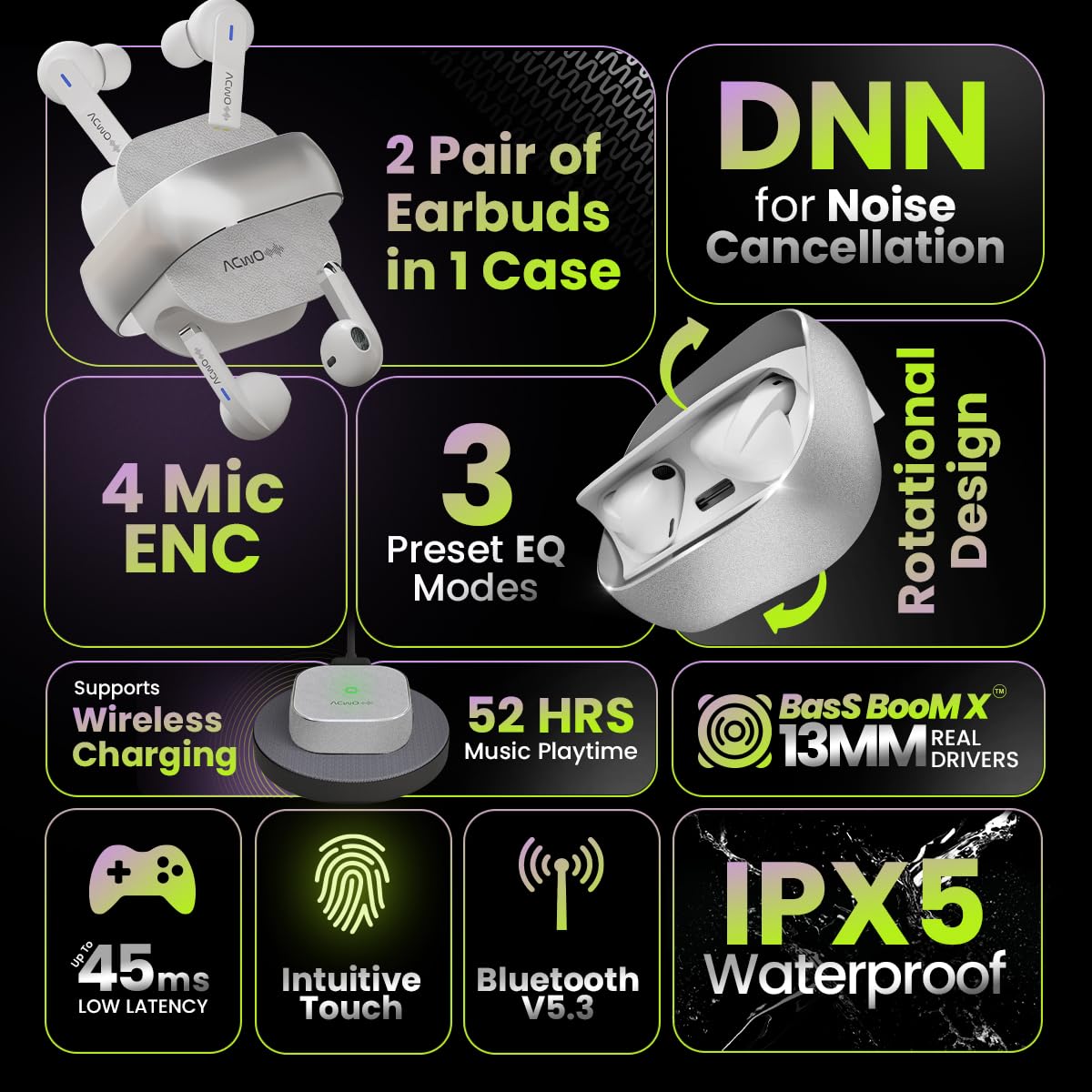
Image: Summary of ACwO DwOTS Fire key features.
8. Laasigbotitusita
8.1 Earbuds Ko Sopọ
- Ensure earbuds are charged and the case lid is open.
- Paa ati tan Bluetooth ẹrọ rẹ.
- Gbagbe ẹrọ naa lati inu atokọ Bluetooth rẹ ki o gbiyanju lati so pọ lẹẹkansii.
- Reset the earbuds (refer to the 'Scan Me Card' for specific reset instructions).
8.2 Ko si Ohun tabi Iwọn kekere
- Ṣayẹwo awọn ipele iwọn didun lori ẹrọ rẹ mejeeji ati awọn agbekọri.
- Rii daju pe awọn agbekọri ti joko daradara ni awọn eti rẹ.
- Nu gbogbo idoti kuro ninu awọn agbọrọsọ eti ati awọn olubasọrọ gbigba agbara.
- Tun awọn agbekọri pọ mọ ẹrọ rẹ.
8.3 Awọn ọran gbigba agbara
- Rii daju pe okun gbigba agbara ti sopọ ni aabo si ọran mejeeji ati orisun agbara.
- If using wireless charging, ensure the case is correctly placed on a compatible wireless charging pad.
- Check for any obstructions on the charging contacts of the earbuds and inside the case.
- Gbiyanju okun gbigba agbara ti o yatọ tabi ohun ti nmu badọgba agbara.
9. Atilẹyin ọja ati Support
The ACwO DwOTS Fire earbuds come with a standard brand warranty. Please refer to the included Warranty Card for specific terms and conditions.
Atilẹyin Onibara:
For any queries, technical assistance, or warranty claims, please contact ACwO customer support:
- Imeeli: help@acwo.com
- Foonu: + 91 9320420001
- Olupese: ACWO LIFESTYLE PRIVATE LIMITED, Borivali, Mumbai, Maharashtra - 400092, India


