1. Ifihan
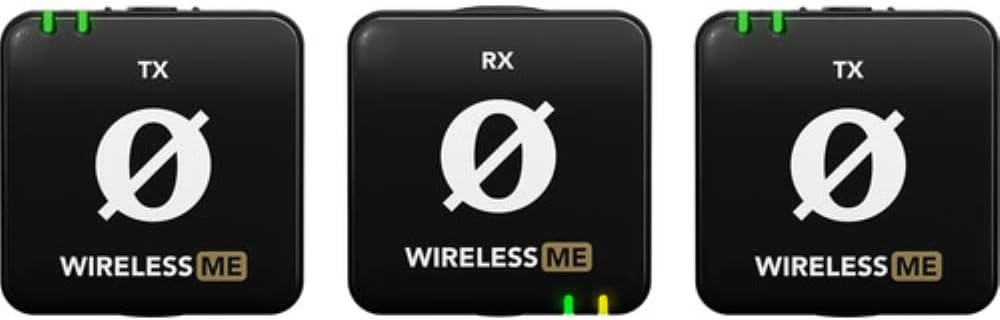
The RØDE Wireless ME Dual Set is an ultra-compact wireless microphone system designed for effortless professional audio recording. It features built-in, broadcast-grade microphones in both transmitters and the receiver, making it suitable for various applications including filmmaking, interviews, and content creation. Intelligent GainAssist technology ensures clear audio without clipping, and its intuitive controls simplify operation. The system offers stable wireless connectivity with a range of over 100 meters.
2. Ohun ti o wa ninu Apoti
The RØDE Wireless ME Dual Set includes the following components:
- 2x Wireless ME Transmitters (TX)
- 1x Wireless ME Receiver (RX)
- 1x SC21 USB-C to Lightning Cable
- 2x SC22 USB-C to USB-C Cables
- 1x SC2 3.5mm TRS to TRS Cable
- 1x SC7 3.5mm TRS to TRRS Cable
- 3x Furry Windshields
- 2x MagClip GO Magnetic Clips
- 1x Apo gbe

3. Eto
3.1. Ngba agbara si awọn ẹrọ
Before first use, ensure all transmitters and the receiver are fully charged. Use the provided USB-C cables (SC21 or SC22) to connect the devices to a USB power source. The battery indicator lights will show charging status.
3.2. Agbara lori / Paa
To power on or off any unit (transmitter or receiver), press and hold the power button until the indicator lights illuminate or turn off.
3.3. Sisọpọ
The Wireless ME Dual Set comes pre-paired from the factory. If re-pairing is necessary, refer to the detailed instructions in the full user manual available on the RØDE webojula.
3.4. Nsopọ si ẹrọ rẹ
Connect the receiver to your recording device using the appropriate cable:
- Awọn kamẹra: Use the SC2 3.5mm TRS to TRS cable.
- Smartphones (iOS with Lightning): Use the SC21 USB-C to Lightning cable.
- Smartphones (Android with USB-C) / Computers (USB-C): Use the SC22 USB-C to USB-C cable.

4. Awọn ilana Iṣiṣẹ
4.1. Àwọn Olùsopọ̀mọ́ Àwọn Olùgbéjáde
Clip the transmitters onto the clothing of the person speaking. For optimal audio, position the microphone close to the speaker's mouth. Use the included furry windshields to reduce wind noise when recording outdoors.
4.2. GainAssist Technology
The Wireless ME features intelligent GainAssist technology, which automatically controls your audio levels to prevent clipping and distortion. This ensures a clean audio signal without manual gain adjustments in most scenarios.
4.3. Abojuto Audio
If your recording device allows, monitor the audio output using headphones to ensure optimal sound quality and detect any potential issues during recording.
5. Key Awọn ẹya ara ẹrọ
- Apẹrẹ Iwapọ Ultra: Small and lightweight for discreet and portable use.
- Awọn Gbohungbohun ti a ṣe sinu: Both transmitters and the receiver feature high-quality omnidirectional microphones.
- Ìmọ̀-ẹ̀rọ GainAssist: Automatically adjusts audio levels for clear, distortion-free sound.
- Ibamu gbooro: Seamlessly connects with cameras, Windows/macOS computers, and iOS/Android phones.
- Gbigbasilẹ ikanni meji: The Dual set captures two subjects simultaneously, recording to separate channels for flexible post-production.
- Ibi ti o gbooro sii: Stable wireless connectivity up to 100 meters (line of sight).
6. Itọju
- Ninu: Lo asọ asọ ti o gbẹ lati nu awọn ẹrọ naa. Yago fun lilo olomi tabi abrasive ose.
- Ibi ipamọ: Store the Wireless ME Dual Set in its carry pouch in a cool, dry place when not in use.
- Itọju Batiri: For optimal battery life, avoid fully discharging the devices frequently. Recharge regularly.
7. Laasigbotitusita
- Ko si Ohun:
- Ensure all units are powered on and properly paired.
- Check cable connections between the receiver and your recording device.
- Verify audio input settings on your recording device.
- Dídára ohùn/Ìdènà tó dára:
- Ensure transmitters are within range of the receiver.
- Minimize obstructions between transmitters and receiver.
- Use furry windshields in windy conditions.
- Check for strong Wi-Fi or other 2.4GHz interference sources.
- Awọn ọran gbigba agbara:
- Rii daju pe awọn okun USB ti sopọ mọ lailewu.
- Gbiyanju orisun agbara USB miiran tabi okun.
8. Awọn pato
| Ẹya ara ẹrọ | Ẹ̀kúnrẹ́rẹ́ |
|---|---|
| Iwọn Nkan | 274 Giramu (9.7 iwon) |
| Ipalara | 200 ohms |
| Gbohungbo Fọọmù ifosiwewe | Lavalier |
| Awọn iwọn (L x W x H) | 8.15 x 4.61 x 1.65 inches |
| Orisun agbara | Agbara Batiri (Batiri 3 pẹlu) |
| Ohun elo | Ṣiṣu |
| Ifihan Ibuwọlu-si-Noise | 60 dB |
| Hardware Platform | Kamẹra |
| Nọmba ti awọn ikanni | 2 |
| Idahun Igbohunsafẹfẹ | 2400 MHz |
| Asopọmọra Technology | Wi-Fi |
| Asopọmọra Iru | USB Iru-C |
| Pataki Ẹya | Bluetooth, Alailowaya |
| Pola Àpẹẹrẹ | Omnidirectional |
9. Atilẹyin ọja ati Support
For warranty information and technical support, please refer to the official RØDE webojula tabi kan si wọn onibara iṣẹ taara. Jeki ẹri rira rẹ fun awọn iṣeduro atilẹyin ọja.
10. Media ọja
Awọn aworan ọja


