1. Ifihan
This manual provides instructions for the Varmilo Koi 73 JIS Keyboard with Sakura Switches (Model: VMMA73A039SAKURA). This keyboard features a unique design inspired by traditional Chinese Koi fish and water elements, combined with a modern aesthetic. It is a compact 65% size keyboard with a Japanese Industrial Standard (JIS) layout, designed for both functionality and portability. The keyboard is equipped with Cherry-style stabilizers for a stable typing experience.
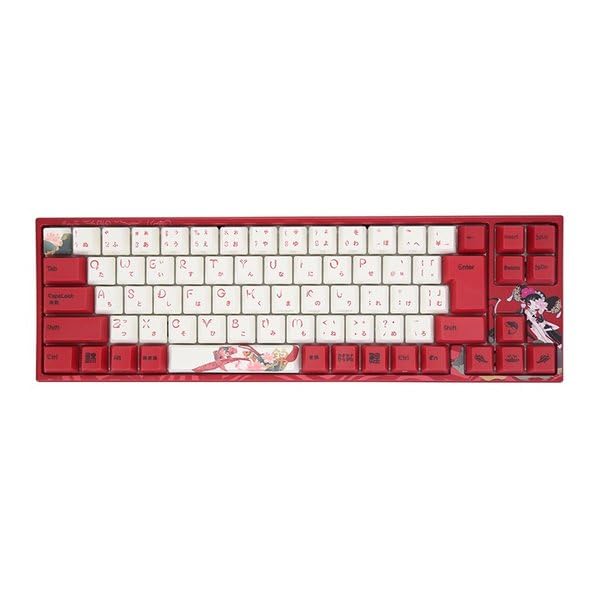
Image: Varmilo Koi 73 JIS Keyboard overview.
2. Key Awọn ẹya ara ẹrọ
- Unique Koi Design: Features vibrant koi fish illustrations and a red aesthetic, developed in collaboration with illustrator Li Huan.
- JIS Layout: 73-key Japanese Industrial Standard layout for specific regional input needs.
- Compact 65% Size: Optimizes desk space while retaining essential function and arrow keys.
- Customizable Switches: Offers a choice of Varmilo mechanical electrostatic capacity switches to suit individual typing preferences.
- Cherry-Style Stabilizers: Ensures consistent and stable key presses, especially for larger keys.
- Asopọmọra USB: Reliable wired connection for stable performance.
3. Eto Itọsọna
3.1 Package Awọn akoonu
Ṣaaju ki o to bẹrẹ, jọwọ rii daju pe gbogbo awọn nkan wa ninu package:
- Varmilo Koi 73 JIS Keyboard
- Okun USB
- Afowoyi Olumulo (iwe-ipamọ yii)
3.2 Nsopọ Keyboard
To connect your Varmilo Koi 73 keyboard to your computer, follow these steps:
- Wa ibudo USB-C ni ẹhin keyboard naa.
- So opin kan ti okun USB ti a pese si ibudo USB-C ti keyboard.
- So opin okun USB pọ si ibudo USB ti o wa lori kọnputa rẹ.
- Awọn bọtini itẹwe yẹ ki o jẹ idanimọ laifọwọyi nipasẹ ẹrọ iṣẹ rẹ.
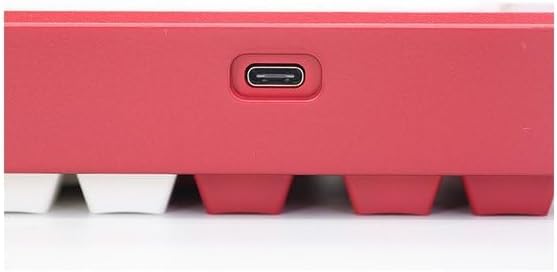
Image: USB-C port for keyboard connection.
3.3 Fifi sori ẹrọ awakọ (Aṣayan)
For advanced customization and optimal performance, it is recommended to install the Varmilo driver software. This software allows you to remap keys, adjust performance settings, and customize lighting effects.
Video: This video demonstrates the driver installation process and software usage for Varmilo keyboards. While it features the Muse65 model, the steps for driver installation and basic software navigation are generally applicable to other Varmilo keyboards like the Koi 73.
Please visit the official Varmilo website for the latest driver downloads specific to your keyboard model. Follow the on-screen instructions during installation.
4. Awọn ilana Iṣiṣẹ
4.1 Ipilẹ Key Awọn iṣẹ
The Varmilo Koi 73 keyboard features a standard JIS layout. Most keys function as labeled. For special functions, refer to the combination keys below.
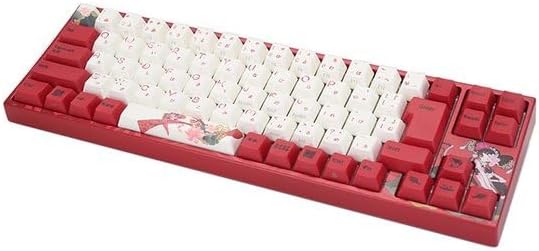
Aworan: Pariview of the Varmilo Koi 73 JIS Keyboard layout.
4.2 Function (Fn) Key Combinations
Since this is a 73-key layout, some functions are accessed via the Fn key. Hold down the Fn key and press the corresponding key to activate its secondary function. Common Fn combinations include:
- Fn + F1-F12: Multimedia controls (e.g., volume, play/pause).
- Fn + Awọn bọtini itọka: Page Up/Down, Home/End (specific to model, refer to keycap legends).
- Fn + Win Key: Awọn titiipa/ṣii bọtini Windows.

Image: Left side keys, often used with Fn for additional functions.
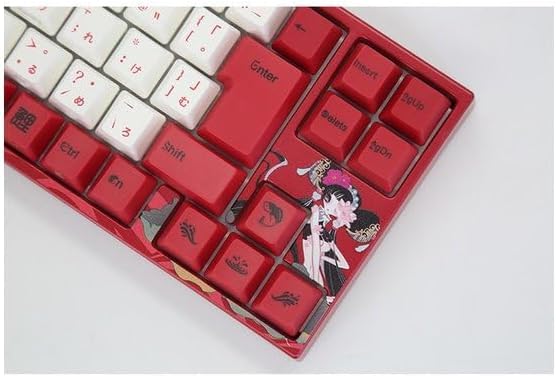
Image: Right side keys, including navigation and utility keys.
4.3 Awọn ipa ina
The Varmilo Koi 73 keyboard supports various RGB lighting effects. You can cycle through different modes and adjust brightness using specific key combinations. Refer to your keyboard's specific keycap legends or the driver software for detailed lighting controls.
Video: This video showcases various RGB lighting effects on a Varmilo keyboard. While the model shown is Muse65, it provides a general idea of the dynamic lighting capabilities available on Varmilo keyboards, including the Koi 73.
5. Itọju ati Itọju
Proper maintenance ensures the longevity and optimal performance of your Varmilo Koi 73 keyboard.
- Awọn bọtini mimọ: Gently remove keycaps using a keycap puller. Clean the keycaps with a soft cloth dampfi ọṣẹ díẹ̀ àti omi bò ó. Rí i dájú pé wọ́n gbẹ pátápátá kí o tó tún so wọ́n pọ̀ mọ́ ara wọn.
- Ninu ara Keyboard: Lo aṣọ rírọrùn tí ó gbẹ láti nu ara keyboard náà. Fún eruku líle, fi díẹ̀ sí i.amp cloth with a small amount of isopropyl alcohol can be used. Avoid excessive moisture.
- Yiyọ eruku kuro: Lo afẹfẹ fisinuirindigbindigbin lati yọ eruku ati idoti kuro laarin awọn bọtini.
- Yago fun Olomi: Keep liquids away from the keyboard to prevent damage.
- Itọju USB: Do not bend or crimp the USB cable excessively.
6. Laasigbotitusita
If you encounter issues with your Varmilo Koi 73 keyboard, try the following solutions:
- Keyboard Ko Dahun:
- Rii daju pe okun USB ti sopọ ni aabo si keyboard mejeeji ati kọnputa naa.
- Gbiyanju lati so keyboard pọ mọ ibudo USB ti o yatọ lori kọnputa rẹ.
- Tun kọmputa rẹ bẹrẹ.
- Ti o ba nlo ibudo USB, gbiyanju lati sopọ taara si kọnputa naa.
- Awọn bọtini Ko Iforukọsilẹ:
- Ṣàyẹ̀wò fún èyíkéyìí ìdọ̀tí tàbí àwọn ohun àjèjì tí ó wà lábẹ́ àwọn ìbòrí kọ́kọ́rọ́ náà.
- If specific keys are not working, consider reinstalling the keyboard driver.
- Awọn oran Imọlẹ:
- Ensure the keyboard driver is installed and up to date.
- Use the Fn key combinations or driver software to adjust lighting modes and brightness.
- Ti ti bọtini Windows pa:
- Tẹ Fn + Win Key láti yí titiipa bọtini Windows padà.
If the problem persists, please contact Varmilo customer support for further assistance.
7. Awọn pato
| Brand | Varmilo |
| Nọmba awoṣe | VMMA73A039SAKURA |
| Ifilelẹ bọtini itẹwe | 73-key JIS (Japanese Industrial Standard) |
| Asopọmọra | Okun USB |
| Yipada Iru | Mechanical (Linear) |
| Awọn ẹrọ ibaramu | Kọǹpútà alágbèéká |
| Ọja Mefa | 34.2 cm (L) x 34.2 cm (W) x 5.1 cm (H) |
| Awọn irinše to wa | Okun USB |
8. Atilẹyin ọja ati Support
Varmilo products typically come with a manufacturer's warranty. Please refer to the warranty card included with your product or visit the official Varmilo webAaye fun alaye atilẹyin ọja ofin ati ipo.
For technical support, driver downloads, or further inquiries, please visit the official Varmilo support page or contact their customer service.
Official Varmilo Webojula: www.varmilo.com


