Ọrọ Iṣaaju
The DEERC SQN-050 Robot Toy is an interactive and educational remote-controlled robot designed for children. It features 16 unique LED eye expressions, a walkie-talkie function for two-way communication, gesture sensing for intuitive control, and a programming mode to encourage creativity. This manual provides comprehensive instructions for the safe and effective use of your robot toy.
Ohun ti o wa ninu Apoti
- DEERC SQN-050 Robot Toy
- Isakoṣo latọna jijin
- Okun Ngba agbara USB
- Screwdriver
- Rechargeable Lithium Ion Battery (pre-installed or separate)
- Ilana Afowoyi (iwe yii)
Ṣeto
1. Fifi sori batiri
The robot toy requires one Lithium Ion battery (included). The remote control requires two AAA batteries (not included).
- Robot Battery: Locate the battery compartment on the underside of the robot. Use the included screwdriver to open the compartment. Insert the Lithium Ion battery, ensuring correct polarity. Close the compartment and secure with the screw.
- Awọn batiri Iṣakoso Latọna jijin: Locate the battery compartment on the back of the remote control. Open the compartment. Insert two AAA batteries, observing the correct polarity (+/-). Close the compartment.
2. Ngba agbara si Robot
The robot toy features a Type-C charging port for convenient recharging.
- Connect the small end of the USB charging cable to the Type-C port on the robot.
- Connect the large end of the USB charging cable to a compatible USB power source (e.g., adapter, power bank, laptop, car charger).
- A full charge typically takes 30-40 minutes and provides up to 100 minutes of playtime.

Image: The DEERC robot toy, its remote control, USB charging cable, and a screwdriver, illustrating the components included for setup.
Awọn ilana Iṣiṣẹ
1. Agbara Tan / Paa
- To turn on the robot, slide the power switch located on its body to the "ON" position.
- To turn on the remote control, slide its power switch to the "ON" position.
- To turn off both devices, slide their respective power switches to the "OFF" position.
2. Isẹ Iṣakoso latọna jijin
The 2.4GHz remote control allows for precise movement and function activation.
- Use the directional joysticks/buttons to move the robot forward, backward, left, and right.
- The robot can perform 360° spins.
- The remote control has buttons to switch between 16 unique LED eye expressions.
- Use the music button to play delightful music and switch between different songs. A mute button is available to stop the music.

Image: The DEERC robot toy and its remote control, demonstrating the primary control method.
3. Gesture Sensing Mode
The robot can be controlled using hand gestures from up to 5.9 inches away.
- Wave your hand in front of the robot to initiate movement.
- Specific gestures will command the robot to move forward, backward, left, right, or perform spins.

Image: A child demonstrating gesture control, with the robot responding to hand movements.
4. Walkie-Talkie Function
The robot features a two-way communication function through the remote control.
- Press and hold the designated walkie-talkie button on the remote control to speak.
- Release the button to listen for a response from the robot.
- Ensure both the robot and remote control are powered on and within range for this feature to work.

Image: A child and an adult interacting with the DEERC robot using its walkie-talkie function, showing communication over a distance.
5. Ipo siseto
The programming mode allows users to create custom sequences of actions for the robot.
- Refer to the remote control diagram for the programming button.
- Enter programming mode, then input a series of commands (movements, turns, expressions).
- Press the programming button again to execute the programmed sequence.
- The robot also has an auto-demo function for pre-set actions.
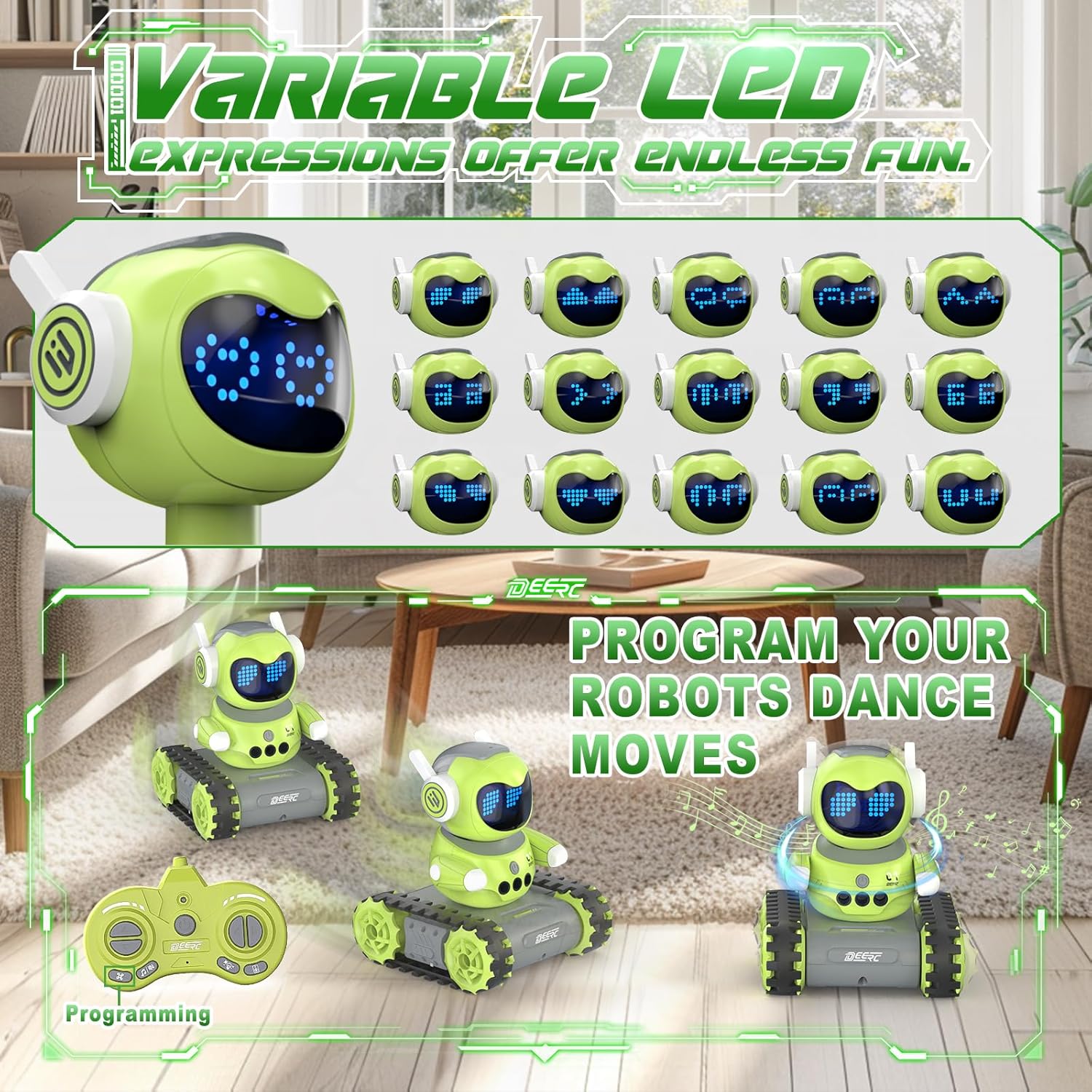
Image: The DEERC robot displaying various LED eye expressions and performing programmed movements, highlighting its interactive features.
Itoju
- Keep the robot and remote control clean by wiping them with a dry, soft cloth.
- Avoid exposing the toy to water or excessive moisture.
- Tọju ohun-iṣere naa ni itura, aaye gbigbẹ kuro lati orun taara nigbati ko si ni lilo.
- Remove batteries from the remote control if the toy will not be used for an extended period to prevent leakage.
Laasigbotitusita
| Isoro | Owun to le Fa | Ojutu |
|---|---|---|
| Robot does not respond. | Low battery in robot or remote; power switch off; not paired. | Charge robot battery; replace remote batteries; ensure both are ON; re-pair if necessary (refer to pairing instructions if applicable, though not explicitly in feature bullets). |
| Short playtime. | Batiri naa ko gba agbara ni kikun; batiri atijọ. | Ensure full charge (30-40 mins); consider replacing battery if performance degrades significantly over time. |
| Walkie-talkie function unclear or not working. | Out of range; interference; button not pressed correctly. | Ensure robot and remote are within 165 feet (without obstacles); avoid areas with strong electronic interference; press and hold the talk button firmly. |
| Gesture sensing not working. | Hand too far; incorrect gesture; sensor obstructed. | Ensure hand is within 5.9 inches; use clear, distinct gestures; check for any obstructions on the robot's sensors. |
Awọn pato
- Awoṣe: SQN-050
- Brand: DEERC
- Awọn iwọn ọja: 5.2 x 6.4 x 5.9 inches
- Ìwọ̀n Nkan: 1.08 iwon
- Ọjọ ori ti a ṣeduro: 6 ọdun ati si oke
- Robot Battery: 1 batiri litiumu ion (pẹlu)
- Awọn batiri Iṣakoso Latọna jijin: Awọn batiri AAA (ko kun)
- Akoko gbigba agbara: 30-40 iṣẹju
- Àkókò eré: Titi di iṣẹju 100
- Igbohunsafẹfẹ Iṣakoso Latọna jijin: 2.4GHz
- Ibi iṣakoso latọna jijin: Titi di ẹsẹ 165 (laisi awọn idiwọ)
- Gesture Sensing Range: Titi di 5.9 inches
Alaye Aabo
Pataki: Children under 6 years old need to use this product under adult supervision. Always ensure safe play environments and keep away from small parts that could be a choking hazard for very young children. Do not disassemble or modify the product. Use only the provided charging cable and recommended batteries.
Atilẹyin ọja ati Support
For warranty information or technical support, please refer to the product packaging or contact DEERC customer service directly. Contact details are typically available on the official DEERC webojula tabi nipasẹ rẹ ra Syeed.


