Ọrọ Iṣaaju
This manual provides essential instructions for the safe and effective use of your Sony FX30 Digital Cinema Camera. The Sony FX30 is designed for content creators and filmmakers, featuring an APS-C sensor for cinematic capture. Please read this manual thoroughly before operating the camera and retain it for future reference.
Package Awọn akoonu
Daju pe gbogbo awọn ohun ti a ṣe akojọ rẹ si isalẹ wa ninu package rẹ. Ti awọn ohun kan ba nsọnu tabi bajẹ, jọwọ kan si alagbata rẹ.

Image: The Sony FX30 Digital Cinema Camera body with various accessories including a memory card, LED light, microphone, and stabilization grip.
Sony Manufacturer Items:
- Sony FX30 Digital Cinema Camera Body
- Sony NP-FZ100 Rechargeable Lithium-Ion Battery
- Sony AC Adapter
- Sony ALC-B1EM Ara fila fun E-Mount Awọn kamẹra
- Sony Multi Interface Shoe fila
- USB-A si okun USB-C (USB 3.2)
Bundled Items:
- SanDisk 128GB High Speed Extreme Pro SD Memory Card
- High Power LED Light with Diffusers
- Ibọn gbohungbohun
- Padded Deluxe Camera Bag
- U-Stabilization Grip
- Extra Replacement Battery (Compatible with NP-FZ100)
- Pistol Hand Grip
- Photo & Video Editing Software (1 Year Digital Download)
- USB Memory Card Reader
- Camera Hand Grip Strap
- Lens Pen
- Lẹnsi Blower
- Camera Starter Kit (Microfiber Cloth, Memory Card Case, Buds)
Ṣeto
1. Fifi sori batiri
Insert the provided Sony NP-FZ100 battery into the battery compartment located at the bottom of the camera. Ensure it clicks into place securely. Charge the battery fully before first use using the supplied AC adapter and USB-A to USB-C cable.
2. Fifi sori kaadi iranti
The FX30 supports SD memory cards. Open the memory card slot cover, typically located on the side of the camera. Insert the SanDisk 128GB Extreme Pro SD card with the label facing the correct direction until it clicks into place. The camera features dual card slots for extended recording or backup.

Aworan: Ẹyin view of the Sony FX30 showing the open memory card slots with two SD cards partially inserted.
3. Attaching the Body Cap
When no lens is attached, always keep the Sony ALC-B1EM Body Cap on the camera's E-mount to protect the sensor from dust and damage.
4. Agbara akọkọ Lori
Press the power button to turn on the camera. Follow any on-screen prompts for initial setup, such as language selection and date/time settings.
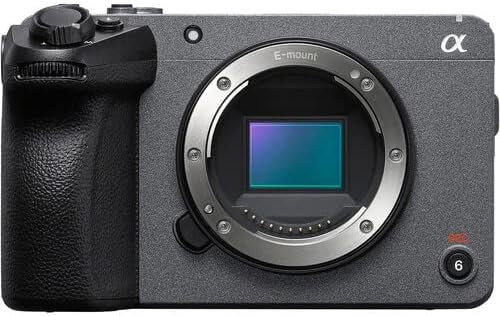
Aworan: Iwaju view of the Sony FX30 camera body, showcasing the E-mount lens interface and grip.
5. Asopọmọra Awọn ẹya ẹrọ
Attach the U-Stabilization Grip, Shotgun Microphone, and LED Light as needed for your shooting requirements. The camera features a Multi Interface Shoe for compatible accessories.
Ṣiṣẹ kamẹra
Ipilẹ idari Loriview
Familiarize yourself with the camera's main controls for efficient operation.

Aworan: Ẹyin view of the Sony FX30, highlighting the LCD screen, MODE dial, MENU button, and various control buttons and dials.
- MODE Dial: Selects shooting modes.
- Bọtini MENU: Accesses camera settings and functions.
- FOCUS MAG: Magnifies the display for precise focusing.
- Bọtini Fn (Iṣẹ) Pese wiwọle yara yara si awọn eto ti a lo nigbagbogbo.
- DISP (Display) Button: Changes the information displayed on the screen.
- Control Wheel: Lilọ kiri awọn akojọ aṣayan ati ṣatunṣe awọn eto.
- Zebra/Peaking: Assists with exposure and focus.

Aworan: Oke view of the Sony FX30, showing the Multi Interface Shoe, IRIS, WB, ISO buttons, and the REC button.
- IRIS Button: Adjusts aperture.
- WB (White Balance) Button: Sets white balance.
- ISO Button: Adjusts ISO sensitivity.
- Bọtini REC: Bẹrẹ ati da gbigbasilẹ fidio duro.
Isẹ iboju ifọwọkan
The FX30 features a touch-sensitive LCD screen for intuitive control. You can tap to select menu items, adjust focus, and navigate settings directly on the display.

Image: A hand interacting with the touch-sensitive LCD screen on the back of the Sony FX30 camera.
Gbigbasilẹ Fidio
To begin recording, ensure a memory card is inserted and the battery is charged. Press the REC button to start recording. Press it again to stop. The camera supports video capture resolutions up to 4K and 1080p in MP4 format.
Asopọmọra
The Sony FX30 supports Wi-Fi connectivity for remote control, file transfer, and other smart functions. Refer to the camera's on-screen menu for Wi-Fi setup instructions.
Itoju
- Ninu ara Kamẹra: Lo asọ ti o rọ, ti o gbẹ lati nu ara kamẹra nu. Fun idoti alagidi, die-die dampFi omi bo aṣọ náà. Yẹra fún lílo àwọn ohun ìfọmọ́ tó lágbára.
- Cleaning the Lens and Sensor: Use a lens blower to remove dust from the lens and sensor. For smudges on the lens, use a lens pen or a specialized lens cleaning solution with a microfiber cloth. Sensor cleaning should be performed with extreme care or by a professional.
- Itọju Batiri: Tọju awọn batiri ni itura, ibi gbigbẹ. Yago fun gbigba awọn batiri ni kikun nigbagbogbo lati fa gigun igbesi aye wọn.
- Ibi ipamọ: When not in use, store the camera in a dry, dust-free environment, preferably in the padded deluxe camera bag provided.
Laasigbotitusita
This section addresses common issues you might encounter. For more detailed troubleshooting, refer to the official Sony support webojula.
- Kámẹ́rà Kò Lágbára: Ensure the battery is fully charged and correctly inserted. Try using the extra replacement battery.
- Aṣiṣe kaadi iranti: Reinsert the memory card. Ensure it is formatted correctly by the camera. Try a different memory card if the issue persists.
- Ko si Gbigbasilẹ fidio: Check if the memory card has sufficient free space. Verify that the camera is in a video recording mode.
- Awọn ọran Didara Aworan: Check lens cleanliness. Ensure appropriate ISO, aperture, and shutter speed settings for your lighting conditions.
Awọn pato
| Ẹya ara ẹrọ | Ẹ̀kúnrẹ́rẹ́ |
|---|---|
| Ọja Mefa | 3.3 x 3.1 x 3.3 inches |
| Iwọn Nkan | 8 iwon |
| ASIN | B0D1RWMS36 |
| Nọmba Awoṣe Nkan | CC-FX30BODY-41524 |
| Olupese | Sony |
| Brand | Sony |
| Fọto sensọ Technology | APS-C |
| Ipinnu Yaworan fidio | 1080p, 4K |
| Flash Memory Iru | SD |
| Fidio Yaworan kika | MP4 |
| Atilẹyin Audio kika | AAC, MP3 |
| Iwon iboju | 3 inches |
| Asopọmọra Technology | Wi-Fi |
| Àwọ̀ | Dudu |
| Pataki Ẹya | Ailokun |
Atilẹyin ọja ati Support
The Sony FX30 Digital Cinema Camera comes with a Limited 1-Year Manufacturer Warranty. Please retain your proof of purchase for warranty claims.
Fun atilẹyin imọ-ẹrọ, iṣẹ, tabi alaye si siwaju sii, jọwọ ṣabẹwo si atilẹyin osise Sony webojula tabi kan si wọn onibara iṣẹ. O le wa alaye siwaju sii ni awọn Sony Atilẹyin Webojula.


