1. Ọja Ipariview
The AULA F2088 Mechanical Keyboard and S12PRO Gaming Mouse Combo provides a comprehensive input solution for various computing needs. The F2088 keyboard features a wired connection, typewriter-style round keycaps, and mechanical blue switches for tactile feedback. It includes multimedia and backlight control functionalities. The S12PRO mouse is also wired, offering adjustable DPI settings and programmable buttons for enhanced gaming performance.
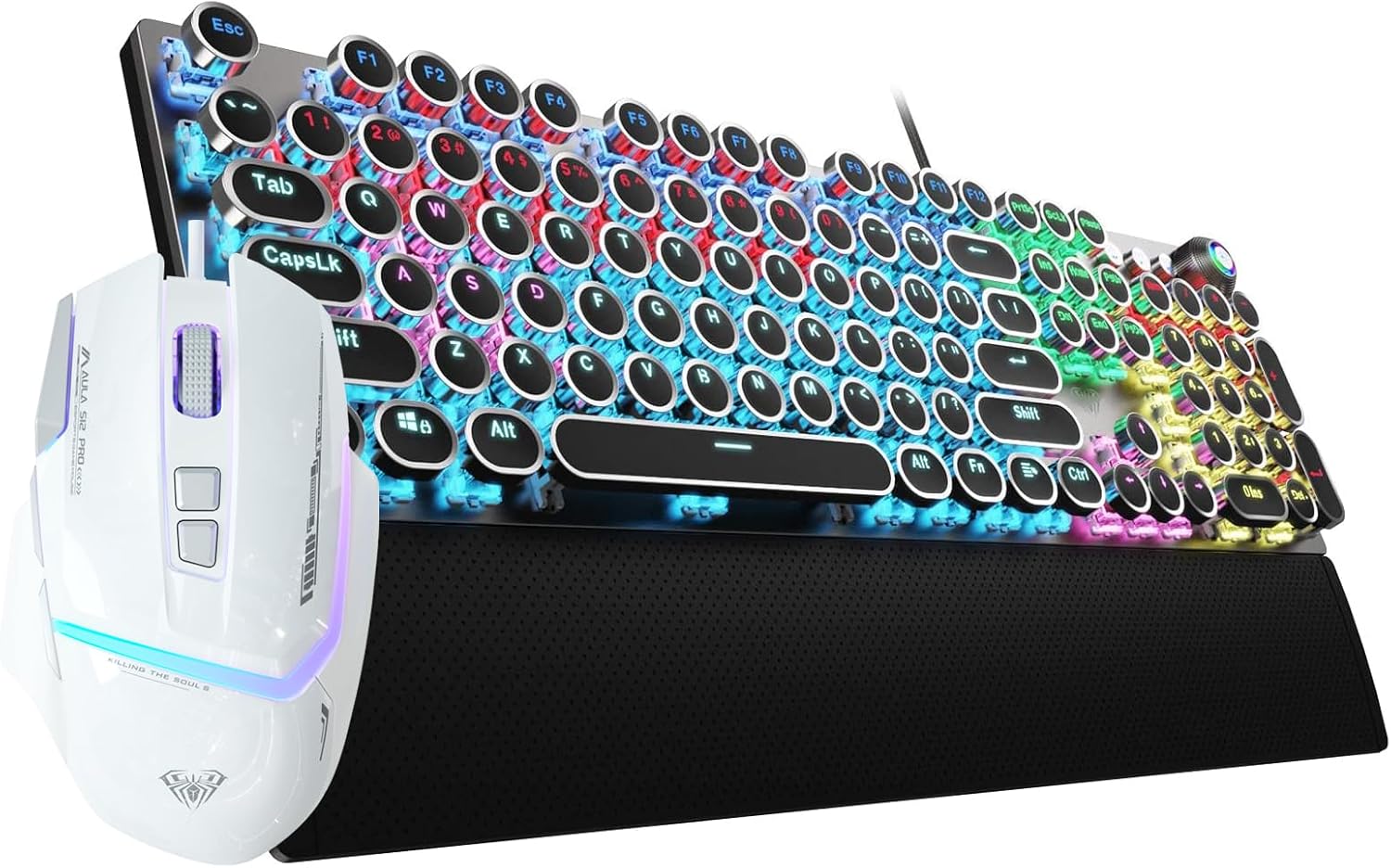
Image 1.1: The AULA F2088 Mechanical Keyboard and S12PRO Gaming Mouse Combo, showcasing the black typewriter-style keyboard with RGB backlighting and the white gaming mouse.
Awọn ẹya pataki:
- F2088 Keyboard: Retro typewriter-style round keycaps, mechanical blue switches, multimedia and backlight control knob, metal panel, detachable magnetic wrist rest.
- S12PRO Mouse: 6 adjustable DPI levels (1200-12800), 13 RGB light effects, 8 programmable buttons, software macro programming support.
2. Awọn ilana iṣeto
This combo utilizes a wired USB connection for both the keyboard and mouse, ensuring a stable and reliable connection. No additional drivers or software are required for basic functionality (plug and play).
2.1 Nsopọ Keyboard
- Wa ibudo USB ti o wa lori kọnputa rẹ.
- Plug the USB connector of the F2088 keyboard into the USB port.
- Awọn bọtini itẹwe yoo jẹ idanimọ laifọwọyi nipasẹ ẹrọ iṣẹ rẹ.
2.2 Nsopọ Asin
- Locate another available USB port on your computer.
- Plug the USB connector of the S12PRO mouse into the USB port.
- The mouse will be automatically recognized by your operating system.
2.3 System ibamu
The AULA F2088 keyboard and S12PRO mouse are compatible with the following operating systems:
- Windows 7/8/10/XP/Vista
- Lainos
- Mac OS
3. Awọn ilana Iṣiṣẹ
3.1 F2088 Mechanical Keyboard Operation
The F2088 keyboard features mechanical blue switches for a responsive typing experience and unique typewriter-style round keycaps. The stepped floating keycap design is intended to reduce hand fatigue.

Aworan 3.1: Pariview of AULA F2088 keyboard features, including Core Knob Control, LED/Media Dual Mode, Retro Punk Style, Floated Layout, Tactile Blue Switch, Decent Rainbow Backlit, Customizable Driver, and Magnetic Wrist Support.
Kókó Ìṣàkóso Multimedia àti Backlight:
The dedicated control knob on the keyboard manages both multimedia functions and backlight effects.
- Tẹ kukuru: Ó ń yípo nípasẹ̀ àwọn ipa ìmọ́lẹ̀ mẹ́rìndínlógún tó yàtọ̀ síra.
- Yiyi: Adjusts the backlit brightness or speed, depending on the active mode.
- Tẹ gun (awọn aaya 3): Switches between multimedia control mode and lighting control mode.

Image 3.2: Illustration of the multimedia and backlight control knob on the AULA F2088 keyboard, showing how a long press switches between lighting control and multimedia modes.
Isọdi Afẹyin:
The keyboard supports 22 backlighting modes and 5 adjustable brightness levels. You can also create 3 customized backlight profiles.

Image 3.3: The AULA F2088 keyboard displaying bright multicolor backlighting, highlighting the 22 backlighting modes, 5 adjustable brightness levels, and one-knob control.
Magnetic Wrist Rest:
The keyboard includes an ergonomic, detachable magnetic wrist rest made of ABS material, designed to provide support and alleviate wrist pressure during extended use.

Image 3.4: The AULA F2088 keyboard with its detachable magnetic wrist rest, emphasizing its ergonomic design for typing comfort.
3.2 S12PRO Gaming Mouse Operation
The S12PRO gaming mouse offers customizable features for an optimized gaming experience.

Aworan 3.5: A sunmọ-soke view of the AULA S12PRO Wired White Gaming Mouse.
Atunse DPI:
The S12PRO mouse features 6 adjustable DPI levels, allowing you to change cursor sensitivity on the fly. The default DPI is 1200.
- Available DPI levels: 1200 / 1600 / 2400 / 4800 / 7200 / 12800.
- Press the dedicated DPI switch button to cycle through the DPI settings.

Image 3.6: The AULA S12PRO mouse demonstrating its 1200-12800 DPI range and the location of the DPI switch button.
Awọn bọtini eto:
The mouse is equipped with 8 programmable buttons. Software is available for macro programming and custom keybinds, including a rapid-fire button. The built-in large storage space ensures settings are retained when changing devices.

Image 3.7: Diagram illustrating the customizable button functions of the AULA S12PRO mouse, including Left Click, Middle Roller, Right Click, Firepower Key, Forward Key, Back Button, DPI+, and DPI-.
Imọlẹ RGB:
The S12PRO mouse features 13 distinct RGB light effects.
4. Itọju
Proper maintenance helps ensure the longevity and optimal performance of your AULA keyboard and mouse combo.
4.1 Ninu Keyboard
- Use the included keycap puller to carefully remove keycaps for thorough cleaning.
- Wipe the metal panel with a soft, dry cloth to remove dust and smudges. Avoid abrasive cleaners.
- For deeper cleaning, use compressed air to clear debris from beneath the keycaps.
4.2 Ninu awọn Asin
- Nu oju eku naa pẹlu asọ ti o rọ diẹ, damp Aṣọ. Rí i dájú pé omi kò wọ inú àwọn èròjà inú.
- Clean the optical sensor area on the bottom of the mouse with a cotton swab to maintain tracking accuracy.
5. Laasigbotitusita
If you encounter issues with your AULA keyboard and mouse combo, consider the following basic troubleshooting steps:
5.1 Gbogbogbo Oran
- Ẹrọ ti ko dahun: Rí i dájú pé àwọn okùn USB keyboard àti àsin so mọ́ àwọn ibudo USB ti kọ̀ǹpútà rẹ láìléwu. Gbìyànjú àwọn ibudo USB tó yàtọ̀ síra.
- Asopọmọra igba diẹ: Check for any damage to the USB cables. Ensure no other devices are causing USB port conflicts.
- Incorrect key input/mouse movement: Restart your computer. Ensure your operating system is up to date.
5.2 Keyboard Specific Issu
- Imọlẹ ẹhin ko ṣiṣẹ: Check if the backlight is turned off or set to minimum brightness using the control knob. Cycle through lighting modes.
- Multimedia keys not functioning: Ensure the control knob is in multimedia mode (long press for 3 seconds to switch).
5.3 Asin Specific Issues
- DPI ko yipada: Press the DPI switch button to cycle through available DPI settings.
- Awọn oran ipasẹ: Clean the optical sensor on the bottom of the mouse. Ensure you are using the mouse on a suitable surface.
If problems persist, please refer to the manufacturer's support resources.
6. Awọn pato
6.1 F2088 Mechanical Keyboard
| Ẹya ara ẹrọ | Sipesifikesonu |
|---|---|
| Yipada Iru | Yiyipada Awọ Buluu Mekaniki |
| Keycap Style | Retro Typewriter Round Keycaps |
| Trigger Route | 4.0mm |
| Agbára Kọ́kọ́rọ́ | 60 ± 10g |
| Key Strokes Lifetime | 100 Milionu Igba |
| Ohun elo nronu | Top-grade Aluminum Alloy |
| Isinmi Ọwọ | Ergonomic ABS Magnetic |
| Awọn ọna Imọlẹhin | 19 (switchable via knob) |
| Imọlẹ Backlight | 5 awọn ipele adijositabulu |
| Asopọmọra | Okun USB |
| Ibamu | Windows 7/8/10 / XP / Vista, Linux, Mac OS |
6.2 S12PRO Gaming Mouse
| Ẹya ara ẹrọ | Sipesifikesonu |
|---|---|
| Awọn ipele DPI | 1200/1600/2400/4800/7200/12800 (6 adjustable levels) |
| DPI aiyipada | 1200 DPI |
| Oṣuwọn ipadabọ | 1000Hz |
| Awọn ipa Imọlẹ RGB | 13 |
| Awọn bọtini eto | 8 |
| Asopọmọra | Okun USB |
7. Atilẹyin ọja ati Support
For detailed warranty information, product registration, or technical support, please refer to the product packaging or visit the official AULA website. Contact information for customer service is typically provided with your purchase documentation.


