Ọrọ Iṣaaju
Thank you for choosing the Tracer M45 Portable Bluetooth Speaker. This manual provides essential information for the safe and efficient use of your device. Please read it thoroughly before operating the speaker and keep it for future reference.
The Tracer M45 is a versatile 45W portable Bluetooth speaker designed for high-quality audio playback from various sources, including Bluetooth-enabled devices, FM radio, and other audio inputs. It features a robust design and intuitive controls for an enhanced listening experience.
Alaye Aabo
- Má ṣe fi agbọ́rọ̀sọ náà sí omi, ọrinrin tàbí ooru tó le koko.
- Yago fun sisọ tabi tẹriba agbọrọsọ si awọn ipa to lagbara.
- Maṣe ṣajọ, tunṣe, tabi tun agbọrọsọ naa ṣe funrararẹ. Tọkasi gbogbo iṣẹ si oṣiṣẹ oṣiṣẹ.
- Jẹ́ kí agbọ́hùnsọ̀ náà jìnnà sí àwọn orísun ooru àti oòrùn tààrà.
- Lo okun gbigba agbara pato nikan ati oluyipada agbara.
- Sọ agbọrọsọ mọ pẹlu asọ asọ ti o gbẹ. Ma ṣe lo abrasive ose tabi epo.
- Rii daju pe fentilesonu to dara nigbati o nṣiṣẹ agbọrọsọ.
Package Awọn akoonu
Jọwọ ṣayẹwo pe gbogbo awọn nkan wa ninu package:
- Tracer M45 Portable Bluetooth Speaker
- Ngba agbara USB
- Isakoṣo latọna jijin
- Afowoyi Olumulo (iwe-ipamọ yii)
Ọja Pariview
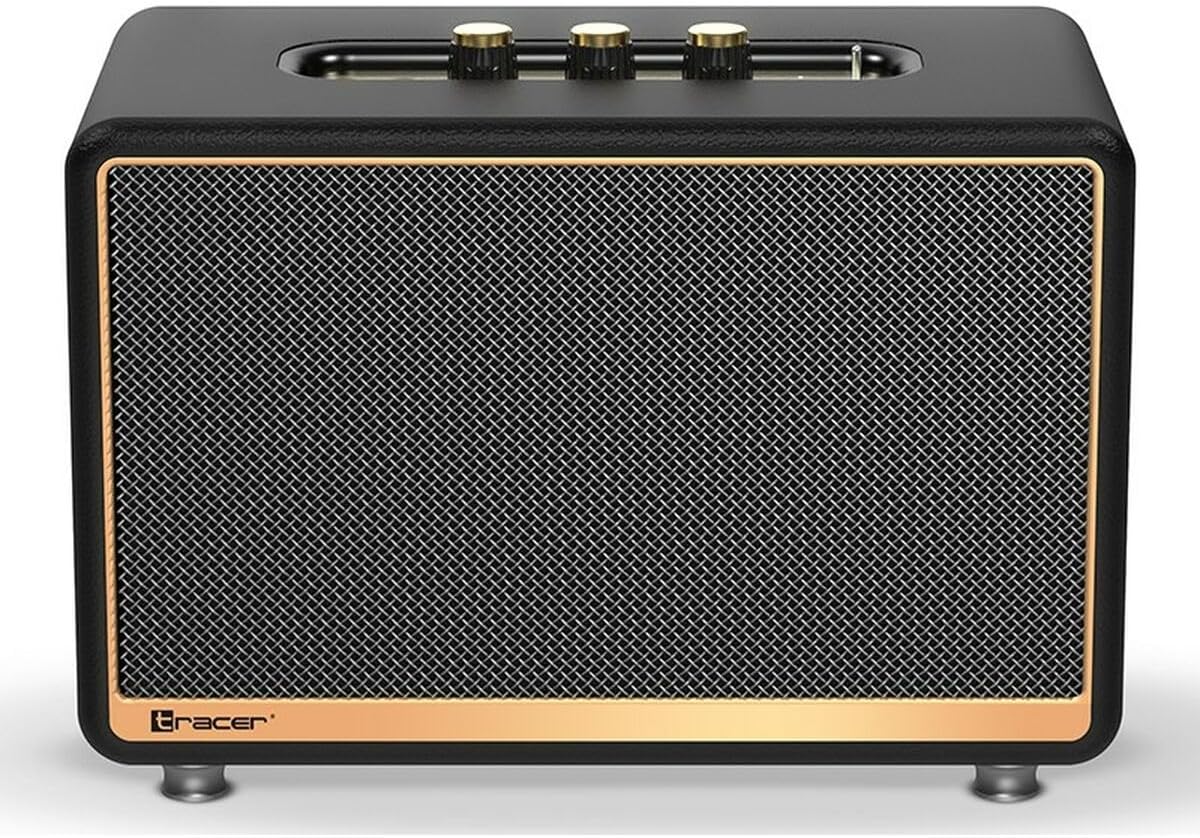
olusin 1: Iwaju view of the Tracer M45 Portable Bluetooth Speaker. The speaker features a black mesh grille with a gold-colored trim, and three gold-colored control knobs are visible on the top panel. The Tracer logo is located at the bottom left of the grille.
Awọn iṣakoso ati awọn ibudo
Familiarize yourself with the various controls and ports on your Tracer M45 speaker:
- Power Button/Switch: Located on the rear or top panel, used to turn the speaker ON/OFF.
- Awọn bọtini iwọn didun: Three gold-colored knobs on the top panel for adjusting volume, bass, and treble.
- Bọtini Ipo: To switch between Bluetooth, FM Radio, and other input modes.
- Bọ́tìnnì Ṣíṣe/Sánu duro: For controlling audio playback.
- Ti tẹlẹ/Awọn bọtini orin atẹle: For navigating through tracks or FM radio stations.
- Ibudo gbigba agbara: Fun sisopọ okun gbigba agbara.
- Ibudo Aux-in: Fun sisopọ awọn ẹrọ ohun afetigbọ ita nipasẹ okun ohun afetigbọ 3.5mm kan.
- Ibudo USB: (If present) For playing music from a USB drive.
- Atọka LED: Fi ipo agbara, ipo gbigba agbara, ati ipo isopọ Bluetooth han.
Ṣeto
1. Gbigba agbara Agbọrọsọ
Before first use, fully charge the speaker. Connect the charging cable to the speaker's charging port and the other end to a suitable USB power adapter (not included) or a computer's USB port. The LED indicator will show the charging status and turn off or change color when fully charged.
2. Agbara lori / Paa
To turn the speaker ON, locate the power switch/button and slide it to the "ON" position or press and hold it for a few seconds. The LED indicator will light up. To turn OFF, repeat the process.
3. Sisopọ Bluetooth
- Ensure the speaker is ON and in Bluetooth mode. If not, press the Mode button until you hear a Bluetooth pairing prompt or see the LED indicator flashing rapidly.
- Lórí fóònù alágbèéká rẹ, tábìlẹ́ẹ̀tì, tàbí ẹ̀rọ Bluetooth mìíràn, mu Bluetooth ṣiṣẹ́.
- Wa fun available devices. You should see "Tracer M45" or a similar name in the list.
- Select "Tracer M45" to connect. Once paired, the speaker will indicate a successful connection (e.g., a sound prompt or steady LED light).
- The speaker will automatically reconnect to the last paired device when in range and Bluetooth is enabled.
4. Connecting via Aux-in
For devices without Bluetooth, connect a 3.5mm audio cable (not included) from your device's headphone jack to the speaker's Aux-in port. The speaker should automatically switch to Aux mode, or you may need to press the Mode button.
5. FM Radio Setup
To use the FM Radio function, switch the speaker to FM mode using the Mode button. For best reception, ensure the speaker is in an open area. Press and hold the Play/Pause button to auto-scan and save available FM stations. Use the Previous/Next Track buttons to navigate between saved stations.
Ṣiṣẹ
Sisisẹsẹhin ipilẹ
- Ṣiṣẹ/Daduro: Tẹ bọtini Play/Sinmi ni ẹẹkan lati mu ṣiṣẹ tabi da ohun duro duro.
- Iṣakoso iwọn didun: Rotate the main volume knob on the top panel to increase or decrease the volume. Use the bass and treble knobs to adjust sound equalization.
- Itele / Tẹlẹ Orin: Press the Next or Previous track buttons to skip to the next or previous song/station.
Lilo Iṣakoso Latọna jijin
The Tracer M45 comes with a remote control for convenient operation. Ensure the remote has working batteries. The remote allows you to control power, mode, volume, track navigation, and FM radio functions from a distance.
Itoju
- Ninu: Fi aṣọ rírọ̀, gbígbẹ, tí kò ní àwọ̀ nu ojú agbọ́rọ̀ náà. Má ṣe lo àwọn ohun ìfọṣọ omi, àwọn ohun ìfọṣọ, tàbí àwọn ohun èlò ìfọṣọ.
- Ibi ipamọ: Nigbati o ko ba wa ni lilo fun awọn akoko ti o gbooro sii, tọju agbohunsoke si tutu, ibi gbigbẹ, kuro lati orun taara ati awọn iwọn otutu to gaju.
- Itọju Batiri: Lati pẹ aye batiri, yago fun gbigba agbara si batiri ni kikun nigbagbogbo. Gba agbara si agbọrọsọ nigbagbogbo, paapaa ti kii ṣe ni lilo.
Laasigbotitusita
| Isoro | Owun to le Fa | Ojutu |
|---|---|---|
| Agbọrọsọ ko ni tan. | Batiri naa kere tabi ti dinku. | Gba agbara si agbọrọsọ ni kikun. |
| Ko le so pọ nipasẹ Bluetooth. | Agbọrọsọ ko si ni ipo sisopọ; Bluetooth wa ni pipa lori ẹrọ; ẹrọ jẹ ju jina. | Ensure speaker is in Bluetooth pairing mode. Turn on Bluetooth on your device. Move device closer to speaker (within 10 meters). |
| Ko si ohun. | Iwọn didun ti lọ silẹ pupọ; Ipo titẹ sii ti ko tọ; ẹrọ ko dun. | Increase speaker and device volume. Check if the correct input mode (Bluetooth, Aux) is selected. Ensure audio is playing on the connected device. |
| Gbigba redio FM ti ko dara. | Ifihan agbara; kikọlu. | Relocate the speaker to an area with better signal. Perform auto-scan again. |
Awọn pato
| Ẹya ara ẹrọ | Ẹ̀kúnrẹ́rẹ́ |
|---|---|
| Nọmba awoṣe | S9174238 |
| Brand | Olutọpa |
| Asopọmọra Technology | Bluetooth 5.0 |
| O pọju o wu Power | 45 Wattis |
| Agbọrọsọ Iru | Portable Bluetooth Speaker (with Subwoofer component) |
| Ipo Ijade Ohun | Ipilẹṣẹ |
| Iṣagbesori Iru | Tabili Duro |
| Pataki Awọn ẹya ara ẹrọ | Wireless, LED Indicator, ON/OFF Switch, FM Radio |
| Niyanju Lilo | Fun kọmputa, Fun foonuiyara tabi tabulẹti |
| Adarí Iru | Isakoṣo latọna jijin |
| Àwọ̀ | Dudu |
| Awọn iwọn Ọja (L x W x H) | 22 x 20 x 32 cm (8.66 x 7.87 x 12.6 inches) |
| Iwọn | 4.04 kg (8.9 lbs) |
Atilẹyin ọja ati Support
Tracer products are designed and manufactured to the highest quality standards. For information regarding warranty coverage, please refer to the warranty card included with your product or visit the official Tracer webojula. Tọju iwe-ẹri rira rẹ bi ẹri rira.
For technical support, troubleshooting assistance, or service inquiries, please contact Tracer customer support through their official channels. Contact information can typically be found on the product packaging or the manufacturer's webojula.
Akiyesi: Awọn ofin atilẹyin ọja le yatọ nipasẹ agbegbe.


