1. Ọja Ipariview
The Baseus Bowie E18 True Wireless Earphones offer a high-quality audio experience with a comfortable, ergonomic design. This section provides a visual guide to the components of your new earphones.
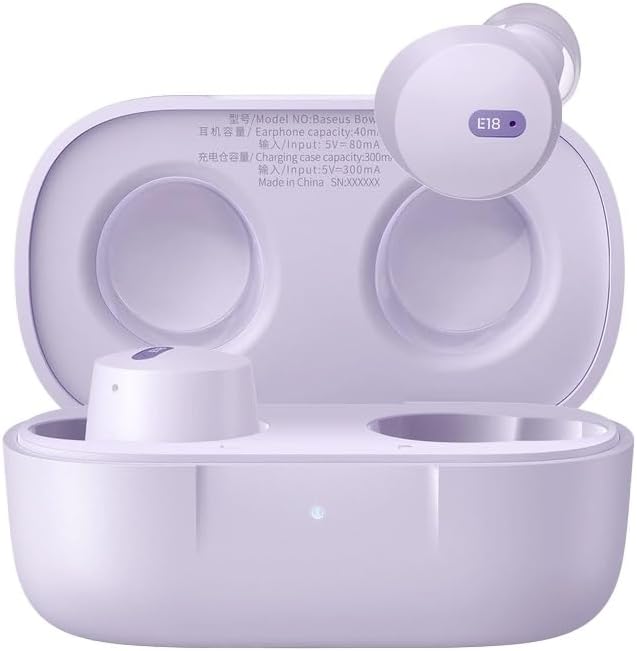
Image 1.1: Baseus Bowie E18 Earphones in their open charging case, showcasing awọn afikọti ati awọn olubasọrọ gbigba agbara.
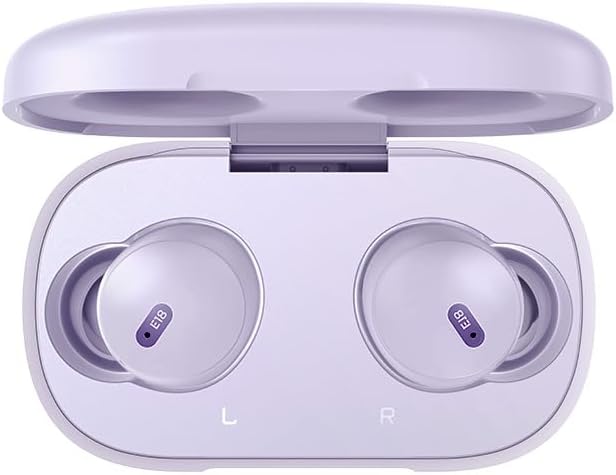
Aworan 1.2: Oke-isalẹ view of the Baseus Bowie E18 Earphones nestled in their charging case, showing the 'E18' model indicator on each earbud.
2. Eto ati Ibẹrẹ Lilo
2.1 Ngba agbara si Awọn Agbekọri ati Ọran
Ṣaaju lilo akọkọ, gba agbara ni kikun awọn agbekọri ati apoti gbigba agbara.
- So àpótí gbigba agbara pọ mọ orisun agbara nipa lilo okun USB-C ti o baamu.
- Ina Atọka lori ọran naa yoo fihan ipo gbigba agbara.
- Gbe awọn agbekọri sinu apoti gbigba agbara. Wọn yoo bẹrẹ gbigba agbara laifọwọyi.

Aworan 2.1: Ẹyin view of the Baseus Bowie E18 charging case, highlighting the USB-C charging port.
2.2 Sisopọ Bluetooth
Lati so awọn agbekọri rẹ pọ mọ ẹrọ kan:
- Rii daju pe awọn agbekọri ti gba agbara ati gbe sinu apoti gbigba agbara.
- Open the charging case lid. The earphones will enter pairing mode automatically.
- Lori ẹrọ rẹ (foonuiyara, tabulẹti, ati be be lo), jeki Bluetooth.
- Wa fun available devices and select "Baseus Bowie E18" from the list.
- Ni kete ti a ti sopọ, awọn agbekọri ti ṣetan fun lilo.

Image 2.2: Visual representation of Bluetooth 5.3 technology, emphasizing stable connection and efficient power usage.
2.3 Wọ Awọn Agbekọri
Fún dídára ohùn àti ìtùnú tó dára jùlọ, rí i dájú pé ó báramu dáadáa:
- Fi rọra fi agbekọri kọọkan sinu odo eti rẹ.
- Adjust the earbud until it feels secure and comfortable.

Image 2.3: An earbud being worn, demonstrating the intended fit for the Baseus Bowie E18.
3. Awọn ilana Iṣiṣẹ
3.1 Fọwọkan Iṣakoso
The Baseus Bowie E18 earphones feature intuitive touch controls for various functions:
- Mu ṣiṣẹ/Danu Orin duro: Fọwọ ba ẹyọkan lori boya agbekọri.
- Orin t’okan: Fọwọ ba lẹẹmeji lori agbekọri ọtun.
- Tẹlẹ Orin: Fọwọ ba lẹẹmeji lori agbekọri osi.
- Idahun/Ipe Ipari: Tẹ ẹyọkan lori boya agbekọri lakoko ipe ti nwọle.
- Kọ Ipe: Tẹ mọlẹ boya agbekọri fun iṣẹju meji 2 lakoko ipe ti nwọle.
- Mu Oluranlọwọ Ohun ṣiṣẹ: Fọwọ ba meteta lori boya agbekọri.
3.2 Agbara Tan / Pa
- Agbara Tan: Open the charging case lid, or take the earbuds out of the case. They will power on automatically.
- Agbara Pa: Gbe awọn agbekọri naa pada sinu apoti gbigba agbara ki o pa ideri naa. Wọn yoo pa a laifọwọyi.
4. Itọju ati Itọju
Proper maintenance ensures the longevity and performance of your earphones.
- Ninu: Lo asọ ti o gbẹ, asọ ti ko ni lint lati nu afikọti ati apoti gbigba agbara. Maṣe lo awọn kẹmika lile tabi awọn ohun elo abrasive.
- Ibi ipamọ: Nigbati o ko ba si ni lilo, tọju awọn agbekọri sinu apoti gbigba agbara wọn lati daabobo wọn lọwọ eruku ati ibajẹ.
- Itọju Batiri: Má ṣe jẹ́ kí batiri náà máa jáde dáadáa nígbà gbogbo. Máa gba agbára lórí àwọn ètí agbọ́rọ̀ nígbà gbogbo, kódà bí a kò bá lò ó fún ìgbà pípẹ́, láti lè mú kí batiri náà ní ìlera tó dára.
- Omi Resistance: The Baseus Bowie E18 earphones are IPX4 water resistant, meaning they are protected against splashing water from any direction. They are not designed for submersion in water or use during swimming. Avoid exposure to heavy rain or extreme moisture.

Image 4.1: Visual representation of IPX4 water resistance, indicating protection against splashes.
5. Laasigbotitusita
If you encounter issues with your Baseus Bowie E18 earphones, try the following solutions:
- Awọn agbekọri ti ko so pọ:
- Rii daju pe awọn agbekọri mejeeji ti gba agbara.
- Pa Bluetooth lori ẹrọ rẹ ki o tan-an pada.
- Delete "Baseus Bowie E18" from your device's Bluetooth list and attempt to re-pair.
- Gbe awọn agbekọri pada sinu ọran naa, pa ideri naa, duro fun iṣẹju-aaya 10, lẹhinna ṣii lati tun-tẹ ipo isọpọ sii.
- Ko si ohun lati inu agbekọri agbekọri kan:
- Rii daju pe awọn agbekọri mejeeji ti gba agbara.
- Gbìyànjú láti fi àwọn ètí ìgbọ́rọ̀ méjèèjì sínú àpótí náà, kí o ti ìbòrí náà, lẹ́yìn náà, kí o tún yọ wọ́n jáde.
- Perform a factory reset (refer to manufacturer's webAaye fun awọn itọnisọna pato ti ko ba ṣe alaye nibi).
- Awọn iṣoro gbigba agbara:
- Ṣàyẹ̀wò okùn gbigba agbara ati adapter fun ibajẹ.
- Rii daju pe awọn olubasọrọ gbigba agbara lori awọn agbekọri ati inu ọran naa jẹ mimọ ati laisi idoti.
- Try a different charging cable and power source.
- Awọn agbekọri ti n ṣubu jade:
- Ensure you are using the correct size ear tips for a secure fit.
- Adjust the angle of the earbuds in your ear.
6. Awọn pato
Detailed technical specifications for the Baseus Bowie E18 True Wireless Earphones:
| Ẹya ara ẹrọ | Sipesifikesonu |
|---|---|
| Orukọ awoṣe | Bowie E18 |
| Nọmba awoṣe | A00023800537-Z1 |
| Ẹya Bluetooth | 5.0 |
| Bluetooth Ibiti | Titi di 10 Mita |
| Agbara Batiri Earbud | Approximately 50mAh (Each Earbud) |
| Ngba agbara Batiri Case | O fẹrẹ to 500mAh |
| Akoko Sisisẹsẹhin Orin | Up to 5 Hours (Single Charge) / Up to 30 Hours (With Charging Case) |
| Aago Ọrọ | Up to 5 Hours (Single Charge) / Up to 30 Hours (With Charging Case) |
| Akoko gbigba agbara | O fẹrẹ to awọn wakati 1.5 |
| Iwọn | Approximately 50g (Including Charging Case) |
| Awakọ Unit | 10mm |
| Idahun Igbohunsafẹfẹ | 20Hz-20kHz |
| Ipalara | 32 ohms |
| Ifamọ | 120.5 dB |
| Omi Resistance | IPX4 |
| Batiri Cell Tiwqn | Litiumu Iwon |

Image 6.1: Illustration emphasizing the extended listening time provided by the Baseus Bowie E18 earphones with their charging case.
7. Atilẹyin ọja ati Support
7.1 Olupese ká atilẹyin ọja
The Baseus Bowie E18 True Wireless Earphones come with a 1-odun olupese ká atilẹyin ọja Láti ọjọ́ tí a rà á. Àtìlẹ́yìn yìí bo àwọn àbùkù iṣẹ́ ṣíṣe, ó sì ń rí i dájú pé ọjà náà bá àwọn ìlànà iṣẹ́ tí a là sílẹ̀ mu lábẹ́ lílo déédéé. Jọ̀wọ́ pa ẹ̀rí ríra rẹ mọ́ fún àwọn ẹ̀tọ́ àtìlẹ́yìn.
For specific terms and conditions of the warranty, please refer to the official Baseus webojula tabi kan si wọn onibara iṣẹ.
7.2 Onibara Support
If you require further assistance, have questions not covered in this manual, or need to make a warranty claim, please contact Baseus customer support through their official webojula tabi alagbata ti o ti ra ọja naa.


