1. Ifihan
Thank you for choosing the AQQA LED Aquarium Light. This light is designed to provide optimal illumination for your aquatic environment, supporting both fish and plant life with its full spectrum capabilities. It features advanced modes like 24/7 natural simulation and a customizable DIY mode, along with IP68 waterproof rating for reliable performance. Please read this manual carefully before use to ensure proper installation and operation.

The AQQA LED Aquarium Light, showcasing its sleek design and integrated controller.
2. Ohun ti o wa ninu Apoti
Jọwọ ṣayẹwo awọn akoonu ti package nigba ṣiṣi:
- 1 x AQQA LED Aquarium Light
- 1 x Adaṣe AC / DC
- 2 x Metal Brackets (Extendable)
- 1 x Afọwọṣe olumulo (Iwe-ipamọ yii)
3. Awọn ilana iṣeto
Follow these steps to set up your AQQA LED Aquarium Light:
- So awọn akọmọ: Slide the two metal brackets onto each end of the LED light fixture. Ensure they are securely fitted.
- Ṣatunṣe Gigun: Extend the brackets to match the length of your aquarium. The brackets are designed to fit various tank sizes within the specified range (e.g., 12-18 inches for the 12W model).
- Imọlẹ ipo: Place the light fixture on top of your aquarium, resting the extended brackets on the tank edges. Ensure the light is centered and stable.
- So agbara: Connect the AC/DC adapter to the light fixture's power input, then plug the adapter into a standard electrical outlet.

The adjustable extendable brackets allow for flexible installation on various aquarium sizes.
4. Awọn ilana Iṣiṣẹ
Your AQQA LED Aquarium Light offers versatile operating modes to suit your needs.
4.1. DIY Ipo
The DIY mode allows you to customize the light color, brightness, and timer settings. Use the integrated controller for adjustments.
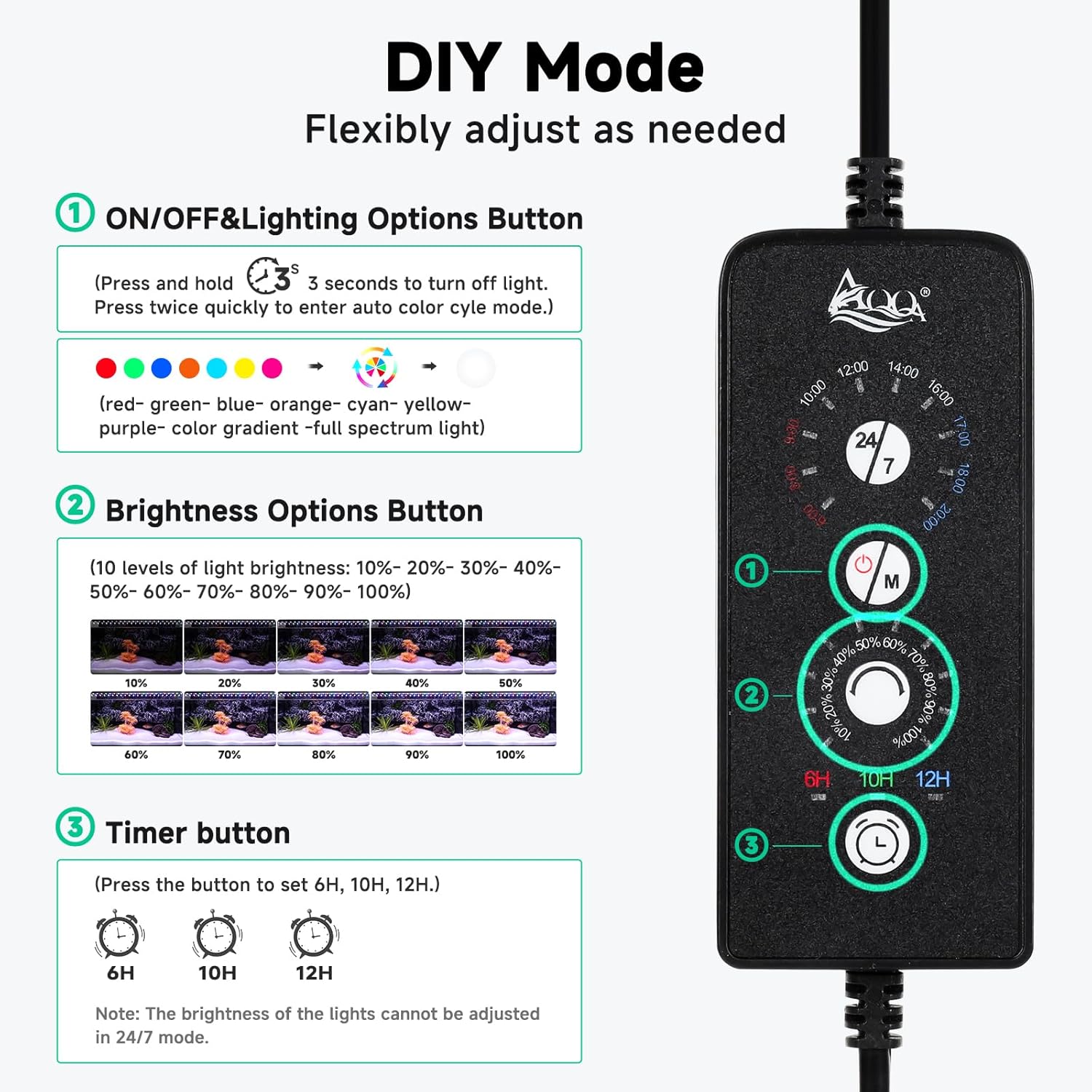
The light controller with clearly labeled buttons for DIY mode adjustments.
- ON/OFF & Lighting Options Button:
Press and hold for 3 seconds to turn off the light. Press twice quickly to enter the auto color cycle mode. This button also allows you to change between 9 available light colors: Red, Green, Blue, Orange, Cyan, Yellow, Purple, Color Gradient, and Full Spectrum Light. - Brightness Options Button:
Adjust the light brightness through 10 levels: 10%, 20%, 30%, 40%, 50%, 60%, 70%, 80%, 90%, and 100%. - Bọtini Aago:
Set the lighting duration to 6 hours, 10 hours, or 12 hours. The light will automatically turn on and off every day according to the set duration.
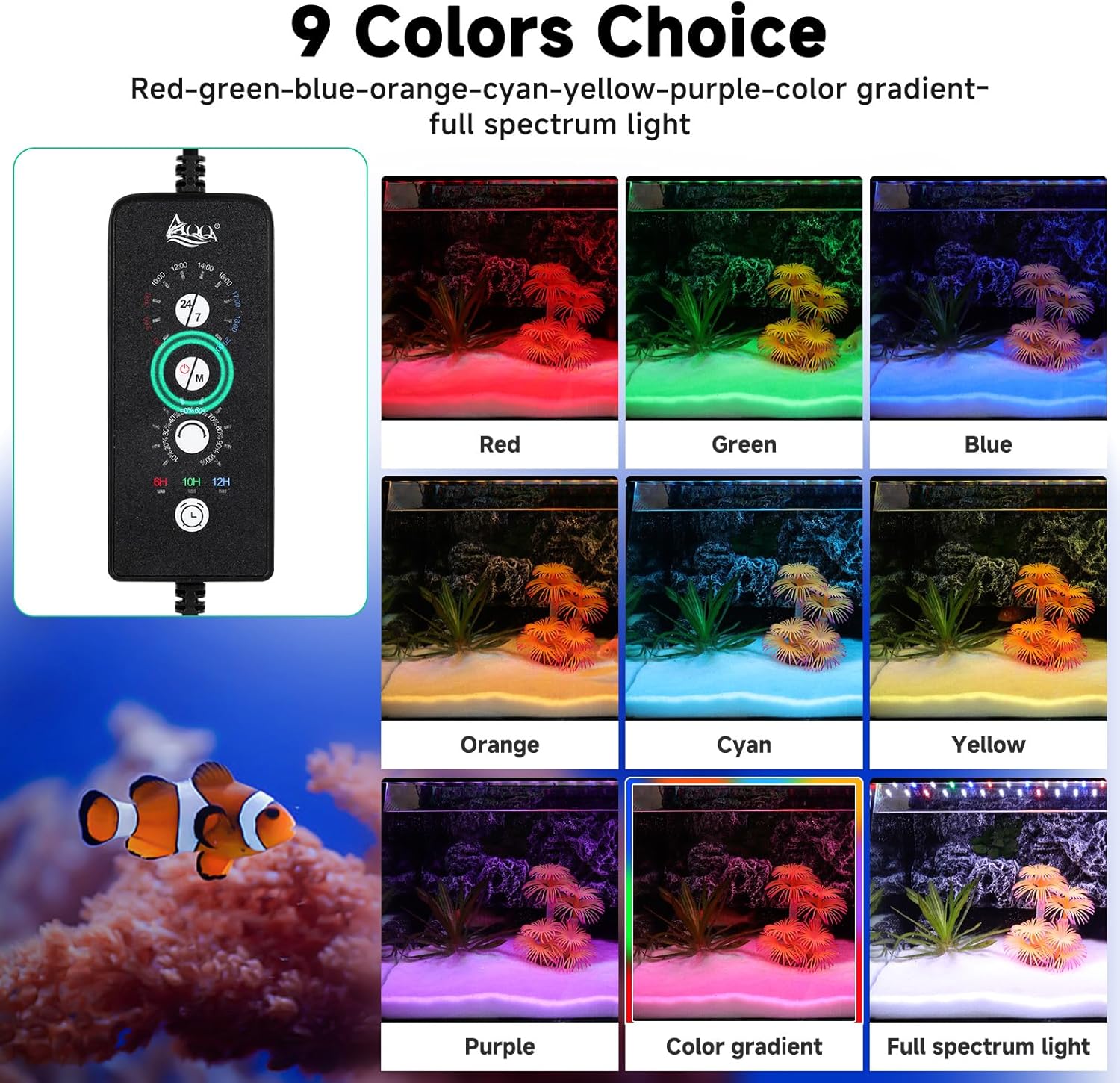
Visual representation of the 9 distinct color options available.
Note: The brightness of the lights cannot be adjusted when in 24/7 mode.
4.2. 24/7 Default Mode
This mode simulates a natural 24-hour sunrise and sunset pattern, promoting healthy plant growth and a natural environment for your fish. The light automatically turns on at 6:00 AM and turns off at 23:00 (11:00 PM).

The 24/7 mode transitions from warm orange light at sunrise to full-spectrum at noon, and starry blue at night.
The automatic on/off time can be postponed or advanced to shift the overall default time period.
5. Itọju
To ensure the longevity and optimal performance of your AQQA LED Aquarium Light, follow these maintenance guidelines:
- Ninu: The aluminum alloy shell is easy to clean. Gently wipe the light fixture with a soft, damp cloth to remove dust or water spots. Do not use abrasive cleaners or solvents.
- Ibọmi omi: The light is IP68 waterproof, meaning it can be directly soaked in water for use. However, ensure the power adapter and controller remain dry and are not submerged.
- Pipade Ooru: The widened and thickened aluminum shell is designed for fast heat dissipation. Ensure the light is not covered or obstructed to allow for proper airflow.
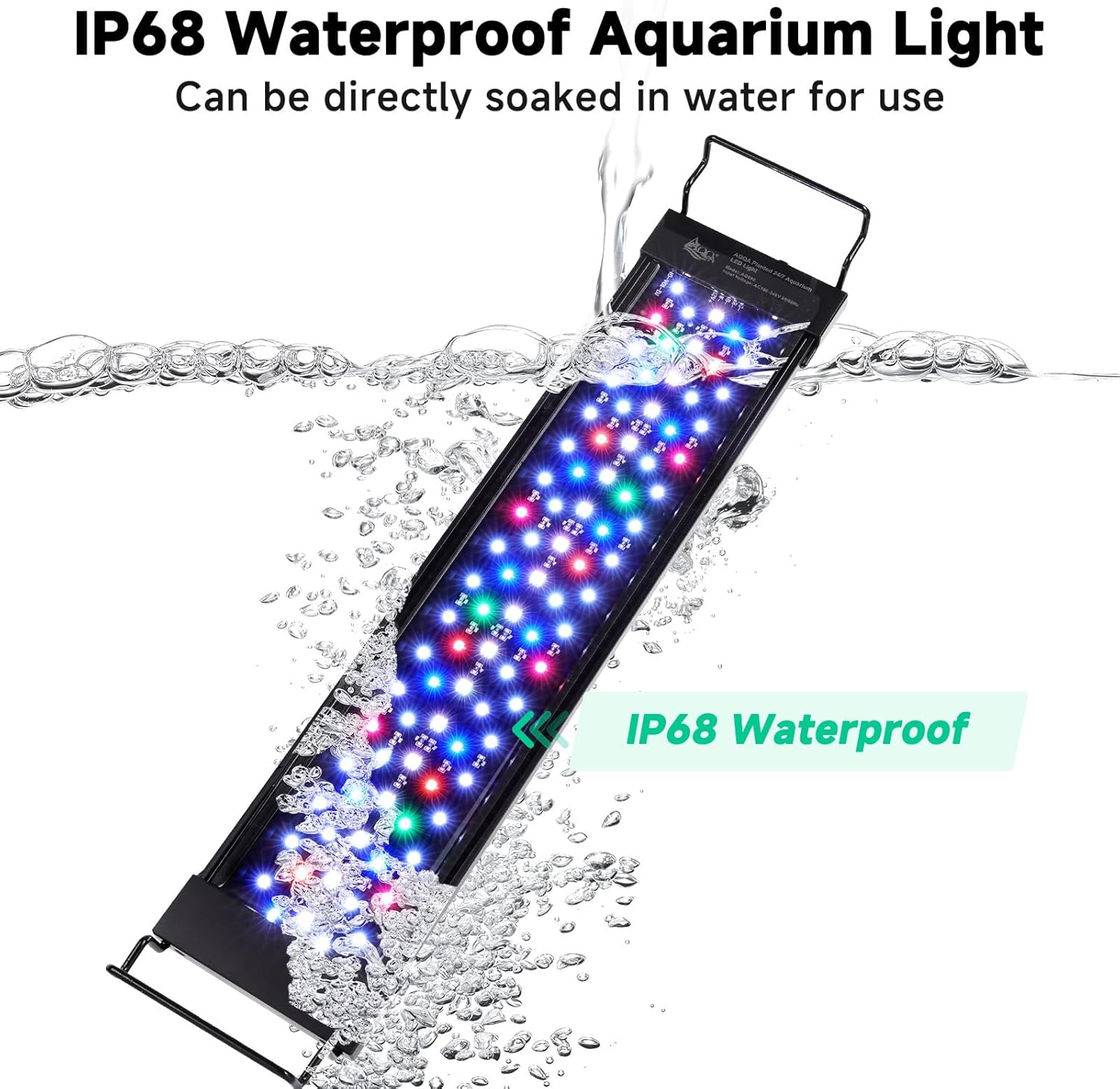
The IP68 waterproof design allows for direct immersion in water, offering flexible placement options.
6. Laasigbotitusita
If you encounter any issues with your AQQA LED Aquarium Light, please refer to the following common problems and solutions:
- Imọlẹ ko tan:
- Check if the power adapter is securely connected to both the light fixture and the electrical outlet.
- Ensure the electrical outlet is functioning correctly by testing it with another device.
- Verify that the ON/OFF button on the controller has been pressed. - Ìmọ́lẹ̀ náà ṣókùnkùn tàbí ó ń tàn yòò:
- Check the brightness setting in DIY mode. Increase the brightness level if necessary.
- Ensure the power adapter is providing stable power.
- If in 24/7 mode, the light intensity changes throughout the day as part of the simulation. - Timer function not working:
- Make sure the timer duration (6H/10H/12H) is correctly selected on the controller.
- The timer starts from the moment it is set. If you unplug the light, the timer will reset. - Colors are not changing:
- In DIY mode, press the ON/OFF & Lighting Options button quickly twice to cycle through colors or enter auto color cycle mode.
- Ensure you are not in 24/7 mode, as color customization is limited in this mode.
If the problem persists after trying these steps, please contact AQQA customer support for further assistance.
7. Awọn pato
Detailed specifications for the AQQA LED Aquarium Light (12W model):
| Ẹya ara ẹrọ | Apejuwe |
|---|---|
| Nọmba awoṣe | AQ090-12W |
| Wattage | 12 Wattis |
| Ohun elo | 12-18 inch (30-45cm) fish tank |
| LED opoiye | 60 PCS |
| Iwọn Imọlẹ | 10.24 inches (26cm) |
| Agbara Okun Ipari | 2.26ft + 4.92ft |
| Ohun elo | Aluminum Alloy, Metal |
| Mabomire Rating | IP68 |
| Imọlẹ Orisun Orisun | LED (Premium 5050 and 2835 LEDs) |
| Pataki Awọn ẹya ara ẹrọ | Full Spectrum, 24/7 Mode, DIY Mode, Adjustable Timer/Brightness, Memory Function |
| Ọja Mefa | 2"L x 2"W x 2"H (Fixture only, without brackets) |
| Iwọn Nkan | 1.17 iwon |
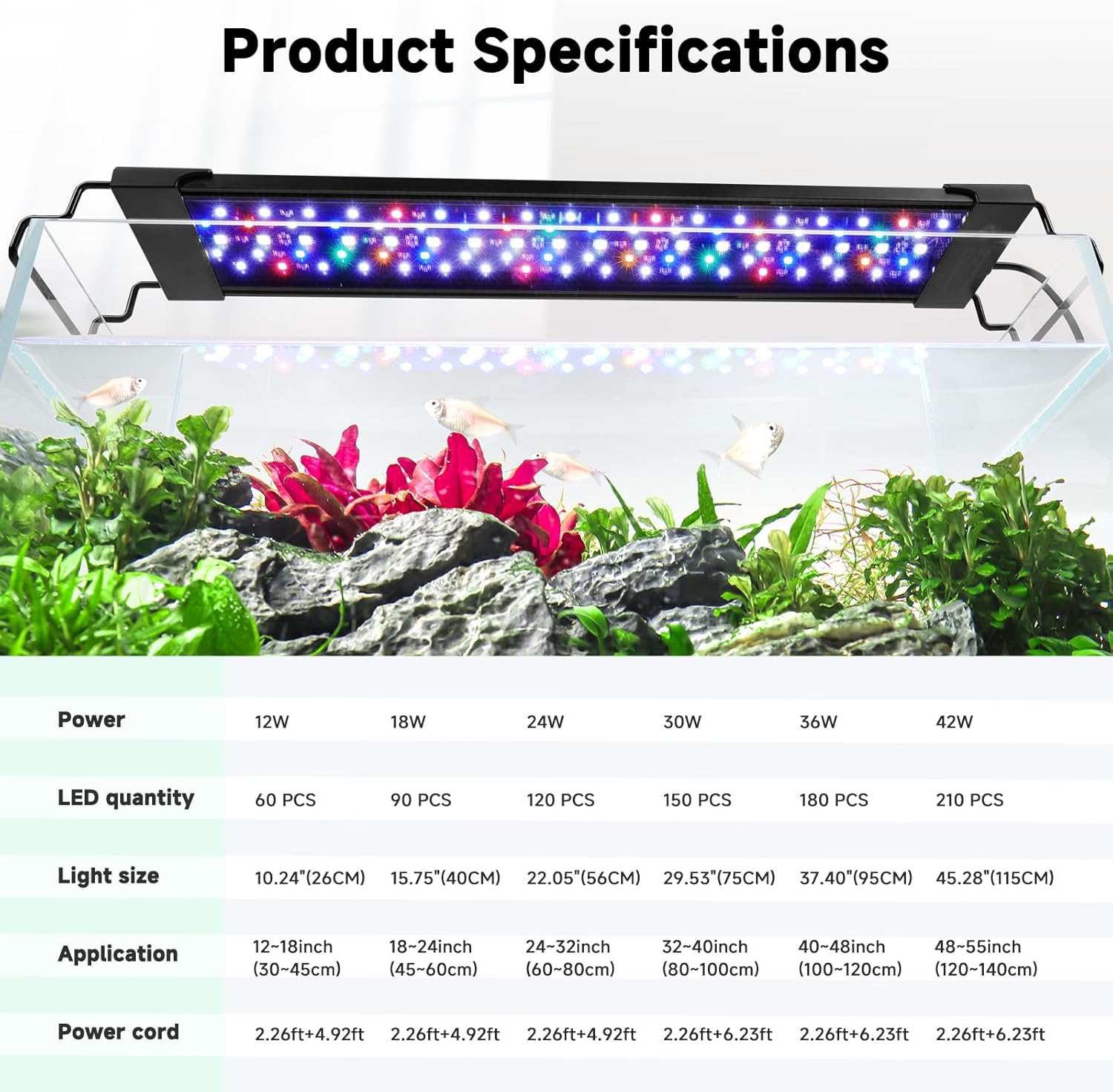
A okeerẹ loriview of the product specifications, including different wattage awọn awoṣe.
8. Atilẹyin ọja ati Support
AQQA provides a standard warranty for this product. Please refer to the product packaging or the official AQQA webAaye fun pato awọn ofin ati ipo atilẹyin ọja.
For technical support, troubleshooting assistance, or any inquiries regarding your AQQA LED Aquarium Light, please visit the official AQQA store on Amazon or contact their customer service directly.


