Ọrọ Iṣaaju
Welcome to the user manual for your boAt Airdopes 300 True Wireless Stereo (TWS) Earbuds. This guide provides essential information on setting up, operating, maintaining, and troubleshooting your device to ensure optimal performance and longevity. Please read this manual thoroughly before using your earbuds.

Image: The boAt Airdopes 300 TWS Earbuds and their charging case in Gunmetal Black.
Ohun ti o wa ninu Apoti
Jẹrisi pe gbogbo awọn nkan wọnyi wa ninu package rẹ:
- 1 X TWS Earbuds (Left and Right)
- 1 X USB gbigba agbara
- 1 X Afowoyi olumulo
Ṣeto
1. Ngba agbara si Earbuds ati Ọran
Before first use, fully charge the earbuds and the charging case. Connect the provided charging cable to the charging port on the case and a compatible USB power source. The LED indicator on the case will show the charging status.

Image: The boAt Airdopes 300 charging case and earbuds, illustrating the ASAP Charge feature which provides 150 minutes of playtime from a 10-minute charge.
2. Initial Pairing (Swift Insta Wake N'Pair & Google Fast Pair)
- Agbara Tan: Open the charging case lid. The earbuds will automatically power on and enter pairing mode.
- Bluetooth ẹrọ: Mu Bluetooth ṣiṣẹ lori foonuiyara tabi ẹrọ rẹ.
- Sopọ: Look for "Airdopes 300" in the list of available Bluetooth devices and select it to connect. For Android devices, Google Fast Pair may offer a quick pop-up connection.
- Ìmúdájú: Ni kete ti a ti sopọ, ohun ìmúdájú yoo ṣiṣẹ, ati awọn agbekọri yoo ṣetan fun lilo.

Image: A visual representation of the Swift Insta Wake N'Pair feature, showing the earbuds connecting to a device, alongside icons for IPX4 water resistance and Google Fast Pair.
3. boAt Hearables App Installation
Enhance your experience by downloading the boAt Hearables App. This application allows for customization and diagnostics.
- Scan the QR code provided in the product packaging or search for "boAt Hearables" in your device's app store.
- Install the app and follow the on-screen instructions to connect your Airdopes 300.
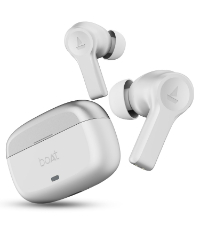
Image: A QR code for downloading the boAt Hearables App, shown next to the Airdopes 300 earbuds and charging case.
You can also download the app via this link: boAt Hearables App
Awọn ilana Iṣiṣẹ
1. Awọn iṣakoso ifọwọkan
The Airdopes 300 features intuitive touch controls for managing audio playback, calls, and voice assistant activation. Refer to the boAt Hearables App for detailed customization options for touch gestures.
2. Ni-Ear erin
The earbuds are equipped with in-ear detection. Audio playback will automatically pause when you remove an earbud and resume when you place it back in your ear. This feature also allows for automatic call answering when an earbud is inserted.

Image: Illustration of the in-ear detection feature, showing how inserting the earbud initiates playback and removing it pauses playback.
3. Multipoint Asopọmọra
Connect your Airdopes 300 to two devices simultaneously. This allows for seamless switching between audio sources, such as taking a call on your phone while watching a video on your tablet, without needing to manually disconnect and reconnect.

Image: The boAt Airdopes 300 earbuds connected to both a smartphone (receiving a call) and a tablet (playing music), demonstrating multipoint connectivity.
4. Cinematic Spatial Audio
Experience immersive sound with Cinematic Spatial Audio. This feature utilizes 24-bit audio processing to add depth and dimension to your listening experience, making content more engaging.

Image: A person enjoying music with the boAt Airdopes 300, illustrating the immersive Spatial Audio Experience.
5. 4 Mic AI-ENx Technology
The Airdopes 300 features four microphones with AI-ENx Technology. This system is designed to reduce environmental noise during calls, ensuring clear voice transmission even in noisy surroundings.

Aworan: A sunmọ-soke view of the boAt Airdopes 300 earbud, highlighting the internal components and the 4 Mic AI-ENx Technology for clear calls.
6. Aye batiri
The Airdopes 300 provides up to 50 hours of total playback time with the charging case, allowing for extended use without frequent recharging.

Image: The boAt Airdopes 300 earbuds and case, with a large '50 Hours Playback' graphic indicating the extended battery life.
Itoju
1. Ninu
Regularly clean your earbuds and charging case to maintain optimal performance and hygiene. Use a soft, dry, lint-free cloth. Avoid using abrasive materials, solvents, or harsh chemicals. Gently remove any earwax or debris from the ear tips and speaker mesh using a small, soft brush or cotton swab.
2. Omi Resistance (IPX4)
The Airdopes 300 earbuds are rated IPX4, meaning they are resistant to splashes of water from any direction. They are suitable for workouts and light rain. However, they are not designed for submersion in water or exposure to pressurized water jets. Do not wear them while swimming or showering.
Laasigbotitusita
If you encounter issues with your Airdopes 300, refer to the following common solutions:
- Awọn agbekọri ti ko so pọ: Ensure both earbuds are in the charging case, then open the lid. Check your device's Bluetooth settings and forget/remove "Airdopes 300" if previously paired, then attempt to pair again.
- Agbekọri agbekọri kan ṣoṣo ti n ṣiṣẹ: Gbe awọn agbekọri mejeeji pada sinu apoti gbigba agbara, pa ideri naa, duro fun iṣẹju diẹ, lẹhinna ṣi i lẹẹkansi. Eyi nigbagbogbo tun atunto asopọ laarin awọn agbekọri.
- Ko si ohun: Check the volume level on both your connected device and the earbuds. Ensure the earbuds are properly paired and selected as the audio output device.
- Awọn iṣoro gbigba agbara: Verify that the charging cable is securely connected to both the case and the power source. Ensure the charging contacts on the earbuds and inside the case are clean and free of debris.
- Didara ipe ti ko dara: Ensure the earbuds are clean and positioned correctly in your ears. Check for strong Bluetooth signal and minimize environmental noise.
Awọn pato
| Ẹya ara ẹrọ | Ẹ̀kúnrẹ́rẹ́ |
|---|---|
| Orukọ awoṣe | Awọn ọna afẹfẹ 300 |
| Asopọmọra Technology | Bluetooth |
| Ẹya Bluetooth | 5.3 |
| Bluetooth Ibiti | 10 Mita |
| Audio Driver Type | Yiyi Awakọ |
| Igbesi aye batiri | Titi di Awọn wakati 50 (pẹlu ọran gbigba agbara) |
| Akoko gbigba agbara | 10 Minutes for 150 Minutes Playtime (ASAP Charge) |
| Awọn gbohungbohun | Àwọn Mókíìkì 4 pẹ̀lú Ìmọ̀-ẹ̀rọ AI-ENx™ |
| Omi Resistance Ipele | IPX4 |
| Latency Ohun | 65 Milise-aaya |
| Ọna Iṣakoso | App / Touch |
| Iwọn Igbohunsafẹfẹ | 20-20000 Hz |
| Iwọn Nkan | 140 giramu |
Atilẹyin ọja ati Support
Your boAt Airdopes 300 earbuds come with a standard manufacturer's warranty. For detailed warranty terms and conditions, please refer to the warranty card included in your product packaging or visit the official boAt webojula.
For technical support, service requests, or further assistance, please contact boAt customer support through their official website or the boAt Hearables App. Have your product model and purchase details ready when contacting support.


