Ọrọ Iṣaaju
Thank you for choosing the Zipro Wave Elliptical Trainer. This manual provides essential information for the safe and effective assembly, operation, and maintenance of your new fitness equipment. Please read this manual thoroughly before using the elliptical trainer and keep it for future reference.

Figure 1: Zipro Wave Elliptical Trainer Overview
Alaye Aabo
Before beginning any exercise program, consult with your physician. It is crucial to follow these safety guidelines to prevent injury and ensure proper operation of the equipment.
- Always place the elliptical trainer on a flat, stable surface. Ensure there is sufficient clear space around the equipment for safe operation.
- The maximum user weight for this elliptical trainer is 120 kg (264 lbs). Do not exceed this limit.
- Pa awọn ọmọde ati awọn ohun ọsin kuro ninu ẹrọ lakoko iṣẹ.
- Wear appropriate athletic clothing and footwear when using the elliptical trainer. Avoid loose clothing that could get caught in moving parts.
- Inspect the equipment before each use for any loose parts, damage, or wear. Do not use if any components are damaged.
- Do not attempt to modify the equipment. Use only original replacement parts if needed.
- Tí o bá ní ìrísí lílù, ríru, ìrora àyà, tàbí àwọn àmì àrùn mìíràn tí kò báradé, dáwọ́ eré ìdárayá rẹ dúró lẹ́sẹ̀kẹsẹ̀ kí o sì bá dókítà sọ̀rọ̀.
irinše Akojọ
Please ensure all components listed below are present in your package before beginning assembly. If any parts are missing or damaged, contact customer support.
- Ifilelẹ akọkọ
- Ipilẹ iwaju
- Ipilẹ ẹhin
- Handlebars (fixed and moving)
- Okun asopọ
- Allen screws (M8 x 15)
- Resistance adjustment knob and cover
- Flat washers (d5, d8)
- Screws (M5 x 40, M10 x 57)
- Okun wiwọn polusi
- Arc support discs
- Nylon nuts (M8, M10)
- Handlebar foomu
- Computer/Console
- Handlebar ideri
- Phillips skru
- Aṣọ apo
- Dimu toweli
- Ilana itọnisọna
- Pedals
- Cranks
- Ideri ipilẹ iwaju
- Rear base balancing plate
- Resistance USB tolesese
- Kọmputa USB

Olusin 2: Example of Elliptical Trainer Components
Eto ati Apejọ
Assembly typically involves attaching the front and rear bases to the main frame, installing the handlebars, pedals, and connecting the console. Follow the detailed instructions provided in the included instruction manual for step-by-step assembly. Ensure all bolts and nuts are securely tightened before use.

Figure 3: The elliptical trainer features transport wheels for easy relocation after assembly.

Figure 4: Detail of the integrated transport wheels for convenient movement.
Awọn ilana Iṣiṣẹ
Awọn iṣẹ console
The integrated console displays key workout metrics such as time, distance, speed, calories burned, and heart rate. Use the buttons on the console to navigate through modes, adjust settings, and select programs.
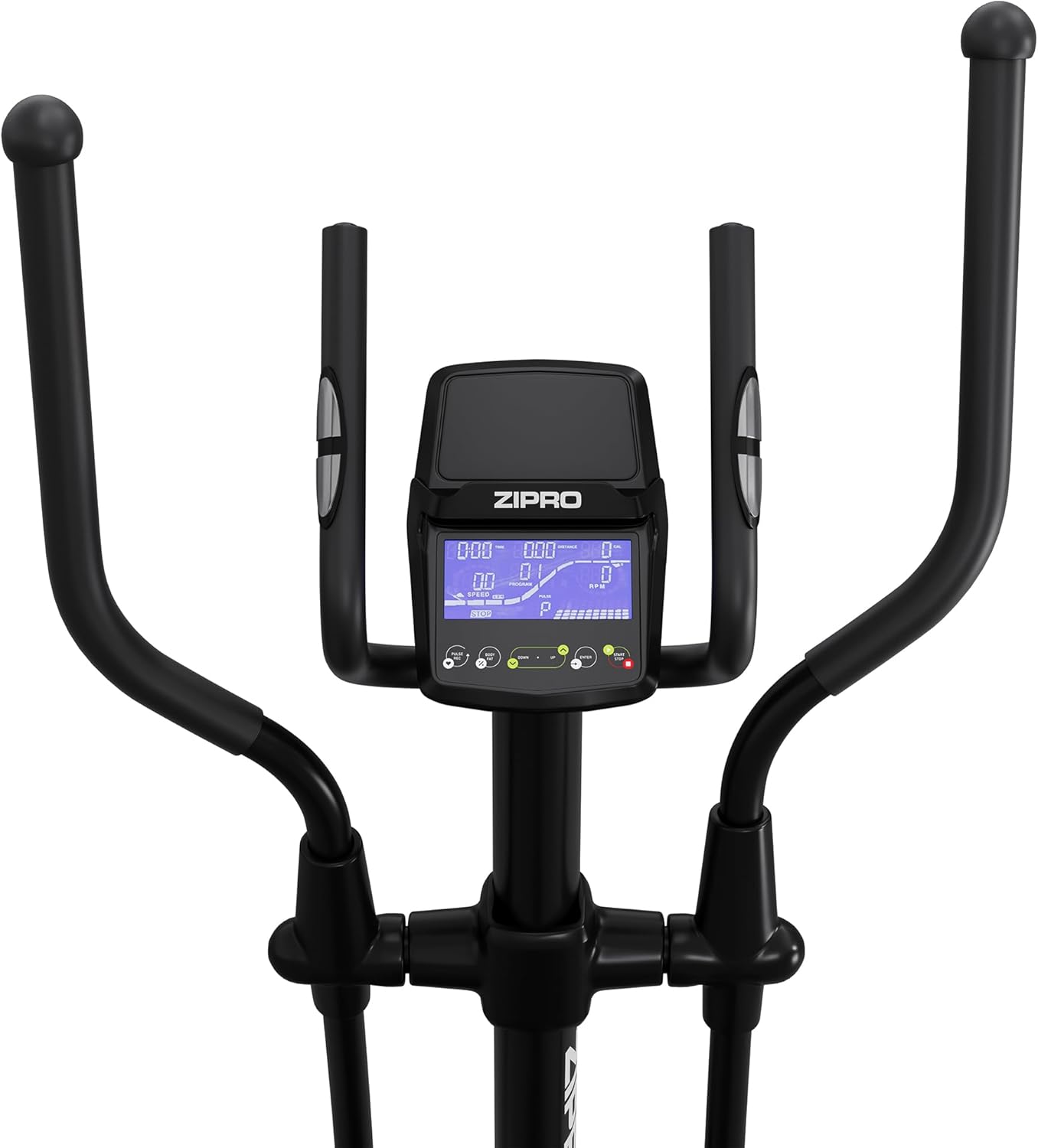
olusin 5: Isunmọ view of the elliptical trainer's digital console.
Tolesese resistance
The Zipro Wave Elliptical Trainer offers 32 levels of electromagnetic resistance. Adjust the resistance level via the console to increase or decrease the intensity of your workout. Higher levels provide a more challenging exercise.
Awọn Eto ti a ti ṣeto tẹlẹ
The elliptical trainer includes 16 pre-set workout programs designed for various fitness goals, such as endurance, fat burning, and interval training. Refer to the console's user guide for details on each program and how to select them.
Abojuto Oṣuwọn Ọkàn
Grip the pulse sensors on the fixed handlebars to monitor your heart rate during your workout. The console will display your current heart rate, allowing you to stay within your target heart rate zone. The HRC (Heart Rate Control) programs automatically adjust resistance based on your heart rate.
App Connectivity (Bluetooth)
Connect your smartphone or tablet to the elliptical trainer via Bluetooth to use compatible fitness apps like Kinomap and Zwift. These apps can provide interactive training experiences, virtual routes, and track your progress.

Figure 6: User interacting with the console and a tablet mounted on the elliptical trainer.

Figure 7: The console features a dedicated holder for tablets or smartphones.

Figure 8: Proper posture and movement during elliptical exercise.
Itoju
Itọju deedee n ṣe idaniloju pe olukọni elliptical rẹ yoo pẹ to ati pe yoo ṣiṣẹ lailewu.
- Ninu: Pa ohun èlò náà rẹ́ pẹ̀lú ìpolówóamp aṣọ lẹ́yìn lílò kọ̀ọ̀kan láti mú òógùn àti eruku kúrò. Yẹra fún àwọn ohun ìfọṣọ tàbí àwọn ohun èlò ìfọṣọ.
- Lubrication: Periodically check moving parts for friction. Apply a silicone-based lubricant to joints and pivot points as recommended in the detailed assembly manual.
- Ayewo: Regularly check all bolts, nuts, and connections to ensure they are tight. Tighten any loose fasteners. Inspect cables and wires for any signs of wear or damage.
- Ibi ipamọ: Tọ́jú elliptical trainer sí ibi gbígbẹ àti tútù, tí ó jìnnà sí oòrùn tààrà àti àwọn igbóná líle koko.
Laasigbotitusita
Abala yii n ṣalaye awọn ọran ti o wọpọ ti o le ba pade. Fun awọn iṣoro ti ko ṣe akojọ si ibi, jọwọ kan si atilẹyin alabara.
| Isoro | Owun to le Fa | Ojutu |
|---|---|---|
| Console not turning on/displaying | Loose power connection; Dead batteries (if applicable) | Ensure power adapter is securely plugged in. Replace console batteries if battery-operated. |
| Ariwo dani nigbati isẹ | Àwọn bọ́tìlì tí ó dẹ̀; Àìsí ìpara; Àwọn ẹ̀yà ara tí ó ti bàjẹ́ | Check and tighten all assembly bolts. Apply lubricant to moving joints. Inspect for worn components and replace if necessary. |
| Resistance ko yi pada | Resistance cable disconnected or damaged; Console malfunction | Check the resistance adjustment cable connection. Ensure it is not pinched or damaged. If the problem persists, contact customer support. |
| Ìwọ̀n ìlù ọkàn tí kò péye | Improper hand placement; Dry hands; Sensor malfunction | Ensure hands are firmly and fully gripping the pulse sensors. Lightly moisten hands if they are too dry. Clean sensors. |
Awọn pato
| Ẹya ara ẹrọ | Ẹ̀kúnrẹ́rẹ́ |
|---|---|
| Orukọ awoṣe | Igbi |
| Nọmba awoṣe | 13112327 |
| Àwọ̀ | Dudu |
| Ohun elo akọkọ | Aluminiomu, Polyethylene, Irin |
| Awọn iwọn Ọja (L x W x H) | 117 x 67 x 163 cm (46.1 x 26.4 x 64.2 inches) |
| Iwọn Nkan | 41 kg (90.4 lbs) |
| O pọju User iwuwo | 120 kg (264 lbs) |
| Resistance Mechanism | Oofa |
| Nọmba awọn ipele Resistance | 32 |
| Gígùn Ìrìn Àjò Tó Gíga Jùlọ | 30 cm (11.8 inches) |
Atilẹyin ọja ati Support
Fun alaye atilẹyin ọja, jọwọ tọka si kaadi atilẹyin ọja ti o wa pẹlu ọja rẹ tabi ṣabẹwo si ZIPRO osise website. If you require technical assistance, have questions about assembly, operation, or need to order replacement parts, please contact ZIPRO customer support through their official channels. Keep your purchase receipt as proof of purchase for any warranty claims.


