Ọrọ Iṣaaju
This manual provides detailed instructions for the safe and effective use of your BÉABA Zen Nomad Video Baby Monitor. Please read this manual thoroughly before operating the device and retain it for future reference.
Ọja Pariview
The BÉABA Zen Nomad is a portable video baby monitor designed for flexible use at home or while traveling. It connects to your smartphone via a dedicated application, offering a range of features to help you monitor your baby.
Awọn ẹya pataki:
- Asopọ Alailowaya: Connects directly to your smartphone via a dedicated app.
- Apẹrẹ to gbe: Lightweight with a versatile clip for easy positioning.
- Igbesi aye batiri gigun: Up to 6 hours of autonomy on battery power.
- Iran Alẹ: Infrared night vision for clear monitoring in low light.
- Two-Way Talk (Walkie-Talkie): Communicate with your baby remotely.
- Awọn Lullabies: Integrated lullabies to soothe your baby.
- Imọlẹ Alẹ-pupọ: Remote-controlled night light for a calming atmosphere.
- Awọn sensọ Ayika: Built-in thermometer and humidity detector.
- Iṣẹ VOX: Sound and motion detection for continuous monitoring.
- Atilẹyin fun awọn kamẹra pupọ: Connect and monitor multiple cameras simultaneously via the app.
Awọn eroja
The BÉABA Zen Nomad Video Baby Monitor includes the following components:
- Zen Nomad Camera Unit
- Okun Ngba agbara USB
- Afowoyi Olumulo (iwe-ipamọ yii)

Aworan 1: The BÉABA Zen Nomad Video Baby Monitor, showing the camera unit, its versatile clip stand, and the product packaging. A smartphone displaying the live feed is also visible.
Awọn ilana iṣeto
- Gba agbara si Ẹrọ naa: Before first use, fully charge the Zen Nomad camera using the provided USB cable. The charging port is typically located on the back or side of the unit.
- Ṣe igbasilẹ Ohun elo Alagbeka: Wa fun the dedicated BÉABA Zen Nomad application on your smartphone's app store (iOS or Android) and install it.
- Ṣẹda akọọlẹ kan: Open the application and follow the on-screen instructions to create a user account or log in if you already have one.
- Fi Kamẹra sii:
- Power on the Zen Nomad camera.
- In the application, select the option to "Add Device" or "Add Camera."
- Follow the app's instructions to pair the camera with your smartphone. This usually involves scanning a QR code on the camera or connecting to a temporary Wi-Fi network broadcast by the camera.
- Ensure your smartphone is connected to a 2.4GHz Wi-Fi network during the pairing process.
- Gbe Kamẹra naa si: Use the versatile clip to securely attach the camera to a crib rail, shelf, or other stable surface. Ensure the camera has a clear view ti omo re.

Aworan 2: The BÉABA Zen Nomad camera unit demonstrating its clip attachment feature on a crib rail. The camera is positioned to monitor the baby.

Aworan 3: The BÉABA Zen Nomad camera unit securely clipped to the side of a crib, providing a clear view into the crib.
Awọn ilana Iṣiṣẹ
Once your BÉABA Zen Nomad is set up, you can access its features through the dedicated mobile application.
Mobile Application Interface:
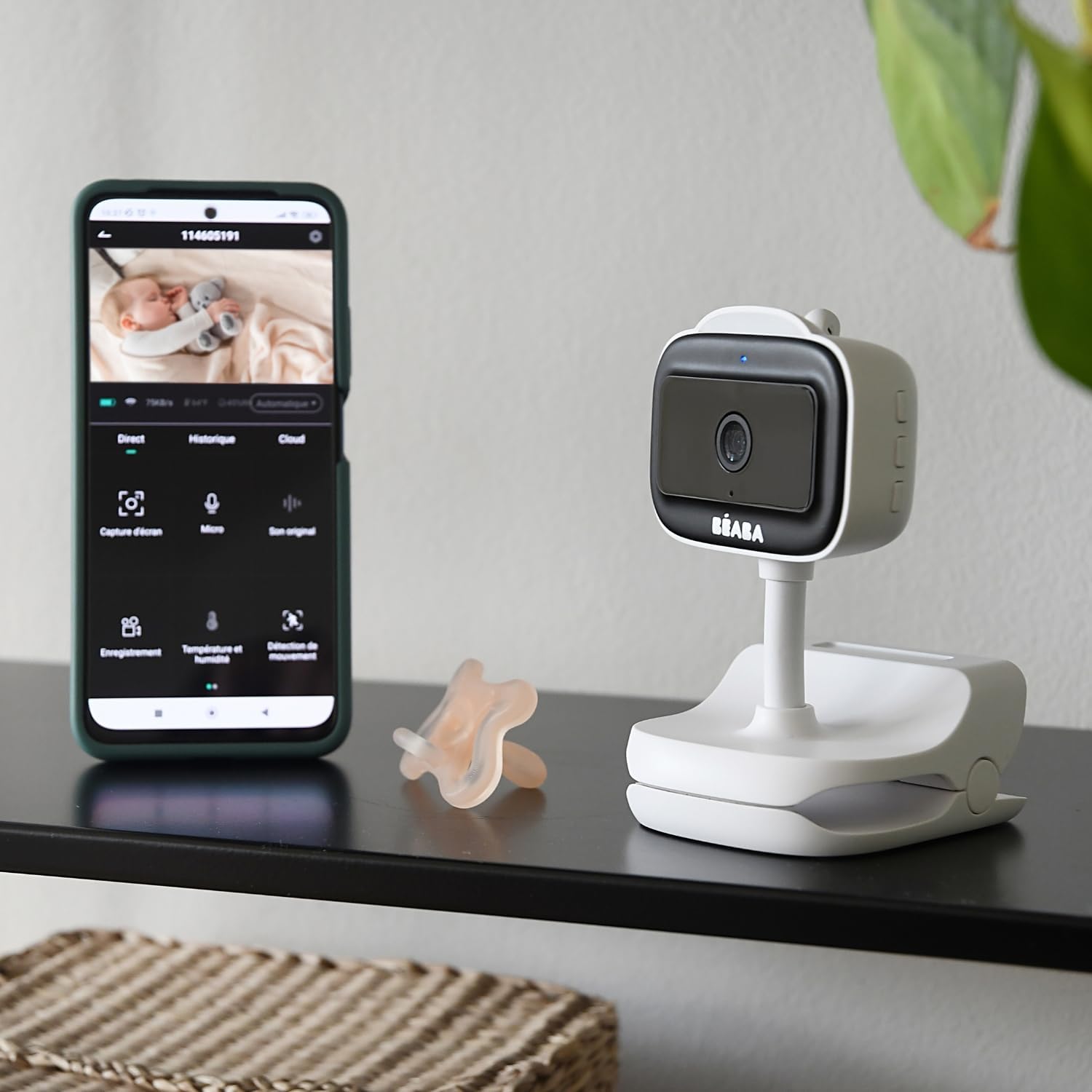
Aworan 4: A smartphone displaying the BÉABA Zen Nomad mobile application interface, showing live video feed and various control options like recording, microphone, temperature, and motion detection.
- Gbe View: Access real-time video and audio from the camera.
- Ọrọ Ọrọ Meji: Use the microphone icon in the app to speak through the camera to your baby.
- Iran Alẹ: The camera automatically activates infrared night vision in low-light conditions.
- Imọlẹ alẹ: Control the multi-color night light feature directly from the app to create a soothing environment.
- Awọn Lullabies: Select and play integrated lullabies through the camera's speaker.
- Abojuto iwọn otutu ati ọriniinitutu: View real-time temperature and humidity readings of the baby's room within the app.
- VOX Function (Sound and Motion Detection): Activate VOX mode to receive alerts on your smartphone when sound or motion is detected in the baby's room. Adjust sensitivity settings as needed.
- Multi-Camera Monitoring: If you have multiple Zen Nomad cameras, you can view feeds from all connected cameras within the same application.

Aworan 5: A smartphone displaying the BÉABA Zen Nomad mobile application, illustrating the capability to monitor multiple camera feeds simultaneously.
- Manual Camera Rotation: The camera unit can be manually rotated to adjust the viewigun igun.
Itoju
- Ninu: Wipe the camera unit with a soft, dry cloth. Do not use abrasive cleaners or solvents.
- Ibi ipamọ: Tọju ẹrọ naa ni itura, aye gbigbẹ nigbati o ko ba wa ni lilo.
- Itọju Batiri: Lati pẹ aye batiri, yago fun gbigba agbara si batiri ni kikun nigbagbogbo. Gba agbara nigbagbogbo.
Laasigbotitusita
| Isoro | Owun to le Fa | Ojutu |
|---|---|---|
| Kamẹra ko ṣiṣẹ. | Kekere tabi ko si idiyele batiri. | Connect the camera to a power source using the USB cable and allow it to charge for at least 30 minutes before attempting to power on again. |
| Unable to pair camera with the app. | Incorrect Wi-Fi network (5GHz instead of 2.4GHz), incorrect password, or camera not in pairing mode. |
|
| No video feed or poor image quality. | Weak Wi-Fi signal, camera too far from router, or network congestion. |
|
| Audio issues (no sound, distorted sound). | Microphone or speaker blocked, app volume settings, or network delay. |
|
Awọn pato
- Nọmba awoṣe: 930373
- Imọ-ẹrọ Asopọmọra: Ailokun (Wi-Fi)
- Orisun Agbara: Batiri Agbara (ṣe gbigba agbara)
- Batiri adase: Titi di wakati 6
- O ga Gbigbasilẹ fidio: 720p
- Awọn ẹya pataki: Motion Detector, Night Vision, Temperature and Humidity Sensor, Two-Way Talk, Lullabies, Multi-Color Night Light, VOX Function
- Awọn ẹrọ ibaramu: Foonuiyara
- Ohun elo: Ṣiṣu
- Àwọ̀: Funfun
- Voltage: 5 Volts
- Agbara: 5 Wattis
- Awọn iwọn: Isunmọ 20.5 x 12.7 x 9.2 cm
- Ìwúwo: O fẹrẹ to giramu 453
Atilẹyin ọja ati Support
The BÉABA Zen Nomad Video Baby Monitor comes with a 2-odun atilẹyin ọja on spare parts, ensuring support for potential component replacements. For technical assistance, troubleshooting beyond this manual, or warranty claims, please contact BÉABA customer support through their official webaaye tabi alaye olubasọrọ ti a pese pẹlu rira rẹ.
For more information, visit the official BÉABA store: BÉABA Official Store


