Ọrọ Iṣaaju
This manual provides essential instructions for setting up, operating, and maintaining your Microsoft Surface Pro 10. The Surface Pro 10 is a versatile 13-inch 2-in-1 tablet and laptop designed for peak performance and adaptability, featuring an Intel Core Ultra 7 processor, 32GB RAM, and a 1TB SSD. It integrates AI capabilities to enhance productivity and user experience.

Image: The Microsoft Surface Pro 10 displayed in tablet mode, supported by its integrated kickstand, showcasing awọn oniwe-aso oniru ati ki o larinrin àpapọ.
Ṣeto
1. Unboxing ati Ibẹrẹ Ayẹwo
Ni ifarabalẹ yọ gbogbo awọn paati kuro ninu apoti. Jẹrisi pe awọn nkan wọnyi wa pẹlu:
- Microsoft Surface Pro 10 device
- Ibi ti ina elekitiriki ti nwa
- Microsoft Surface Pro Keyboard (if bundled)
- Microsoft Surface Pro Slim Pen (if bundled)
- Quick Bẹrẹ Itọsọna
2. Ngba agbara ẹrọ
Connect the power supply to the Surface Connect port on your device and then to a power outlet. Allow the device to charge fully before first use for optimal battery calibration.
3. Agbara akọkọ Lori ati Eto Windows
Press the power button located on the top edge of the device. Follow the on-screen instructions to complete the Windows 11 Pro setup, including language selection, network connection, and user account creation.
4. Attaching the Keyboard and Pen
Align the magnetic connector of the Microsoft Surface Pro Keyboard with the bottom edge of the Surface Pro 10 until it snaps into place. The Microsoft Surface Pro Slim Pen can be magnetically attached to the side of the device for storage and charging.
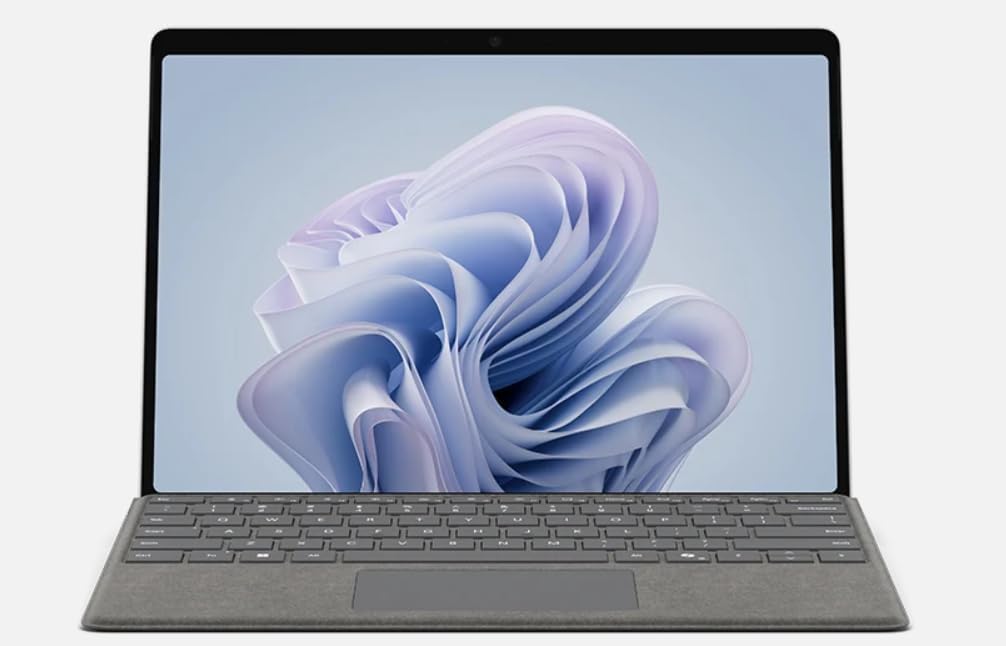
Image: The Microsoft Surface Pro 10 with its detachable keyboard attached, illustrating its laptop configuration.
Awọn ilana Iṣiṣẹ
1. Navigating Windows 11 Pro
Utilize the 10-point multi-touch screen for intuitive gestures, the attached keyboard and touchpad for traditional input, or the Surface Slim Pen for precise writing and drawing. Windows 11 Pro offers a streamlined interface for productivity and creativity.
2. Switching Between Modes
The Surface Pro 10 seamlessly transitions between a tablet and a laptop. Simply attach or detach the keyboard to switch modes. The integrated kickstand allows for various viewing angles in both configurations, adapting to your work style.

Aworan: The ru view of the Microsoft Surface Pro 10, demonstrating its integrated kickstand extended for stable positioning.
3. Connecting to Networks and Peripherals
Connect to Wi-Fi networks via the Settings menu. The device features USB-C ports for connecting external displays, storage, and other peripherals. The Surface Connect port is primarily for power but can also support docking solutions.

Aworan: A ẹgbẹ profile of the Microsoft Surface Pro 10, highlighting its slim design and available ports for connectivity.
4. Utilizing AI Features
The Intel Core Ultra 7 processor enables enhanced AI experiences, including accelerated Microsoft Copilot features. Access Copilot through the dedicated button on the taskbar or by voice command to assist with tasks, generate content, and streamline workflows.
Itoju
1. Ninu Rẹ Device
Lo asọ rirọ, ti ko ni lint dampened with water or an approved screen cleaner to gently wipe the screen and chassis. Avoid harsh chemicals or abrasive materials. Ensure the device is powered off and unplugged before cleaning.
2. Software imudojuiwọn
Regularly check for and install Windows updates to ensure optimal performance, security, and access to the latest features. Navigate to Eto> Imudojuiwọn Windows lati ṣakoso awọn imudojuiwọn.
3. Itọju batiri
To prolong battery life, avoid extreme temperatures and allow the battery to discharge partially before recharging. For long-term storage, charge the device to approximately 50% and store it in a cool, dry place.
4. Ibi ipamọ Management
Lorekore tunview and manage your 1TB SSD storage. Delete unnecessary files, uninstall unused applications, and consider cloud storage solutions to free up local space and maintain performance.
Laasigbotitusita
Wọpọ Oran ati Solusan
- Ẹrọ Ko Tii: Ensure the device is charged. Press and hold the power button for 10-15 seconds to perform a force restart.
- Awọn ọran Asopọmọra Wi-Fi: Check if Wi-Fi is enabled in Settings. Restart your router and the Surface Pro 10. Forget and reconnect to the network.
- Iṣẹ ṣiṣe ti o lọra: Close unnecessary applications. Check for and install Windows updates. Run a disk cleanup.
- Iboju ifọwọkan Ko dahun: Tun ẹrọ naa bẹrẹ. Rii daju pe iboju naa mọ ati pe ko si idoti kankan.
- Accessory Not Detected: Ensure the accessory (keyboard, pen) is properly attached or paired. Check battery levels for wireless accessories.
For more detailed troubleshooting or persistent issues, refer to the official Microsoft Surface support webojula.
Awọn pato
| Orukọ awoṣe | ZEA-00001 |
| Iwon iboju | 13 inches |
| Ipinnu iboju | 2880 x 1920 pixels (267 ppi) |
| Oṣuwọn sọtun | 120 Hz (60 Hz Default) |
| isise | 1.4 GHz Intel Core Ultra 7 165U (16-Core) |
| Àgbo | 32GB DDR5 Ramu |
| Ibi ipamọ | 1 TB SSD |
| Eto isesise | Windows 11 Pro |
| Kaadi eya aworan | Ese Intel Graphics |
| Alailowaya Iru | 802.11ac |
| Ẹyìn WebKame.awo-ori Ipinnu | 13 MP |
| Ọja Mefa | 11.3 x 8.2 x 0.4 inches |
| Àwọ̀ | Platinum |
| Awọn batiri | 1 batiri litiumu ion (pẹlu) |
Atilẹyin ọja ati Support
Atilẹyin ọja olupese
Your Microsoft Surface Pro 10 is covered by a limited manufacturer's warranty. Details regarding the warranty period and coverage can be found on the official Microsoft Surface support website or within the warranty documentation included with your device.
Onibara Support
For technical assistance, warranty claims, or additional support, please visit the official Microsoft Surface support webojula:
Please have your device's serial number ready when contacting support.


