1. Ifihan
This manual provides detailed instructions for the installation, operation, and maintenance of your ZUMIMALL ZS-GX2S 3MP Wireless Outdoor Security Camera. Please read this manual thoroughly before using the product to ensure proper functionality and safety.
The ZUMIMALL ZS-GX2S is a solar-powered, wireless outdoor security camera designed for comprehensive surveillance. It features 3MP resolution, 360° pan and tilt capabilities, AI detection, two-way audio, and IP66 weatherproofing, making it suitable for various outdoor environments.
2. Ọja Ipariview
2.1 Package Awọn akoonu
Package pẹlu awọn nkan wọnyi:
- ZUMIMALL ZS-GX2S 3MP Wireless Outdoor Security Camera (2 units)
- Pánẹ́lì oòrùn (ẹ̀yà méjì)
- Mounting Bracket for Camera
- Iṣagbesori akọmọ fun Solar Panel
- Okun Ngba agbara USB
- Screw Package (screws and wall anchors)
- Ilana itọnisọna
- Tip Sticker ('Hey! YOU ARE ON CAMERA')
2.2 Awọn ohun elo kamẹra
Familiarize yourself with the main parts of the camera:
- Lẹnsi kamẹra: Ya fidio footage.
- Imọlẹ funfun: Provides illumination for color night vision.
- PIR Sensọ: Ṣe awari išipopada.
- Gbohungbohun: Ó máa ń gba ohùn fún ìbánisọ̀rọ̀ ọ̀nà méjì.
- Agbọrọsọ: Ó ń gbé ohùn jáde fún ìbánisọ̀rọ̀ ọ̀nà méjì àti sírénì.
- Eriali Wi-Fi: Enhances wireless connectivity.
- Atọka ipo: Ṣe afihan ipo kamẹra.
- Bọtini atunto: Used to reset the camera.
- Bọtini agbara: Yipada kamẹra si titan/pa.
- Iho kaadi SD: Fún ìfipamọ́ fídíò agbègbè (ó lè ṣe àtìlẹ́yìn títí dé 128GB).
- Ibudo agbara Iru-C: For connecting the solar panel or charging.

2.3 Key Awọn ẹya ara ẹrọ
- 3MP Full Color Image: Delivers 2K resolution, 1.5 times sharper than standard 1080p, with 4X digital zoom.
- 360° View: Ó n pese iyipo inaro 355° petele ati 120° fun agbegbe kikun.
- Solar Powered & 100% Wireless: Equipped with a high-efficiency solar panel and large-capacity rechargeable battery for continuous operation.
- 2.4G WiFi Asopọmọra: Features 4dBi dual antennas for stable wireless connection.
- Wiwa AI ti oye: Advanced PIR sensor and AI algorithms identify persons, pets, vehicles, and parcels, reducing false alarms.
- Awọn titaniji akoko gidi: Sends instant notifications to your mobile app upon motion detection.
- Audio Ọna Meji: Gba laaye fun ibaraẹnisọrọ akoko gidi nipasẹ kamẹra.
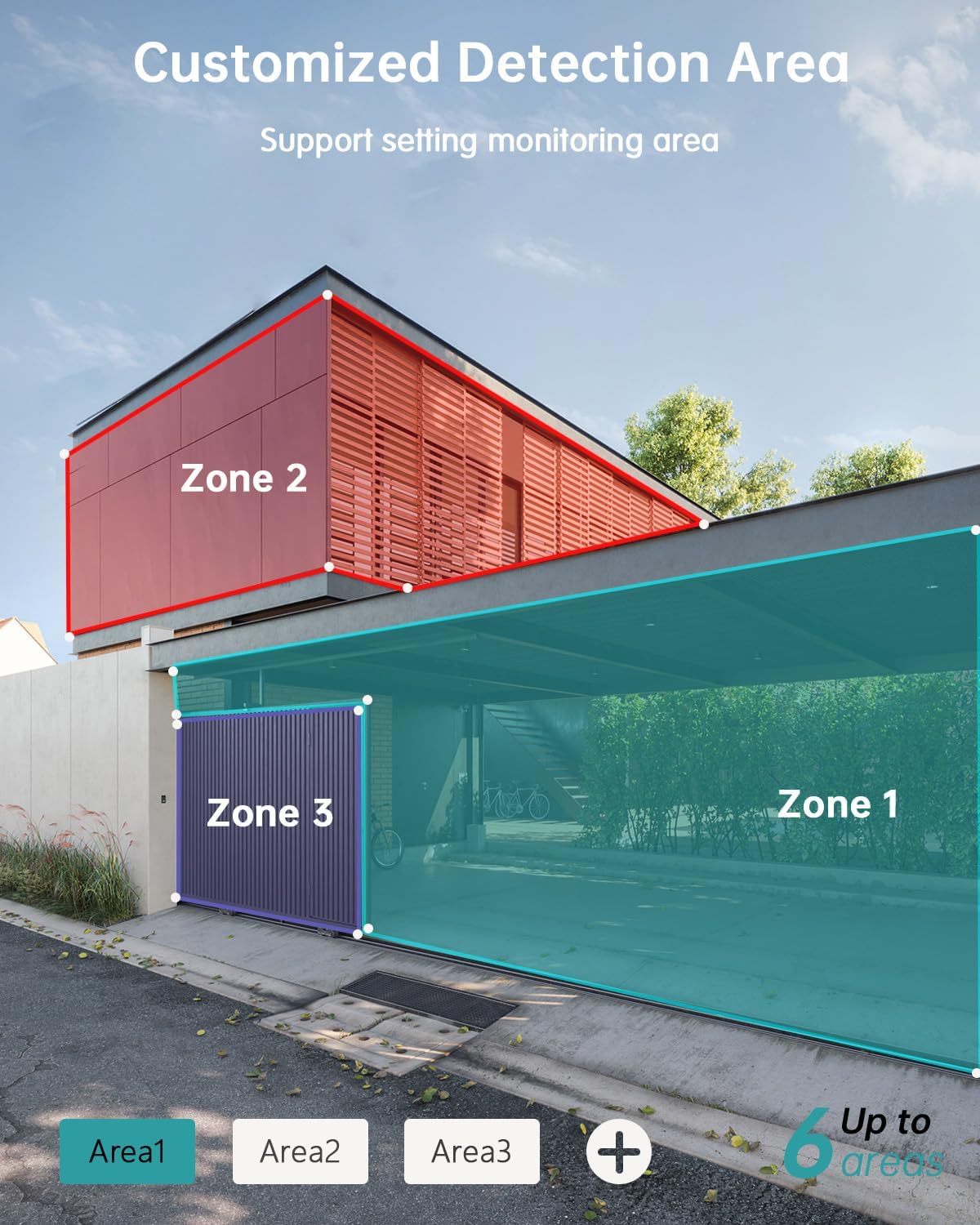
- Customizable Detection Areas: Set specific monitoring zones to focus on critical areas.
- IP66 Oju ojo: Designed to withstand various weather conditions, including rain, wind, and snow.
- Awọn aṣayan ipamọ pupọ: Supports local storage via Micro SD card (up to 128GB) and cloud storage.
- Ṣiṣẹ pẹlu Alexa: Integrate with Amazon Alexa for voice control and live view on compatible devices.
3. Eto
3.1 Fifi sori ti ara
Before permanent installation, ensure the camera has a strong 2.4G Wi-Fi signal in the desired location. The camera can be mounted on various surfaces including wood, drywall, stucco, or even gutters using appropriate fasteners.
- Attach Mounting Base: Secure the camera's mounting base to your chosen surface using the provided screws and wall anchors.
- Solar Panel: Attach the solar panel to its bracket and position it to receive maximum sunlight. Connect the solar panel's Type-C cable to the camera's charging port. Ensure the cable is neatly managed to prevent damage.
- Kamẹra Oke: Align the camera with the mounting base and slide it down until it locks securely.

3.2 App fifi sori ati so pọ
The ZUMIMALL app is required to operate your camera. Follow these steps to set up the app and pair your camera:
- Ṣe igbasilẹ ohun elo naa: Scan the QR code provided in the manual or on the product packaging, or search for 'ZUMIMALL' in your device's app store.
- Iwe akọọlẹ iforukọsilẹ: Open the ZUMIMALL app and follow the on-screen instructions to register a new account or log in if you already have one.
- Fi ẹrọ kun: In the app, select 'Add Device' or the '+' icon. Follow the prompts to select your camera model.
- Agbara Lori Kamẹra: Rii daju pe kamẹra rẹ wa ni titan.
- Ṣayẹwo koodu QR: The app will display a QR code. Hold your camera's lens towards your phone screen to scan the QR code. You will hear a confirmation sound when successful.
- Sopọ si Wi-Fi: Follow the app's instructions to connect the camera to your 2.4G Wi-Fi network.
- Iṣeto Pari: Once connected, you can name your camera and begin using it.

4. Isẹ
4.1 Live View ati Sisisẹsẹhin
Access the live feed and review foo ti o ti gbasilẹtage directly from the ZUMIMALL app.
- Gbe View: Ṣí àpù náà kí o sì yan kámẹ́rà rẹ láti view the real-time feed.
- Sisisẹsẹhin: Navigate to the 'History' or 'Cloud' section in the app to review ti o ti gbasilẹ iṣẹlẹ.

4.2 Išipopada erin ati titaniji
The camera's AI detection system identifies specific objects and sends alerts.
- Iwari AI: The camera can distinguish between persons, pets, vehicles, and parcels.
- Custom Areas: Set specific detection zones within the app to monitor areas of interest and reduce unnecessary alerts.
- Awọn iwifunni gidi-akoko: Receive instant alerts on your phone when motion is detected.

4.3 Meji-Ona Audio
Engage in real-time conversations through the camera using the app's two-way audio feature.
4.4 PTZ Iṣakoso
Control the camera's pan (horizontal) and tilt (vertical) movements directly from the app to adjust your viewigun igun.
- Akara: Yiyipo petele 355°.
- Tẹ: Yiyi inaro 120°.

4.5 Ibi ipamọ Aw
Your camera offers flexible storage solutions for recorded footage.
- Kaadi SD Micro: Fi kaadi Micro SD kan (to 128GB) sinu iho ti a yàn fun ibi ipamọ agbegbe.
- Ibi ipamọ awọsanma: ZUMIMALL offers cloud storage services for convenient access and backup of your recordings.
4.6 Ìṣọ̀kan Alexa
The ZUMIMALL ZS-GX2S camera is compatible with Amazon Alexa. You can use voice commands to view the live feed on compatible Alexa-enabled devices.
5. Itọju
5.1 Batiri ati Gbigba agbara oorun
The integrated solar panel is designed to keep your camera's battery charged, providing continuous operation.
- Ensure the solar panel is positioned in an area that receives direct sunlight for several hours daily.
- In periods of low sunlight or high usage, the camera's battery may require manual charging via the USB port.
5.2 Ninu
Mimọ deede ṣe iranlọwọ lati ṣetọju iṣẹ to dara julọ.
- Gently wipe the camera lens and solar panel with a soft, damp asọ lati yọ eruku ati idoti.
- Yẹra fún lílo àwọn kẹ́míkà líle tàbí àwọn ohun èlò ìpalára tí ó lè ba ojú tàbí lẹ́ńsì kámẹ́rà jẹ́.
6. Laasigbotitusita
If you encounter issues with your ZUMIMALL ZS-GX2S camera, consider the following common solutions:
- Ko si Agbara: Ensure the solar panel is receiving adequate sunlight or manually charge the camera using the USB cable.
- Awọn ọran Isopọ Wi-Fi: Verify your Wi-Fi network is 2.4Ghz. Check the camera's proximity to the router and ensure a strong signal. Restart your router and camera if necessary.
- Awọn itaniji eke: Adjust the motion detection sensitivity settings in the app. Utilize the custom detection area feature to exclude irrelevant zones.
- Ko si Awọn Gbigbasilẹ: Check if the Micro SD card is properly inserted and formatted. Ensure cloud storage is active if you are using that service.
- Didara Aworan Ko dara: Nu lẹnsi kamẹra naa. Rii daju pe ko si awọn idena ninu aaye kamẹra naa view.
- Awọn Iṣoro Ohun-orin Ọna Meji: Check the volume settings on your phone and in the app. Ensure there are no obstructions blocking the camera's microphone or speaker.
For further assistance, please refer to the ZUMIMALL app's help section or contact customer support.
7. Awọn pato
| Ẹya ara ẹrọ | Ẹ̀kúnrẹ́rẹ́ |
|---|---|
| Nọmba awoṣe | ZS-GX2S |
| Ipinnu | 3MP (2K) |
| Orisun agbara | Solar Powered (with rechargeable Lithium Ion battery) |
| Asopọmọra | 2.4G WiFi |
| Pan / Tẹ Range | 355° Petele, 120° inaro |
| Wide Angle lẹnsi | 130° |
| Alẹ Iranran | 3MP Color Night Vision (with 2 IR and 2 white lights) |
| Digital Sisun | 4X |
| Iwari AI | Person, Pet, Vehicle, Parcel |
| Ohun | Ona Meji Audio |
| Ibi ipamọ | Micro SD Kaadi (to 128GB), Ibi ipamọ awọsanma |
| Resistance Oju ojo | IP66 |
| Awọn iwọn otutu ti nṣiṣẹ | -4°F si 120°F (-20°C si 50°C) |
| Awọn ẹrọ ibaramu | Smartphone, Amazon Alexa |
| Ọja Mefa | 13.7 x 7.4 x 5.4 inches |
| Iwọn Nkan | 4.71 iwon |
8. Atilẹyin ọja ati Support
ZUMIMALL is committed to providing high-quality products and customer satisfaction. For warranty information, technical support, or any inquiries regarding your ZS-GX2S camera, please refer to the ZUMIMALL app's support section or visit the official ZUMIMALL website. You can also contact ZUMIMALL customer service directly for assistance.


