Ọja Pariview

The KiiBoom Loop 65 mechanical keyboard, featuring its distinctive gradient design and RGB backlighting.
The KiiBoom Loop 65 is a high-performance 65% mechanical keyboard designed for enthusiasts and professionals. It features a full aluminum block structure with a unique gradient design, offering both durability and aesthetic appeal. The keyboard incorporates advanced features such as QMK/VIA programmability, hot-swappable switches, and tri-mode connectivity, providing a customizable and versatile typing experience.
Awọn ẹya pataki pẹlu:
- Aesthetic Gradient Design: Anodized 6063 aluminum case with a unique two-color gradient, complemented by Cherry Profile dye-sub PBT keycaps.
- Gasket Mount Structure and Flex-cut FR4 Plate: Ensures superior key sounds and typing comfort with a neutral sound profile and pleasant flex.
- Five Layers of Sound Dampening Material: Includes Poron sandwich foam, IXPE switch pad, PET sound-improving film, Poron case foam, and an additional PET film layer for enhanced acoustic performance.
- QMK/VIA Programmable: Allows for extensive customization of key mappings, macros, shortcuts, and key combinations.
- PCB Gbona-Swappable: Supports easy replacement of 3-pin/5-pin mechanical switches without soldering, enabling personalized tactile feedback and efficient maintenance.
- Asopọmọra-Ipo Mẹta: Offers flexible connection options via wired USB-C, Bluetooth 5.0, and 2.4GHz wireless with a USB dongle.
- Batiri 4000mAh: Provides long-lasting wireless operation.
- South-Facing RGB Lighting: Ensures visible backlighting and full compatibility with Cherry profile awọn bọtini itẹwe.

The KiiBoom Loop 65 mechanical keyboard, showcasing its compact 65% layout and key features such as tri-mode connectivity, full aluminum construction, QMK/VIA support, and hot-swappable switches.
Ṣeto
Package Awọn akoonu
Before setup, ensure all items are present:
- KiiBoom Loop 65 Mechanical Keyboard
- Okun USB (USB-C si USB-A)
- Keycap Puller
- Switch Puller (often included with hot-swappable keyboards)
- 2.4GHz USB Dongle (for wireless connectivity)
Ni ibẹrẹ Asopọ
The KiiBoom Loop 65 supports three connectivity modes: wired, Bluetooth, and 2.4GHz wireless.

The KiiBoom Loop 65 offers versatile tri-mode connectivity for various devices.
Ipo onirin (USB-C)
- Locate the USB-C port on the keyboard (typically on the back or side).
- Connect one end of the provided USB-C cable to the keyboard and the other end to a USB-A port on your computer.
- Ensure the connectivity switch on the keyboard is set to the wired mode (refer to the keyboard's physical switch, often labeled with a USB icon or 'Wired').
- Awọn bọtini itẹwe yoo jẹ idanimọ laifọwọyi nipasẹ ẹrọ iṣẹ rẹ.
2.4GHz Alailowaya Ipo
- Locate the 2.4GHz USB dongle. This dongle is often stored in a dedicated slot on the keyboard itself for convenience.
- Pulọọgi dongle USB sinu ibudo USB ti o wa lori kọnputa rẹ.
- Set the connectivity switch on the keyboard to the 2.4GHz wireless mode (often labeled with a wireless icon or '2.4G').
- The keyboard should automatically pair with the dongle. If not, press Fn + 4$ (as indicated in product images) to initiate pairing.
Ipo Bluetooth
- Set the connectivity switch on the keyboard to Bluetooth mode (often labeled with a Bluetooth icon or 'BT').
- The keyboard supports up to three Bluetooth devices. To enter pairing mode for a specific slot, press and hold Fn + Q, Fn + W, or Fn + E for a few seconds until the keyboard's RGB lighting indicates pairing mode (e.g., rapid flashing).
- On your device (PC, laptop, tablet, smartphone), navigate to Bluetooth settings and search for new devices.
- Select "KiiBoom Loop 65" (or similar name) from the list of available devices to complete the pairing process.
- Once paired, you can switch between connected Bluetooth devices by pressing Fn + Q, Fn + W, or Fn + E.

Alaye view of the KiiBoom Loop 65's connectivity options and compatible devices.
Awọn ilana Iṣiṣẹ
QMK/VIA Programmability
The KiiBoom Loop 65 is QMK/VIA programmable, allowing for extensive customization of key functions, macros, and lighting effects. To utilize this feature:
- Ṣe ìgbàsókè àpò ìṣiṣẹ́ QMK àti sọ́fítíwètì VIA láti ọ̀dọ̀ QMK/VIA tí a mọ̀ sí QMK/VIA webojula.
- Connect your keyboard in wired mode to your computer.
- Lọlẹ software VIA. Sọfitiwia naa yẹ ki o rii keyboard rẹ laifọwọyi.
- Use the intuitive interface to remap keys, create custom macros, and configure layers. Changes are applied in real-time.
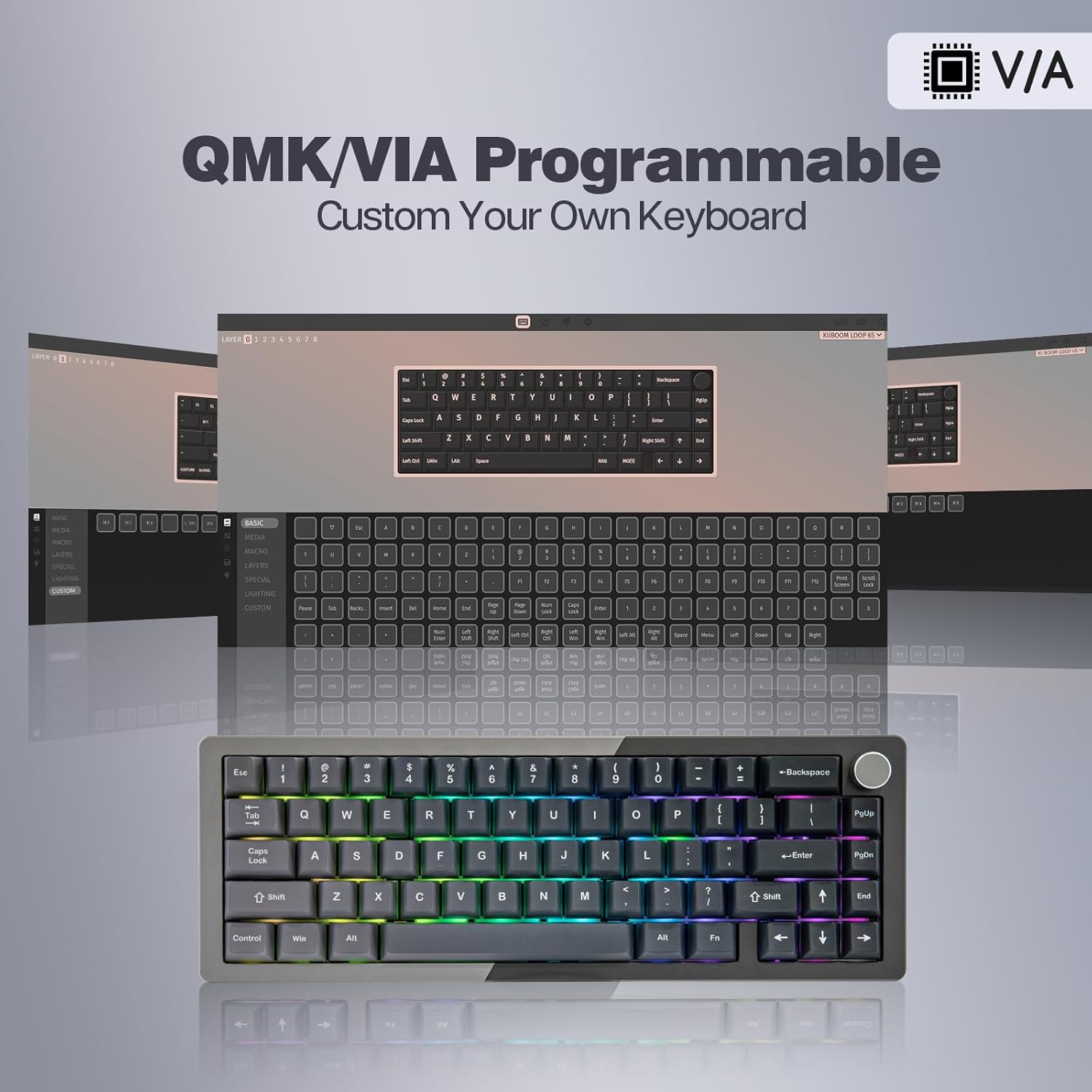
Customize your keyboard layout and functions using the QMK/VIA software.
Note: Some users have reported initial difficulties with QMK/VIA setup. Ensure you are using the correct software version and refer to online community resources or the official KiiBoom support for detailed guides if needed.
Iṣakoso Imọlẹ RGB
The keyboard features south-facing RGB lighting with various effects. You can control the lighting directly from the keyboard:
- Turn On/Off Backlights: Press Fn + Z
- Toggle Backlight Effects: Press Fn + \ (backslash)
- Toggle Backlight Colors: Press Fn + < (comma) or Fn + > (period)
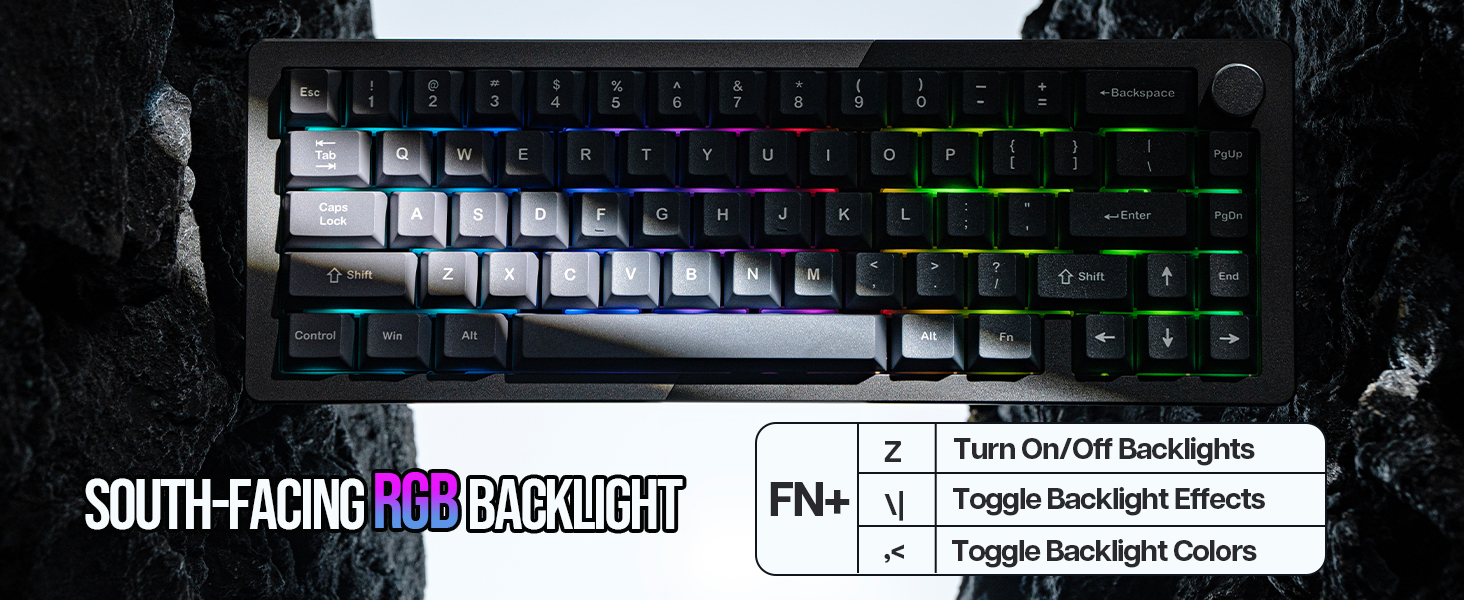
Control the vibrant RGB lighting directly from your keyboard.
Iwọn didun Iwọn
The integrated metal knob on the upper right corner of the keyboard functions as a volume control. Rotate it to adjust the system volume. Press the knob to mute/unmute audio.

The multi-functional metal knob for volume control.
Iṣakoso batiri
The KiiBoom Loop 65 is equipped with a 4000mAh battery for extended wireless use. To charge the keyboard, connect it via the USB-C cable to a power source (computer USB port or wall adapter). The keyboard can be used while charging.

The 4000mAh battery provides long-lasting power for wireless use.
Itoju
Ninu Keyboard
Mímú kí keyboard mọ́ déédéé máa ń mú kí iṣẹ́ àti ìrísí rẹ̀ máa lọ déédéé:
- Ge asopọ bọtini itẹwe lati gbogbo awọn orisun agbara.
- Lo asọ asọ, ti ko ni lint die-die dampfi omi tàbí omi ìwẹ̀nùmọ́ díẹ̀ pa á láti nu àwọn ìbòrí àti àpótí ìbòrí náà. Yẹra fún ọrinrin púpọ̀ jù.
- Fun eruku ati idoti laarin awọn bọtini bọtini, lo afẹfẹ fisinuirindigbindigbin tabi fẹlẹ kekere kan.
Replacing Switches (Hot-Swappable)
The KiiBoom Loop 65 features a hot-swappable PCB, allowing you to change switches without soldering. This is useful for customizing typing feel or replacing faulty switches.
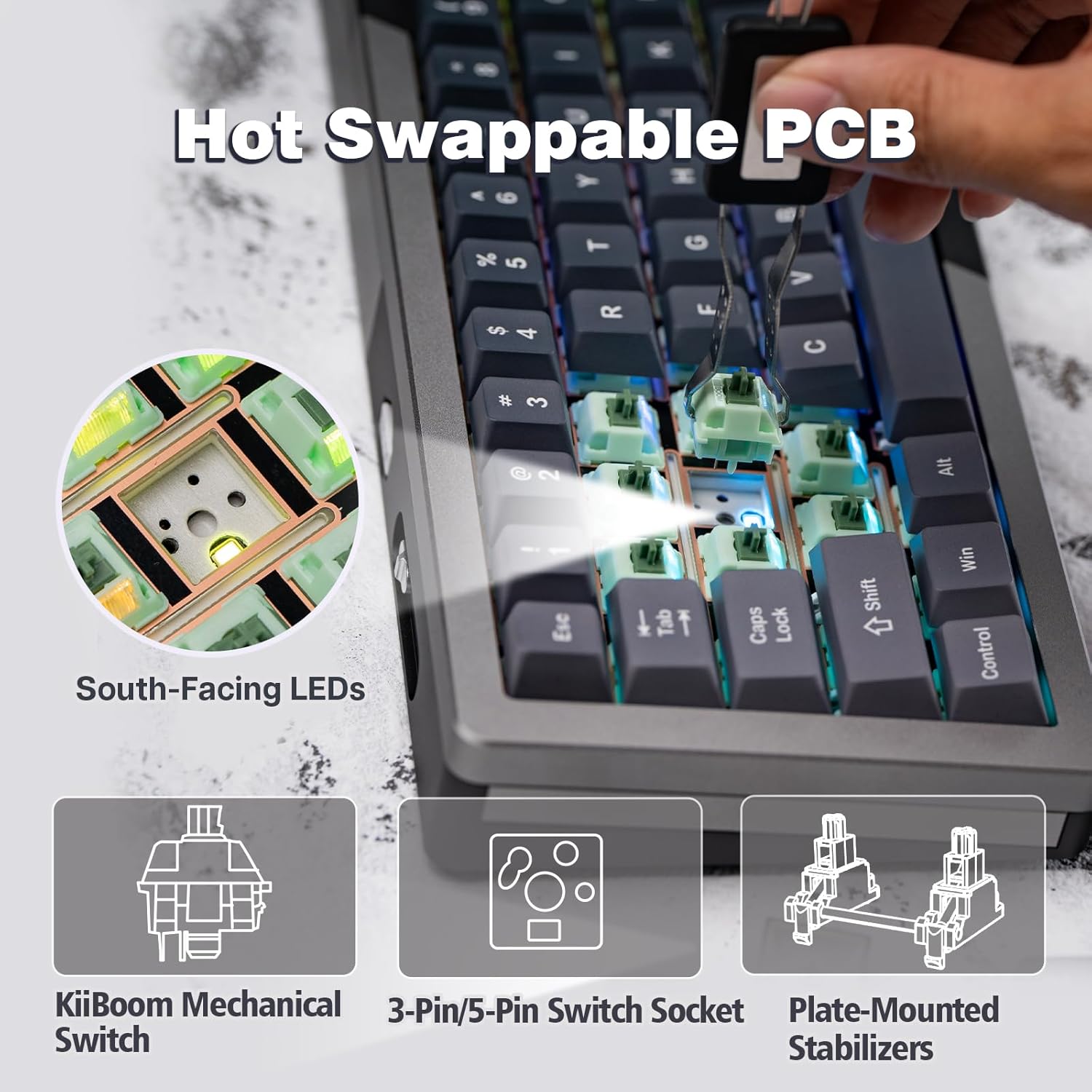
The hot-swappable PCB allows for easy switch replacement.
- Using the provided keycap puller, gently remove the desired keycap by pulling straight up.
- Once the keycap is removed, use the switch puller to grasp the switch firmly. Apply gentle pressure and pull the switch straight up to remove it from the PCB.
- Mö awọn pinni ti awọn titun yipada pẹlu awọn iho lori PCB. Rii daju pe awọn pinni wa ni taara lati yago fun atunse.
- Gently push the new switch into place until it clicks securely.
- Re-attach the keycap by pressing it firmly onto the new switch stem.
Video demonstrating the assembly process of the KiiBoom Loop 65 keyboard, including how to install components like switches and the case structure.
Rirọpo Keycaps
To replace keycaps, use the keycap puller to gently remove the existing keycap. Align the new keycap with the switch stem and press down firmly until it is seated securely.

The keyboard features durable Cherry Profile dye-sub PBT keycaps.
Laasigbotitusita
| Isoro | Owun to le Fa | Ojutu |
|---|---|---|
| Keyboard kii ṣe asopọ lailowa (2.4GHz/Bluetooth) |
|
|
| Keys not responding or inconsistent input |
|
|
| QMK/VIA software not detecting keyboard or programming issues |
|
|
| Key height inconsistency |
|
|
Awọn pato
| Ẹya ara ẹrọ | Ẹ̀kúnrẹ́rẹ́ |
|---|---|
| Ọja Mefa | 12.68 x 4.49 x 1.77 inches (322mm L x 114mm W x 45mm H) |
| Iwọn Nkan | 4.38 poun (isunmọ 1.99 kg) |
| Olupese | KiiBoom |
| Asopọmọra Technology | 2.4Ghz Wireless, Bluetooth 5.0, USB-C Wired |
| Apejuwe Keyboard | Ẹ̀rọ |
| Niyanju Lilo | Everyday Use, Education, Gaming, Business |
| Pataki Awọn ẹya ara ẹrọ | CNC Aluminum, QMK/VIA Programmable, Backlit, Creamy Keyboard, Detachable Block Structure, Gasket Mount, FR4 Plate, 5-layer Sound Dampipari |
| Àwọ̀ | Grey Black (as per current model) |
| Nọmba ti Awọn bọtini | 66 |
| Imọlẹ afẹyinti | RGB (South-Facing) |
| Agbara Batiri | 4000mAh |
| Ohun elo Keycap | Dye-sub PBT (Cherry Profile) |

Detailed dimensions and specifications of the KiiBoom Loop 65 keyboard.
Atilẹyin ọja ati Support
For warranty information, technical support, or further assistance, please refer to the official KiiBoom webAaye ayelujara tabi kan si iṣẹ alabara wọn taara. Iwe Itọsọna Olumulo ti o kun fun alaye ni ọna kika PDF tun wa fun igbasilẹ:
Ṣe igbasilẹ Itọsọna olumulo (PDF)
For additional resources and community support, consider visiting the KiiBoom Store on Amazon.


