1. Ifihan
Thank you for choosing the Udreamer Record Player Turntable. This versatile audio system combines classic analog sound with modern connectivity, allowing you to enjoy your vinyl collection with exceptional clarity and convenience. Featuring built-in speakers, Bluetooth capabilities, and USB recording, this turntable is designed for both audiophiles and casual listeners.

Image: The Udreamer Record Player Turntable in brown finish with two external bookshelf speakers.
2. Ohun ti o wa ninu Apoti
- Turntable
- 2 Bookshelf Agbọrọsọ
- Itọsọna olumulo
- Àdánù ìwọ̀n
- Platter Mat
- 9V, 2A Power Cord
- Okun RCA
- Okun PC
- Adapter RPM 45
3. Ọja Ipariview
Awọn ẹya pataki:
- Ese Phono Preamp & 40W External Speakers: Enjoy high-fidelity stereo sound with two 20W bookshelf speakers. Connect to active speakers or amplifiers via RCA, or passive speakers using the dedicated jacks.
- Asopọmọra Bluetooth meji: Stream music wirelessly from your Bluetooth devices (phones, tablets) to the turntable, or output vinyl playback to external Bluetooth speakers or headphones.
- ATN-3600L Moving Magnetic Cartridge: Delivers outstanding clarity and rich sound with extended user life.
- Solid Metal Platter: Ensures stability and consistent rotation for optimal playback.
- USB Digital to PC Record: Convert your vinyl collection into digital files by connecting the turntable to your computer via the included PC cable.
- Adjustable Counterweight and Pitch Control: Fine-tune needle pressure to prevent skipping and calibrate playback speed (33 RPM and 45 RPM).
- Sound Interference Reduction: Ground wire jack helps minimize unwanted noise.
- Arm Lifter & Platter Mat: Protects your records from scratches and reduces static/vibration.
- Belt Drive & Auto Stop: Smooth belt-driven system with an auto-stop switch to halt platter rotation at the end of a record.
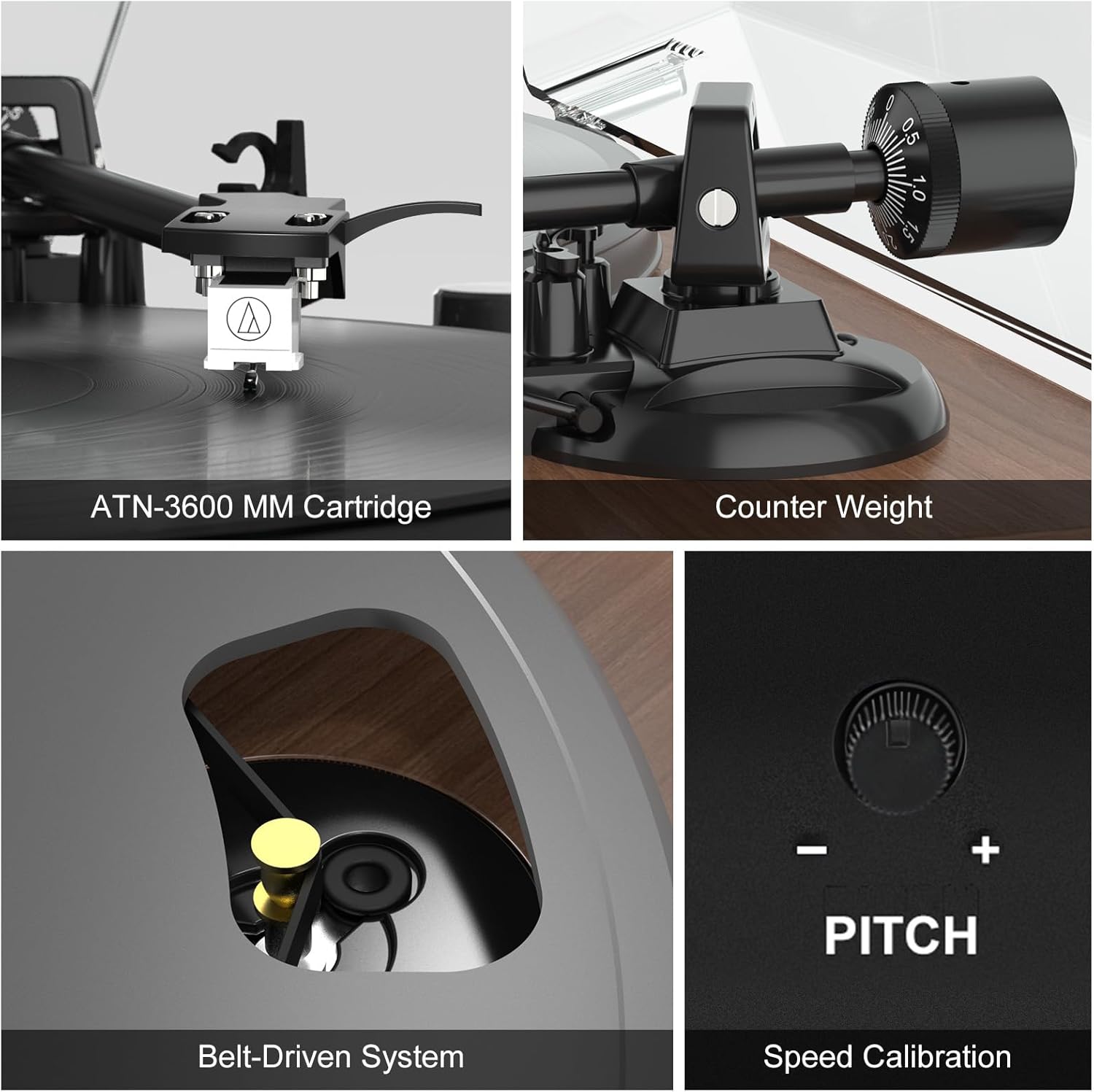
Aworan: Alaye view of the ATN-3600 MM Cartridge, adjustable counterweight, belt-driven system, and pitch control dial.
4. Eto
4.1 Turntable Apejọ
- Install the Platter and Belt: Carefully place the metal platter onto the turntable spindle. Ensure the drive belt is correctly positioned around the motor pulley and the inner rim of the platter.
- So iwuwo counterweight pọ mọ: Slide the counterweight onto the tonearm. Rotate it until the tonearm is neutrally balanced (floating horizontally). Adjust the tracking force according to your cartridge's specifications (typically 3g for the ATN-3600L).
- Place the Platter Mat: Lay the felt platter mat on top of the metal platter.
- Fi Ideri Eruku sori ẹrọ: Carefully align the hinges of the dust cover with the slots on the turntable base and gently push down until it clicks into place.
4.2 Asopọ Agbọrọsọ
- Connect the included bookshelf speakers to the speaker output terminals on the rear of the turntable. Ensure correct polarity (red to red, black to black).
- For external active speakers or an amplifier, use the RCA cable to connect the AUDIO OUTPUT jacks on the turntable to the corresponding input on your audio system.
- Connect the 9V, 2A power cord to the DC 9V-2A input on the turntable and plug it into a power outlet.
Video: A step-by-step guide demonstrating the installation of the belt, counterweight, speakers, and dust cover for the turntable.
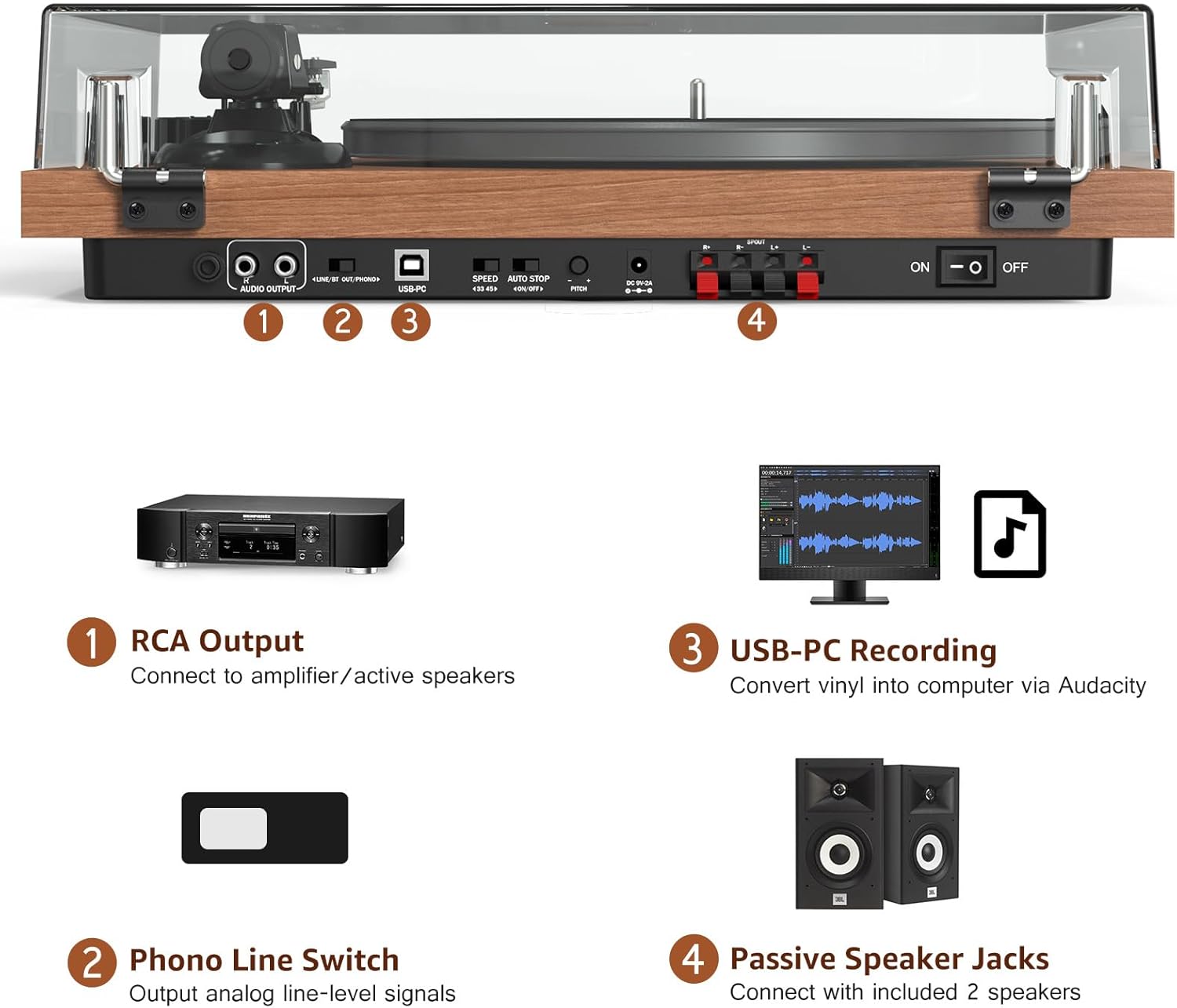
Aworan: Pariview of the turntable's rear panel, highlighting RCA output, Phono Line Switch, USB-PC port, speed selector, auto-stop switch, pitch control, and external speaker jacks.
5. Awọn ilana Iṣiṣẹ
5.1 Ṣíṣe àwo orin fínílì
- Place a vinyl record on the platter mat.
- Select the appropriate speed (33 or 45 RPM) using the switch on the rear panel.
- Gently lift the tonearm using the arm lifter.
- Position the stylus over the desired track on the record.
- Lower the tonearm slowly using the arm lifter. The record will begin to play.
- Adjust the volume using the main volume knob.
- To enable or disable auto-stop, use the AUTO STOP ON/OFF switch on the rear panel.
5.2 Bluetooth Asopọmọra
The turntable supports both Bluetooth input (BT IN) and Bluetooth output (BT OUT).
- Bluetooth Input (BT IN): To stream music from your phone or tablet to the turntable's speakers, switch the mode selector to BT IN. The indicator light will flash. Pair your device with
Awọn iwe aṣẹ ti o jọmọ - UD006

Udreamer UD006 Turntable System User User: Eto, Isẹ & Itọsọna Gbigbasilẹ
Okeerẹ olumulo Afowoyi fun Udreamer UD006 Turntable System. Pẹlu awọn ilana iṣeto, awọn itọsọna iṣiṣẹ fun ṣiṣe awọn igbasilẹ, Asopọmọra Bluetooth, Gbigbasilẹ USB si kọnputa, awọn imọran itọju, ati laasigbotitusita.
Udreamer UD001 Turntable System User Afowoyi
Itọsọna olumulo fun Udreamer UD001 Turntable System, ṣe alaye ilana ọja, awọn paati, asopọ, Bluetooth ati ṣiṣiṣẹsẹhin fainali, awọn ilana aabo, awọn pato, ati alaye atilẹyin ọja.
Awọn ibeere ti Udreamer Record Player beere: Laasigbotitusita ati Atilẹyin
Wa awọn idahun si awọn ibeere ti o wọpọ nipa ẹrọ orin igbasilẹ Udreamer rẹ, pẹlu fifa iṣoro, awọn iṣoro iyara, ati akoonu package. Kan si atilẹyin fun iranlọwọ.
Udreamer Gba Player FAQ ati Laasigbotitusita Itọsọna
Awọn ibeere ti a beere nigbagbogbo (FAQ) ati itọsọna laasigbotitusita fun ẹrọ orin igbasilẹ Udreamer, ibora awọn ọran ti o wọpọ bii didara ohun, fo, iyara, ati agbara.
Udreamer UD007 Afọwọṣe Olumulo Eto Turntable - Eto, Isẹ, ati Itọsọna Awọn ẹya
Ìwé ìtọ́ni tó péye fún ẹ̀rọ Udreamer UD007 Turntable System. Ìtọ́sọ́nà yìí ṣàlàyé bí a ṣe ń ṣètò rẹ̀, bí a ṣe ń ṣiṣẹ́ fún Phono, Bluetooth, FM Radio, àti USB playback, àti àwọn ohun èlò ìkọ̀wé, àwọn ìlànà ìmọ̀ ẹ̀rọ, àti àwọn ìlànà ìtọ́jú.
Udreamer UD001 Wireless Turntable User Manual - Setup, Operation, and Specifications
Comprehensive user manual for the Udreamer UD001 Wireless Turntable. Learn how to connect, play vinyl records, use Bluetooth, and understand specifications and warranty information.