Ọrọ Iṣaaju
Welcome to the user manual for your new boAt Stone 352 Pro Bluetooth Speaker. This guide provides detailed instructions on how to set up, operate, and maintain your speaker, ensuring you get the best audio experience. Please read this manual thoroughly before using the product.
Ohun ti o wa ninu Apoti
Upon unboxing your boAt Stone 352 Pro, you should find the following items:
- 1 x boAt Stone 352 Pro Bluetooth Speaker
- 1 x Okun Gbigba agbara (Iru-C)
- 1 x Itọsọna olumulo (iwe yii)
- 1 x Kaadi atilẹyin ọja
- 1 x Katalogi

Image: The boAt Stone 352 Pro speaker, a USB Type-C charging cable, and the warranty card/user manual are shown, representing the contents of the product box.
Video: An unboxing demonstration of the boAt Stone 352 Pro Bluetooth Speaker, showing the speaker, charging cable, and documentation included in the package.
Ọja Pariview
The boAt Stone 352 Pro is a portable Bluetooth speaker designed to deliver powerful audio with enhanced features. Key highlights include:
- 14W boAt Signature Sound: Experience clear and powerful audio output.
- Dynamic RGB LEDs: Enhance your listening experience with vibrant lighting effects.
- Up to 12 Hours Playback: Gbadun orin ti o gbooro sii lori gbigba agbara kan.
- Ẹya TWS: Connect two Stone 352 Pro speakers for a stereo sound experience.
- Gbohungbohun ti a ṣe sinu: Facilitates hands-free calling.
- Bluetooth v5.3: Ṣe idaniloju Asopọmọra alailowaya iduroṣinṣin ati lilo daradara.
- IPX5 Omi Resistance: Ó ń dáàbò bo ara rẹ̀ lọ́wọ́ ìfọ́ àti òógùn.
- Awọn ọna Asopọmọra pupọ: Supports Bluetooth, AUX, and TF Card playback.
- Iru-C Gbigba agbara: Igbalode ati irọrun gbigba agbara ni wiwo.

Image: A black boAt Stone 352 Pro speaker, showcasing its cylindrical design and the illuminated RGB LED strip on the front.
Awọn iṣakoso ati Awọn Atọka
Familiarize yourself with the speaker's controls and indicators for optimal use.

Image: The side panel of the boAt Stone 352 Pro speaker, highlighting the power button, volume up/down buttons, and mode selection button.
- Bọtini agbara: Tẹ kí o sì di mú kí o lè tan/pa. Tẹ̀ kí o sì dá orin dúró.
- Iwọn didun soke (+): Tẹ kukuru lati mu iwọn didun pọ si. Tẹ gun fun orin atẹle.
- Iwọn didun isalẹ (-): Tẹ kukuru lati dinku iwọn didun. Tẹ gun fun orin iṣaaju.
- Bọtini Ipo (M): Tẹ kukuru lati yipada laarin awọn ipo Bluetooth, AUX, ati TF Card.
- Ìlà LED RGB: Indicates power status, charging, and provides dynamic lighting effects.
Bibẹrẹ
Gbigba agbara si Agbọrọsọ
Before first use, fully charge your speaker. The boAt Stone 352 Pro features a Type-C charging port.
- Connect the Type-C end of the charging cable to the speaker's charging port.
- Connect the USB-A end of the cable to a compatible USB power adapter (5V/1A recommended).
- The RGB LED strip will indicate charging status. It typically takes approximately 2 hours for a full charge.
- Ni kete ti o ti gba agbara ni kikun, ge asopọ okun gbigba agbara.

Aworan: A alaye view of the boAt Stone 352 Pro's side panel, illustrating the Type-C charging interface and the various connectivity ports (Bluetooth, AUX, TF Card).
Titan / Pipa agbara
- To power on, press and hold the Power button until you hear an audible prompt and the RGB LEDs illuminate.
- To power off, press and hold the Power button again until you hear an audible prompt and the RGB LEDs turn off.
Awọn ilana Iṣiṣẹ
Bluetooth Asopọmọra
- Ensure the speaker is powered on and in Bluetooth mode (indicated by a specific LED pattern or audible prompt).
- Lori foonuiyara tabi ẹrọ ohun, mu Bluetooth ṣiṣẹ ki o wa awọn ẹrọ to wa.
- Select "boAt Stone 352 Pro" from the list of devices.
- Once paired, you will hear a confirmation tone, and the speaker's LED will indicate a successful connection.
- Agbọrọsọ yoo tun sopọ laifọwọyi si ẹrọ ti o so pọ to kẹhin nigbati o ba wa ni tan-an, ti ẹrọ naa ba wa laarin iwọn.
Ipo AUX
For wired connections, use the AUX port.
- Connect one end of a 3.5mm AUX cable (not included) to the speaker's AUX port.
- Connect the other end to your audio device's 3.5mm audio output.
- Press the 'M' (Mode) button on the speaker to switch to AUX mode.
- Audio yoo ṣiṣẹ ni bayi nipasẹ agbọrọsọ lati ẹrọ ti o sopọ.
TF Kaadi Sisisẹsẹhin
Play music directly from a TF (microSD) card.
- Fi kaadi TF sii pẹlu ohun MP3 files into the speaker's TF card slot.
- Press the 'M' (Mode) button to switch to TF Card mode.
- The speaker will automatically begin playing music from the card.
Iṣẹ TWS (Sitẹrio Alailowaya Otitọ) Iṣẹ
Connect two boAt Stone 352 Pro speakers wirelessly for a true stereo sound experience.
- Rii daju pe awọn agbohunsoke mejeeji wa ni titan ati pe wọn ko sopọ si eyikeyi ẹrọ Bluetooth miiran.
- On one speaker (this will be the primary speaker), long press the 'M' (Mode) button until you hear a TWS pairing prompt.
- The two speakers will automatically search and pair with each other. A confirmation tone will indicate successful TWS pairing.
- Now, connect your audio device to the primary speaker via Bluetooth as described above.
- Both speakers will play audio in stereo.

Image: Two boAt Stone 352 Pro speakers, one black and one blue, operating in TWS mode, demonstrating synchronized audio playback from a connected smartphone.
Ọwọ-Free Ipe
The built-in microphone allows for convenient hands-free calls when connected via Bluetooth.
- When an incoming call is received, press the Power button once to answer.
- To end a call, press the Power button once again.
- To reject an incoming call, long press the Power button.
RGB LED Functionality
The boAt Stone 352 Pro features dynamic RGB LEDs that add a visual element to your audio experience.

Aworan: A sunmọ-soke view of the boAt Stone 352 Pro's RGB LED strip, displaying a gradient of colors from blue to green to orange, highlighting its dynamic lighting feature.
- The RGB LEDs automatically cycle through various colors, synchronizing with the music or providing ambient lighting.
- Specific button presses may allow for changing LED modes or turning them off (refer to product-specific quick start guide for advanced controls if available).
Itọju ati Itọju
- Ninu: Lo asọ asọ ti o gbẹ lati sọ agbọrọsọ di mimọ. Ma ṣe lo abrasive ose tabi epo.
- Omi Resistance (IPX5): The speaker is IPX5 rated, meaning it is protected against low-pressure water jets from any direction. It is not designed for submersion in water. Ensure the charging port cover is securely closed to maintain water resistance.
- Ibi ipamọ: Tọju agbohunsoke ni itura, aye gbigbẹ kuro lati orun taara ati awọn iwọn otutu to gaju.
- Itọju Batiri: Lati pẹ aye batiri, yago fun gbigba agbara ni kikun agbọrọsọ nigbagbogbo. Gba agbara rẹ nigbagbogbo, paapaa ti kii ba lo fun awọn akoko gigun.

Image: The boAt Stone 352 Pro speaker with water droplets on its surface, emphasizing its IPX5 splash and sweat resistance feature.
Laasigbotitusita
| Isoro | Owun to le Solusan |
|---|---|
| Agbọrọsọ ko ni agbara lori. | Rí i dájú pé a ti gba agbára sí agbọ́hùnsọ̀ náà. So ó pọ̀ mọ́ orísun agbára kí o sì tún gbìyànjú lẹ́ẹ̀kan sí i. |
| Ko le so pọ nipasẹ Bluetooth. |
|
| Ko si ohun tabi iwọn kekere. |
|
| Sisopọ TWS kuna. |
|
| Didara ipe ko dara. |
|
Awọn pato
| Ẹya ara ẹrọ | Ẹ̀kúnrẹ́rẹ́ |
|---|---|
| Orukọ awoṣe | Okuta 352 Pro |
| Agbọrọsọ Iru | Agbọrọsọ Gbigbe |
| Agbọrọsọ o wu Power | 14 Wattis |
| Ẹya Bluetooth | v5.3 |
| Bluetooth Ibiti | 10 Mita |
| Batiri Apapọ Life | Awọn wakati 12 |
| Akoko gbigba agbara | Awọn wakati 2 |
| Agbara Batiri | 3600 Milionuamp Awọn wakati |
| Omi Resistance | IPX5 |
| Asopọmọra Technology | Bluetooth, USB, Wi-Fi (Note: While Wi-Fi is listed, primary connectivity is Bluetooth, AUX, and TF Card as per product features.) |
| Ọna Iṣakoso | Titari Bọtini |
| Ọja Mefa | 15.8D x 9.4W x 9.4H |
| Iwọn Nkan | 20 giramu |
| Awọn irinše to wa | Speaker, Cable, User Manual, Warranty Card, Catalogue |
Atilẹyin ọja ati Support
Your boAt Stone 352 Pro Bluetooth Speaker comes with a standard brand warranty. Please refer to the included Warranty Card for specific terms and conditions.
- Akoko atilẹyin ọja: Typically 1 year from the date of purchase.
- Ilana ẹtọ: For warranty claims or technical support, please contact boAt customer service or visit their official website. Keep your purchase receipt and warranty card handy.
- Atilẹyin ọja ti o gbooro sii: An optional 1 Year Extended Warranty by OneAssist is available for purchase.
Fun iranlọwọ siwaju, o tun le tọka si boAt Hearables App for additional user help guides and support resources.
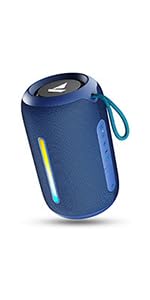
Image: A QR code for the boAt Hearables App, which provides additional support and features for the speaker.


