1. Ifihan
This manual provides detailed instructions for the safe and effective use of your KKnoon Digital Multimeter, specifically focusing on the FY128 model. This compact and intelligent electrical tester is designed for accurate measurements of various electrical parameters, making it suitable for professionals, educational institutions, and home users. It adheres to the safety requirements of the International Electrotechnical Safety Standard (IEC-61010) for electronic measuring instruments.
The multimeter features a 5999-count backlit LCD for clear readings, along with functions for AC/DC voltage, resistance, frequency, continuity, live wire checking, and Non-Contact Voltage (NCV) erin.

olusin 1: Iwaju view of the KKnoon Digital Multimeter (Model FY128) showing the display and control buttons.
2. Alaye Aabo
To ensure safe operation and prevent damage to the meter, please read and follow all safety instructions carefully. Improper use can result in electric shock or damage to the instrument.
- Always verify the meter's functionality before use by testing a known voltage tabi orisun lọwọlọwọ.
- Má ṣe kọjá iye ìtẹ̀síwájú tó pọ̀ jùlọ tí a sọ fún gbogbo ìwọ̀n.
- Ensure test leads are in good condition, free from cracks or damaged insulation, before connecting them to any circuit.
- Never use the meter if it appears damaged or if the casing ṣii.
- Ṣọra pupọ nigbati o ba n ṣiṣẹ pẹlu voltages loke 30V AC RMS, 42V tente oke, tabi 60V DC. Awọn wọnyi ni voltages duro a mọnamọna ewu.
- Yọ awọn itọsọna idanwo kuro ninu Circuit ṣaaju ki o to yi awọn iṣẹ tabi awọn sakani pada.
- Rọpo awọn batiri lẹsẹkẹsẹ nigbati ifihan batiri kekere ba han lati rii daju pe o peye awọn kika.
- Má ṣe lo mita náà níbi tí afẹ́fẹ́, èéfín, tàbí ibi tí eruku ti ń bò.
3. Awọn ẹya Ọja
The KKnoon Digital Multimeter offers a range of features designed for convenience and accuracy:
- Iṣẹ-ṣiṣe pupọ: Awọn iwọn AC/DC Voltage, Resistance, Frequency, Continuity, Live Wire Checking, and NCV (Non-Contact Voltagati).
- Two Measurement Modes:
- Auto Identification: Automatically detects and measures AC/DC voltage, frequency, resistance, and continuity.
- Yipada afọwọṣe: Allows selection of specific functions including AC/DC voltage, frequency, resistance, continuity, diode, capacitance (FY129C only), and LIVE NCV.
- Idaduro data: Lock the current measurement reading on the display with a single button press.
- Ifihan LCD nla: Provides clear and easy-to-read values with a 5999-count resolution.
- Flashlight & Screen Backlight: Ṣe ilọsiwaju hihan ni awọn ipo ina kekere.
- Compact Design with Bracket: Portable and includes a built-in support bracket for hands-free operation.
- Ibamu Aabo: Designed and produced according to IEC-61010 safety standards.

Figure 2: The multimeter's large LCD display clearly shows various measurement functions.

Figure 3: The integrated support bracket allows for convenient hands-free use.
4. Package Awọn akoonu
Nígbà tí o bá ṣí àpò rẹ, jọ̀wọ́ rí i dájú pé gbogbo àwọn ohun tí a kọ sí ìsàlẹ̀ yìí wà ní ipò tó dára:
- 1 x KKnoon Digital Multimeter (Model FY128)
- 1 x Méjì Àwọn Ìdánwò (Pupa àti Dúdú)
- 1 x Afọwọṣe olumulo (Gẹẹsi)
5. Eto
5.1 Fifi sori batiri
The multimeter requires 2 x 1.5V AAA batteries (not included). To install or replace batteries:
- Rí i dájú pé multimeter náà ti pa, àti pé a ti ge àwọn èdìdì ìdánwò náà kúrò.
- Wa ideri iyẹwu batiri ni ẹhin ẹrọ naa.
- Lo screwdriver lati ṣii yara batiri naa.
- Fi awọn batiri AAA 1.5V meji sii, ki o si kiyesi polarity ti o tọ (+/-) gẹgẹ bi a ti fihan ninu yara naa.
- Rọpo ideri kompaktimenti batiri ki o ni aabo pẹlu dabaru.
5.2 Nsopọ Awọn itọsọna Igbeyewo
The multimeter comes with a pair of test leads (red and black). Connect them as follows:
- Fi okun idanwo dudu sinu apoti titẹ sii 'COM' (Common).
- Insert the red test lead into the 'INPUT' jack for most measurements (Voltage, Resistance, Frequency, Continuity, Diode, Capacitance).

Figure 4: Labeled diagram of the multimeter's functions and input jacks.
6. Awọn ilana Iṣiṣẹ
6.1 Agbara Tan / Pa
Tẹ bọtini agbara pupa (Bọtini Agbara) to turn the multimeter on or off. The device features an auto-shutdown function to conserve battery life after a period of inactivity.
6.2 Awọn ọna wiwọn
The multimeter offers two primary measurement modes:

Figure 5: The multimeter supports both auto identification and manual switching modes.
- Auto Identification Mode: When powered on, the meter defaults to auto identification. In this mode, it automatically detects and measures AC/DC voltage, frequency, resistance, and continuity. Simply connect the test leads to the circuit, and the meter will display the relevant measurement.
- Ipo Iyipada Afọwọṣe: To access specific functions not covered by auto identification or to manually select a range, press the 'NCV/LIVE' button (or other function buttons if available on your specific model, e.g., FY129C for Diode/Capacitance). This allows you to cycle through AC/DC voltage, frequency, resistance, continuity, LIVE, and NCV.
6.3 Iwọn AC / DC Voltage
- Connect the black test lead to the 'COM' jack and the red test lead to the 'INPUT' jack.
- If in auto identification mode, the meter will automatically detect voltage. If in manual mode, select the appropriate AC or DC voltagiṣẹ e.
- So awọn okun idanwo pọ ni afiwe kọja paati tabi iyika ti a o wọn.
- Ka voltage iye lori ifihan LCD.
6.4 Idiwọn Resistance
- Rii daju pe iyika naa ti ni agbara ṣaaju idiwọn resistance.
- Connect the black test lead to 'COM' and the red test lead to 'INPUT'.
- If in auto identification mode, the meter will automatically detect resistance. If in manual mode, select the resistance function (Ω).
- Connect the test leads across the component whose resistance you wish to measure.
- Ka iye resistance lori ifihan LCD.
6.5 Wiwọn Igbohunsafẹfẹ
- Connect the black test lead to 'COM' and the red test lead to 'INPUT'.
- If in auto identification mode, the meter will automatically detect frequency. If in manual mode, select the frequency function (Hz).
- Connect the test leads to the circuit where frequency is to be measured.
- Ka iye igbohunsafẹfẹ lori ifihan LCD.
6.6 Igbeyewo Ilọsiwaju
- Rí i dájú pé ẹ̀rọ náà kò ní agbára púpọ̀.
- Connect the black test lead to 'COM' and the red test lead to 'INPUT'.
- If in auto identification mode, the meter will automatically detect continuity. If in manual mode, select the continuity function (★)).
- Touch the test leads to the two points of the circuit or component you want to test.
- A continuous beep indicates a low resistance path (continuity). The display will show the resistance value.
6.7 Live Wire Checking
This function helps identify live AC wires.
- Connect the black test lead to 'COM' and the red test lead to 'INPUT'.
- Press the 'NCV/LIVE' button until 'LIVE' is indicated on the display.
- Insert the red test lead into the socket or touch it to the wire you suspect is live.
- The meter will beep and the display will indicate 'LIVE' if a live wire is detected.
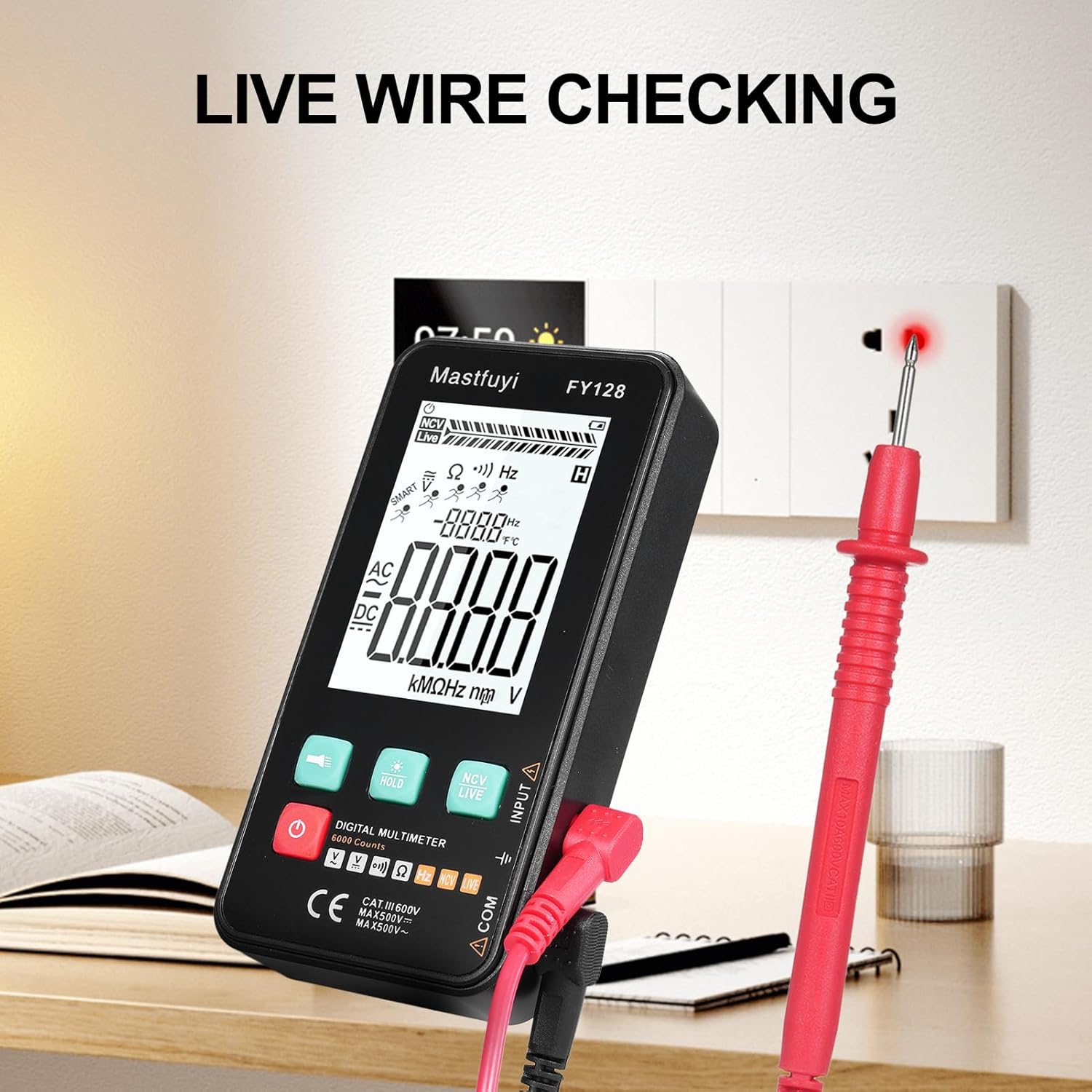
Figure 6: Using the multimeter for live wire detection.
6.8 NCV (Ti kii ṣe Olubasọrọ Voltage) Idanwo
Iṣẹ́ NCV gba láàyè láti rí i pé a ti lo AC voltage lai taara olubasọrọ.
- Press the 'NCV/LIVE' button until 'NCV' is indicated on the display.
- Bring the top front part of the multimeter close to the wire or electrical outlet.
- The meter will beep and the NCV indicator on the display will illuminate or increase in intensity as it detects AC voltage.

Àwòrán 7: Ìdìpọ̀ Tí Kò Ní Ìfọwọ́kàntage (NCV) erin ni ilọsiwaju.
6.9 Data idaduro Išė
To freeze the current reading on the display, press the 'HOLD' button. Press it again to release the hold and resume live measurements.
6.10 Flashlight & Backlight
Press the flashlight button (🔦) to turn on the built-in flashlight. Long press the 'HOLD' button to activate the screen backlight for improved visibility in dark environments.
7. Itọju
7.1 Batiri Rirọpo
When the low battery indicator appears on the display, replace the batteries as described in Section 5.1. Always use new 1.5V AAA batteries.
7.2 Ninu
Lati nu multimeter, nu ọran naa pẹlu ipolowoamp asọ ati ki o kan ìwọnba detergent. Maṣe lo awọn abrasives tabi awọn nkan ti o nfo. Rii daju pe ẹrọ naa ti gbẹ patapata ṣaaju lilo.
7.3 Ibi ipamọ
If the multimeter is not used for an extended period, remove the batteries to prevent leakage and corrosion. Store the device in a cool, dry place, away from direct sunlight and extreme temperatures.
8. Laasigbotitusita
Tí o bá ní ìṣòro pẹ̀lú multimeter rẹ, wo àwọn ìṣòro àti ìdáhùn tó wọ́pọ̀ wọ̀nyí:
| Isoro | Owun to le Fa | Ojutu |
|---|---|---|
| Ko si ifihan tabi baibai àpapọ | Awọn batiri kekere tabi okú; Fifi sori ẹrọ batiri ti ko tọ | Rọpo awọn batiri; Ṣayẹwo polarity batiri |
| Awọn kika ti ko pe | Low batteries; Damaged test leads; Incorrect function selected | Replace batteries; Inspect/replace test leads; Select correct measurement function |
| Idanwo ilosiwaju ko dun rara | Open circuit; High resistance; Incorrect function | Ensure circuit is closed; Check for breaks; Select continuity function |
| Mita ko dahun | Frozen display (Data Hold); Internal fault | Press 'HOLD' button to release; Contact customer support if issue persists |
9. Awọn pato
The following specifications apply to the KKnoon Digital Multimeter Model FY128 (and FY128C, unless specified for FY129C):
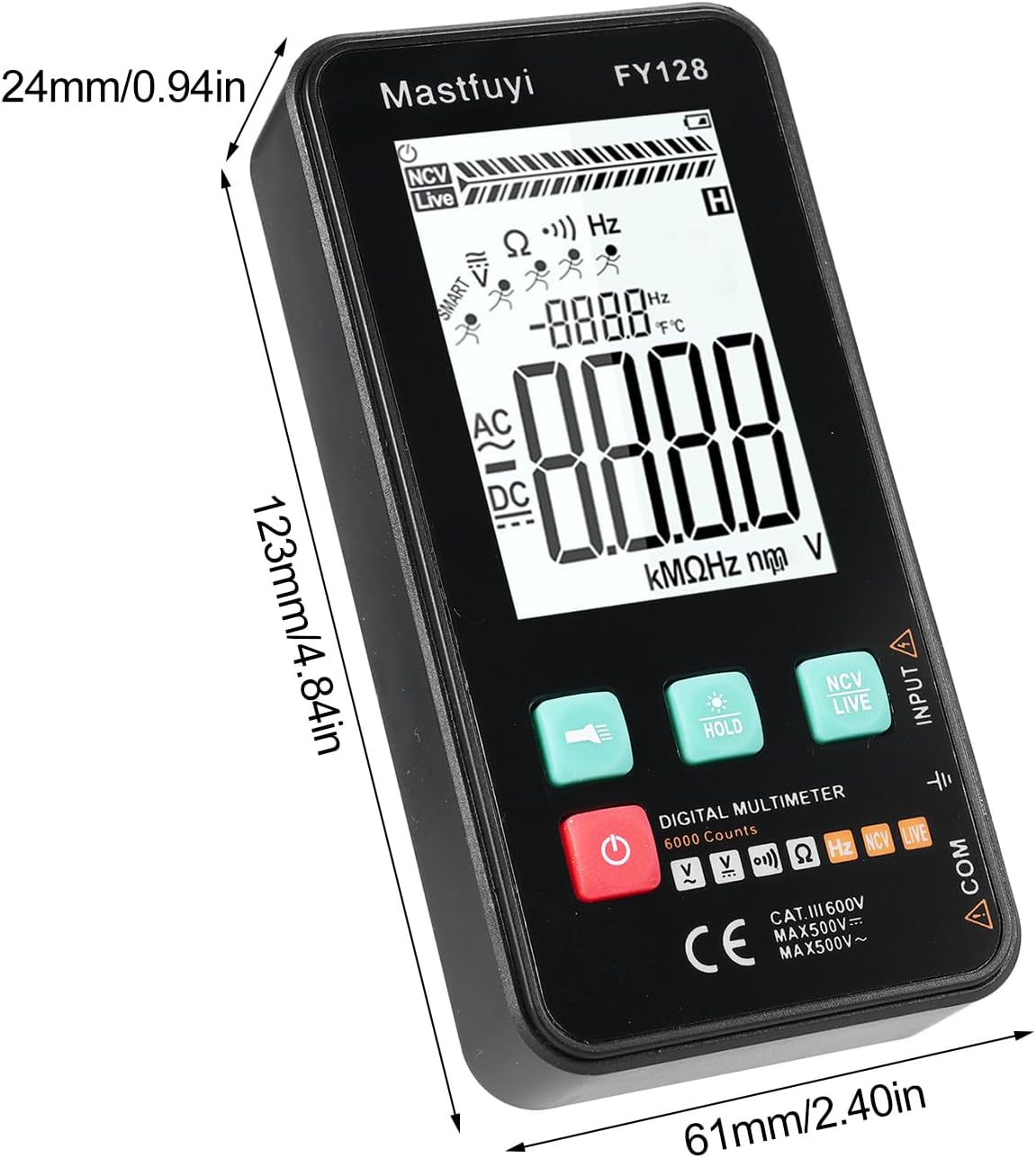
Figure 8: Physical dimensions of the KKnoon Digital Multimeter.
| Paramita | Specification (FY128/FY128C) | Specification (FY129C - if different) |
|---|---|---|
| AC Voltage | 1V~500V, ±(1.5%+3) | 0.8V~500V, ±(1.5%+5) |
| DC Voltage | 0.5V~500V, ±(1.2%+5) | 0.8V~500V, ±(1.2%+5) |
| Atako | 30Ω~10000KΩ, ±(2%+5) | 30Ω~60000KΩ, ±(2%+5) |
| Igbohunsafẹfẹ | 40Hz~1000Hz, ±(2.5%+5) | 10Hz~6000Hz, ±(2.5%+5) |
| Agbara | N/A | 6nf~60000µf, ±(2.5%+5) |
| Iwọn otutu | N/A | -20℃~1000℃, ±(5%+4) |
| Ibaramu otutu | N/A | 0℃ ~ 70℃ |
| Diode | Rara | Bẹẹni |
| Itesiwaju | Bẹẹni | Bẹẹni |
| NCV | Bẹẹni | Bẹẹni |
| Live Wire Checking | Bẹẹni | Bẹẹni |
| Tiipa aifọwọyi | Bẹẹni | Bẹẹni |
| Ibi ti ina elekitiriki ti nwa | 2 * 1.5V AAA batteries (Not included) | 2 * 1.5V AAA batteries (Not included) |
| Iwọn Nkan | 123 * 61 * 24mm / 4.84 * 2.40 * 0.94in | 123 * 61 * 24mm / 4.84 * 2.40 * 0.94in |
| Iwọn Nkan | 113g / 3.98 iwon | 113g / 3.98 iwon |
10. Atilẹyin ọja ati Support
For warranty information or technical support, please refer to the product packaging or contact your retailer. Keep your purchase receipt as proof of purchase. For general inquiries, you may visit the KKnoon brand page on Amazon.
