1. Ifihan
O ṣeun fun riraasing the ZEBRONICS VITA BAR 200 Mini Soundbar. This manual provides essential information for the proper setup, operation, and maintenance of your device. Please read this manual carefully before use to ensure optimal performance and to prevent damage.

Image 1.1: The ZEBRONICS VITA BAR 200 Mini Soundbar, showcasing its sleek design and integrated multicolor LED lighting.
2. Ohun ti o wa ninu Apoti
Jọwọ ṣayẹwo awọn akoonu package lati rii daju pe gbogbo awọn ohun kan wa:
- Speaker - 1 Unit
- Charging Cable - 1 Unit (Type-C)
- AUX Cable - 1 Unit
- QR code Guide - 1 Unit
3. Awọn ẹya Ọja
- Ijade ti o lagbara: Delivers a robust 24W RMS output for immersive sound.
- Dual Passive Radiators: Enhances bass performance for deeper, richer low-frequency sounds.
- Multi-Connectivity: Supports Bluetooth v5.3, USB, and AUX for versatile audio source connections.
- Awakọ Meji: Provides clear, dynamic sound across a wide frequency range.
- Atọka LED: Built-in LED provides visual cues for power and connectivity status.
- Àkókò eré tó gùn: Integrated rechargeable battery offers up to 8 hours of playback (at 50% volume, LED off).
- LED awọ-pupọ: Customizable LED modes add vibrant visual effects.
- Awọn iṣakoso ogbon: Easy adjustment of audio settings directly on the device.

Image 3.1: Illustration highlighting the 24W (12W + 12W) RMS output, dual passive radiators, and dual powerful drivers of the soundbar.

Image 3.2: The soundbar displaying various multicolor LED modes, enhancing the aesthetic appeal.

Image 3.3: Visual representation of the soundbar's built-in rechargeable battery, providing up to 8 hours of backup at 50% volume with LED off.
4. Eto
4.1 Charging the Soundbar
- Connect the provided Type-C charging cable to the charging port on the soundbar.
- So opin okun miiran pọ si ohun ti nmu badọgba agbara USB (kii ṣe pẹlu) tabi ibudo USB ti kọnputa kan.
- The LED indicator will illuminate to show charging status. It will change or turn off once fully charged.
4.2 Titan / Pa a
- To power on, slide the ON/OFF switch to the 'ON' position.
- To power off, slide the ON/OFF switch to the 'OFF' position.
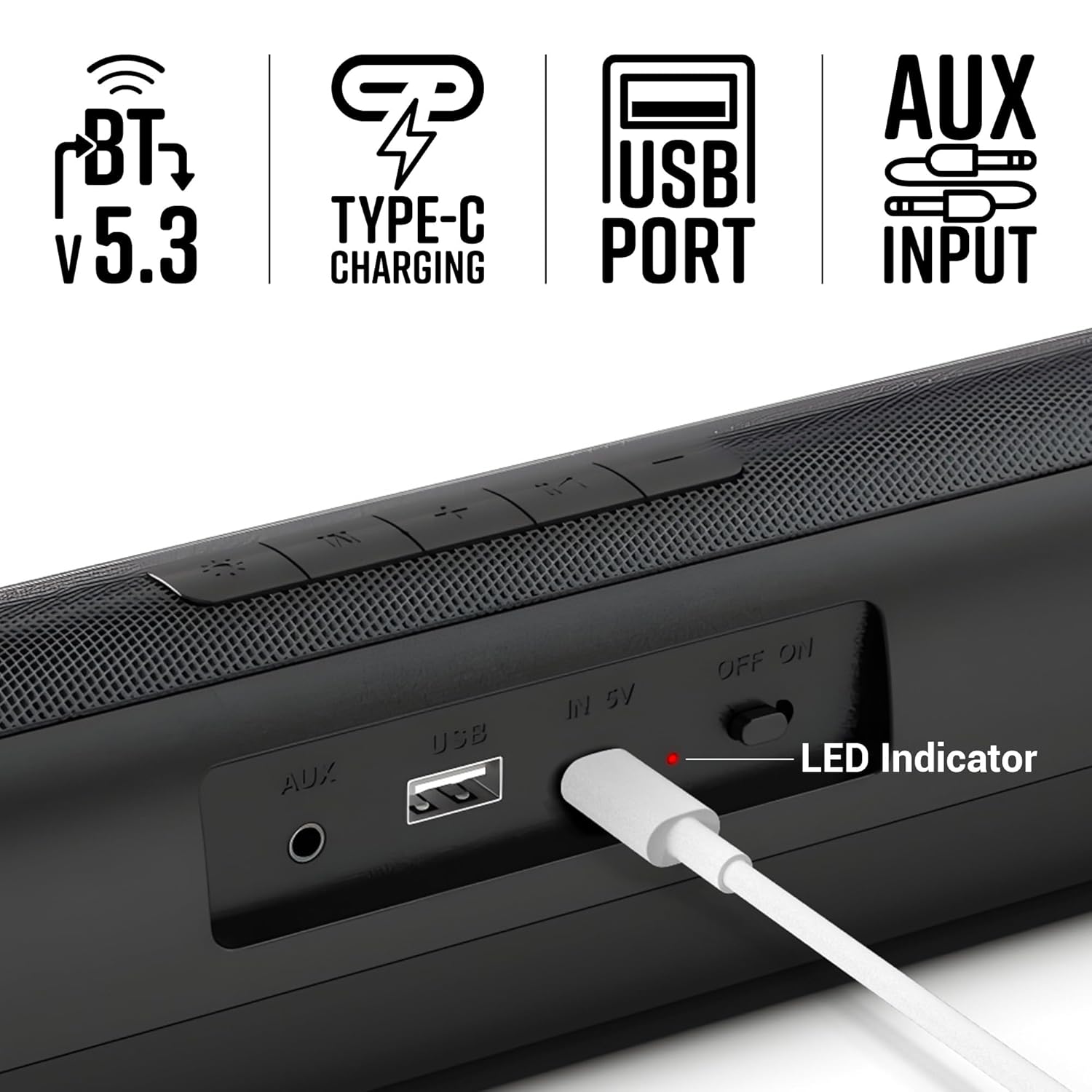
Aworan 4.1: Isunmọ view of the soundbar's rear panel, showing the AUX input, USB port, Type-C charging port, ON/OFF switch, and LED indicator.
5. Awọn ilana Iṣiṣẹ
5.1 Ipo Bluetooth
- Turn on the soundbar. It will automatically enter Bluetooth pairing mode.
- Mu Bluetooth ṣiṣẹ lori foonuiyara tabi ẹrọ miiran.
- Wa fun "Zeb-VITA BAR 200" in the list of available devices and select it to pair.
- Nígbà tí a bá ti so pọ̀, ọ̀pá ohùn náà yóò fi hàn pé a ti ṣe àṣeyọrí sí ìsopọ̀ náà.
5.2 USB Ipo
- Fi awakọ USB kan ti o ni ohun ti o ni ninu files sinu USB ibudo lori awọn soundbar.
- The soundbar will automatically switch to USB mode and begin playing audio.
5.3 AUX Ipo
- Connect one end of the provided AUX cable to the AUX input on the soundbar.
- Connect the other end to the audio output of your device (e.g., smartphone, TV, computer).
- The soundbar will automatically switch to AUX mode.
5.4 Awọn iṣakoso
The soundbar features intuitive control buttons on its top panel:
- Iwọn didun isalẹ (-): Din iwọn didun.
- Previous Track (<<): Rekọja si orin ti tẹlẹ.
- Play/Pause (►▮▮): Ó máa ń gbé ohùn sókè tàbí ó máa ń dá dúró.
- Next Track (>>): Rekọja si orin atẹle.
- Iwọn didun soke (+): Mu iwọn didun pọ si.
- Ipo (M): Switches between Bluetooth, USB, and AUX modes.
- LED Light Control (☀): Toggles or changes multicolor LED modes.
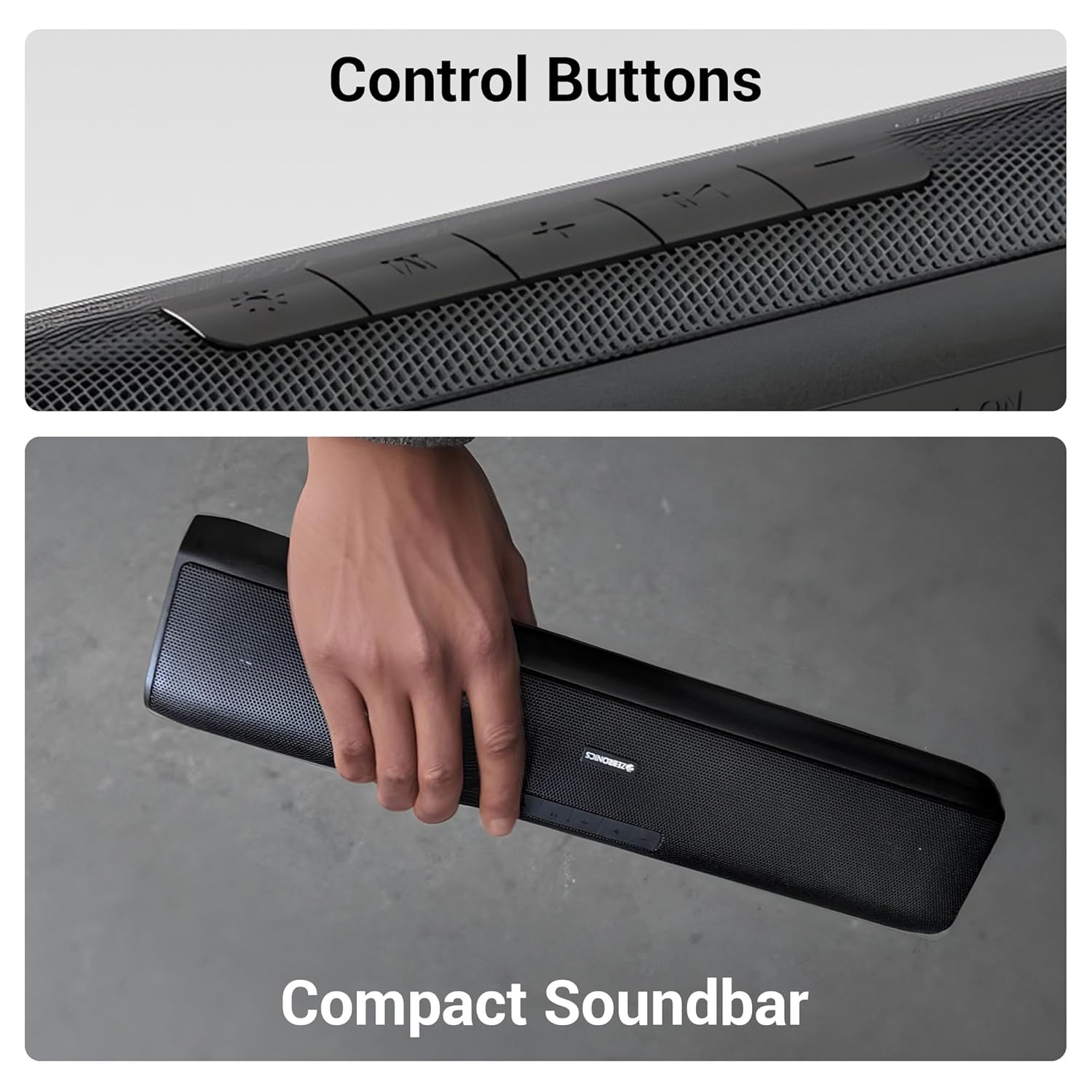
Aworan 5.1: alaye view of the control buttons located on the top surface of the soundbar.
6. Itọju
6.1 Ninu
- Use a soft, dry cloth to clean the surface of the soundbar.
- Do not use liquid cleaners or aerosol sprays directly on the device.
6.2 Ibi ipamọ
- Tọju ọpa ohun ni itura, aye gbigbẹ kuro lati orun taara ati awọn iwọn otutu to gaju.
- Ti o ba wa ni ipamọ fun akoko ti o gbooro sii, gba agbara si batiri lorekore lati ṣetọju ilera rẹ.
6.3 batiri Itọju
- Yago fun gbigba agbara si batiri ni kikun nigbagbogbo.
- Ma ṣe fi batiri han si awọn iwọn otutu giga.
7. Laasigbotitusita
| Isoro | Owun to le Fa | Ojutu |
|---|---|---|
| Ko si agbara | Batiri ti wa ni imugbẹ | Charge the soundbar using the provided Type-C cable. |
| Ko si ohun | Iwọn didun ti lọ silẹ tabi dakẹ | Increase the volume on the soundbar and your connected device. |
| Bluetooth ko sopọ | Soundbar not in pairing mode or too far | Ensure the soundbar is in Bluetooth mode and within range (10 meters). Forget the device on your phone and re-pair. |
| Iyipada ohun | Volume too high or poor source quality | Din iwọn didun. Gbiyanju orisun ohun ti o yatọ tabi file. Ensure AUX cable is fully inserted. |
8. Awọn pato
| Ẹya ara ẹrọ | Ẹ̀kúnrẹ́rẹ́ |
|---|---|
| Orukọ awoṣe | Zeb-VITA BAR 200 |
| Agbọrọsọ Iru | Pẹpẹ Ohùn Mini |
| Agbara Ijade | 24 Wattis RMS |
| Asopọmọra | Bluetooth v5.3, USB, AUX |
| Igbesi aye batiri | Up to 8 Hours (at 50% volume, LED off) |
| Gbigba agbara Iru | Iru-C |
| Awọn iwọn Ọja (D x W x H) | 8.5D x 41W x 6.8H |
| Iwọn Nkan | 857 giramu |
| Ipalara | 3 ohm |
| Ọna Iṣakoso | Bọtini |

Image 8.1: Diagram illustrating the physical dimensions of the ZEBRONICS VITA BAR 200 soundbar.
9. Atilẹyin ọja ati Support
The ZEBRONICS VITA BAR 200 Mini Soundbar comes with a standard manufacturer's warranty. Please refer to the warranty card included in your package for specific terms and conditions, including the warranty period and coverage details.
For technical support, service, or warranty claims, please contact ZEBRONICS customer service through their official webaaye tabi alaye olubasọrọ ti a pese ninu iwe ọja rẹ.
Olupese: Zebronics India Private Limited
Adirẹsi: No.13/7, Smith Road, Royapettah, Chennai - 600 002


