1. Ifihan
This manual provides detailed instructions for the installation, operation, and maintenance of your SJoyBring 7-Inch Double Din Car Stereo. Please read this manual thoroughly before using the product to ensure proper functionality and safety. Keep this manual for future reference.
2. Alaye Aabo
- A ṣe iṣeduro fifi sori Ọjọgbọn: Nítorí ìṣòro tó wà nínú àwọn ẹ̀rọ ohùn ọkọ̀ ayọ́kẹ́lẹ́, a gbani nímọ̀ràn láti fi ẹ̀rọ náà síṣẹ́ ní ọ̀jọ̀gbọ́n kí ó má baà ba ẹ̀rọ náà tàbí ọkọ̀ rẹ jẹ́.
- Dash Size Verification: Before installation, ensure your vehicle's dashboard opening size is compatible with this stereo (standard US vehicle double din: 170*97mm). An additional dash kit may be required if the dimensions do not match.
- Asopọmọra: Carefully follow the wiring diagram provided. Incorrect wiring can cause damage or malfunction.
- Aabo awakọ: Do not operate features that require significant attention while driving. Always prioritize safe driving practices.
- Ibi ti ina elekitiriki ti nwa: Ensure the car stereo is connected to a 12V DC power supply with negative grounding.
3. Package Awọn akoonu
Daju pe gbogbo awọn nkan ti a ṣe akojọ rẹ si isalẹ wa ninu package rẹ:
- SJoyBring 7-Inch Double Din Car Stereo Unit
- Isakoṣo latọna jijin
- Ikun iṣan
- Àwọn Békẹ́ẹ̀tì (Ohun èlò ìfìsókòó)
- Awọn skru
- Ẹyìn View Kamẹra
- Okun Kamẹra Afẹyinti
- Itọsọna olumulo
- Additional Frames (2, for use if needed)

Image: Main unit, remote control, and included backup camera.
4. Ọja Ipariview
4.1 Iwaju Panel idari
- Bọtini Agbara / Ipo: Press to turn on/off, short press to switch modes.
- Bọtini Iwọn didun: Yiyi lati ṣatunṣe iwọn didun.
- Bọtini Ile: Pada si akojọ aṣayan akọkọ.
- Dahun/Fi awọn ipe duro: Dedicated buttons for phone calls.
- Bọtini atunto: Small button for system reset.
- Soketi kaadi SD: For media playback from an SD card.
- Socket USB: For media playback, phone charging, and wired Mirror Link.
4.2 Ru Panel Awọn isopọ
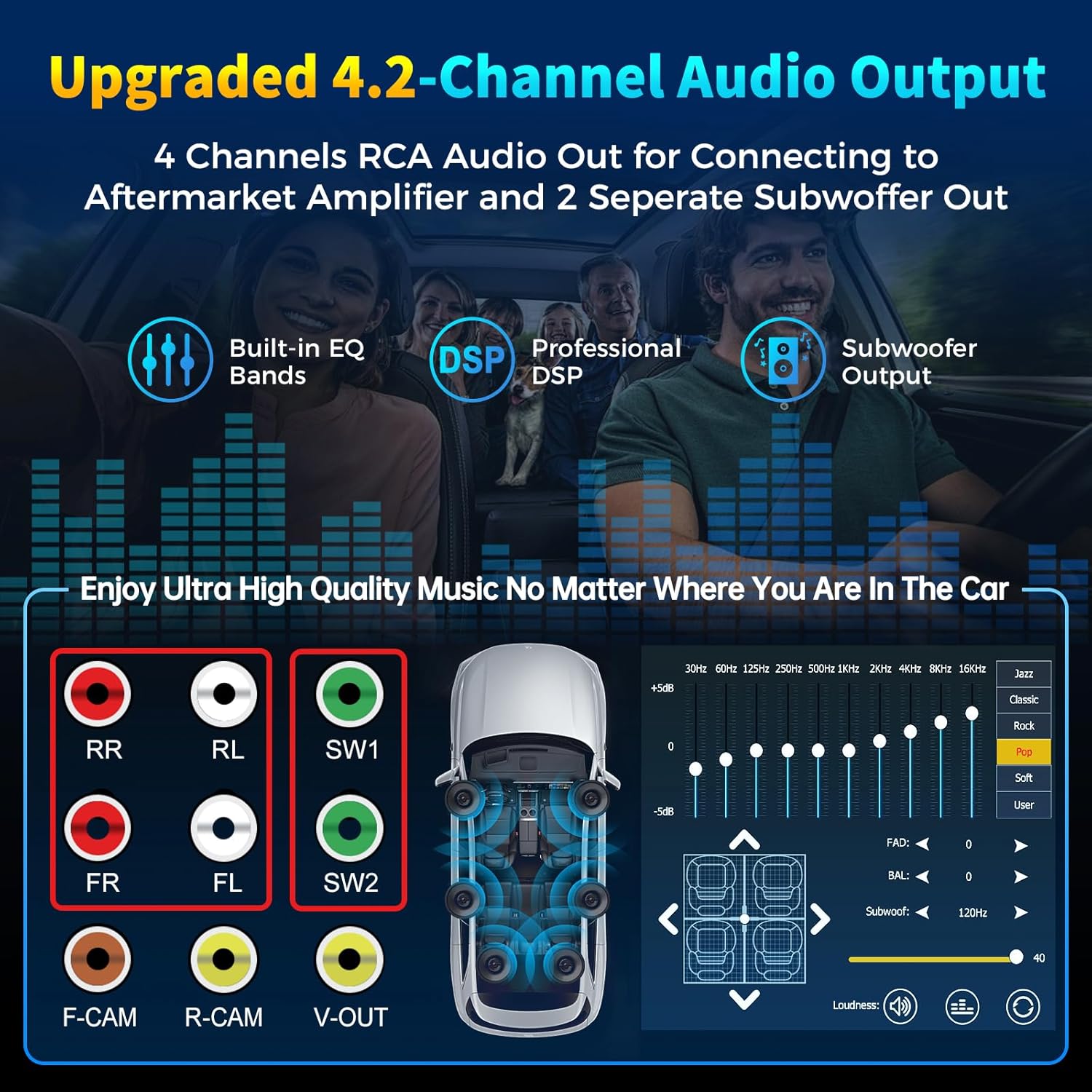
Image: Rear panel of the stereo unit, highlighting RCA pre-amplifier outputs, subwoofer outputs, and camera inputs.
- 4 Channels Pre-amplifier (RCA): Front Right (FR), Front Left (FL), Rear Right (RR), Rear Left (RL) outputs for connecting to an aftermarket amplifier.
- 2 Subwoofer Outputs (SW1, SW2): Dedicated outputs for connecting subwoofers.
- Front Camera Input (F-CAM): RCA input for an optional front view kamẹra.
- Rear Camera Input (R-CAM): RCA input for the included backup camera.
- Video Output (V-OUT): RCA video output.
- Extra Bluetooth Antenna: Enhances Bluetooth connection stability.
- Power Harness Connector: Main power and speaker wire connection.
5. Itọsọna fifi sori ẹrọ
The SJoyBring car stereo is designed for a standard double din opening. Ensure your vehicle's dash size is suitable. If not, an additional dash kit may be required. It is recommended to have this unit installed by a professional car audio technician.
5.1 Dimensions and Wiring Diagram

Image: Detailed diagram illustrating the physical dimensions of the stereo unit and the comprehensive wiring connections for power, speakers, external amplifier, cameras, and steering wheel controls.
- Power Connections (Section A): Connect the Yellow wire to +12V (B+), Black to Ground (GND), Red to +12V ACC (ignition switch), Orange to Illuminate light, and Blue to Auto Antenna/Amplifier.
- Speaker Connections (Section B): Connect the corresponding speaker wires (Grey, White, Green, Purple) to your vehicle's front and rear speakers.
- Special Function Wires (Section C): Connect the Brown wire to Brake detect, Pink to Back car control (for reverse camera trigger), Green to Steering wheel control 1, Green/Black to Steering wheel control 2, and Pink/Black to Front view camera power supply.
- Àwọn ìsopọ̀ RCA: So ita amplifiers, subwoofers, and cameras to the corresponding RCA ports on the rear panel as shown in the diagram.
Akiyesi pataki: Some vehicles may require additional accessories such as a wire harness adapter and a radio antenna adapter for proper installation. These are typically specific to your car model and are not included.
6. Eto
6.1 Ibẹrẹ Agbara-On
After successful installation, turn on your vehicle's ignition. The stereo unit should power on automatically. If not, press the Power/Mode button on the front panel.
6.2 Eto eto
From the main menu, navigate to the 'Setup' icon to access system configurations.
- Èdè: Yan ede ti o fẹ fun wiwo olumulo.
- Eto akoko: Ṣatunṣe awọn eto ọjọ ati akoko.
- Ifihan: Customize display options, including brightness and wallpaper. You can choose from pre-installed wallpapers or upload your own via USB.
- Ohun: Access equalizer settings, fader/balance controls, and subwoofer adjustments.
- Eto Bluetooth: Manage Bluetooth pairing and connection settings.
7. Awọn ilana Iṣiṣẹ
7.1 Alailowaya CarPlay ati Android Auto
This unit supports wireless Apple CarPlay and Android Auto, allowing seamless integration of your smartphone's features onto the stereo display without a USB cable. Access navigation, music, calls, and messages through a simplified interface.

Image: The stereo display showing the Apple CarPlay interface, providing access to phone, music, maps, messages, and other applications.
Iṣakoso ohun: Utilize intelligent voice assistants (Siri for CarPlay, Google Assistant for Android Auto) to make calls, navigate, play music, and more, ensuring hands-free operation for safer driving.
Fidio: Ipariview of the SJoyBring 7-Inch Double Din Car Stereo, demonstrating features such as wireless CarPlay and Android Auto connectivity, audio adjustments, real-time navigation, voice control, steering wheel control compatibility, wired mirror link, and front/backup camera support.
7.2 Bluetooth Išė
The independent Bluetooth module and antenna provide a stable, fast, and clear connection for wireless audio streaming and hands-free calling. The built-in ultra-clear microphone ensures clear call quality and accurate voice control.

Image: The Bluetooth call screen on the stereo, displaying options to end, mute, use keypad, or add a call.
7.3 Mirror Link
The Mirror Link function supports both iOS and Android phones. Connect your smartphone via USB to mirror its screen onto the stereo's 7-inch HD touchscreen. This allows you to view apps like Google Maps, Spotify, or YouTube directly on the larger display.

Image: A smartphone connected to the car stereo via USB, demonstrating the Mirror Link feature where the phone's display is replicated on the stereo's screen.
7.4 4.2-Channel Audio Output
The stereo features 4 channels of RCA audio output for connecting to aftermarket amplifiers and 2 separate subwoofer outputs. This configuration allows for enhanced sound quality and powerful bass effects.

Image: A diagram showing the 4.2-channel audio output system, including connections for front, rear, and subwoofer speakers, along with an equalizer interface.
Oluṣatunṣe (EQ): Adjust audio frequencies to customize your listening experience. The unit includes multiple preset EQ modes (e.g., Jazz, Classic, Rock, Pop, Soft) and a user-definable mode.
7.5 FM / AM Redio
Access FM and AM radio stations. Use the scan function to find available stations and save your favorites as presets.
7.6 Rear and Front View Atilẹyin kamẹra
The car stereo supports both rear and front view cameras. When the vehicle shifts into reverse, the display automatically switches to the rear camera view. The included HD night vision rear view camera offers a wide viewing angle and waterproof design for safer parking.
Image: A split screen showing the view from a front camera (top) and a rear camera with parking guidelines (bottom) on the car stereo display.
8. Itọju
To maintain the performance and appearance of your SJoyBring car stereo:
- Ninu: Lo aṣọ rírọrùn tí ó gbẹ láti nu ìbòjú àti ìta. Yẹra fún àwọn ohun ìfọmọ́ tàbí àwọn ohun èlò ìfọ́mọ́ra.
- Yago fun Olomi: Do not allow liquids to enter the unit, as this can cause damage.
- Iwọn otutu: Yago fun ṣiṣafihan ẹyọ naa si awọn iwọn otutu to gaju.
9. Laasigbotitusita
If you encounter issues with your SJoyBring car stereo, refer to the following common problems and solutions:
- Ko si Agbara: Check all power connections (Yellow, Black, Red wires) to ensure they are securely connected and receiving power. Verify vehicle fuses.
- Ko si Ohun: Check speaker wiring connections. Ensure the volume is not muted or set too low. Verify external amplifier connections if used.
- Awọn oran Asopọmọra Bluetooth: Ensure Bluetooth is enabled on both the stereo and your smartphone. Delete previous pairings and attempt to re-pair. Ensure the extra Bluetooth antenna is properly connected.
- CarPlay/Android Auto Ko Sopọ: For wireless connection, ensure Wi-Fi and Bluetooth are enabled on your phone. For wired Mirror Link, ensure the USB cable is securely connected and the phone's USB debugging mode (for Android) or trust prompt (for iOS) is accepted.
- Kámẹ́rà Àtìlẹ́yìn Kò Hàn: Check the R-CAM connection and ensure the Pink 'Back car control' wire is correctly connected to the vehicle's reverse light trigger.
- Iboju Ko dahun: Try pressing the Reset button with a thin object (e.g., a paperclip).
If problems persist after attempting these solutions, please contact SJoyBring customer support for further assistance.
10. Awọn pato
| Ẹya ara ẹrọ | Sipesifikesonu |
|---|---|
| Iwọn Ifihan | 7 Inṣi |
| Ipinnu Ifihan | 1024 x 600 (Supports 1920 x 1080P video playback) |
| Asopọmọra Technology | Bluetooth, USB |
| Pataki Awọn ẹya ara ẹrọ | Wireless Apple CarPlay, Android Auto, Built-In Wi-Fi, DSP, GPS Navigation (via phone mirroring) |
| Ipo Ijade Ohun | Sitẹrio |
| Kakiri Ohun ikanni iṣeto ni | 4.2 |
| Fidio fifi koodu | H.264, H.265 / HEVC, MPEG-4 |
| Iwọn Nkan | 2.72 iwon |
| Package Mefa | 9.21 x 6.34 x 6.14 inches |
| Nọmba awoṣe | 27a18396-8e56-4cb0-90fe-8164166a6ab7 |
11. Atilẹyin ọja ati Support
This SJoyBring car stereo unit comes with a 1-odun atilẹyin ọja lati ọjọ ti o ra. Atilẹyin ọja yi ni wiwa awọn abawọn iṣelọpọ ati ailagbara labẹ lilo deede.
For technical support, troubleshooting assistance, or warranty claims, please contact SJoyBring customer service through the retailer where the product was purchased or visit the official SJoyBring webojula fun alaye olubasọrọ.