1. Ifihan
This manual provides essential instructions for the safe and effective operation of the CONTEC TP500(LED) Non-Contact Infrared Thermometer. This device is designed for accurate and rapid temperature measurement without physical contact, suitable for infants, children, and adults. Please read this manual thoroughly before use and retain it for future reference.

Figure 1: CONTEC TP500(LED) Non-Contact Infrared Thermometer.
2. Alaye Aabo
- Ma ṣe fi thermometer bọ inu omi tabi awọn olomi miiran.
- Pa ẹrọ naa mọ kuro ninu oorun taara, iwọn otutu to lagbara, ati ọriniinitutu giga.
- Yago fun sisọ ẹrọ naa silẹ tabi fifisilẹ si awọn ipa to lagbara.
- Do not attempt to disassemble or repair the device yourself. Contact customer support if service is required.
- Pa awọn batiri mọ kuro lọwọ awọn ọmọde. Pa awọn batiri ti a ti lo mọ daradara gẹgẹbi ofin agbegbe.
- This device is intended for household use. Consult a medical professional for any health concerns or persistent fever.
- Ensure the measurement probe is clean before each use to maintain accuracy and hygiene.
3. Awọn ẹya Ọja
- Wiwọn ti kii ṣe Olubasọrọ: Measures temperature without physical contact, reducing discomfort and potential cross-contamination.
- Precise Infrared Probe: Utilizes an advanced infrared sensor for accurate and rapid temperature readings within 1 second.
- Ifihan LED nla: Clear and easy-to-read LED display, visible even in low light conditions or at night.
- Iṣẹ Iranti: Stores up to 30 groups of measurement values, allowing for easy tracking of temperature trends.
- Fever Warning: Intelligent sound and light prompts indicate different temperature levels (normal, low fever, high fever) for quick assessment.
- Tiipa Aifọwọyi: Device automatically turns off after 5 seconds of inactivity to conserve battery life.
- Iyipada Ẹka: Easily switch between Celsius (°C) and Fahrenheit (°F) as preferred.
- Atọka Batiri Kekere: Alerts the user when batteries need replacement.

Figure 2: Understanding the display indicators.
4. Eto
4.1 Fifi sori batiri
- Wa ideri ibi ipamọ batiri naa lori ọwọ ti iwọn otutu naa.
- Slide or open the cover according to the indicator marks.
- Insert two "AAA" batteries, ensuring correct polarity (+/-) as indicated inside the compartment.
- Pa ideri batiri naa ni aabo titi yoo fi tẹ si aaye.
Note: The package does not contain batteries. Please use two new "AAA" batteries for optimal performance.
5. Awọn ilana Iṣiṣẹ
5.1 Gbigba Idiwon
- Ensure the thermometer is clean and dry.
- Press the power button to turn on the device. The LED display will light up.
- Position the thermometer 1-3 cm (approximately 0.4-1.2 inches) from the center of the forehead. Ensure there is no hair, sweat, or cosmetics obstructing the measurement area.
- Press the measurement button (trigger) once. The temperature reading will appear on the LED display within 1 second.
- The device will provide sound and light prompts based on the measured temperature.
- The measurement will be automatically saved to the device's memory.

Figure 3: Proper measurement distance and placement on the forehead.
5.2 Yíyípadà láàrin Celsius (°C) àti Fahrenheit (°F)
- Tan thermometer.
- Long press the "M" (Memory) button to enter the memory interface.
- While in the memory interface, long press and hold the "M" button again to enter the setting mode.
- Press the "M" button briefly to toggle between Celsius (°C) and Fahrenheit (°F).
- Once your desired unit is displayed, release the button. The setting will be saved automatically.
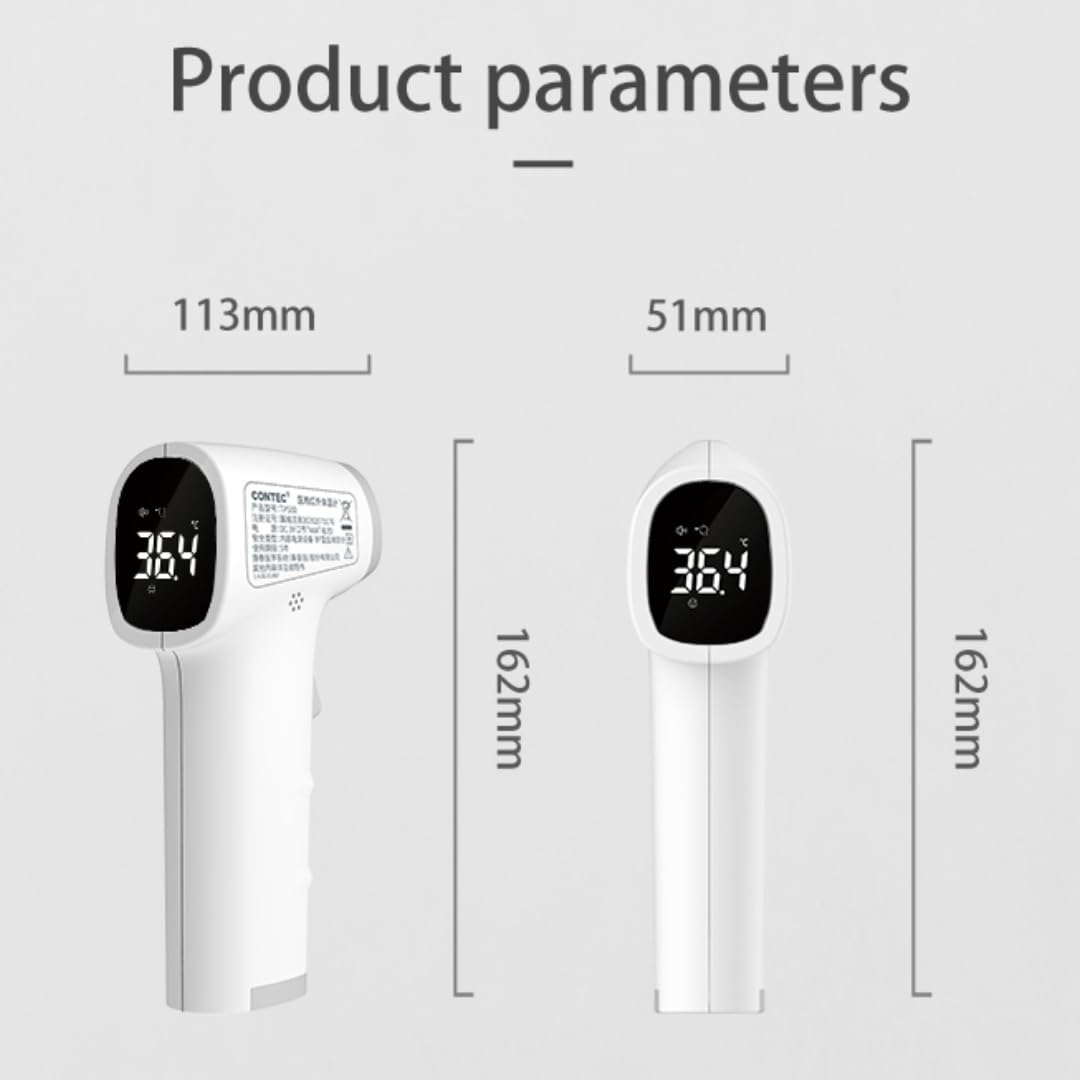
Figure 4: Celsius and Fahrenheit unit conversion.
5.3 Iṣẹ iranti
The CONTEC TP500(LED) thermometer automatically stores the last 30 temperature readings. To view past measurements:
- Tan thermometer.
- Briefly press the "M" (Memory) button to cycle through the stored readings. Each press will display the next stored value.

Figure 5: Memory function displaying temperature trends.
6. Itọju
6.1 Ninu
- Wipe the thermometer body with a soft, slightly damp asọ.
- For the infrared probe, gently clean with a cotton swab lightly moistened with 70% isopropyl alcohol. Allow it to dry completely before use.
- Má ṣe lo àwọn ohun ìfọṣọ, àwọn ohun èlò ìfọṣọ, tàbí kí o fi omi tẹ ẹ̀rọ náà mọ́lẹ̀.
6.2 Ibi ipamọ
- Store the thermometer in a cool, dry place, away from direct sunlight, extreme temperatures, and high humidity.
- If the device will not be used for an extended period (e.g., more than one month), remove the batteries to prevent leakage and potential damage.
7. Laasigbotitusita
| Isoro | Owun to le Fa | Ojutu |
|---|---|---|
| Ẹrọ ko tan. | Awọn batiri ti ku tabi fi sii lọna ti ko tọ. | Replace batteries with new "AAA" batteries, ensuring correct polarity. |
| Awọn kika ti ko pe. | Measurement distance too far or too close; dirty probe; environmental interference. | Ensure correct measurement distance (1-3 cm). Clean the infrared probe. Avoid measuring in areas with strong drafts or extreme temperature changes. |
| Cannot switch temperature units. | Ìtẹ̀lé bọ́tìnì tí kò tọ́. | Follow the steps in section 5.2 carefully: Turn on, long press 'M' to memory, then long press 'M' again to setting mode, brief press 'M' to toggle. |
| Ifihan fihan "Lo" tabi "Hi". | Iwọn otutu wa ni ita ibiti o le ṣe iwọn. | Ensure the thermometer is used within its specified operating temperature range. If measuring body temperature, ensure proper placement and that the subject's temperature is within the human body temperature range. |
8. Awọn pato
- Awoṣe: TP500
- Ọna Wiwọn: Non-contact Infrared
- Ijinna Wiwọn: 1-3 cm
- Ifihan: LED
- Ibi ipamọ Iranti: 30 awọn ẹgbẹ
- Tiipa Aifọwọyi: 5 aaya
- Orisun Agbara: Awọn batiri 2 x AAA (kii ṣe pẹlu)
- Igbesi aye batiri: O fẹrẹ to awọn iwọn 600
- Awọn ẹya pataki: Low Battery Indicator, Fever Warning
- Ohun elo: Ṣiṣu
- Àwọ̀: Funfun
- Awọn iwọn: Approximately 162mm (Height) x 113mm (Length) x 51mm (Width)

olusin 6: Awọn iwọn ọja.
9. Atilẹyin ọja ati Support
The CONTEC TP500(LED) Non-Contact Infrared Thermometer comes with a one-year warranty from the date of purchase. This warranty covers manufacturing defects and malfunctions under normal use.
For warranty claims, technical support, or any questions regarding the product, please contact CONTEC customer service. You can typically find contact information on the product packaging or through the official CONTEC webojula.
For purchases made on Amazon, you may also contact the seller, CONTEC, directly through your Amazon order history for assistance.