1. Ọja Ipariview
The Itel Buds Ace 2 are True Wireless Stereo (TWS) earbuds designed to deliver a premium audio experience with advanced features for daily use. These earbuds offer extended battery life, clear call quality, and a durable, comfortable design.

Image: Itel Buds Ace 2 TWS Earbuds in their open white charging case.
2. Ohun ti o wa ninu Apoti
Jọwọ ṣayẹwo awọn akoonu package lati rii daju pe gbogbo awọn ohun kan wa:
- Itel Buds Ace 2 TWS Earbuds (Left and Right)
- Ngba agbara Case
- USB Iru-C Ngba agbara USB
- Awọn imọran Eti Afikun (awọn titobi oriṣiriṣi)
- Afowoyi Olumulo (iwe-ipamọ yii)
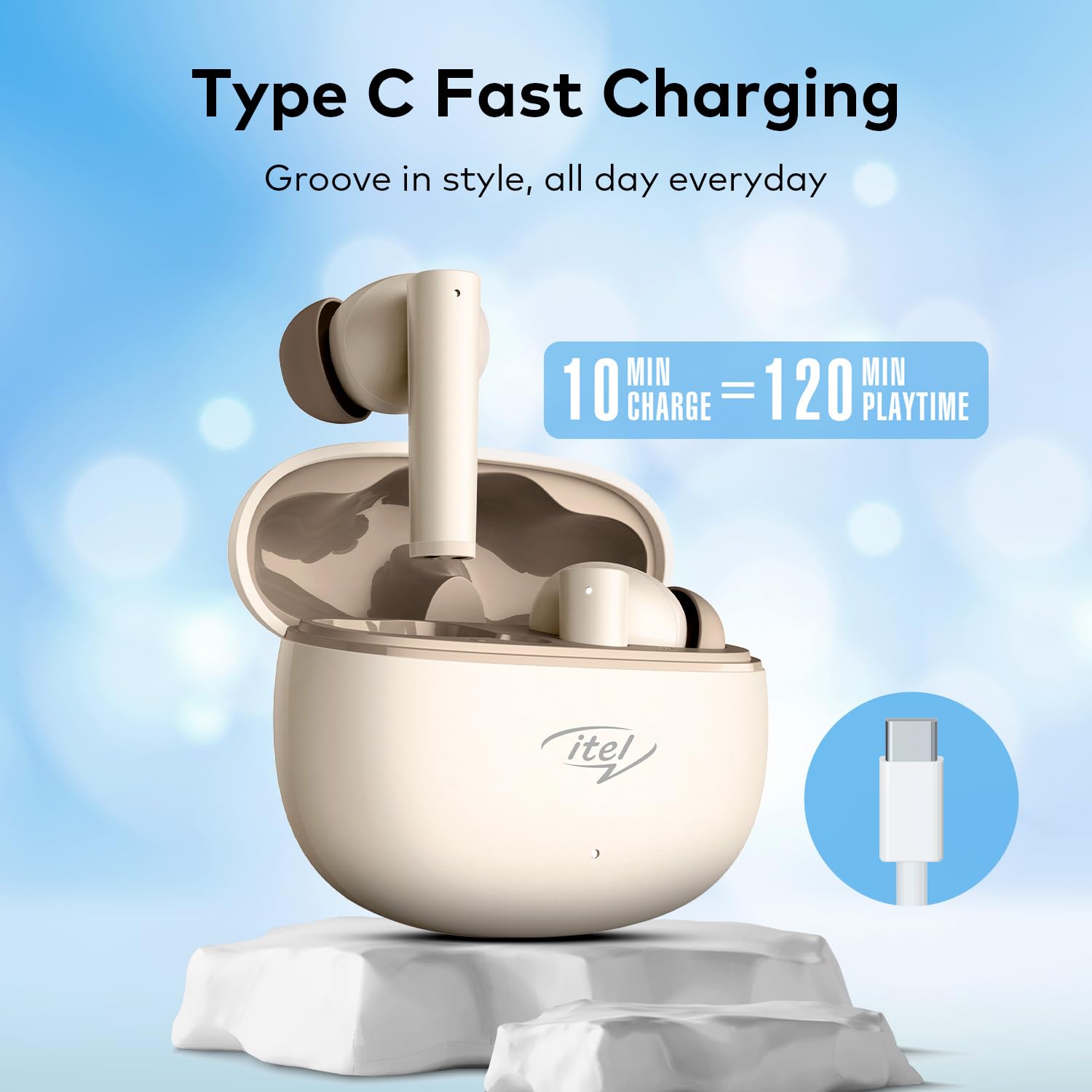
Image: The Itel Buds Ace 2 earbuds, charging case, and USB Type-C cable laid out.
3. Awọn ẹya Ọja
- 13mm Bass Boost Drivers: Experience rich and powerful audio with enhanced bass for an immersive listening experience.
- 360° Deep Bass with DSP: Digital Signal Processing (DSP) technology optimizes sound for a comprehensive deep bass effect.
- Quad Mic ENC: Environmental Noise Cancellation (ENC) with four microphones ensures crystal-clear call quality by reducing background noise.
- Akoko ere 50: Enjoy extended listening sessions with up to 50 hours of total playtime (including charges from the case).
- Gbigba agbara yiyara: A quick 10-minute charge provides up to 120 minutes of playback.
- Iru-C Gbigba agbara: Convenient and universal Type-C port for charging the case.
- IPX5 Omi Resistance: Ti ṣe apẹrẹ lati koju awọn splashes ati lagun, ṣiṣe wọn dara fun awọn adaṣe ati awọn iṣẹ ita gbangba.
- Bluetooth 5.3 Asopọmọra: Provides a stable, reliable, and efficient wireless connection with compatible devices.
- Iṣakoso Fọwọkan: Intuitive touch sensors on the earbuds allow for easy management of music playback, calls, and voice assistant activation.
- Apẹrẹ Ergonomic: Secure and comfortable fit for prolonged wear during various activities.

Aworan: A sunmọ-soke view of an earbud, emphasizing the 13mm Bass Boost Drivers for premium audio.

Image: The Itel Buds Ace 2 charging case with a Type-C cable, illustrating the fast charging capability: 10 minutes charge for 120 minutes playtime.

Image: The Itel Buds Ace 2 charging case being splashed with water, indicating its IPX5 water resistance.
4. Eto ati Sisopọ
4.1 Gbigba agbara akọkọ
- Open the charging case and place both earbuds inside.
- Connect the provided USB Type-C cable to the charging port on the case and a power source.
- The indicator light on the case will show charging status. Ensure the earbuds and case are fully charged before first use.
4.2 Agbara Tan / Pa
- Agbara Tan: Ṣii apoti gbigba agbara, ati awọn agbekọri yoo tan ina laifọwọyi. Ni omiiran, tẹ agbegbe ifọwọkan gigun lori awọn agbekọri mejeeji fun iṣẹju-aaya 3.
- Agbara Pa: Gbe awọn agbekọri naa pada sinu apoti gbigba agbara ki o pa ideri naa. Wọn yoo pa ina laifọwọyi ati bẹrẹ gbigba agbara. Ni omiiran, tẹ agbegbe ifọwọkan gigun lori awọn agbekọri mejeeji fun iṣẹju-aaya 5.
4.3 Sisopọ Bluetooth
- Rii daju pe awọn agbekọri ti gba agbara ati titan.
- Open the charging case. The earbuds will enter pairing mode, indicated by a flashing LED light on one of the earbuds.
- Lori ẹrọ rẹ (foonuiyara, tabulẹti, ati be be lo), jeki Bluetooth.
- Wa fun available Bluetooth devices and select "Itel Buds Ace 2" from the list.
- Ni kete ti a ti sopọ, Atọka LED lori awọn agbekọri yoo da ikosan duro, ati pe ẹrọ rẹ yoo jẹrisi asopọ naa.
- If pairing fails, turn off the earbuds, disable Bluetooth on your device, and repeat the steps.
Fidio: Ọja kukuru ti pariview demonstrating unboxing, pairing, and key features of the Itel Buds Ace 2.
5. Awọn ilana Iṣiṣẹ
5.1 Wọ awọn Earbuds
Gently insert the earbuds into your ears and rotate them slightly to find a comfortable and secure fit. Ensure the ear tips create a good seal for optimal sound quality and bass response.
5.2 Fọwọkan Iṣakoso
The Itel Buds Ace 2 feature intuitive touch controls on each earbud. The specific functions may vary slightly, but common controls include:
- Ṣiṣẹ/Daduro: Fọwọ ba ẹyọkan lori boya agbekọri.
- Orin t’okan: Fọwọ ba lẹẹmeji lori agbekọri ọtun.
- Tẹlẹ Orin: Fọwọ ba lẹẹmeji lori agbekọri osi.
- Idahun/Ipe Ipari: Tẹ ẹyọkan lori boya agbekọri lakoko ipe ti nwọle.
- Kọ Ipe: Tẹ gun lori boya agbekọri lakoko ipe ti nwọle.
- Mu Oluranlọwọ Ohun ṣiṣẹ: Fọwọ ba meteta lori boya agbekọri.
6. Itọju ati Itọju
To ensure the longevity and optimal performance of your Itel Buds Ace 2 earbuds, follow these maintenance guidelines:
- Ninu: Mọ awọn afikọti nigbagbogbo ati apoti gbigba agbara pẹlu asọ ti o gbẹ, asọ ti ko ni lint. Maṣe lo awọn kẹmika lile tabi awọn ohun elo abrasive.
- Italolobo Eti: Yọ awọn imọran eti kuro ki o sọ wọn di mimọ pẹlu ọṣẹ kekere ati omi. Rii daju pe wọn ti gbẹ patapata ṣaaju ki o to tun ṣe.
- Ibudo gbigba agbara: Jẹ́ kí ibudo gbigba agbara Iru-C wà láìsí eruku àti ìdọ̀tí.
- Ibi ipamọ: When not in use, store the earbuds in their charging case to protect them from damage and keep them charged.
- Omi Resistance: While IPX5 rated, avoid submerging the earbuds in water or exposing them to heavy rain. Dry them thoroughly if they get wet.
- Iwọn otutu: Yago fun ṣiṣafihan awọn agbekọri si awọn iwọn otutu pupọ (gbona tabi otutu) tabi oorun taara fun awọn akoko gigun.
7. Laasigbotitusita
If you encounter any issues with your Itel Buds Ace 2, try the following solutions:
| Isoro | Ojutu |
|---|---|
| Earbuds ko so pọ pẹlu ẹrọ |
|
| Kò sí ohùn láti inú earbuds kan tàbí méjèèjì |
|
| Awọn ọran gbigba agbara |
|
| Earbuds tẹsiwaju gige asopọ |
|
7.1 Ntun awọn Earbuds
Ti o ba ni awọn iṣoro ti o n tẹsiwaju, atunto ile-iṣẹ le yanju wọn:
- Gbe awọn afikọti mejeeji sinu ọran gbigba agbara.
- Jeki ideri ṣii.
- Press and hold the reset button (usually a small button inside the case or a touch area on the earbuds) for approximately 10-15 seconds until the indicator lights flash, indicating a successful reset.
- Remove the earbuds and try pairing them again with your device.
8. Awọn pato
| Ẹya ara ẹrọ | Ẹ̀kúnrẹ́rẹ́ |
|---|---|
| Orukọ awoṣe | Buds Ace 2 |
| Asopọmọra Technology | Bluetooth |
| Ẹya Bluetooth | 5.3 |
| Audio Driver Iwon | 13mm |
| Igbesi aye batiri (Lapapọ) | Titi di awọn wakati 50 |
| Gbigba agbara yara | 10 min charge = 120 min playtime |
| Gbigba agbara Port | USB Iru-C |
| Omi Resistance | IPX5 |
| Awọn gbohungbohun | Quad Mic with ENC |
| Iṣakoso Iru | Iṣakoso ifọwọkan |
| Ohun elo | Ṣiṣu |
| Iwọn Nkan | 22 g |
9. Atilẹyin ọja ati Support
For warranty information, technical support, or service inquiries, please refer to the warranty card included in your product packaging or visit the official Itel webojula. Jeki ẹri rira rẹ fun awọn iṣeduro atilẹyin ọja.


