1. Ifihan
This manual provides detailed instructions for the installation, operation, and maintenance of your Reobiux D20-1P 2K Outdoor Surveillance Camera. Please read this manual thoroughly before using the product to ensure proper functionality and safety.
2. Package Awọn akoonu
Daju pe gbogbo awọn ohun ti a ṣe akojọ rẹ si isalẹ wa ninu package rẹ. Ti awọn ohun kan ba nsọnu tabi bajẹ, jọwọ kan si atilẹyin alabara.
- 1x Reobiux D20-1P Solar PTZ Camera
- 1x Solar Collector
- 1x Itọsọna olumulo
- 1x Ipilẹ iṣagbesori
- 1x Power Supply (for initial charging)
- Àpò skru 1x (fún fífi sori ẹrọ)
- 1x Type-C Charging Line
3. Ọja Ipariview
The Reobiux D20-1P is a 2K outdoor surveillance camera designed for comprehensive home security. It features dual lenses, 360° Pan-Tilt-Zoom (PTZ) capabilities, and operates wirelessly via Wi-Fi. Key features include PIR motion detection, color night vision, two-way audio, and an IP66 weatherproof rating, powered by a solar panel and rechargeable battery.
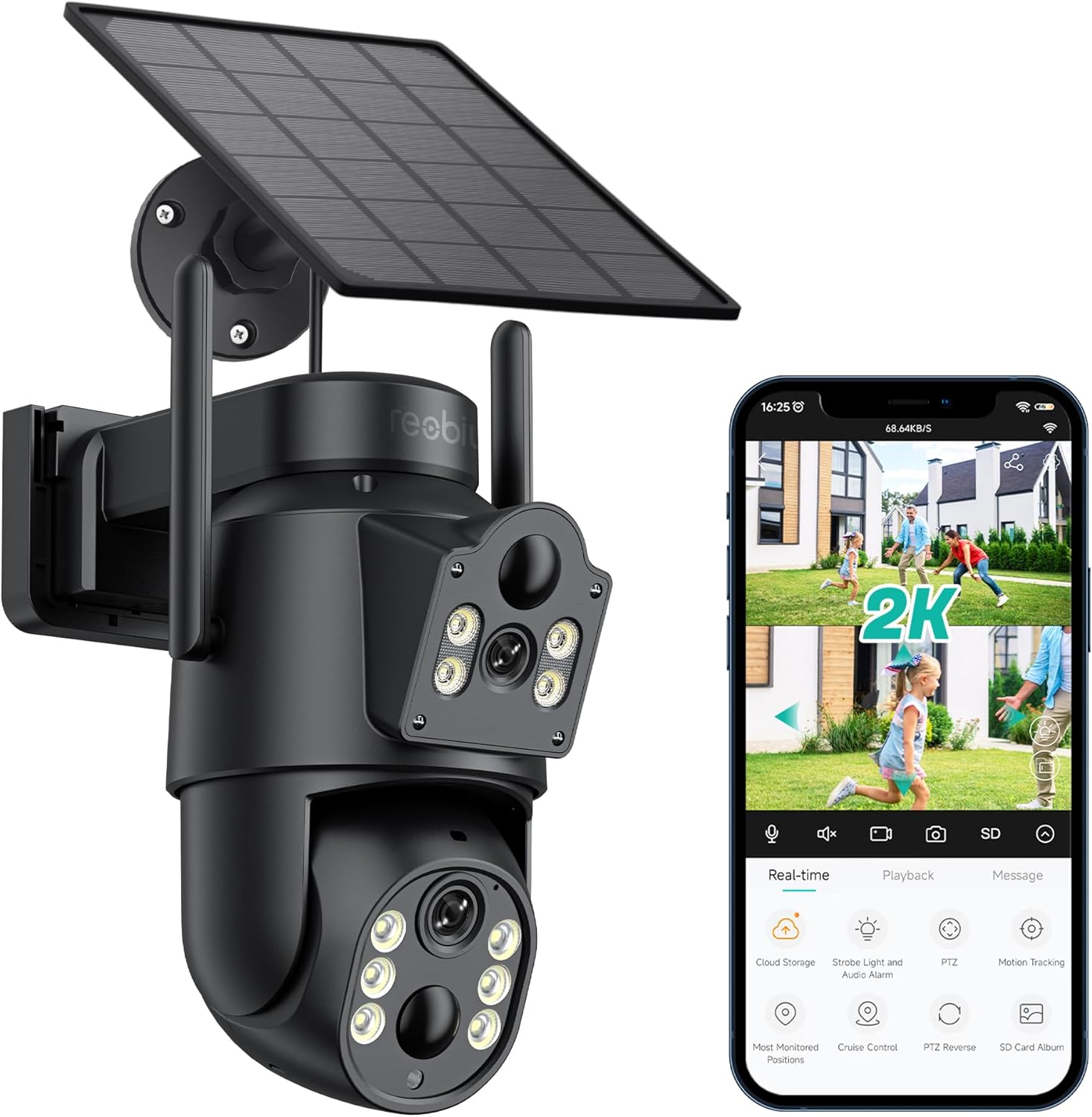
Nọmba 3.1: Reobiux D20-1P Solar PTZ Camera and its mobile application interface showing real-time monitoring, playback, and various control options.
Awọn ẹya pataki:
- 2K QHD High Resolution: Pese ko o ati alaye foo fidiotage.
- Apẹrẹ lẹnsi meji: Combines a fixed lens with a rotating lens for comprehensive coverage.
- 360° PTZ Functionality: Allows remote control of pan, tilt, and zoom for flexible viewing awọn igun.
- Solar Powered with Rechargeable Battery: Ensures continuous operation with minimal manual charging.
- Iwari išipopada PIR: Intelligently detects human movement to reduce false alarms.
- Oju Alẹ Awọ: Offers full-color video even in low-light conditions, alongside infrared night vision.
- Audio Ọna Meji: Enables communication with visitors or deterrence of intruders.
- IP66 Oju ojo: Ti ṣe apẹrẹ lati koju ọpọlọpọ awọn ipo oju ojo ita gbangba.
- Asopọmọra Wi-Fi Alailowaya: Easy setup and remote access via smartphone.
4. Eto Itọsọna
4.1 Gbigba agbara akọkọ
Before first use, fully charge the camera's internal battery using the provided Type-C charging line and power supply. This ensures the camera has sufficient power for initial setup and operation, especially if solar charging conditions are not optimal immediately after installation.
4.2 Fifi sori ẹrọ ati Ṣiṣẹda Akọọlẹ
- Gba awọn iCSee app from your smartphone's app store (iOS App Store or Google Play Store).
- Fi sori ẹrọ ni app ki o si ṣi o.
- Follow the on-screen instructions to create a new account or log in if you already have one.
4.3 Camera Connection to Wi-Fi
- Rii daju pe kamẹra rẹ wa ni titan.
- In the iCSee app, tap the "+" icon to add a new device.
- Select the option for "Wi-Fi Camera" or "Add Device by AP Hotspot" (refer to app for exact wording).
- Follow the app's instructions to connect the camera to your 2.4GHz Wi-Fi network. You may need to scan a QR code displayed on your phone with the camera, or listen for a sound prompt.
- Nígbà tí o bá ti sopọ̀ mọ́ ara rẹ, o lè sọ orúkọ kámẹ́rà rẹ kí o sì bẹ̀rẹ̀ sí í ṣe àkíyèsí.
4.4 Iṣagbesori Kamẹra
Choose a location that provides optimal surveillance coverage and receives direct sunlight for the solar panel. Ensure the camera is within range of your Wi-Fi network.
- Yan Ibi: Identify a suitable wall or surface for mounting. Consider the camera's viewing angle (355° pan, 90° tilt) and the solar panel's exposure to sunlight.
- Samisi Awọn aaye Liluho: Use the mounting base as a template to mark the screw holes on the wall.
- Awọn iho iho: Drill pilot holes at the marked positions. Insert wall anchors if necessary.
- Attach Mounting Base: Ṣe aabo ipilẹ iṣagbesori si odi nipa lilo awọn skru ti a pese.
- So Kamera pọ mọ: Mount the camera onto the secured base.
- Ṣatunṣe Igbimọ Oorun: Position the solar panel to maximize sunlight exposure throughout the day.

Nọmba 4.1: Illustration of the camera mounted with its solar panel, highlighting the fixed and rotating lenses and the benefit of continuous solar power.
5. Awọn ilana Iṣiṣẹ
5.1 Live View ati Sisisẹsẹhin
Open the iCSee app and select your camera to access the live view. From here, you can:
- Abojuto gidi-akoko: View ifiwe fidio kikọ sii.
- Iṣakoso PTZ: Use the on-screen joystick to pan (355°) and tilt (90°) the camera.
- Sun-un oni-nọmba: Pinch to zoom on the live feed.
- Sisisẹsẹhin: Wiwọle gba silẹ footage stored on the SD card or cloud storage.

Nọmba 5.1: Demonstrates the superior clarity of 2K QHD resolution compared to 1080P, providing more details for monitoring.
5.2 Išipopada erin ati titaniji
The camera utilizes PIR (Passive Infrared) intelligent detection to identify human movement, minimizing false alarms from pets or swaying branches.
- Mu ṣiṣẹ/Pa: Activate or deactivate motion detection in the app settings.
- Atunse ifamọ: Adjust the PIR sensor's sensitivity to suit your environment.
- Awọn iwifunni Itaniji: Receive instant push notifications on your smartphone when motion is detected.
- Ohun ati Itaniji Imọlẹ: Configure the camera to trigger a strobe light and audible alarm upon detection.

Nọmba 5.2: The camera's PIR intelligent detection distinguishes human movement from other objects, reducing unnecessary alerts.

Nọmba 5.3: When motion is detected, the camera can send real-time push notifications and activate a sound and light alarm to deter intruders.
5.3 Night Iran Awọn ọna
The camera offers two night vision modes for clear visibility in the dark:
- Spotlight Full Color Night Vision: Utilizes built-in spotlights to provide full-color video in low-light conditions.
- Spotlight Infrared Night Vision: Uses infrared LEDs for black-and-white video in complete darkness, with a range of up to 30 meters.
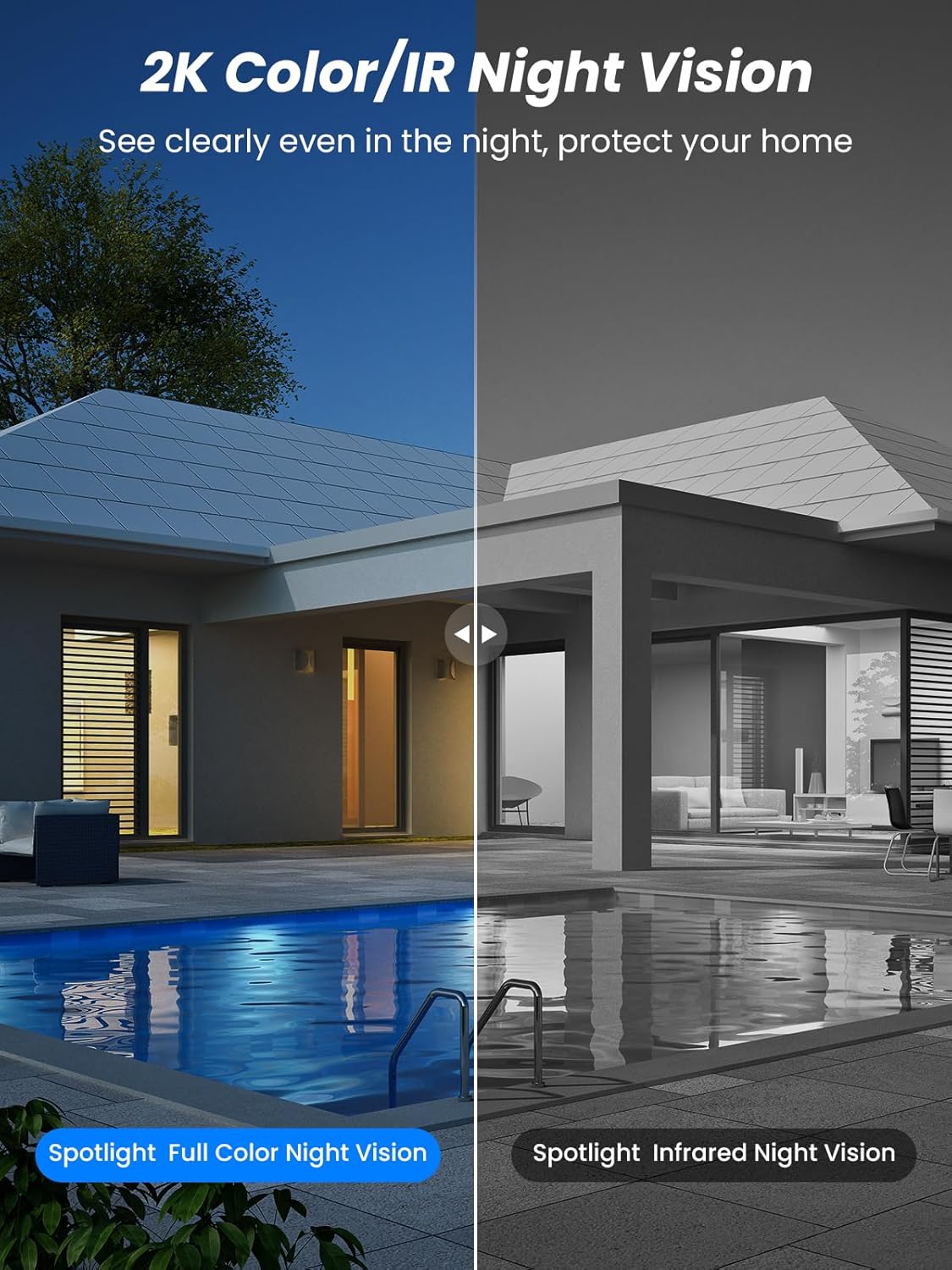
Nọmba 5.4: Illustrates the difference between full-color night vision, enabled by spotlights, and traditional infrared night vision.
5.4 Meji-Ona Audio
The integrated microphone and speaker allow for two-way communication.
- Sọ: Tẹ àmì gbohùngbohùn inú àpù náà láti sọ̀rọ̀ nípasẹ̀ agbọ́hùnsọ kámẹ́rà náà.
- Gbọ: The camera's microphone captures audio from its surroundings.

Nọmba 5.5: The two-way audio function allows for direct communication through the camera, useful for interacting with visitors or delivery personnel.
6. Itọju
- Ninu: Lokọọkan nu lẹnsi kamẹra ati nronu oorun pẹlu asọ, damp cloth to ensure optimal performance and clear image quality. Avoid abrasive cleaners.
- Ilera Batiri: While solar-powered, extreme weather or prolonged periods of low sunlight may require manual charging. Monitor battery levels via the app.
- Awọn imudojuiwọn famuwia: Check the iCSee app regularly for available firmware updates to ensure your camera has the latest features and security enhancements.
- Idaabobo oju ojo: The camera is IP66 weatherproof, designed to withstand rain, snow, and sun. However, ensure all connections are secure to maintain water resistance.

Nọmba 6.1: The IP66 rating ensures the camera's durability and functionality in various outdoor weather conditions, including snow, rain, and direct sunlight.
7. Laasigbotitusita
- Kamẹra ko sopọ mọ Wi-Fi:
- Ensure the camera is within range of your 2.4GHz Wi-Fi network. 5GHz networks are not supported.
- Rii daju pe ọrọ igbaniwọle Wi-Fi rẹ tọ.
- Tun olulana rẹ ati kamẹra bẹrẹ.
- If issues persist, try resetting the camera (refer to app or product for reset button location).
- Battery not charging or draining quickly:
- Ensure the solar panel is clean and receives direct sunlight for several hours daily.
- Check the connection between the solar panel and the camera.
- If in a low-light environment, manually charge the camera using the Type-C cable.
- Frequent motion detection events or live view streaming can consume battery faster. Adjust settings if needed.
- False motion detection alarms:
- Adjust the PIR motion detection sensitivity in the iCSee app.
- Ensure the camera is not pointed at areas with constant movement (e.g., busy roads, swaying trees) if not intended for monitoring.
- Didara aworan ti ko dara:
- Nu lẹnsi kamẹra nu.
- Ensure sufficient lighting for optimal image capture, especially at night.
- Check your Wi-Fi signal strength; a weak signal can affect video streaming quality.
8. Awọn pato
| Ẹya ara ẹrọ | Ẹ̀kúnrẹ́rẹ́ |
|---|---|
| Orukọ awoṣe | D20-1P |
| Ipinnu Yaworan fidio | 2.5K |
| Ipinnu fidio ti o munadoko | 2K QHD |
| Imọ-ẹrọ Ibaraẹnisọrọ Alailowaya | Wi-Fi (2.4GHz) |
| Fọọmù ifosiwewe | Dome |
| Viewigun igun | Awọn iwọn 355 (Pan), Awọn iwọn 90 (Titi) |
| Iru fifi sori ẹrọ | Odi-agesin |
| Ibiti Iran Night | 30 Mita |
| Iwọn fireemu | 25 fps |
| Ohun elo | Ṣiṣu |
| Voltage | 12 Volts (DC) |
| Wattage | 5 watt |
| Orisun agbara | Agbara Batiri, Agbara Oorun |
| Awọn batiri | Awọn batiri Lithium ion 3 (pẹlu) |
| Ilana Asopọmọra | Wi-Fi |
| Adarí Iru | iCSee App |
| Pataki Awọn ẹya ara ẹrọ | Night Vision (Color/IR), PIR Motion Detection, Two-Way Audio, IP66 Weatherproof |
| Iwọn Nkan | 1.06 kg |
| Parcel Mefa | 21.7 x 19.5 x 13.8 cm |
9. Atilẹyin ọja ati Support
Reobiux offers a 1-odun atilẹyin ọja for this product. For any issues or inquiries, please do not hesitate to reach out to our customer service. We provide 20 hours of online service to assist you.
For support, please refer to the contact information provided with your purchase or within the iCSee application.


