Ọrọ Iṣaaju
This manual provides essential instructions for the safe and efficient operation of your Kaiser MSA-2016 Professional Portable Bluetooth Speaker System. Please read this manual thoroughly before using the product and retain it for future reference.
Alaye Aabo pataki
- Orisun Agbara: Lo oluyipada agbara pàtó kan fun gbigba agbara.
- Ifihan omi: This device is not waterproof. Avoid exposure to water or excessive moisture.
- Afẹfẹ: Rii daju pe fentilesonu to dara. Ma ṣe dina eyikeyi awọn ṣiṣi atẹgun.
- Ninu: Disconnect from power before cleaning. Use a dry, soft cloth.
- Ṣiṣẹ: Do not attempt to repair this product yourself. Refer all servicing to qualified personnel.
- Batiri: The unit contains a rechargeable battery. Do not expose to extreme temperatures or dispose of in fire.
Package Awọn akoonu
Awọn nkan wọnyi ti o wa ninu package rẹ:
- 1 x Kaiser MSA-2016 Speaker System
- 1 x Gbohungbo ti a firanṣẹ
- 1 x Itọsọna olumulo
- 1 x Okun Agbara
Ọja Pariview
Agbọrọsọ irinše
The Kaiser MSA-2016 speaker system features a robust design with integrated controls and multiple connectivity options.

olusin 1: Iwaju view of the Kaiser MSA-2016 speaker, showing dual 25 cm speakers and dynamic LED illumination.
Ifilelẹ Panel Iṣakoso
The top-mounted control panel provides intuitive access to all speaker functions.

Nọmba 2: Alaye view of the control panel, including power switch, input ports (Micro SD, USB, AUX, MIC, Guitar), volume, EQ, and playback controls.
Rear Panel and Portability
The rear of the speaker includes a bass reflex port and features for enhanced portability.
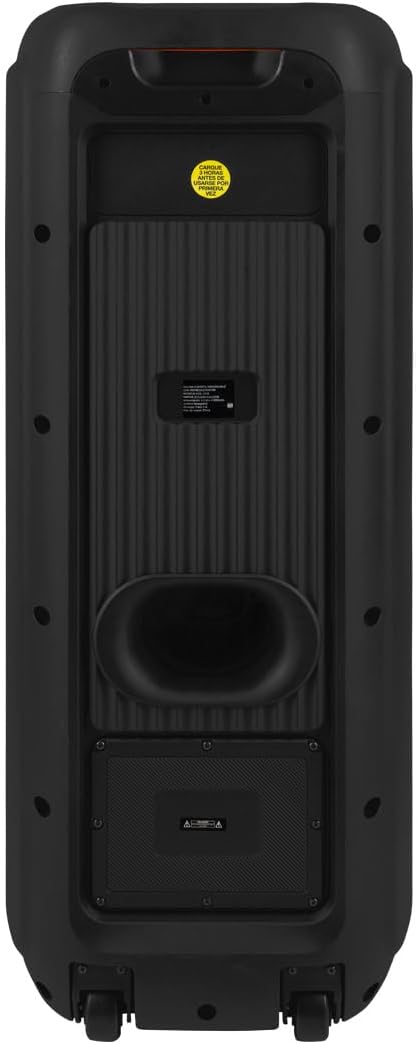
olusin 3: Ẹyìn view of the speaker, showing the bass port and overall enclosure design.
Awọn aṣayan Asopọmọra
The speaker supports various audio input methods for versatile use.

Figure 4: Diagram detailing the input ports: AUX 3.5 mm, two 6.3 mm microphone inputs, one 6.3 mm guitar input, USB, and Micro SD card slot.
To wa Awọn ẹya ẹrọ
The package includes a wired microphone for immediate use.

Figure 5: The wired microphone accessory provided with the Kaiser MSA-2016 speaker.
Awọn ilana iṣeto
Gbigba agbara si Agbọrọsọ
- Connect the power cable to the speaker's power input.
- So opin keji okun ina sinu ibudo ina deede.
- The charging indicator (if available) will illuminate.
- The speaker can operate while charging, but for optimal battery life, it is recommended to fully charge before first use.
Agbara akọkọ Lori
- Wa awọn AGBARA switch on the control panel.
- Flip the switch to the "ON" position. The display will light up, indicating the speaker is active.
Awọn ilana Iṣiṣẹ
Aṣayan Ipo
Tẹ awọn MODE button on the control panel to cycle through available input modes: Bluetooth, USB, Micro SD, AUX, and FM Radio.
Bluetooth Asopọ
- Tan agbọrọsọ naa ki o yan Bluetooth mode using the MODE button. The display will show "BLUE" or a similar indicator.
- Lori ẹrọ alagbeka rẹ (foonuiyara, tabulẹti, ati bẹbẹ lọ), mu Bluetooth ṣiṣẹ ki o wa awọn ẹrọ to wa.
- Select "Kaiser MSA-2016" from the list of devices.
- Once paired, the speaker will emit a confirmation sound, and the display will indicate a successful connection.
- You can now play audio from your device wirelessly through the speaker.
USB / Micro SD Sisisẹsẹhin
- Insert a USB flash drive or Micro SD card into the corresponding port on the control panel.
- The speaker will automatically switch to USB or Micro SD mode and begin playing audio files. Tí kò bá rí bẹ́ẹ̀, tẹ MODE bọtini lati yan titẹ sii to tọ.
- Use the playback control buttons (Play/Pause, Previous, Next) to manage your music.
Apọju AX
- So ẹ̀rọ ohùn ìta pọ̀ mọ́ ẹ̀rọ orin (fún àpẹẹrẹ, ẹ̀rọ orin MP3, kọ̀ǹpútà alágbèéká) mọ́ AUX input port using a 3.5mm audio cable.
- Tẹ awọn MODE bọtini lati yan AUX mode.
- Audio from your connected device will now play through the speaker.
Redio FM
- Tẹ awọn MODE bọtini lati yan Redio FM mode.
- Tẹ mọlẹ Ṣiṣẹ / Sinmi button to initiate an automatic scan for FM stations. The speaker will save detected stations.
- Lo awọn Ti tẹlẹ ati Itele awọn bọtini lati lilö kiri laarin awọn ibudo ti a fipamọ.
Gbohungbo ati awọn igbewọle gita
- Connect a wired microphone to either MIC 1 or MIC 2 igbewọle.
- So a guitar si awọn Gita igbewọle.
- Ṣatunṣe awọn MIC vol knob for microphone volume and GUITAR VOL knob for guitar volume.
- Lo awọn ECHO ati MIC idaduro knobs to add effects to the microphone audio.
Tolesese ohun
Lo awọn Iwọn didun knob to control the overall master volume. The TREK. ati Bass knobs allow you to adjust the high and low frequencies of the audio output.
Awọn EQ button allows you to cycle through preset equalizer modes for different audio profiles.
Itoju
Ninu
Wipe the speaker's exterior with a soft, dry cloth. Do not use abrasive cleaners, waxes, or solvents as they may damage the finish. Ensure the speaker is powered off and unplugged before cleaning.
Ibi ipamọ
When not in use for extended periods, store the speaker in a cool, dry place, away from direct sunlight and extreme temperatures. It is recommended to charge the battery periodically to maintain its health.
Laasigbotitusita
| Isoro | Owun to le Fa | Ojutu |
|---|---|---|
| Ko si agbara | Battery drained, power cable disconnected. | Charge the speaker. Ensure power cable is securely connected. |
| Ko si ohun | Volume too low, incorrect input mode, device not connected properly. | Increase volume. Select correct input mode. Reconnect audio source. |
| Ikuna sisopọ Bluetooth | Speaker not in pairing mode, device too far, interference. | Ensure speaker is in Bluetooth mode. Move device closer. Turn off other Bluetooth devices. |
| Gbohungbohun ko ṣiṣẹ | Microphone not plugged in, MIC VOL too low, microphone switch off. | Ensure microphone is fully plugged into MIC 1 or MIC 2. Increase MIC VOL. Check microphone's ON/OFF switch. |
Awọn pato
| Ẹya ara ẹrọ | Ẹ̀kúnrẹ́rẹ́ |
|---|---|
| Orukọ awoṣe | MSA-2016 |
| Brand | Kaiser |
| Agbọrọsọ Iru | Ile-iṣọ |
| Iwọn Agbọrọsọ | 25 cm (inṣis 10) x 2 |
| Agbara Ijade | 60 Wattis RMS |
| Idahun Igbohunsafẹfẹ | 60 kHz |
| Asopọmọra Technology | Bluetooth |
| Alailowaya Ibaraẹnisọrọ | Bluetooth |
| Ọna Iṣakoso | Tactile (Knobs/Buttons) |
| Orisun agbara | Hybrid (Electric Cable and Battery) |
| Igbesi aye Batiri (Apapọ) | Awọn wakati 6 |
| Batiri gbigba agbara | Bẹẹni |
| Iwọn (D x W x H) | 33 cm x 32 cm x 84 cm |
| Mabomire | Rara |
| Awọn irinše to wa | 1 Speaker, 1 User Manual, 1 Wired Microphone |
Atilẹyin ọja ati Support
This product comes with a limited warranty. For detailed warranty information and support, please refer to the warranty card included in your package or visit the official Kaiser website. For customer service inquiries, please contact Kaiser support directly.
You can visit the Kaiser store on Amazon for more products and information: Kaiser Store


