1. Ifihan
The OontZ Angle 3 Pro is a high-performance portable Bluetooth speaker designed for both indoor and outdoor use. It features robust audio output, extended battery life, and a durable waterproof design, making it suitable for various environments. This manual provides essential information for setting up, operating, and maintaining your speaker.
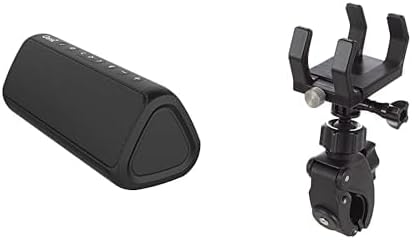
Image 1: The OontZ Angle 3 Pro Bluetooth Speaker (left) shown alongside its multipurpose bracket and clamp mount (right).
2. Key Awọn ẹya ara ẹrọ
- Didara Olohun to gaju: Engineered with 40% larger custom Neodymium drivers and a 21-Watt Digital AMP, delivering crystal clear sound, rich bass, and distortion-free audio even at maximum volume.
- Igbesi aye batiri ti o gbooro sii: Enjoy up to 15 hours of playtime on a full charge when set to 2/3 volume.
- Asopọmọra to lagbara: Advanced antenna design provides a wireless range of up to 100 feet via Bluetooth 5.0, ensuring a fast and stable connection to your smartphone, tablet, laptop, or other Bluetooth-enabled devices.
- IPX7 Waterproof & Saltproof: Certified IPX7 water-resistant, allowing the speaker to be submerged up to 1 meter for 30 minutes. It is also saltproof, making it ideal for beach and outdoor activities.
- Apẹrẹ to gbe: Lightweight and easy to carry, featuring a unique triangular shape that allows for versatile placement.
- Iṣagbesori Olopọ: Includes an official bracket and clamp mount for secure attachment to boat railings, kayaks, rod holders, handlebars, or beach umbrellas.
- Awọn iṣakoso Iṣọkan: Features touch controls for power, volume, track navigation, and Bluetooth pairing.
- Iṣawọle Iranlọwọ: Supports direct connection via an auxiliary input for non-Bluetooth devices.
- Iṣẹ Bank Power: The USB port can provide power to charge your iPhone, smartphone, or other devices (output up to 5V – 1A).
- Sitẹrio Sitẹrio: Connect two OontZ Angle 3 Pro speakers together for enhanced stereo sound.
- Iṣọkan Iranlọwọ Oluranlọwọ: Push a button to activate and talk to Siri on your iPhone.
3. Eto Itọsọna
3.1 Gbigba agbara si Agbọrọsọ
- Wa rọba gbigbọn ni ẹgbẹ ti agbọrọsọ.
- Fi ọwọ́ rọra ṣí ìbòrí náà láti fi ibùdó gbigba agbara USB-C hàn.
- So okùn gbigba agbara USB-C ti a pese mọ agbọrọsọ ati orisun agbara USB ti o baamu (fun apẹẹrẹ, adapter odi, ibudo USB kọmputa).
- The LED indicator will show charging status. A full charge typically takes a few hours.
- Once fully charged, securely close the rubber flap to maintain the IPX7 waterproof rating.
3.2 Titan / Pa a
- Lati tan -an, tẹ mọlẹ Bọtini agbara (usually indicated by a circle with a vertical line) until you hear an audible cue and the LED indicator lights up.
- Lati fi agbara si pipa, tẹ mọlẹ Bọtini agbara lẹ́ẹ̀kan síi títí tí agbọ́hùnsọ̀ náà yóò fi ṣẹ́.
3.3 Sisopọ Bluetooth
- Ensure the speaker is powered on and within range of your Bluetooth device (e.g., smartphone, tablet).
- The Bluetooth LED indicator on the speaker will flash blue, indicating it is in pairing mode.
- Lori ẹrọ rẹ, lọ si awọn eto Bluetooth ki o wa awọn ẹrọ to wa.
- Select "OontZ Angle 3 Pro" from the list.
- Once connected, the Bluetooth LED will turn solid blue, and you will hear a confirmation tone.
3.4 Auxiliary Input Connection
- Open the rubber flap on the side of the speaker to access the auxiliary input port.
- Connect a 3.5mm audio cable (not included) from your audio source to the speaker's auxiliary input.
- The speaker will automatically switch to auxiliary mode.
- Ṣatunṣe iwọn didun lati orisun ohun afetigbọ rẹ mejeeji ati agbọrọsọ.
4. Awọn ilana Iṣiṣẹ
4.1 Ipilẹ idari
- Iwọn didun Soke/Isalẹ: Tẹ awọn '+' or '-' awọn bọtini lori agbọrọsọ.
- Ṣiṣẹ/Daduro: Tẹ awọn Bọtini ṣiṣẹ/Sinmi (àmì onígun mẹ́ta).
- Orin t’okan: Tẹ awọn Next Bọtini Orin (right arrow icon).
- Tẹlẹ Orin: Tẹ awọn Bọtini orin ti tẹlẹ (left arrow icon).
- Idahun/Ipe Ipari: Tẹ awọn Bọtini ṣiṣẹ/Sinmi during an incoming call.
- Mu Olùrànlọ́wọ́ Ohùn (Siri) ṣiṣẹ́: Press the dedicated voice assistant button (if available, or long-press Play/Pause on some models) to activate Siri on your connected iPhone.
4.2 Stereo Pairing (Dual Speaker Mode)
For an immersive stereo experience, you can connect two OontZ Angle 3 Pro speakers together. Refer to the official OontZ app or Cambridge Soundworks website for detailed instructions on stereo pairing, as the process may vary slightly.
5. Itọju ati Itọju
- Iduroṣinṣin ti omi: Always ensure the rubber flap covering the charging and auxiliary ports is securely closed when using the speaker near water or in wet conditions to maintain its IPX7 waterproof rating.
- Ninu: Lo asọ, damp cloth to clean the speaker. Avoid using harsh chemicals or abrasive cleaners.
- Igba aye Batiri: To prolong battery life, avoid fully discharging the speaker frequently. Charge it regularly, and if storing for an extended period, ensure it has a partial charge (around 50%).
- Ibi ipamọ: Tọju agbohunsoke ni itura, ibi gbigbẹ kuro lati awọn iwọn otutu to gaju.
6. Laasigbotitusita
- Ko si Agbara: Rii daju pe agbọrọsọ ti gba agbara ni kikun. Sopọ mọ orisun agbara ati ṣayẹwo itọkasi gbigba agbara.
- Ko si Ohun: Check the volume levels on both the speaker and your connected device. Ensure the speaker is correctly paired via Bluetooth or connected via auxiliary cable.
- Àwọn Ìṣòro Ìjápọ̀/Ìsopọ̀ Bluetooth:
- Ensure the speaker is within the 100-foot Bluetooth range.
- Turn off and on the Bluetooth on your device and the speaker.
- Forget the speaker from your device's Bluetooth list and re-pair.
- Rí i dájú pé kò sí ẹ̀rọ míì tó so mọ́ agbọ̀rọ̀sọ náà.
- Didara Ohun Ko dara: Ensure the speaker is not too far from your device. Check for obstructions between the speaker and your device. If using auxiliary input, try a different cable.
7. Awọn pato
| Ẹya ara ẹrọ | Ẹ̀kúnrẹ́rẹ́ |
|---|---|
| Orukọ awoṣe | Angle 3 Pro |
| Agbọrọsọ Iru | Ita gbangba |
| Pataki Ẹya | Lightweight, Wireless Charging (referring to power bank function) |
| Awọn ẹrọ ibaramu | Kọǹpútà alágbèéká, Foonuiyara, Tabulẹti |
| Àwọ̀ | Dudu |
| Se mabomire | Otitọ (IPX7) |
| Ọna Iṣakoso | Fọwọkan |
| Imọ-ẹrọ Ibaraẹnisọrọ Alailowaya | Bluetooth |
| Orisun agbara | Agbara Batiri |
| Omi Resistance Ipele | Mabomire |
| Audio Driver Type | Yiyi Awakọ |
| Bluetooth Ibiti | 100 Ẹsẹ |
| Agbọrọsọ Agbara Ijade ti o pọju | 21 Wattis |
| Asopọmọra Technology | Bluetooth |
| Ipo Ijade Ohun | Sitẹrio |
| Iṣagbesori Iru | Vehicle Mount, Handlebar |
| Olupese | Awọn iṣẹ Ohun Cambridge |
| Nọmba Awoṣe Nkan | fed95d1f-ed0f-48b2-ba82-6b915e90b190 |
8. Atilẹyin ọja ati Support
The OontZ Angle 3 Pro Bluetooth Speaker comes with a Limited Warranty. For specific warranty details, product support, or to register your product, please visit the official Cambridge Soundworks webojula tabi kan si wọn onibara iṣẹ.
Atilẹyin Ayelujara: www.TheOontZ.com


