Ọrọ Iṣaaju
O ṣeun fun riraasing the Udreamer Turntable with Integrated Preamplifier. This Hi-Fi system features 40W bookshelf speakers, Bluetooth connectivity, an aluminum platter, and a 2-speed belt drive. Designed for vinyl enthusiasts, it delivers high-fidelity sound reproduction close to the original recording. This manual provides detailed instructions for setup, operation, maintenance, and troubleshooting to ensure optimal performance and longevity of your device.

Image: The Udreamer Turntable system, featuring the main unit with a record on the platter, a clear dust cover, and two accompanying bookshelf speakers. The turntable and speakers are finished in a brown wood grain.
Ohun ti o wa ninu Apoti
Jọwọ ṣayẹwo awọn akoonu inu package rẹ lati rii daju pe gbogbo awọn nkan wa:
- Turntable Unit
- Bookshelf Speakers (2x)
- AT-3600L Cartridge (pre-installed or separate)
- Solid Platter
- Yiyọ Eruku Ideri
- Okun USB fun Asopọ PC
- Itọsọna olumulo
- Okun RCA
- Adapter RPM 45
- Àdánù ìwọ̀n
- Platter Mat
- 9V 2A Power Adapter
Eto Itọsọna
1. Unpacking ati Placement
Carefully remove all components from the packaging. Place the turntable on a stable, level surface away from direct sunlight, heat sources, and excessive vibration. Ensure adequate ventilation around the unit and speakers.
2. Assembling the Turntable
- Fi Platter sori ẹrọ: Gently place the solid aluminum platter onto the spindle. Ensure it sits securely.
- Install the Belt: Locate the drive belt (usually pre-installed or in a separate bag). Carefully stretch the belt around the inner rim of the platter and hook it onto the motor pulley.
- Place the Platter Mat: Lay the felt platter mat on top of the platter.
- Install the Counterweight: Slide the counterweight onto the rear of the tonearm. Rotate it to adjust tracking force later.
- Fi Ideri Eruku sori ẹrọ: Attach the removable dust cover to the hinges at the back of the turntable.

Aworan: Exploded view of the Udreamer Turntable components, showing the main unit, platter, belt, and dust cover, illustrating how they fit together.
3. Nsopọ awọn Agbọrọsọ
Connect the included bookshelf speakers to the passive speaker jacks on the rear of the turntable using the provided speaker wires. Ensure correct polarity (positive to positive, negative to negative) for optimal sound.

Image: The Udreamer Turntable with its two bookshelf speakers, highlighting the internal speaker components and the 40W powerful listening experience.
4. Asopọ agbara
Connect the 9V 2A power adapter to the DC IN port on the back of the turntable, then plug it into a wall outlet.
5. Tonearm Balance and Tracking Force Adjustment
Properly balancing the tonearm and setting the tracking force is crucial for sound quality and record longevity.
- Iwontunwonsi odo: With the stylus guard on, release the tonearm clamp. Rotate the counterweight until the tonearm floats freely and is perfectly level.
- Set Tracking Force: Once balanced, hold the counterweight steady and rotate the numbered ring to '0'. Then, rotate the entire counterweight (including the numbered ring) counter-clockwise to the recommended tracking force for the AT-3600L cartridge, which is typically 3.5 grams.

Aworan: Isunmọ view of the AT-3600L cartridge on the Udreamer Turntable, emphasizing its design for delicate and outstanding sound quality.

Aworan: Alaye views of the Udreamer Turntable's tonearm, showing the cartridge for accuracy, the counterweight for adjustment, and the control knobs for balance and overall control.
Awọn ilana Iṣiṣẹ
1. Ti ndun a Gba
- Gbe igbasilẹ kan sori apẹrẹ.
- Select the appropriate speed (33 1/3 or 45 RPM) using the speed selector switch. For 45 RPM records, place the 45 RPM adapter on the spindle if needed.
- Remove the stylus guard from the cartridge.
- Fi ọwọ́ rọra gbé ohun orin náà sókè nípa lílo ìfàmọ́ra.
- Move the tonearm over the desired starting groove of the record.
- Slowly lower the cueing lever to gently drop the stylus onto the record.
- Adjust the volume using the main volume knob.
- Láti dá ìṣiṣẹ́ orin dúró, gbé ohun èlò orin náà sókè nípa lílo ohun èlò orin tí a fi ń tọ́ka sí, dá a padà sí ibi ìsinmi ohun èlò orin náà, kí o sì fi cl náà pamọ́.amp.
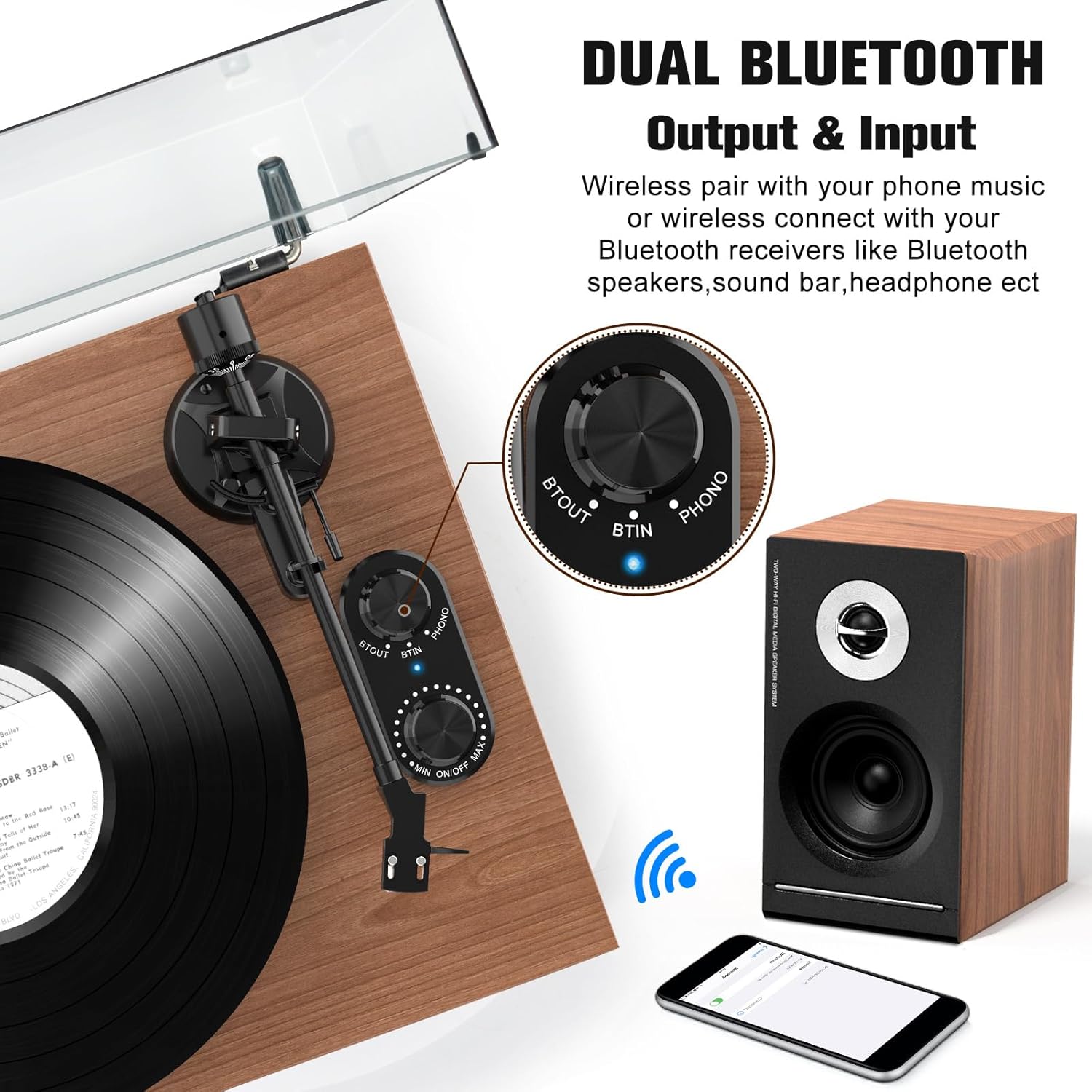
Image: The Udreamer Turntable showcasing its belt drive with 2 speeds (33 1/3 or 45 RPM) and compatibility with 7", 10", and 12" vinyl records.
2. Bluetooth Connectivity (Input & Output)
The Udreamer turntable supports both Bluetooth input and output.
Bluetooth Output (Connecting to Bluetooth Speakers/Headphones)
- Ensure your Bluetooth receiver (speaker, headphones) is in pairing mode.
- Turn the "BT OUT" knob on the turntable to activate Bluetooth output. The indicator light will flash.
- The turntable will automatically search for and connect to nearby Bluetooth devices. Once connected, the indicator light will become solid.
- You can now play records, and the audio will be streamed to your connected Bluetooth device.
Bluetooth Input (Playing Music from Phone/Tablet)
- Turn the "BT IN" knob on the turntable to activate Bluetooth input. The indicator light will flash.
- On your smartphone or tablet, search for Bluetooth devices and select "Udreamer Turntable" (or similar name).
- Nígbà tí a bá ti so pọ̀, ìmọ́lẹ̀ àfihàn náà yóò di líle.
- You can now play music from your phone/tablet through the turntable's speakers.

Image: The Udreamer Turntable demonstrating its dual Bluetooth output and input capabilities, showing wireless pairing with a phone and connection to Bluetooth speakers.
3. USB-PC Recording
You can convert your vinyl records into MP3 files for digital storage and playback.
- Connect the turntable to your computer using the supplied USB cable.
- Install audio recording software on your computer (e.g., Audacity, available for free online).
- Follow the software's instructions to select the turntable as the input device and begin recording.
- Play your vinyl record to record the audio.
- Save the recorded audio as an MP3 file.

Image: The Udreamer Turntable connected to a laptop via USB, illustrating the process of converting vinyl audio to MP3 format for transfer to a computer.
4. RCA o wu
Àtẹ ìyípadà náà ní àbájáde RCA fún sísopọ̀ mọ́ ìta amplifiers tabi ti nṣiṣe lọwọ agbohunsoke.
- Connect the RCA cable from the "AUDIO OUTPUT" ports on the turntable to the corresponding input ports on your amplifier tabi ti nṣiṣe lọwọ agbohunsoke.
- Ensure the "PHONO LINE SWITCH" is set correctly based on your amplifier's input type (Phono or Line).

Image: Rear panel of the Udreamer Turntable, detailing the RCA output, Phono Line Switch, USB-PC recording port, and Passive Speaker Jacks with numerical labels for easy identification.
Itoju
1. Nu Turntable naa
- Always unplug the turntable before cleaning.
- Use a soft, dry, lint-free cloth to wipe the dust cover and cabinet.
- For the platter and tonearm, use a slightly damp cloth, then dry immediately. Avoid harsh chemicals or abrasive cleaners.
2. Ìtọ́jú Stylus
- Clean the stylus regularly using a soft brush designed for stylus cleaning, brushing gently from back to front.
- Yago fun fifọwọkan stylus pẹlu awọn ika ọwọ rẹ.
- Replace the stylus (AT-3600L compatible) every 300-500 hours of playback or if you notice a degradation in sound quality.
3. Ìtọ́jú Àkọsílẹ̀
- Handle records by their edges or label.
- Store records vertically in their sleeves to prevent warping.
- Clean records with a dedicated record brush before each play to remove dust and static.
Laasigbotitusita
| Isoro | Owun to le Fa | Ojutu |
|---|---|---|
| Ko si agbara | Power adapter not connected; outlet not working | Ensure power adapter is securely plugged in; try a different outlet. |
| Ko si ohun lati ọdọ awọn agbohunsoke | Speakers not connected; volume too low; Phono/Line switch incorrect | Check speaker connections and polarity; increase volume; ensure Phono/Line switch matches your setup. |
| Ohun daru tabi fo | Stylus dirty or worn; tracking force incorrect; record dirty or damaged | Clean stylus; re-adjust tracking force; clean record or try a different one. |
| Bluetooth ko sopọ | Device not in pairing mode; too far from turntable; interference | Ensure device is in pairing mode; move closer to turntable; reduce other wireless interference. |
| Platter ko nyi | Drive belt dislodged or broken; motor issue | Check and re-seat the drive belt; contact customer support if belt is broken or motor is faulty. |
Awọn pato
- Orukọ awoṣe: Udreamer Platine Vinyle Système Hi-FI (UD006-Marron)
- Brand: Olódùmarè
- Imọ-ẹrọ Asopọmọra: Bluetooth, USB
- Iyara Yiyi to pọju: 45 RPM (supports 33 1/3 RPM)
- Ohun elo: Igi
- Àwọ̀: Brown
- Awọn iwọn ọja: 47 x 41.5 x 37.5 cm (18.5 x 16.3 x 14.8 inches)
- Ìwúwo: 9.62 kilogram (21.2 lbs)
- Awọn eroja to wa: Turntable, Bookshelf Speakers (2), AT-3600L Cartridge, Solid Platter, Removable Dust Cover, USB Cable, User Manual, RCA Cable, 45 RPM Adapter, Counterweight, Platter Mat, 9V 2A Power Adapter
- Awọn ẹya pataki: Detachable Speaker, Digital Recorder, Volume Control, Die-cast Aluminum Platter, Bluetooth Input and Output, Adjustable Counterweight, Adjustable Speed, Anti-resonance, Automatic Belt Drive Design, Built-in Preamplifier, Built-in Cartridge
- Power Consumption (On-state): 40 watt

Image: Diagram showing the dimensions of the Udreamer Turntable and its accompanying speakers in centimeters and inches.
Atilẹyin ọja ati Support
Udreamer products are designed for quality and reliability. For warranty information and technical support, please refer to the contact details provided on the product packaging or visit the official Udreamer webojula. Tọju iwe-ẹri rira rẹ bi ẹri rira fun awọn iṣeduro atilẹyin ọja.
Ilana Pada: This product typically has a 14-day return policy for refund or replacement, subject to retailer terms.
For further assistance, you may contact the seller directly through the platform where you purchased the product.


