1. Ifihan
Welcome to the world of high-fidelity audio with your new Pro-Ject Debut EVO 2 Audiophile Turntable. This manual provides essential information for setting up, operating, and maintaining your turntable to ensure optimal performance and longevity. Please read through these instructions carefully before first use.
2. Awọn ilana aabo
Lati yago fun ibajẹ tabi ipalara, jọwọ tẹle awọn iṣeduro aabo wọnyi:
- Always disconnect the turntable from the power supply before cleaning or performing any maintenance.
- Keep the turntable away from water, moisture, and excessive heat.
- Do not place heavy objects on the turntable or its dust cover.
- Lo oluyipada agbara nikan ti a pese pẹlu ẹyọkan.
- Avoid touching the stylus (needle) directly.
- Ensure proper ventilation around the turntable.
3. Ohun ti o wa ninu Apoti
Carefully unpack all items from the packaging. Please ensure all components listed below are present:
- Pro-Ject Uncomfortable EVO 2 Turntable
- Transparent Dustcover
- Connection Cable (RCA)
- Adapter agbara
- Titete Protractor
- Single Adapter (for 45 RPM records with large center holes)
- Fet Mat
- Àdánù ìwọ̀n
- Anti-skating iwuwo

Image: The Pro-Ject Debut EVO 2 turntable in High Gloss Black, showcasing awọn oniwe-aso oniru ati akọkọ irinše.
4. Ọja Ipariview
The Pro-Ject Debut EVO 2 is an audiophile-grade turntable designed for exceptional sound reproduction and ease of use. It features a carbon fiber tonearm, electronic speed selection, and a pre-mounted Pick it MM EVO cartridge.
Awọn ẹya pataki:
- Next generation of the best-selling audiophile turntable.
- Pick it MM EVO cartridge, expertly crafted by Ortofon.
- 25-year spare parts availability guarantee for long-term usability.
- True Balanced Ready: Anti-magnetic 1.7kg die-cast aluminum platter supports MC cartridges.
- Built with over 30 years of Pro-Ject's experience in manual turntable development.
Awọn nkan pataki:
| Ẹya ara ẹrọ | Apejuwe |
|---|---|
| Pẹpẹ | Heavy, TPE damped, anti-magnetic aluminum platter for stable rotation and reduced resonance. |
| Ohun ija | 8.6-inch carbon fiber tonearm for precise tracking and minimal resonance. |
| Katiriji | Pre-mounted Pick it MM EVO moving magnet cartridge for vibrant sound. |
| Mọto | Electronically controlled DC motor with belt drive for accurate speed. |
| Ẹsẹ | Adjustable, damped feet for isolation from vibrations. |

Aworan: Alaye view of the carbon fiber tonearm and the pre-mounted Pick it MM EVO cartridge.

Image: The tonearm's counterweight and anti-skating weight, crucial for proper tracking.

Image: The heavy aluminum platter and the belt drive system, ensuring stable rotation.
Product Introduction Video:
Video: An official introduction to the Pro-Ject Debut EVO 2 turntable, highlighting its design and features.
5. Eto
5.1 Ṣiṣii silẹ
Carefully remove the turntable and all accessories from the packaging. Retain the original packaging for future transport or storage.
5.2 Ibi
Place the turntable on a stable, level surface, away from direct sunlight, heat sources, and strong vibrations. Ensure there is adequate space for the dust cover to open fully.
5.3 Apejọ
- Place the platter onto the sub-platter.
- Carefully loop the drive belt around the sub-platter and the motor pulley.
- Install the dust cover by inserting its hinges into the designated slots at the rear of the plinth.
5.4 Cartridge Alignment
The Pick it MM EVO cartridge comes pre-mounted and aligned from the factory. Fine adjustments can be made using the included alignment protractor if necessary, following the protractor's instructions.
5.5 Tracking Force Adjustment
- Carefully remove the stylus guard.
- Balance the tonearm by adjusting the counterweight until the tonearm floats freely and horizontally.
- While holding the counterweight steady, rotate the tracking force scale ring until the '0' mark aligns with the line on the tonearm.
- Rotate the entire counterweight (including the scale ring) counter-clockwise to set the recommended tracking force for the Pick it MM EVO cartridge, which is typically 1.8g. Refer to the cartridge manufacturer's specifications for precise values.
5.6 Anti-Skating Atunse
Attach the anti-skating weight's loop to the third groove of the anti-skating stub on the tonearm. This setting is generally suitable for the pre-mounted cartridge.
5.7 Nsopọ si Audio System
- Connect the supplied RCA cable from the turntable's output jacks (L and R) to the PHONO input of your amplifier tabi phono preamplifier.
- Connect the ground wire from the turntable to the ground terminal on your amplifier/ṣaajuamplifier to minimize hum.
- Connect the power adapter to the turntable's DC input and then to a suitable wall outlet.
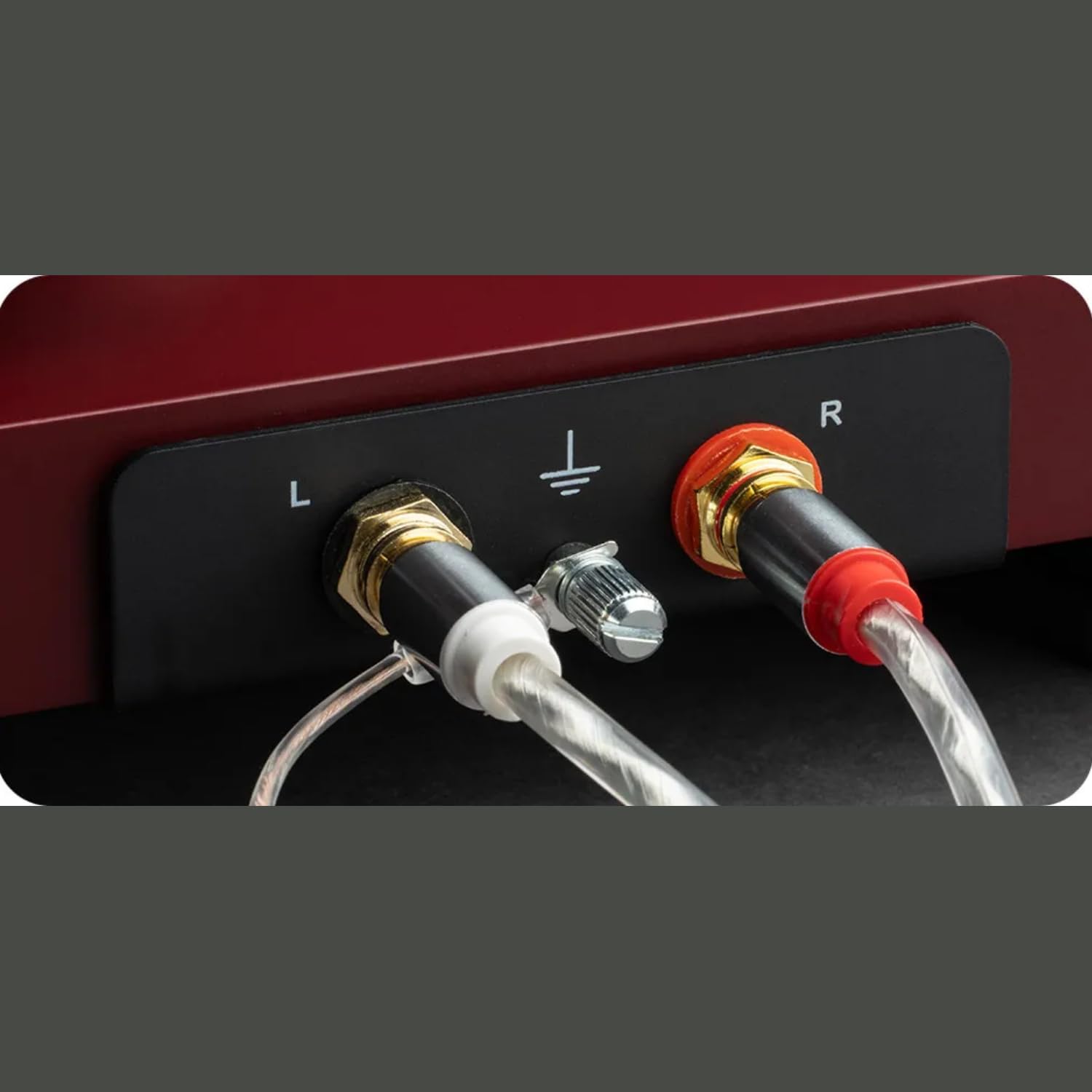
Image: The rear panel showing the RCA output jacks and the ground terminal for connecting to an amplifier.

Image: An overhead perspective of the turntable, illustrating the overall layout during the setup process.
6. Awọn ilana Iṣiṣẹ
6.1 Titan / Pa a
The turntable is powered on when the power adapter is connected to the wall outlet and the turntable. There is no separate power switch. To turn off, disconnect the power adapter.
6.2 Ti ndun igbasilẹ kan
- Place a record on the platter. If playing a 45 RPM single with a large center hole, use the included single adapter.
- Select the desired speed (33 or 45 RPM) using the electronic speed selection switch located on the plinth.
- Gbe apa ohun orin soke nipa lilo lefa ika.
- Carefully position the tonearm over the desired starting groove of the record.
- Rọra sọ apa ohun orin silẹ nipa lilo lefa ika. Awọn stylus yoo sọkalẹ sori igbasilẹ ati ṣiṣiṣẹsẹhin yoo bẹrẹ.
6.3 Yiyan Iyara
The Debut EVO 2 features electronic speed selection. A switch on the plinth allows you to easily toggle between 33 1/3 RPM and 45 RPM. For 78 RPM records, a special pulley and stylus are required (sold separately), and the belt must be manually moved to the larger step on the motor pulley.
6.4 Idaduro Sisisẹsẹhin
At the end of a record, or when you wish to stop playback, lift the tonearm using the cueing lever and return it to the tonearm rest. Secure the tonearm with the tonearm clip.
7. Itọju
7.1 Cleaning the Turntable
- Use a soft, lint-free cloth to wipe the plinth and dust cover. Avoid abrasive cleaners.
- The platter can be cleaned with a damp cloth. Ensure it is completely dry before re-installing.
- For the carbon fiber tonearm, use a very soft, dry brush or cloth.
7.2 Stylus Itọju
Regularly clean the stylus using a dedicated stylus cleaning brush or fluid. Always brush from back to front, never side to side. A clean stylus ensures optimal sound quality and extends the life of your records.
7.3 igbanu Rirọpo
The drive belt may stretch or degrade over time. If you notice inconsistent speed or reduced performance, the belt may need replacement. Contact Pro-Ject support or an authorized dealer for a replacement belt.
8. Laasigbotitusita
If you encounter issues with your turntable, consult the table below for common problems and solutions.
| Isoro | Owun to le Fa | Ojutu |
|---|---|---|
| No power / No rotation | Power adapter not connected; Faulty power outlet. | Ṣàyẹ̀wò àwọn ìsopọ̀ agbára; Gbìyànjú ọ̀nà ìjáde mìíràn. |
| Ko si ohun tabi iwọn didun kekere | Ti yan igbewọle ti ko tọ lori amplifier; Loose RCA cables; Cartridge not properly connected. | Select PHONO input; Secure RCA connections; Check cartridge wiring. |
| Ariwo humming | Ground wire not connected; Proximity to other electronics. | Connect ground wire; Move turntable away from interfering devices. |
| Ohun ti o daru | Incorrect tracking force or anti-skating; Dirty stylus; Worn stylus. | Adjust tracking force/anti-skating; Clean stylus; Replace stylus if worn. |
| Iyara ti ko ni ibamu | Stretched or dirty drive belt; Motor issues. | Clean or replace drive belt; Contact support if motor issue persists. |
9. Awọn pato
| Ẹya ara ẹrọ | Ẹ̀kúnrẹ́rẹ́ |
|---|---|
| Ọja Mefa | 16.4 x 12.6 x 4.5 inches |
| Iwọn Nkan | 13.2 iwon (6 kilo) |
| Nọmba awoṣe | 9120129864831 |
| Olupese | Awọn Ẹrọ Audio Pro-Ject |
| Asopọmọra Technology | Olùrànlọ́wọ́ (RCA) |
| Ohun elo | Carbon Fiber (tonearm) |
| Motor Iru | Igbanu-Iwakọ |
| Awọn irinše to wa | Turntable, transparent dustcover, connection cable, power adapter, alignment protractor, single adapter |
| Àwọ̀ | High Gloss Black (for this specific model) |
10. Atilẹyin ọja ati Support
Pro-Ject Audio Systems products are manufactured to the highest quality standards. For warranty information, please refer to the warranty card included with your product or visit the official Pro-Ject Audio Systems website. For technical support or service inquiries, please contact your authorized Pro-Ject dealer or distributor.
Pro-Ject offers a 25-year spare parts availability guarantee, ensuring long-term support for your turntable.
O le wa alaye diẹ sii ati awọn orisun atilẹyin lori awọn Pro-Ject Store on Amazon.


