1. Ifihan
This manual provides essential information for the safe and efficient operation of your VISION VP-621 4K Ultra HD Multimedia Projector. Please read this manual thoroughly before using the projector and retain it for future reference.
The VISION VP-621 is a versatile smart projector featuring 4K Ultra HD support, 11000 lumens brightness, 5G WiFi, Bluetooth 5.0, Auto Focus, Wireless Miracast, and an integrated Android 9.0 operating system. It is designed for various applications including home entertainment, business presentations, and educational purposes.
2. Alaye Aabo
- Má ṣe dí àwọn ihò afẹ́fẹ́. Rí i dájú pé afẹ́fẹ́ tó wà ní àyíká ẹ̀rọ ìfọ́júwe náà tó láti dènà kí ó má baà gbóná jù.
- Ma wo taara sinu pirojekito lẹnsi nigbati awọn lamp wa lori. Imọlẹ didan le fa ibajẹ oju.
- Gbe awọn pirojekito lori kan idurosinsin, ipele dada lati se o lati ja bo.
- Jeki pirojekito kuro lati omi, ọrinrin, ati awọn iwọn otutu to gaju.
- Lo oluyipada agbara nikan ti a pese pẹlu pirojekito.
- Má ṣe gbìyànjú láti ṣí tàbí tún ẹ̀rọ ìṣiṣẹ́ náà ṣe fúnra rẹ. Tọ́ka gbogbo iṣẹ́ ìtọ́jú náà sí àwọn òṣìṣẹ́ tó péye.
- Yọọ pirojekito nigba iji manamana tabi nigba lilo fun igba pipẹ.
3. Package Awọn akoonu
Daju pe gbogbo awọn nkan ti a ṣe akojọ rẹ si isalẹ wa ninu package rẹ:
- VISION VP-621 Projector
- Okun agbara
- Adapter
- Isakoṣo latọna jijin
- AV Cable
- Pirojekito lẹnsi Ideri
4. Ọja Ipariview
Familiarize yourself with the main components and interfaces of your VISION VP-621 projector.

Aworan: Iwaju ati ẹgbẹ view of the VISION VP-621 projector, showcasing awọn oniwe-iwapọ oniru ati lẹnsi.
4.1 Front and Top Panel
- Lẹnsi asọtẹlẹ: Yiyọ aworan naa.
- Olugba Infurarẹẹdi: Fun awọn ifihan agbara iṣakoso latọna jijin.
- Awọn bọtini Iṣakoso: Power, Navigation (OK, Up, Down, Left, Right), Back.
- Awọn Grilles Afẹfẹ: For cooling the internal components.

Aworan: Oke view of the projector highlighting the integrated control buttons for power and navigation.
4.2 Rear Panel and Connectivity Ports
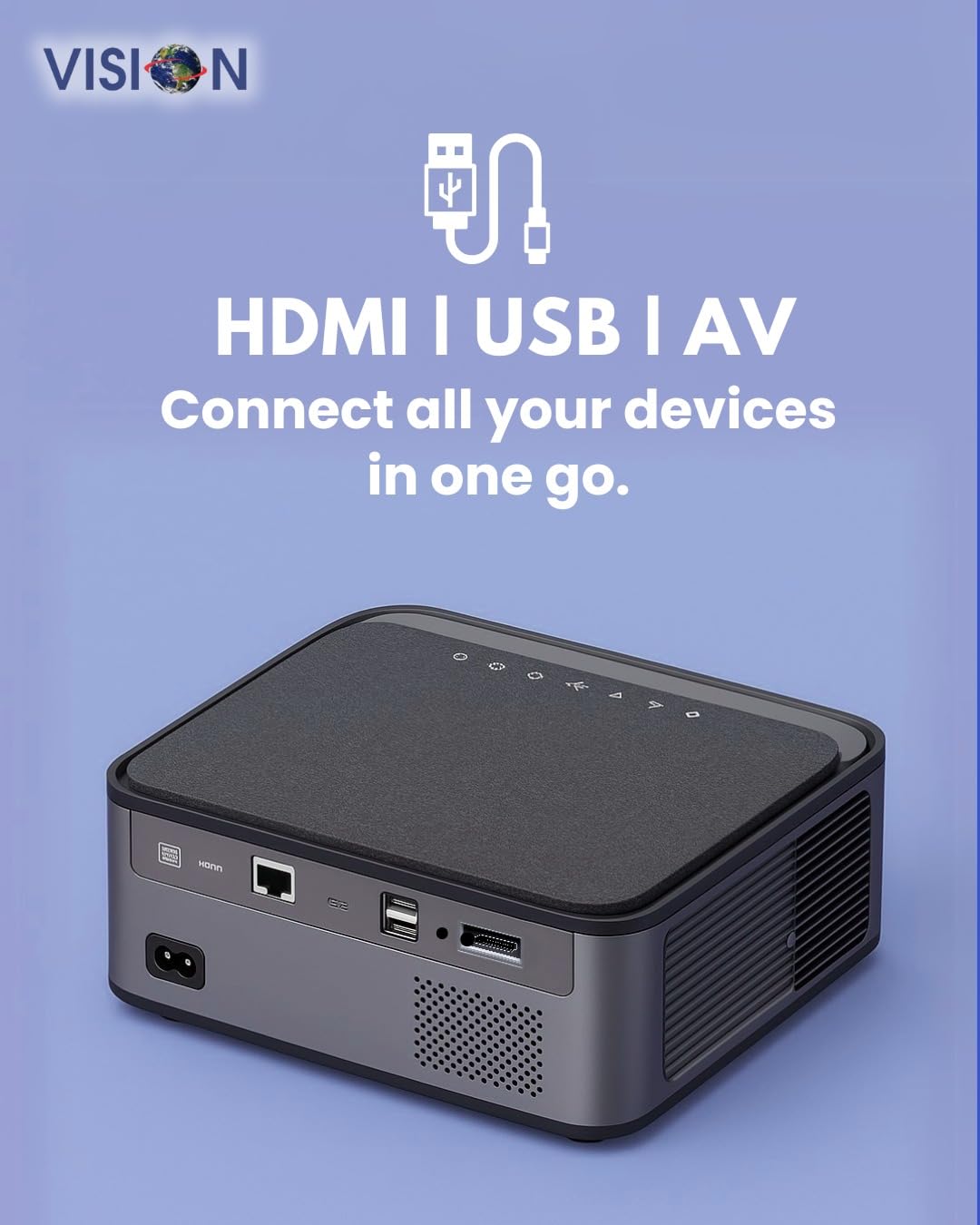
Aworan: Ẹyin view of the projector displaying the various input and output ports, including HDMI, USB, and AV.
- Iṣagbewọle agbara: So ohun ti nmu badọgba agbara pọ nibi.
- Ibudo HDMI: Connect to HDMI-enabled devices (laptops, gaming consoles, streaming sticks).
- Awọn ibudo USB (x2): Connect USB drives for media playback or external devices.
- Iṣawọle AV: Connect to older devices using the provided AV cable.
- Ohùn tó ń jáde (3.5mm): So awọn agbohunsoke ita tabi awọn agbekọri.
- Ibudo LAN: For wired internet connection (if available).
5. Eto
5.1 Pirojekito Placement
Choose a flat, stable surface for the projector. Ensure there are no obstructions in front of the lens and that the ventilation grilles are clear.

Image: A projector positioned on a desk, illustrating a typical setup environment.
5.2 Asopọ agbara
- So ohun ti nmu badọgba agbara si awọn pirojekito ká agbara input ibudo.
- Pulọọgi okun agbara sinu iṣan ogiri kan.
- Ina Atọka agbara lori pirojekito yoo tan imọlẹ.
5.3 Ibẹrẹ Agbara Lori
- Tẹ bọtini agbara lori pirojekito tabi isakoṣo latọna jijin lati tan-an.
- The projector will boot up and display the Android 9.0 home screen.
5.4 Àtúnṣe Àfojúsùn àti Ìṣàtúnṣe Òkúta
The VISION VP-621 features automatic focus and 4D keystone correction for a clear and properly aligned image.

Image: Illustrates the projector's automatic focus and keystone correction capabilities, ensuring a sharp and aligned picture.
- Idojukọ aifọwọyi: The projector will automatically adjust the focus for a sharp image upon startup or movement.
- Atunse okuta bọtini 4D: The projector automatically corrects image distortion when placed at an angle. Manual adjustments may be available in the settings menu if needed.
6. Awọn ilana Iṣiṣẹ
6.1 Android 9.0 Smart OS
The integrated Android 9.0 system allows direct access to streaming services and apps.
- Lilọ kiri: Use the remote control's directional buttons and "OK" button to navigate the interface.
- Fifi sori ẹrọ: Access the Google Play Store to download and install applications like YouTube, Netflix, and Prime Video.
- Isopọ nẹtiwọki: Go to Settings > Network to connect to a 5G WiFi network or a wired LAN connection.
6.2 Nsopọ Awọn ẹrọ ita
HDMI Asopọ
- Connect an HDMI cable from your device (laptop, gaming console, Fire TV Stick) to the HDMI port on the projector.
- On the projector's home screen, select the HDMI input source.
Asopọ USB
- Insert a USB drive into one of the USB ports on the projector.
- The projector will typically prompt you to open the media player or file browser. If not, navigate to the file manager app on the Android home screen.
AV Asopọmọra
- Connect the provided AV cable to the AV input port on the projector and to your external device.
- Select the AV input source on the projector.
Bluetooth 5.0 Audio Output
- Go to Settings > Bluetooth on the projector.
- Mu Bluetooth ṣiṣẹ ki o wa awọn ẹrọ to wa.
- Select your Bluetooth speaker or headphones from the list to pair and connect.
Wireless Miracast (Screen Mirroring)
Miracast allows you to wirelessly mirror the screen of your compatible smartphone, tablet, or laptop.
- On the projector's home screen, select the "Miracast" or "Screen Mirroring" application.
- On your mobile device, enable screen mirroring (often found in quick settings or display settings, named "Cast," "Smart View," "Wireless Display," etc.).
- Select the projector from the list of available devices to establish the connection.
7. Itọju
7.1 Ninu Pirojekito
- Lẹnsi: Lo aṣọ rirọ, tí kò ní àwọ̀ tí a ṣe pàtó fún àwọn lẹ́ńsì ojú. Má ṣe lo àwọn ohun ìfọmọ́ra.
- Casing: Nu pirojekito naa nu casing pẹ̀lú aṣọ rírọ̀ tí ó gbẹ. Fún eruku líle, díẹ̀ dampen awọn asọ pẹlu omi ati ki o si nu gbẹ.
- Afẹfẹ: Regularly check and clean the ventilation grilles to ensure proper airflow and prevent dust buildup. Use a soft brush or compressed air.
7.2 Lamp Igbesi aye
The VISION VP-621 utilizes advanced LED technology, providing an estimated lamp life of up to 50,000 hours. This significantly reduces the need for lamp replacement compared to traditional projectors.
8. Laasigbotitusita
| Isoro | Owun to le Fa | Ojutu |
|---|---|---|
| Ko si aworan han |
|
|
| Aworan ti ko dara |
|
|
| Ko si ohun |
|
|
| Ko le sopọ si Wi-Fi |
|
|
9. Awọn pato
| Brand | IRIRAN |
| Orukọ awoṣe | VP-621 AN |
| Ifihan ọna ẹrọ | LCD |
| Ifihan Iru | LED |
| Imọlẹ | 11000 Lumens |
| Eto Itansan Aworan | 18000: 1 Píksẹ́lì |
| Ipinnu abinibi | 1920 x 1280 (HD ni kikun) |
| Ipinnu atilẹyin | Up to 4K Ultra HD |
| Apakan Ipin | 16:9, 4:3 |
| Eto isesise | Android 9.0 |
| Asopọmọra Technology | Bluetooth 5.0, HDMI, USB, Wi-Fi (5G) |
| Ni wiwo Hardware | Bluetooth 5, HDMI, USB 3.0 |
| Pataki Awọn ẹya ara ẹrọ | Built-In 3D, Built-In Cooling System, Built-In Speaker, Electric Focus, Wi-Fi Ready, Auto Focus, 4D Keystone Correction, Wireless Miracast |
| Ọja Mefa | 30 x 18 x 7 cm |
| Iwọn Nkan | 8 kg |
| Lamp Igbesi aye | Titi di wakati 50,000 |

Image: Illustrates the projector's Full HD (1920x1080) resolution capability for crisp visuals.

Image: Highlights the projector's 11000 lumens brightness, ensuring clear visuals in various lighting conditions.
10. Atilẹyin ọja ati Support
For warranty information and technical support, please contact the manufacturer:
- Olupese: Scorpio Infosolutions
- Ibi: Delhi, India
- Foonu: + 91-7982647130
- Webojula: visionsheen.in
Please have your product model (VP-621) and purchase details ready when contacting support.


