Ọrọ Iṣaaju
The TOZO E2 Wireless Earbuds are designed to provide an immersive audio experience with advanced features. These earbuds feature 10mm dynamic drivers for powerful bass and clear sound, AI Call Noise Cancellation for clear communication, and Bluetooth 5.3 for stable connectivity. The TOZO App allows for extensive sound customization with 32 EQ settings. Enjoy extended listening with up to 30 hours of total playtime using the charging case.

Image: TOZO E2 Wireless Earbuds showcasing their elegant space capsule design.
Ohun ti o wa ninu Apoti
- TOZO E2 Wireless Earbuds
- Ngba agbara Case
- 3 pairs of Eartips (S/M/L)
- Okùn USB-C (A sí C) (20cm)
- Itọsọna olumulo

Image: The TOZO E2 Wireless Earbuds, charging case, and included accessories.
Ṣeto
Wọ awọn Earbuds
- Ensure the earbud tip is facing downwards.
- Place the earbuds into your ear.
- Rotate the earbuds back to your auricle side to fit snugly.

Image: Demonstrates the comfortable and secure fit of the TOZO E2 earbuds for prolonged listening.
Asopọ Bluetooth
- Pick up both earbuds from the charging case. The white indicator light will blink slowly, indicating pairing mode.
- Wa fun the pairing name "TOZO E2" and select it in your mobile device's Bluetooth settings.

Image: Illustrates the Bluetooth 5.3 technology for faster and more stable connections.
Ṣiṣẹ
Smart Fọwọkan idari
The TOZO E2 earbuds feature intuitive touch controls for easy management of audio playback and calls.
- Ṣiṣẹ/Daduro: Fọwọ́ tẹ etí ìgbọ́rọ̀ lẹ́ẹ̀kan (L/R).
- Orin ti tẹlẹ: Fọwọ ba agbekọri osi lemeji.
- Orin to nbọ: Fọwọ ba agbekọri ọtun lẹẹmeji.
- Iwọn didun isalẹ: Mu agbekọri osi.
- Iwọn didun Up: Di agbekọri ọtun mu.
- Dahun/Fi ipe duro: Fọwọ́ tẹ etí ìgbọ́rọ̀ lẹ́ẹ̀kan (L/R).
- Kọ Ipe: Hold the earbud for 2 seconds (L/R).
- Mu Oluranlọwọ Ohun ṣiṣẹ: Tap the earbud three times (L/R).

Image: The TOZO E2 earbuds in their charging case, illustrating the touch control panel on each earbud.
TOZO App Customization
Enhance your listening experience by utilizing the TOZO App. The app provides:
- 32 preset EQ modes to tailor sound preferences.
- Access to over 2,000 user-shared EQs in the 'EQ Zone'.
- Additional settings and features for personalized audio.

Image: A visual representation of the TOZO App, demonstrating its features for customizing sound settings and accessing EQ modes.
AI Ipe Noise Ifagile
The TOZO E2 earbuds are equipped with 2 built-in microphones and advanced Environmental Noise Cancellation (ENC) technology. This system works to effectively block out background noise during calls, ensuring clearer communication even in busy environments.

Image: A person engaged in a clear conversation using the TOZO E2 earbuds, highlighting the call noise cancellation feature.
Gbigba agbara
The TOZO E2 Wireless Earbuds offer extended playtime, with up to 8.5 hours on a single charge. The portable charging case provides an additional 30 hours of power, totaling 30 hours of use.
Ngba agbara si Ọran ati Earbuds
- To charge the earbuds, place them back into the charging case. The earbuds will automatically begin charging.
- To charge the case, connect the provided USB-C (A to C) cable to the charging port on the case and a compatible power source. The indicator light on the case will show charging status.
- Akoko gbigba agbara fun ọran naa fẹrẹ to awọn wakati 1.5.
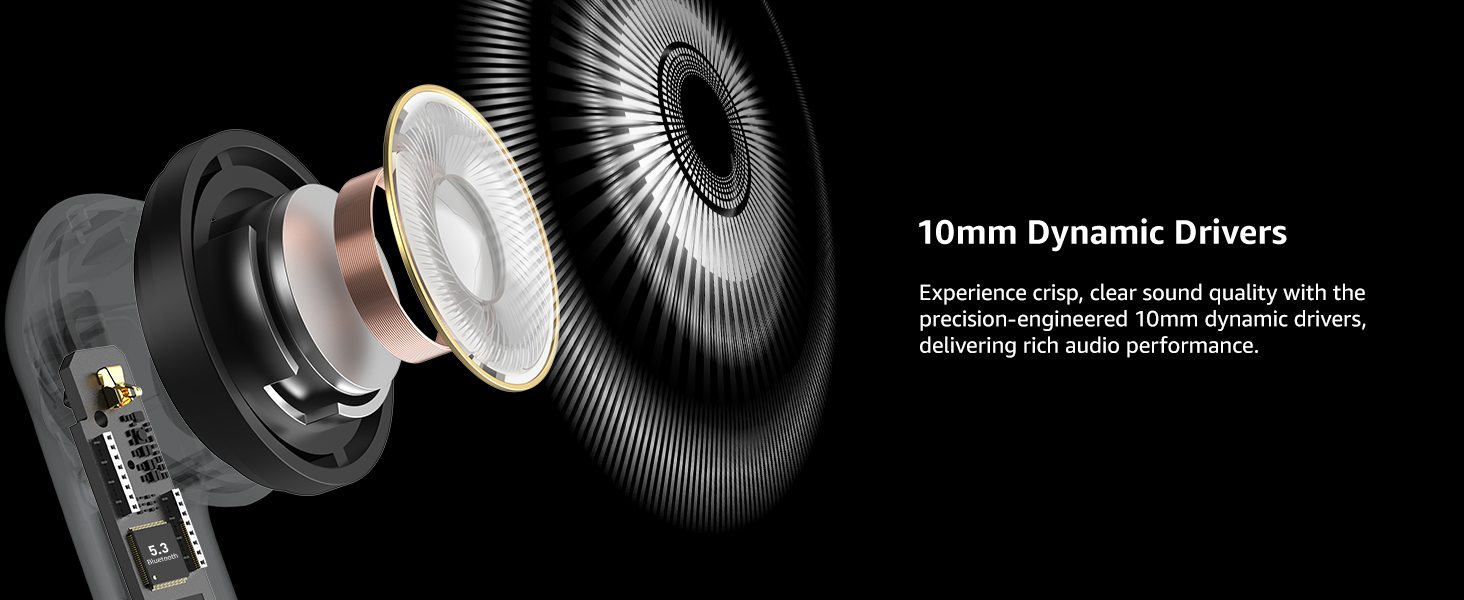
Image: The TOZO E2 earbuds and charging case, illustrating the extended battery life of 8.5 hours on a single charge and 30 hours with the case.
Didara ohun
The TOZO E2 earbuds are engineered with 10mm dynamic drivers, delivering a balanced audio profile with powerful bass, clear midrange, and crisp treble. This design ensures an enhanced and immersive listening experience across various music genres.

Aworan: inu view highlighting the 10mm dynamic drivers responsible for the earbuds' sound performance.
Awọn pato
| Ẹya ara ẹrọ | Ẹ̀kúnrẹ́rẹ́ |
|---|---|
| Orukọ awoṣe | E2 |
| Asopọmọra Technology | Ailokun (Bluetooth 5.3) |
| Ariwo Iṣakoso | Ifagile Ariwo Ayika |
| Audio Driver Iwon | 10 millimeters |
| Akoko iṣere (Igba agbara ẹyọkan) | Titi di wakati 8.5 |
| Lapapọ akoko ere (pẹlu Ọran) | Titi di wakati 30 |
| Akoko gbigba agbara | Awọn wakati 1.5 |
| Omi Resistance Ipele | Mabomire |
| Iṣakoso Iru | Iṣakoso ọwọ, App Iṣakoso |
| Bluetooth Ibiti | 20 Mita |
| Latency Ohun | 60 Milliseconds (Low-latency mode) |
| Iwọn Nkan | 32.9 giramu |
| Awọn iwọn | 2.4 x 1.93 x 1.02 inches |
Laasigbotitusita
If you encounter issues with your TOZO E2 Wireless Earbuds, consider the following general troubleshooting steps:
- Ko si Ohun: Ensure earbuds are charged and properly paired with your device. Check device volume and earbud fit.
- Awọn oran Isopọpọ: Place earbuds back in the case, close it, then reopen to re-enter pairing mode. Ensure Bluetooth is enabled on your device and try reconnecting.
- Asopọmọra Laarin: Ensure no obstructions between earbuds and device. Try resetting the earbuds (refer to the included Quick Guide for specific reset instructions).
- Awọn iṣakoso Fọwọkan ti ko dahun: Rii daju pe awọn ika ọwọ rẹ mọ ati gbẹ. Gbiyanju lati tun awọn agbekọri bẹrẹ nipa gbigbe wọn sinu ọran naa ki o tun mu wọn jade lẹẹkansi.
For detailed troubleshooting or specific error messages, please refer to the comprehensive User Manual included in the product packaging.
Itoju
To ensure the longevity and optimal performance of your TOZO E2 Wireless Earbuds, follow these maintenance guidelines:
- Ninu: Regularly clean the earbuds and charging case with a soft, dry cloth. Avoid using harsh chemicals or abrasive materials. Gently clean earbud tips and charging contacts to prevent debris buildup.
- Ibi ipamọ: Store the earbuds in their charging case when not in use to protect them from dust, moisture, and physical damage. Keep the case in a cool, dry place.
- Ifihan omi: While the earbuds are waterproof, avoid prolonged submersion in water. Ensure they are dry before placing them back in the charging case to prevent damage to the charging contacts.
- Itọju Batiri: Avoid fully draining the battery frequently. Charge the earbuds and case regularly to maintain battery health.
Atilẹyin ọja ati Support
The TOZO E2 Wireless Earbuds come with an 18-osu atilẹyin ọja. For any product-related inquiries, technical support, or warranty claims, please contact TOZO customer support.
- Atilẹyin Wiregbe Live: Ṣabẹwo www.tozostore.com for 7x24 Live Chat Support.
- Imeeli Atilẹyin Onibara: Kan si nipasẹ imeeli ni info@tozostore.com.
Jọwọ ṣe idaduro ẹri rira rẹ fun ijẹrisi atilẹyin ọja.


