Ọrọ Iṣaaju
This manual provides detailed instructions for the QCOQ T60 Smart Watch. It covers setup, operation, maintenance, and troubleshooting to ensure optimal use of your device. The QCOQ T60 Smart Watch features a 1.91-inch display, Bluetooth call functionality, heart rate monitoring, and IP68 water resistance.
Package Awọn akoonu
Jọwọ ṣayẹwo package fun awọn nkan wọnyi:
- QCOQ T60 Smart Watch (1 unit)
- Ngba agbara USB
- Itọsọna olumulo
Ṣeto
1. Ngba agbara ẹrọ
Before first use, fully charge the smart watch. Connect the magnetic charging cable to the charging contacts on the back of the watch and plug the USB end into a standard USB power adapter (not included).

Image: The QCOQ T60 Smart Watch connected to its magnetic charging cable, illustrating the charging process. The watch display shows an 80% battery level, indicating partial charge.
- Akoko gbigba agbara: O fẹrẹ to awọn wakati 2 fun idiyele ni kikun.
- Battery Life: Up to 7 days of typical usage on a full charge.
2. Fifi sori App ati Sisopọ
To utilize all features of your QCOQ T60 Smart Watch, download and install the companion application on your smartphone.
- Scan the QR code provided in the quick start guide or search for the app name (usually indicated in the watch's initial setup screen or manual) in your smartphone's app store (App Store for iOS, Google Play Store for Android).
- Rii daju pe Bluetooth ti ṣiṣẹ lori foonuiyara rẹ.
- Open the installed app and follow the on-screen instructions to create an account or log in.
- Within the app, navigate to the device pairing section and select your QCOQ T60 Smart Watch from the list of available devices.
- Jẹrisi ibeere isopọmọ lori foonu alagbeka rẹ ati aago ọlọgbọn rẹ.
Awọn ilana Iṣiṣẹ
1. Ipilẹ Lilọ kiri
The QCOQ T60 Smart Watch features a touchscreen display and a side button for navigation.
- Ra soke/isalẹ: Yi lọ nipasẹ awọn akojọ aṣayan ati awọn iwifunni.
- Ra osi/Ọtun: Access quick functions or different widgets.
- Fọwọ ba: Yan ohun kan tabi jẹrisi iṣẹ kan.
- Bọtini ẹgbẹ: Tẹ lati pada si iboju ile tabi ji ẹrọ naa. Tẹ fun awọn aṣayan agbara.
2. Bluetooth Call Functionality
Once paired with your smartphone, the QCOQ T60 Smart Watch allows you to make and answer calls directly from your wrist.
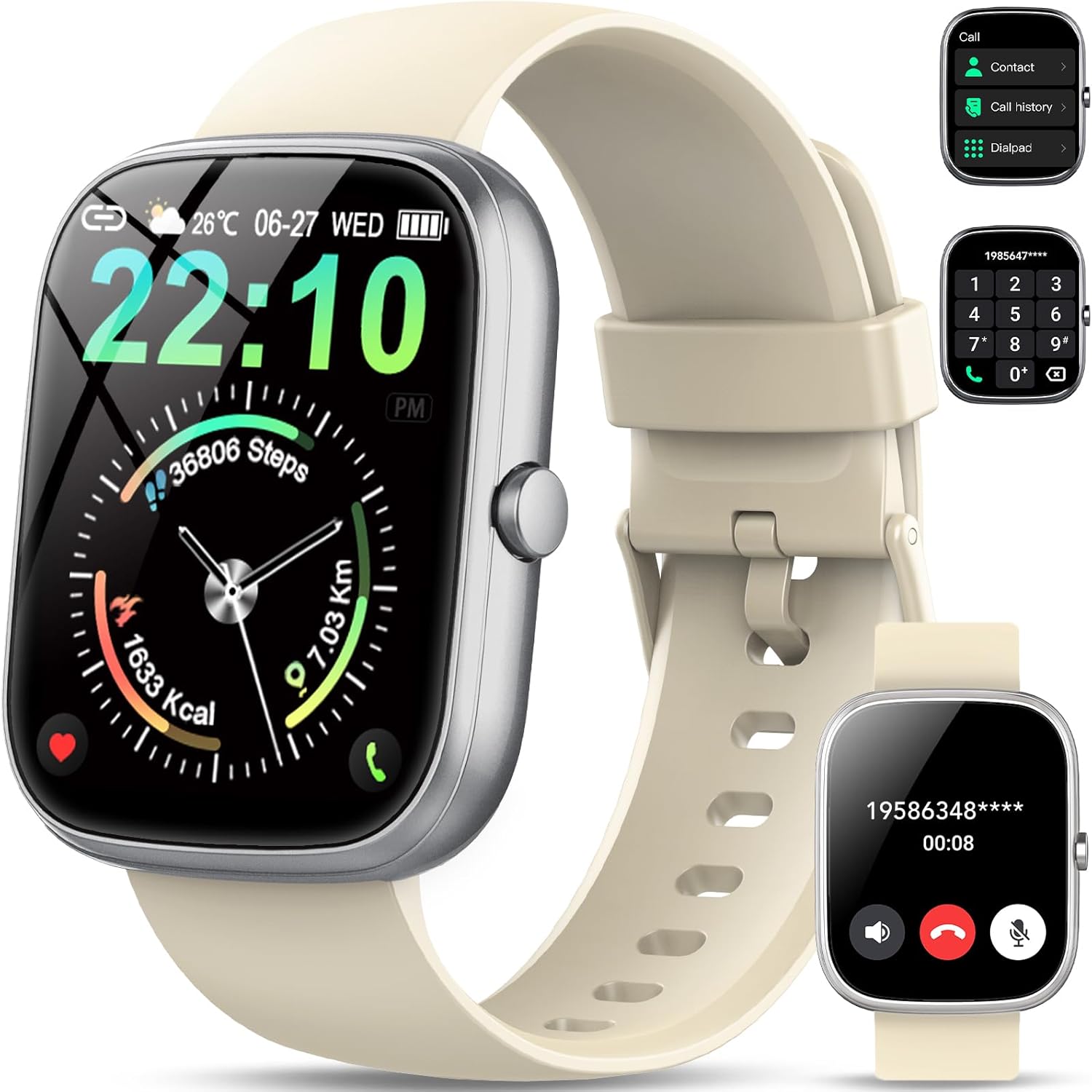
Image: The QCOQ T60 Smart Watch screen showing the call interface, including options to access contacts, view call history, and use a dialpad. A separate inset shows an incoming call notification.
- Ndahun Awọn ipe: Nigbati ipe ti nwọle ba ti gba, tẹ aami idahun alawọ ewe ni kia kia loju iboju aago.
- Ṣiṣe awọn ipe: Access the 'Call' menu on the watch, then select from contacts, call history, or use the dialpad to enter a number.
3. Awọn iwifunni
Gba awọn iwifunni lati inu foonu alagbeka rẹ taara lori aago rẹ.

Image: The QCOQ T60 Smart Watch screen showing notifications from various social media and messaging applications. Adjacent to it, a smartphone displays an incoming call, demonstrating the watch's Bluetooth call feature.
- Rii daju pe awọn igbanilaaye iwifunni ti ṣiṣẹ fun ohun elo ẹlẹgbẹ lori foonuiyara rẹ.
- Rọra lati oke oju aago naa si isalẹ view to šẹšẹ iwifunni.
4. Amọdaju Titele
The QCOQ T60 Smart Watch monitors various fitness metrics.

Image: A visual representation of the QCOQ T60 Smart Watch's fitness capabilities, highlighting over 110 sport modes, step counting, calorie expenditure tracking, IP68 water resistance, and comprehensive daily activity data.
- Abojuto Oṣuwọn Ọkàn: The watch provides real-time heart rate data. Access the heart rate function on the watch or through the app.
- Step Count & Calories: Tracks your daily steps, distance, and estimated calories burned.
- Awọn ọna idaraya: Select from over 110 sport modes to track specific activities.
5. Abojuto oorun
The watch automatically monitors your sleep patterns.

Image: The QCOQ T60 Smart Watch screen showing detailed sleep monitoring data, including deep, light, and awake sleep stages. Another section displays a 7-day weather forecast.
- Wear the watch while sleeping for accurate data.
- View detailed sleep analysis in the companion app, including deep sleep, light sleep, and awake times.
6. Miiran Awọn ẹya ara ẹrọ
- Àfojúsùn ojú ọjọ: View current weather and a 7-day forecast.
- Iṣakoso Orin: Ṣakoso ṣiṣiṣẹsẹhin orin lori foonuiyara rẹ (mu ṣiṣẹ, da duro, fo awọn orin).
- Latọna Kamẹra: Lo aago naa gege bi oju isakoṣo latọna jijin fun kamẹra foonu alagbeka rẹ.
- Oluranlọwọ ohun: Wọle si oluranlọwọ ohun ti foonu alagbeka rẹ.
- Olurannileti Iduroṣinṣin: Gba awọn itaniji lati gbe lẹhin awọn akoko aiṣiṣẹ.
- Itaniji: Ṣeto awọn itaniji taara lati aago.
- Abojuto Atẹgun ẹjẹ: Ṣe iwọn awọn ipele atẹgun ẹjẹ rẹ.
- Ilera Awọn Obirin: Track menstrual cycles and related data.
- Ẹrọ iṣiro: Iṣẹ iṣiro ipilẹ.
7. Customizing Watch oju
Personalize your watch with various watch faces.

Image: A collage of various watch faces available for the QCOQ T60 Smart Watch, demonstrating the range of styles and information displays, including options for personalized backgrounds.
- Long press on the current watch face to enter the watch face selection menu.
- Swipe left or right to browse available watch faces. Tap to select.
- More watch faces and customization options (including custom backgrounds) are available through the companion app.
Itoju
1. Ninu
- Pa iboju aago ati ara rẹ nu pẹlu asọ ti ko ni lint.
- For the strap, use a mild soap and water solution if necessary, then rinse thoroughly and dry completely before wearing.
- Yago fun lilo awọn kẹmika lile tabi awọn ohun elo abrasive.
2. Omi Resistance (IP68)
The QCOQ T60 Smart Watch is IP68 rated, meaning it is resistant to dust and can withstand immersion in water up to 1.5 meters for up to 30 minutes. It is suitable for daily use, such as hand washing or light rain.
- Do not use the watch for diving, hot showers, saunas, or in environments with high-pressure water.
- Water resistance is not a permanent condition and may decrease over time with normal wear and tear.
3. Itọju batiri
- Yẹra fún àwọn iwọn otutu tó le koko, èyí tó lè ba iṣẹ́ bátírì jẹ́.
- Gba agbara aago naa nigbagbogbo; maṣe jẹ ki batiri naa gbẹ patapata fun igba pipẹ.
Laasigbotitusita
- Wo ti ko tan: Rii daju pe aago naa ti gba agbara ni kikun. Sopọ mọ ṣaja fun o kere 10 iṣẹju.
- Ko le so pọ pẹlu foonuiyara:
- Rii daju pe Bluetooth ti ṣiṣẹ lori foonu rẹ ati aago.
- Rii daju pe aago wa laarin iwọn foonu rẹ.
- Tun aago mejeeji bẹrẹ ati foonu rẹ.
- Check if the companion app has necessary permissions.
- Awọn iwifunni ko gba:
- Verify that notifications are enabled in the watch's settings and the companion app.
- Rí i dájú pé aago náà so pọ̀ dáadáa nípasẹ̀ Bluetooth.
- Check your phone's notification settings for the app.
- Inaccurate heart rate/activity data: Ensure the watch is worn snugly on your wrist, not too tight or too loose. Clean the sensor regularly.
Awọn pato
| Ẹya ara ẹrọ | Sipesifikesonu |
|---|---|
| Brand | QCOQ |
| Awoṣe | T60 |
| Iwọn Ifihan | 1.91 inches |
| Ifihan ọna ẹrọ | LCD |
| Ipinnu | 240 x 240 |
| Asopọmọra | Bluetooth |
| Awọn ẹrọ ibaramu | Foonuiyara |
| Omi Resistance | IP68 |
| Pataki Awọn ẹya ara ẹrọ | Heart Rate Monitor, Notifications, Camera Remote, Voice Assistant |
| Human Interface Input | Afi ika te |
| GPS | Ko si GPS |
| Batiri Iru | Lítíọ́mù Íọ́nù (1 pọndandan) |
| Awọn iwọn (Pace) | 17.4 x 9.4 x 1.8 cm |
| Ìwúwo (Àpò) | 38.19 g |
| Àwọ̀ | Ọra-funfun |
Alaye Aabo
- Consult your doctor before starting any new exercise regimen or if you have pre-existing health conditions.
- Maṣe gbiyanju lati ṣaito tabi yi aago pada.
- Keep the device away from extreme heat or cold.
- Sọ ẹrọ naa ati batiri rẹ sọnu ni ibamu si awọn ilana agbegbe.
Atilẹyin ọja ati Support
For warranty information and customer support, please refer to the documentation included with your purchase or visit the official QCOQ website. Ensure you have your purchase receipt and product model number (T60) available when contacting support.


