Ọrọ Iṣaaju
This manual provides comprehensive instructions for the assembly, operation, maintenance, and troubleshooting of your SEDETA Corner Computer Desk. This versatile U-shaped desk features a reversible design, integrated power outlet, LED lighting, three fabric drawers, and ample storage shelves, making it suitable for various home office and gaming setups.
Alaye Aabo pataki
Jọwọ ka gbogbo awọn ikilọ ailewu ati awọn ilana ni pẹkipẹki ṣaaju apejọ ati lilo. Ikuna lati tẹle awọn ilana wọnyi le ja si ipalara tabi ibajẹ ọja naa.
- Ensure proper anchoring to the wall to prevent tipping. Wall anchoring hardware may be required and is recommended for stability.
- Do not exceed the weight limit of 76 pounds on the desk surface. Distribute weight evenly.
- Follow the assembly instructions carefully to ensure structural stability. Do not overtighten screws.
- Keep electrical components (power outlet, LED lights) away from water and moisture to prevent electric shock.
- Má ṣe yí àwọn ẹ̀yà iná mànàmáná tàbí wáyà padà.
- Jeki awọn ẹya kekere ati awọn ohun elo iṣakojọpọ kuro lọdọ awọn ọmọde lati ṣe idiwọ awọn eewu gige.
Eto ati Apejọ
The SEDETA Corner Computer Desk requires assembly. It is recommended that two people perform the assembly for ease and safety.
Before beginning, ensure all parts are present and undamaged. Refer to the included hardware pack and assembly guide for detailed step-by-step instructions.
Apẹrẹ iparọ
This desk features a reversible design, allowing you to configure the L-shape with the longer section on either the left or right side to best suit your space. Follow the specific instructions in your assembly guide for the desired orientation.
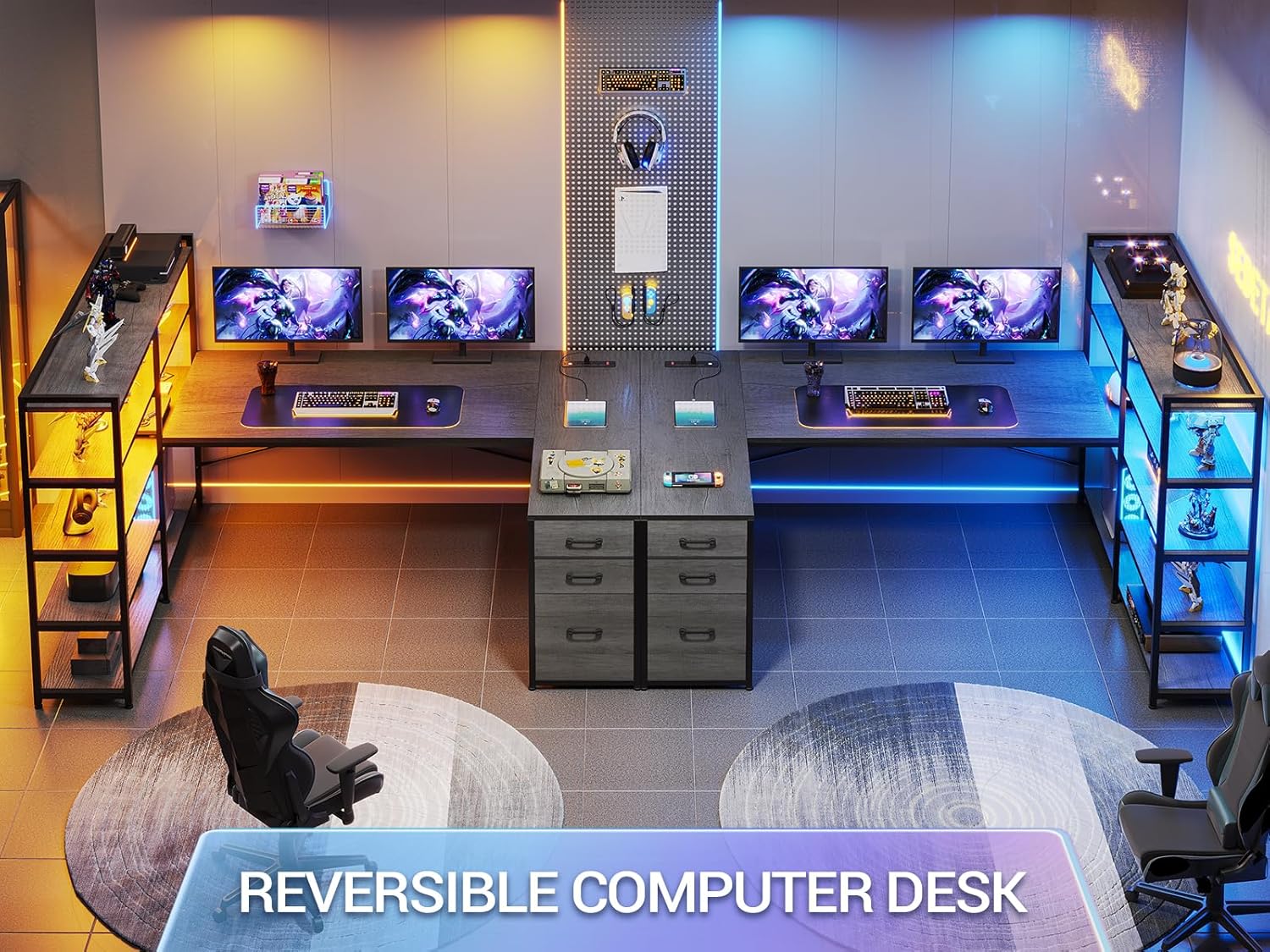
The desk can be assembled in two different orientations to fit your room layout.
Ọja Mefa
Understanding the dimensions is crucial for proper placement and assembly. The overall dimensions are approximately 19"D x 64.5"W x 29.5"H. The desk offers a large workspace, with the main desk surface measuring approximately 64.5 inches in length.
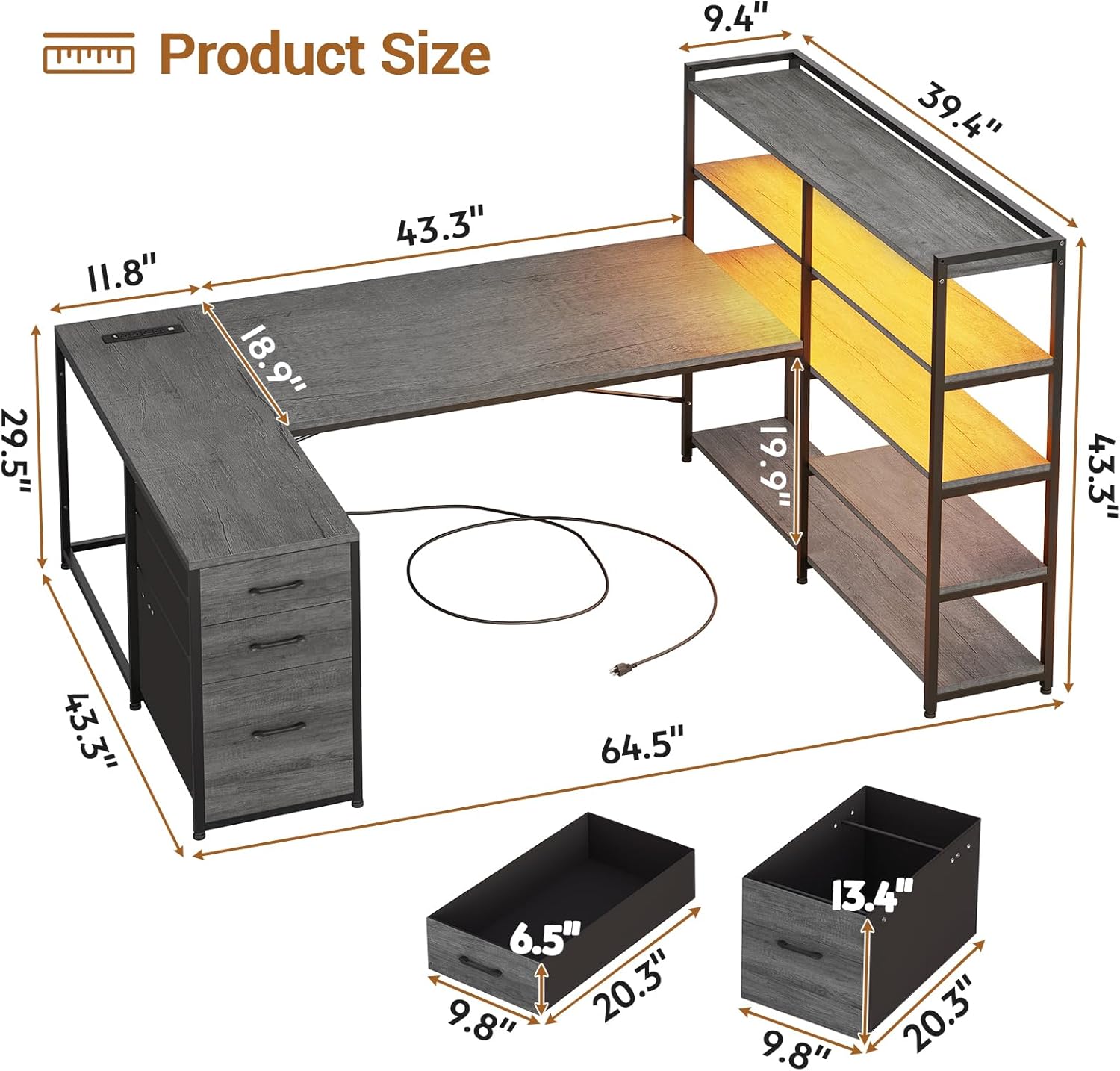
Detailed product dimensions for planning your space.

The desk provides a spacious 64.5-inch main working surface.
Awọn ilana Iṣiṣẹ
Isopọ Agbara Apapo
The desk is equipped with a built-in power strip for convenient access to power. This charging station includes:
- 4 Awọn iṣan AC (125V/12A)
- 2 Awọn ibudo USB (5V/2A)
- 1 Tan-an/Pa Power Yipada
To use, simply plug the desk's power cord into a wall outlet. Use the integrated power switch to turn the power strip on or off, ensuring safe electricity use and easy power management for connected devices like cell phones, tablets, and notebooks.
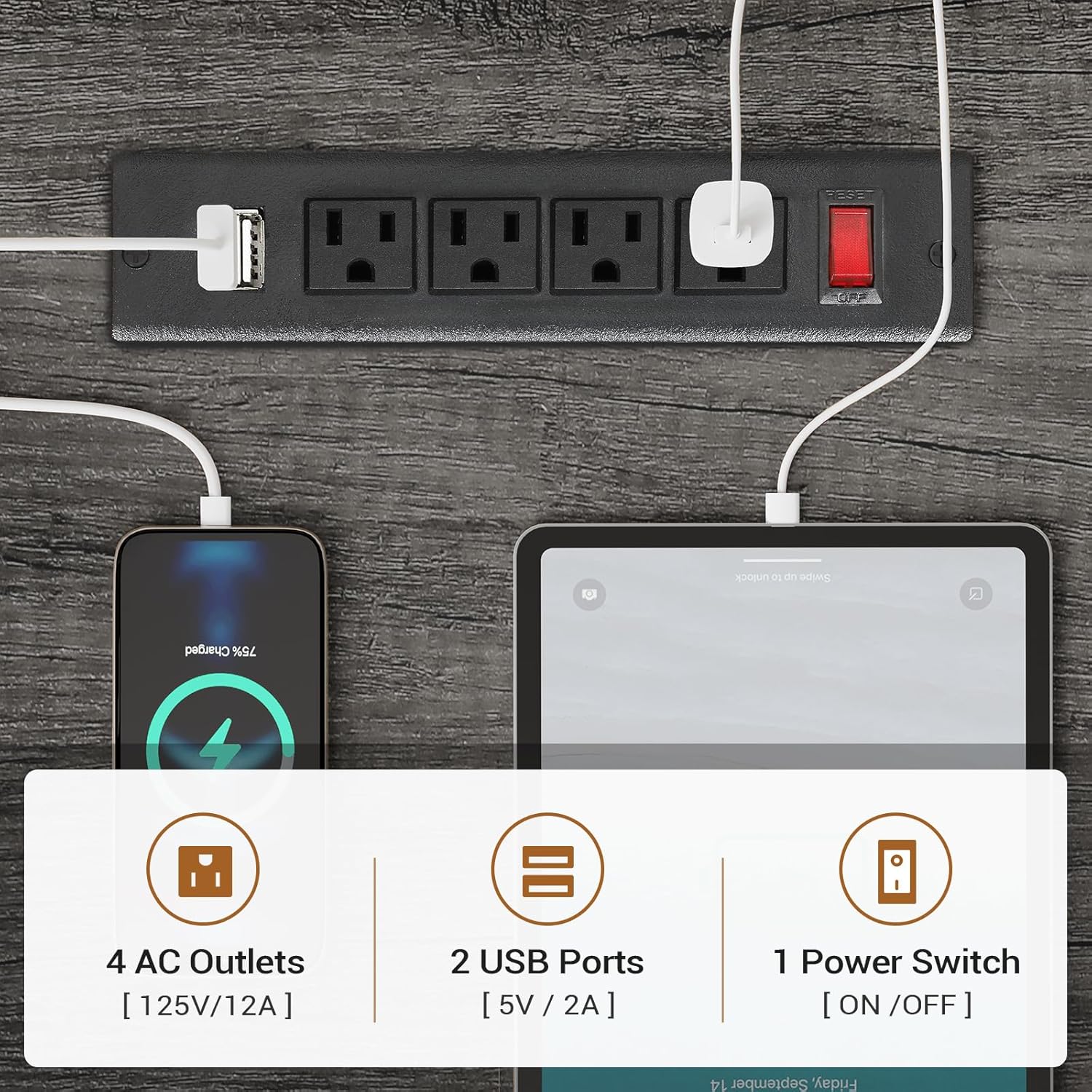
The integrated power strip provides convenient charging for multiple devices.
LED ina System
The corner gaming desk features RGB LED lights for customizable ambiance. The LED lights can be controlled via a remote control or a dedicated mobile application.
- Awọn aṣayan awọ: Yan lati inu awọn awọ ti o ju 60,000 lọ.
- Awọn ọna Imọlẹ: Select from 29 different flashing modes.
- Iṣẹ́ Ìṣọ̀kan Orin: The built-in sensitivity adjustable microphone allows the LED light color to change rhythmically with sound and music.
- Iṣakoso: Use the provided remote control or download the specified app for advanced control options.

Control your LED lights with a remote or smartphone app for dynamic lighting effects.
Fabric Storage Drawers
The desk includes three fabric drawers designed for organized storage. These drawers can accommodate various document sizes, including Legal, Letter, and A4 files. The top drawer can also serve as a general storage cabinet for office items.

The fabric drawers provide versatile storage for documents and office supplies.
Awọn selifu ipamọ
The desk features a 5-tier storage shelf unit, providing ampaaye fun awọn iwe, files, printers, and decorative items. These shelves are integrated into the desk's design, offering convenient access to your essentials.
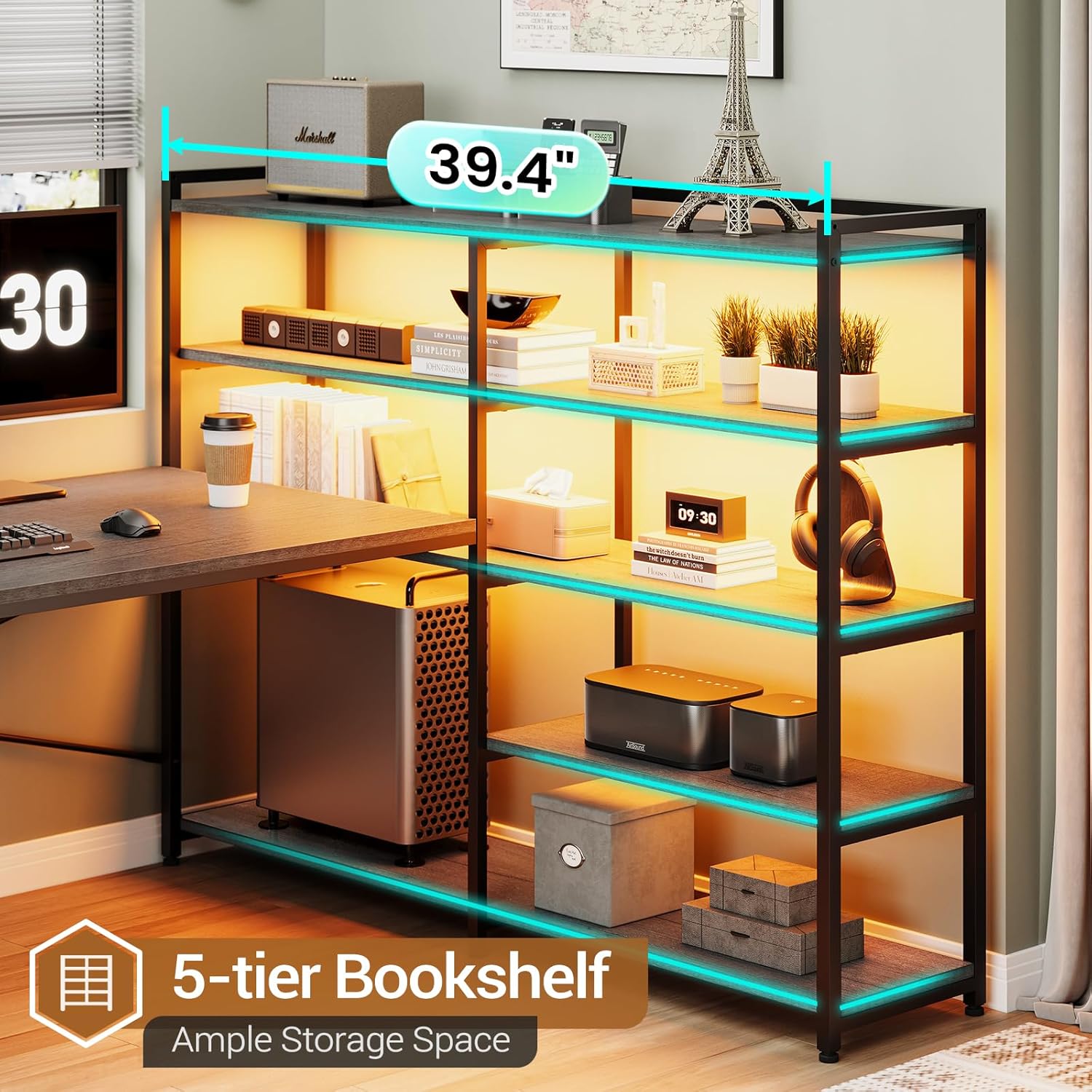
The 5-tier bookshelf offers extensive storage capacity.
Itoju
- Ninu: Pa awọn ipele tabili nu pẹlu asọ, damp asọ. Yẹra fun awọn kẹmika lile tabi awọn olutọpa abrasive ti o le ba ipari jẹ.
- Eruku: Nigbagbogbo eruku gbogbo awọn aaye, pẹlu selifu ati awọn apoti, lati ṣe idiwọ ikojọpọ.
- Awọn ohun elo itanna: Ensure the power outlet and LED lights are kept dry. If cleaning around these components, unplug the desk from the wall outlet first.
- Hardware: Lokọọkan ṣayẹwo gbogbo awọn skru ati awọn fasteners lati rii daju pe wọn wa ni wiwọ. Retighten ti o ba wulo lati ṣetọju iduroṣinṣin.
- Awọn Aṣọ Aṣọ: Spot clean fabric drawers with a mild detergent and water if needed. Allow to air dry completely before reinserting.
Laasigbotitusita
| Isoro | Owun to le Fa | Ojutu |
|---|---|---|
| Iduro jẹ riru tabi riru. | Àwọn ohun ìdè tí kò dọ́gba; ilẹ̀ tí kò dọ́gba; ìtòjọ tí kò tọ́. | Check and tighten all screws. Ensure the desk is on a level surface. Verify assembly steps were followed correctly. Consider using the wall anchoring kit if not already installed. |
| Awọn imọlẹ LED ko ṣiṣẹ. | Power not connected; remote battery low; app connection issue; damaged wiring. | Ensure the desk's power cord is plugged in and the power strip switch is ON. Check remote control battery. Re-pair the app if using. Inspect wiring for visible damage (unplug first). |
| Power outlets/USB ports not providing power. | Power strip switch OFF; desk not plugged in; circuit breaker tripped. | Ensure the red power switch on the power strip is ON. Verify the desk's main power cord is securely plugged into a working wall outlet. Check your home's circuit breaker. |
| Awọn iyaworan ko rọra laisiyonu. | Obstruction; misaligned drawer slides; overloaded drawer. | Remove contents and check for obstructions. Ensure drawer slides are properly aligned and installed. Do not overload drawers beyond their capacity. |
Awọn pato
| Ẹya ara ẹrọ | Ẹ̀kúnrẹ́rẹ́ |
|---|---|
| Brand | SEDETA |
| Nọmba awoṣe | 265-desk |
| Orukọ awoṣe | Reversible Computer Desk |
| Awọn iwọn Ọja (D x W x H) | 19"D x 64.5"W x 29.5"H |
| Iwọn Nkan | 76 iwon |
| Iwọn Idiwọn | 76 Pounds (on desk surface) |
| Àwọ̀ | Grẹy |
| Ara | Ilé iṣẹ́ |
| Ohun elo mimọ | Irin |
| Top elo Iru | Onigi Igi |
| Pari Iru | Ti a bo lulú |
| Pataki Awọn ẹya ara ẹrọ | Built-In USB Outlet, Reversible Design, LED Lights |
| Nọmba ti Drawers | 3 (Àwọn Àpótí Aṣọ) |
| Iru Drawer | File Drawer (Legal/Letter/A4 compatible) |
| Nọmba ti selifu | 5 |
| Ile-iṣẹ Agbara | 4 AC Outlets, 2 USB Ports, On/Off Switch |
| Awọn imọlẹ LED | RGB, APP/Remote Control, Music Sync |
| Apejọ ti a beere | Bẹẹni |
| Niyanju Eniyan fun Apejọ | 2 |
Atilẹyin ọja ati Support
For any questions, concerns, or assistance with your SEDETA Corner Computer Desk, please contact SEDETA customer support. Refer to your purchase documentation or the SEDETA brand store for specific warranty details and contact information.
You can visit the official SEDETA store on Amazon for more information and support: SEDETA Store