Ọrọ Iṣaaju
Thank you for choosing the Mesqool CR1025 Digital Alarm Clock Radio. This device combines multiple functions including a digital alarm clock, Bluetooth 5.0 speaker, FM radio, night light, and dual USB charging ports. This manual provides detailed instructions to help you set up and operate your new device effectively.
Package Awọn akoonu
- Mesqool CR1025 Digital Alarm Clock Radio
- Adapter agbara
- Itọsọna olumulo
- C Battery (for backup)
Ọja Pariview
Familiarize yourself with the components and controls of your Mesqool CR1025 Digital Alarm Clock Radio.
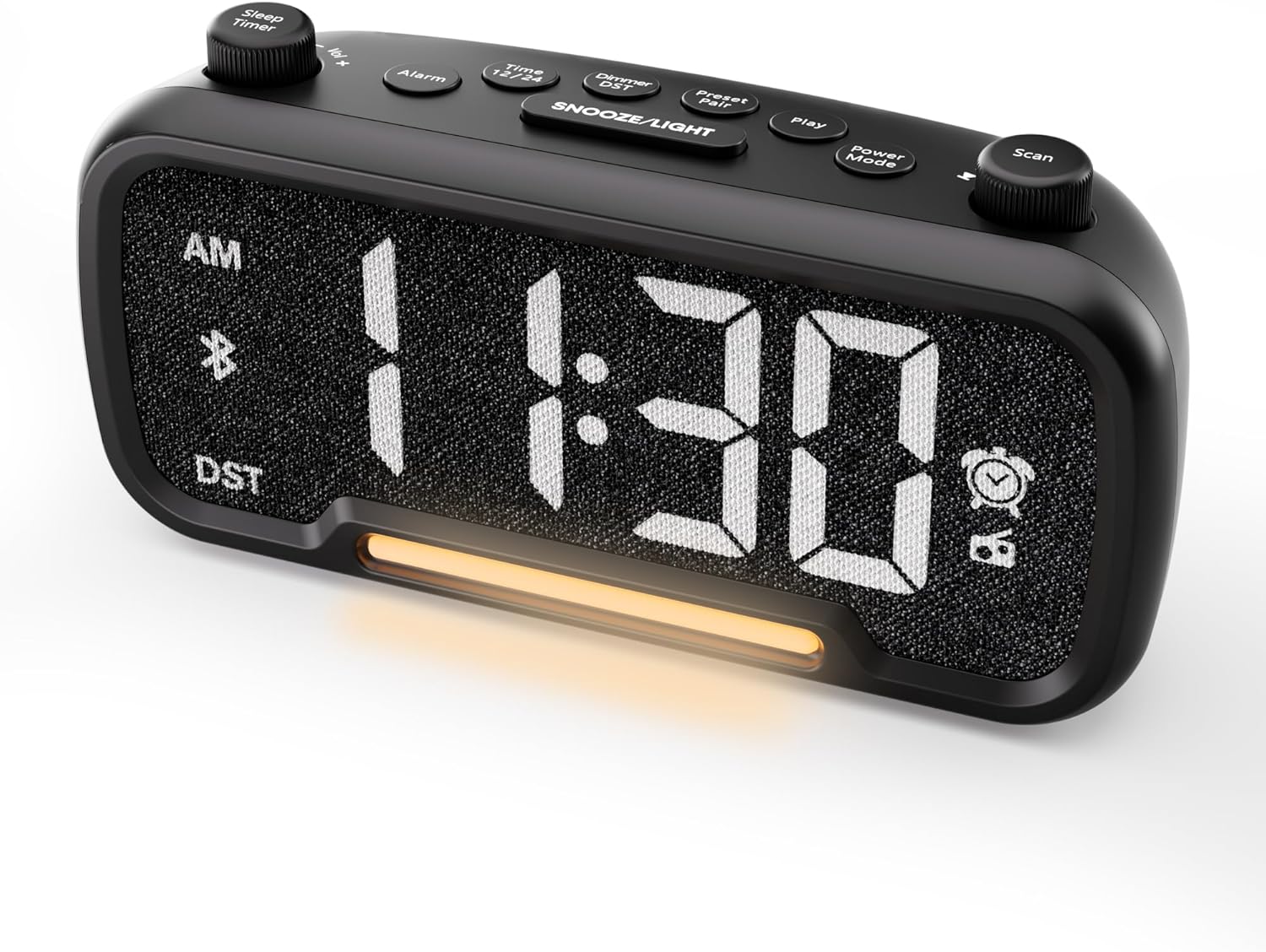

Control Buttons and Knobs:
- Sleep Timer / Vol +/- Knob (Left): Adjusts volume, sets sleep timer duration.
- Bọtini Itaniji: Sets and activates/deactivates alarms.
- Time 12/24 Button: Yípadà láàrín àwọn ọ̀nà ìgbà wákàtí méjìlá àti wákàtí mẹ́rìnlélógún.
- Dimmer / DST Button: Adjusts display brightness, activates/deactivates Daylight Saving Time (DST).
- Preset / Pair Button: Saves FM radio presets, initiates Bluetooth pairing.
- Bọtini Play: Plays/pauses media in Bluetooth mode.
- Bọtini Ipo Agbara: Cycles through operating modes (FM, Bluetooth, AUX).
- Scan / TU +/- Knob (Right): Scans FM radio stations, manually tunes FM frequency.
- Bọtini SINOOZE/Imọlẹ: Activates snooze function, turns night light on/off.

Ṣeto
1. Ibẹrẹ Agbara-soke
Connect the provided power adapter to the DC 5V IN port on the back of the alarm clock and plug it into a standard wall outlet. The display will light up. Ensure the C battery is installed for backup in case of power outage.

2. Eto Akoko
- Tẹ mọlẹ Akoko 12/24 button for 2 seconds. The hour digits will begin to flash.
- Yiyi awọn Vol +/- bọtini (kọnu apa osi) lati ṣatunṣe wakati naa.
- Tẹ awọn Akoko 12/24 button again. The minute digits will begin to flash.
- Yiyi awọn Vol +/- koko lati ṣatunṣe iseju.
- Tẹ awọn Akoko 12/24 button once more to confirm the time setting.
Video demonstrating how to set the time on the Mesqool Digital Alarm Clock Radio.
3. Ọna kika akoko wakati 12/24
Láti yípadà láàrín àwọn ọ̀nà ìgbà wákàtí méjìlá sí wákàtí mẹ́rìnlélógún, tẹ ẹ̀rọ kúkúrú náà Akoko 12/24 button. The display will change accordingly.
4. Àtúnṣe Àkókò Ìfipamọ́ Òsán (DST)
To activate or deactivate DST, press and hold the Dimmer / DST button for 2 seconds. The time will adjust by one hour forward or backward, and the DST indicator will appear or disappear on the display.
Awọn ilana Iṣiṣẹ
1. Eto Itaniji
- Tẹ mọlẹ Itaniji bọ́tìnì náà fún ìṣẹ́jú-àáyá mẹ́ta. Àwọn nọ́mbà wákàtí náà yóò máa tàn yanranyanran.
- Yiyi awọn Vol +/- knob to adjust the desired alarm hour.
- Tẹ awọn Itaniji bọtini lẹẹkansi. Awọn nọmba iṣẹju yoo filasi.
- Yiyi awọn Vol +/- knob to adjust the desired alarm minute.
- Tẹ awọn Itaniji button again. The alarm sound selection will flash (bell icon for buzzer, radio icon for FM radio). Rotate the Vol +/- knob to choose between buzzer or FM radio as the alarm sound.
- If FM radio is selected, press the Itaniji button again. The volume level will flash (L01-L16). Rotate the Vol +/- knob to set the desired alarm volume.
- Tẹ awọn Itaniji button once more to confirm and activate the alarm. The alarm icon will appear on the display.
To deactivate the alarm, short press the Itaniji Bọtini naa. Aami itaniji naa yoo parẹ kuro ninu ifihan naa.

Iṣẹ́ lẹ́ẹ̀kọ̀ọ̀kan:
Nigbati itaniji ba dun, tẹ bọtini naa SNOOZE / LIGHT button to activate the snooze function for 9 minutes. The alarm will sound again after 9 minutes. To turn off the alarm completely, press any other button except SNOOZE / LIGHT.

2. FM Radio isẹ
- Tẹ awọn Ipo agbara button repeatedly until the radio icon lights up on the display, indicating FM radio mode.
- Auto-Scan and Save Presets: Tẹ awọn Scan / TU +/- knob (right knob) to automatically search for available FM stations and save them as presets (up to 20 stations). The display will show "P01", "P02", etc., as stations are saved.
- Itọsọna Afowoyi: Yiyi awọn Scan / TU +/- knob to manually browse frequencies.
- Ṣe iranti awọn tito tẹlẹ: Kukuru tẹ awọn Tẹlẹ / Bata bọtini lati yipo nipasẹ awọn ibudo ti a ti ṣeto tẹlẹ.
- Ṣatunṣe Iwọn didun: Yiyi awọn Vol +/- knob (left knob) to adjust the radio volume (L01-L16).

Video demonstrating how to set the FM radio alarm on the Mesqool Digital Alarm Clock Radio.
3. Iṣẹ́ Agbọrọsọ Bluetooth
- Tẹ awọn Ipo agbara button repeatedly until the Bluetooth icon (bt) starts flashing on the display, indicating pairing mode.
- On your mobile device, enable Bluetooth and search for "CR1025" in the list of available devices.
- Select "CR1025" to pair. Once connected, the Bluetooth icon will stop flashing and remain solid.
- You can now play audio from your device through the alarm clock's speaker.
- Lo awọn Vol +/- knob on the alarm clock or your mobile device to adjust the volume.
- Tẹ awọn Ṣiṣẹ bọtini lati mu ṣiṣẹ tabi danu ohun afetigbọ.

Video demonstrating how to set up Bluetooth on the Mesqool Digital Alarm Clock Radio.
4. Night Light Operation
The alarm clock features a gentle night light. To turn the night light on or off, short press the SNOOZE / LIGHT bọtini.

5. Dimmer Setting
The display brightness can be adjusted to 5 levels. Short press the Dimmer / DST button to cycle through the brightness levels (L01-L05). Select the level that best suits your environment.

6. Sleep Timer Setting
The sleep timer allows you to set a duration for the FM radio or Bluetooth speaker to play before automatically turning off. This is useful for falling asleep to music or podcasts.
- While in FM radio or Bluetooth mode, press the Aago orun button. The display will show the current sleep timer duration (e.g., "30" for 30 minutes).
- Yiyi awọn Sleep Timer / Vol +/- knob to select the desired duration: 15, 30, 60, 90, or 120 minutes. You can also select "OFF" to disable the sleep timer.
- The timer will start counting down, and the device will automatically turn off after the selected duration.
7. Awọn ibudo gbigba agbara USB
The alarm clock is equipped with two USB charging ports (Type-C and USB-A) on the back, each providing 5V/1A output. These ports can be used to conveniently charge your smartphone, tablet, or other USB-powered devices.

Laasigbotitusita
| Isoro | Owun to le Solusan |
|---|---|
| Ifihan aago ko ṣofo. | Rí i dájú pé ohun tí a fi ń so agbára pọ̀ mọ́ aago àti ibi tí agbára ń gbé jáde. Ṣàyẹ̀wò bóyá ibi tí agbára ń gbé jáde náà ń ṣiṣẹ́. |
| Itaniji ko dun. | Verify that the alarm is set and activated (alarm icon visible on display). Check the alarm volume level. Ensure the correct alarm sound (buzzer or FM radio) is selected. |
| Gbigba redio FM ti ko dara. | Extend the FM antenna fully. Try repositioning the antenna or the clock for better signal. Perform an auto-scan again to find stronger stations. |
| Cannot pair Bluetooth device. | Ensure the clock is in Bluetooth pairing mode (flashing 'bt' icon). Make sure Bluetooth is enabled on your mobile device and it is within range. Forget "CR1025" from your device's Bluetooth list and try pairing again. |
| Awọn ibudo gbigba agbara USB ko ṣiṣẹ. | Confirm the alarm clock is powered on. Ensure the charging cables are properly connected to both the clock and your device. Try a different USB cable or device to rule out cable/device issues. |
Awọn pato
| Ẹya ara ẹrọ | Ẹ̀kúnrẹ́rẹ́ |
|---|---|
| Brand | Mesqool |
| Nọmba awoṣe | CR1025 |
| Àwọ̀ | Dudu |
| Ifihan Iru | LED oni-nọmba |
| Ọja Mefa | 6.61"L x 3.31"W x 2.32"H |
| Orisun agbara | Corded Electric (AC adapter included) |
| Batiri Afẹyinti | Batiri 1C (pẹlu) |
| Ẹya Bluetooth | V5.0 |
| FM Igbohunsafẹfẹ | 87.5-108MHz |
| Awọn tito tẹlẹ FM | Títí dé àwọn ibùdó ọgbọ̀n |
| Ifihan Dimmer | 5 ipele |
| Awọn ohun itaniji | Buzzer, FM Radio |
| Igba didun lẹẹkọọkan | 9 iṣẹju |
| USB Ngba agbara wu | Type-C & USB-A, 5V/1A each |
| Ohun elo | Ṣiṣu |
| Iwọn Nkan | 0.48 Poun (isunmọ. 7.7 iwon) |
Itoju
- Fi aṣọ gbígbẹ tó rọ, tó sì rọ̀ nu ẹ̀rọ náà. Má ṣe lo àwọn ohun èlò ìfọmọ́ omi tàbí àwọn ohun èlò ìpara.
- Pa ẹrọ naa mọ kuro ninu oorun taara, iwọn otutu to lagbara, ati ọriniinitutu giga.
- Rii daju pe fentilesonu to dara ni ayika ẹrọ lati ṣe idiwọ igbona.
- If the device will not be used for an extended period, remove the backup battery.
Alaye Aabo
- Ma ṣe fi ẹrọ naa han si omi tabi ọrinrin.
- Ma ṣe gbiyanju lati tunto tabi tun ẹrọ naa funrararẹ. Tọkasi awọn oṣiṣẹ iṣẹ ti o peye.
- Jeki ẹrọ naa kuro ni arọwọto awọn ọmọde.
- Lo adapter agbara ti a pese nikan. Lilo awọn adapter ti a ko fun ni aṣẹ le ba ẹrọ naa jẹ ki o si sọ atilẹyin ọja di ofo.
- Avoid placing the device near heat sources or open flames.
Atilẹyin ọja ati Support
Specific warranty details are not provided in the product information. For warranty claims, technical support, or further assistance, please contact Mesqool customer service through their official website or the retailer where the product was purchased. Please retain your proof of purchase for any warranty-related inquiries.
Visit the Mesqool Store for more information: Mesqool Official Store


