1. Ifihan
This manual provides instructions for the safe and efficient operation of the LAPOND AC 220V/18KW 25HP Variable Frequency Drive (VFD). This VFD is designed to convert single-phase or three-phase 220VAC input to three-phase 220VAC output, suitable for controlling three-phase asynchronous motors up to 20HP (15kW) 55Amps.
The LAPOND VFD features high stability, low failure rate IGBT modules, and a robust cooling system. It includes a detachable operation panel for remote control and enhanced digital/analog terminals, supporting Mach3 function and RS-485 communication.
2. Alaye Aabo
Read all safety warnings and instructions carefully before installation, operation, or maintenance of the VFD. Failure to follow these instructions may result in electric shock, fire, serious injury, or death.
- This VFD is ONLY applicable to three-phase asynchronous motors.
- Ensure proper grounding of the VFD and the motor to prevent electric shock.
- Disconnect all power sources before performing any wiring, inspection, or maintenance. Wait for the VFD's indicator lights to turn off completely before touching any components.
- If your motor operates under heavy load, select a VFD with higher horsepower than your motor's rated capacity.
- For air compressors, which have a very large instantaneous starting current, select a VFD with at least twice the horsepower of the motor to avoid overcurrent. For example, for a 2 HP compressor, a 4 HP or 5 HP VFD is recommended.
- Do not start the motor directly after the VFD is powered on. The VFD's soft-start capability prevents high current to the power grid and mechanical shock to the machine system.
- Install the VFD in a clean, dry, well-ventilated area, free from direct sunlight, corrosive gases, conductive dust, and excessive vibration.
- Oṣiṣẹ oṣiṣẹ nikan yẹ ki o fi sori ẹrọ, ṣiṣẹ, ati ṣetọju ohun elo yii.
3. Ọja Ipariview
3.1. External Features and Control Panel

Figure 1: LAPOND VFD with its detachable operation panel, allowing for flexible control and monitoring.

Nọmba 2: Alaye view of the VFD's control panel, highlighting the frequency knob, start key, stop/reset key, menu entry/exit, shift key, numerical modification keys, function toggle, and parameter confirmation key.
- Knobu Igbohunsafẹfẹ: Adjusts the output frequency.
- Bọtini RUN: Ti bẹrẹ iṣẹ-ṣiṣe mọto.
- STOP/RESET Key: Stops the motor or clears error states.
- PRG Key: Enters or exits the parameter menu.
- Bọtini Yiyi: Navigates through parameters or shifts digits during value entry.
- Numerical Modification Key (Up Arrow): Increases parameter values.
- Numerical Modification Key (Down Arrow): Decreases parameter values.
- FUNC Key: Selects functions or toggles settings.
- ENTER Key: Confirms parameter settings or menu selections.
3.2. Internal Design and Protection Features

Figure 3: A composite image illustrating the VFD's internal components: the newest mainboard for protection and functionality, full chip design for stability, flame-retardant material for safety, and a powerful cooling fan for efficient heat dissipation.
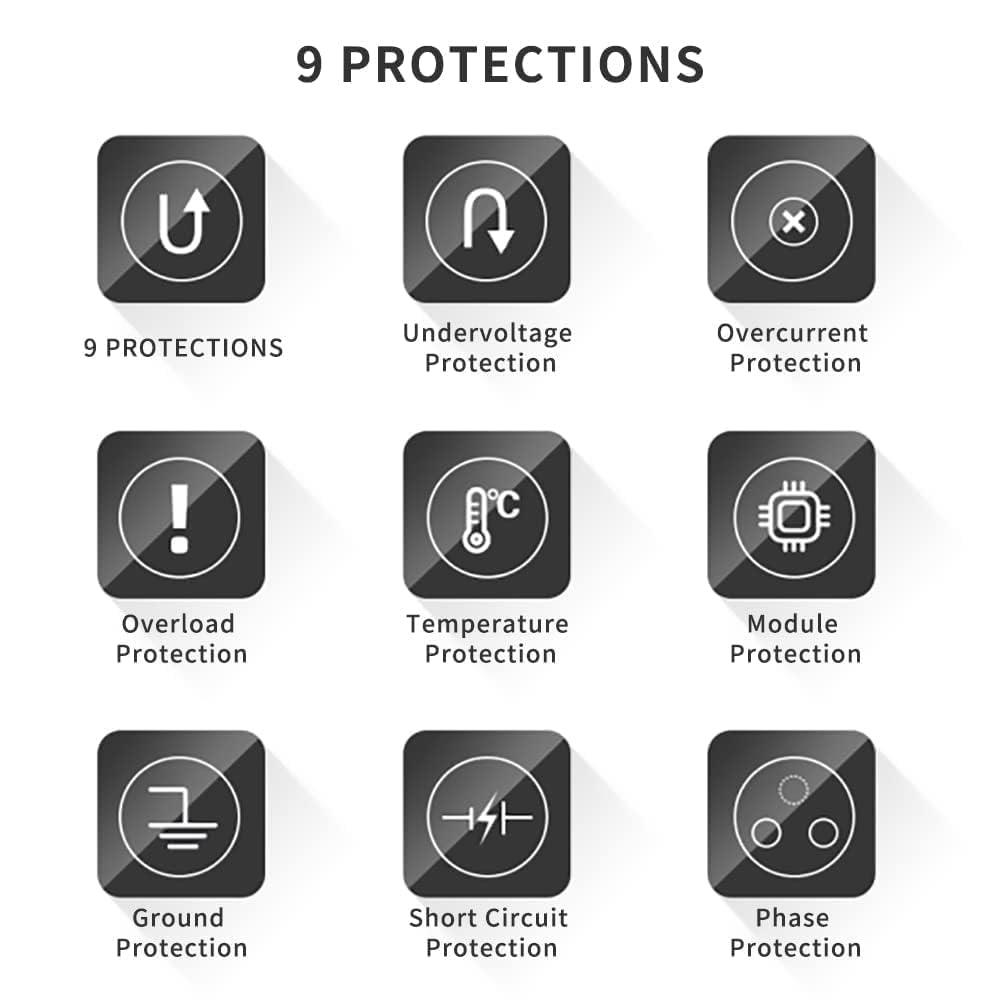
Figure 4: Illustration of the nine built-in protection features: Undervoltage, Overcurrent, Overload, Temperature, Module, Ground, Short Circuit, and Phase Protection, ensuring operational safety and longevity.
4. Fifi sori ẹrọ ati Wiring
Ensure all power is disconnected before attempting any wiring. Improper wiring can lead to equipment damage or personal injury.
4.1. Terminal Control Overview
olusin 5: Ti abẹnu view of the VFD showing the terminal block for control wiring, including +10V, GND, 485+, 485-, DI1, DI2, DI3, AI1, AI2, AO1, COM.
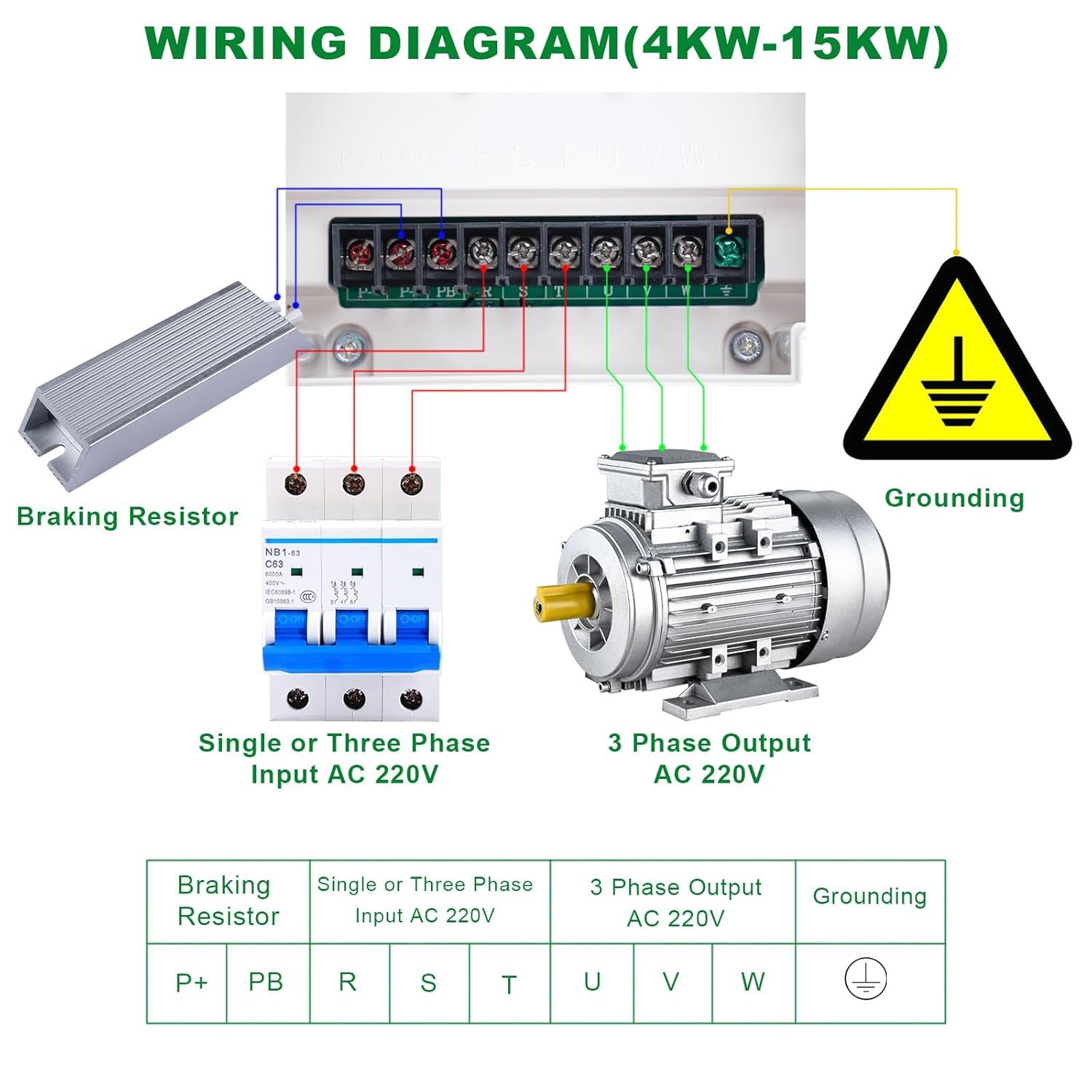
4.2. Wiring Diagram (4KW-15KW)

Figure 6: A diagram showing the wiring connections for the VFD, including input (single or three-phase AC 220V), output (3-phase AC 220V to motor), grounding, and optional braking resistor connections.
- Input Power (R, S, T): Connect single-phase or three-phase AC 220V power supply to these terminals.
- Ìjáde Mọ́tò (U, V, W): Connect the three-phase asynchronous motor to these terminals.
- Grounding (⚧): Connect the VFD to a reliable ground. This is critical for safety.
- Braking Resistor (P+, PB): If an external braking resistor is required for applications needing rapid deceleration, connect it to these terminals.
5. Awọn ilana Iṣiṣẹ
After successful installation and wiring, follow these steps for basic operation:
- Agbara Tan: Apply power to the VFD. The display will illuminate.
- Iṣeto paramita: Lo awọn PRG key to enter the parameter menu. Navigate through parameters using the Yi lọ yi bọ key and adjust values using the Numerical Modification Keys (Up/Down arrows). Confirm settings with the WOLE key. Refer to the full user manual for detailed parameter descriptions.
- Atunse Igbohunsafẹfẹ: Lo awọn Frequency Knob (1) on the control panel to set the desired output frequency for the motor.
- Ibẹrẹ Motor: Tẹ awọn RUN key (2) to start the motor. Observe the motor's operation.
- Mọto Duro: Tẹ awọn Duro/Tunto key (3) to stop the motor.
- Isakoṣo latọna jijin: The VFD supports remote potentiometer, switch start/stop, and RS-485 communication for integration into control systems (e.g., Mach3 function). Refer to advanced wiring and parameter settings in the comprehensive manual for these features.
6. Itọju
Itọju deedee n ṣe idaniloju gigun ati iṣẹ igbẹkẹle ti VFD rẹ.
- Ninu: Periodically inspect the VFD for dust accumulation, especially on the cooling fan and heat sinks. Clean with dry compressed air. Ensure power is off and discharged before cleaning.
- Ṣayẹwo Asopọmọra: Regularly check all wiring connections for tightness. Loose connections can cause overheating or intermittent operation.
- Awọn ipo Ayika: Ensure the VFD operates within its specified environmental conditions (temperature, humidity). Maintain proper ventilation and ensure the cooling fan is unobstructed.
- Ayewo: Look for any signs of damage, discoloration, or unusual odors. If any issues are detected, discontinue use and contact technical support.
7. Laasigbotitusita
The LAPOND VFD is equipped with 9 protection features to prevent damage. If an error occurs, the display will show an error code. Refer to the full manual for specific error code interpretations.
- Ko si Agbara/Ifihan Pipa:
- Check the input power supply and ensure all connections are secure.
- Verify the circuit breaker or fuse is not tripped.
- Mọ́tò tí kò bẹ̀rẹ̀:
- Ensure the RUN command is active (e.g., RUN key pressed, or external control signal).
- Check motor wiring for correct phase sequence and connections.
- Verify that no protection (e.g., overload, overcurrent) is active. Reset if necessary.
- Overcurrent/Overload Protection (Error Code):
- Check the motor load. Reduce the load if it exceeds the motor's capacity.
- Ensure the VFD's capacity is appropriate for the motor, especially for high-starting current applications like compressors (refer to Safety Information).
- Inspect motor and VFD for any short circuits.
- Apọjutage/ Undervoltage (Error Code):
- Check the stability and voltage level of the input power supply.
- Fun overvoltage during deceleration, consider installing a braking resistor if not already present.
- Overheating (Error Code):
- Ensure proper ventilation around the VFD.
- Clean the cooling fan and heat sinks to remove dust and obstructions.
- Verify ambient temperature is within specifications.
8. Awọn pato
| Ẹya ara ẹrọ | Iye |
|---|---|
| Brand | LAPOND |
| Orukọ awoṣe | K100-018G1 |
| Olupese Apá Number | TK128-10 |
| Iṣagbewọle Voltage | 1-phase/3-phase 220VAC (±15%, 50/60Hz) |
| O wujade Voltage | 3-phase 220VAC (0-400Hz) |
| Won won Power o wu | 18KW (25HP) |
| Ti won won Jade Lọwọlọwọ | 75A |
| Mọto ti o wulo | ≤20HP (15kW) 55Amps 200-230V 3-Phase Motor |
| Ifihan Iru | LED |
| Electrical Output Waveform | Wave Sine Sure |
| Awọn Iwọn Nkan (L x W x H) | 10.6"L x 8"W x 19.3"H |
| Niyanju Lilo | Mixer, pump, compressor, conveyor, elevator, ventilator, grinder, milling machine, drilling machine, CNC router, extruder, slitter, winder, centrifuge, winding machine, etc. |
9. Atilẹyin ọja ati Support
Atilẹyin ọja: This LAPOND Variable Frequency Drive comes with a 1-Year Manufacturer Warranty from the date of purchase.
Atilẹyin: For technical assistance, troubleshooting, or warranty claims, please contact LAPOND customer service. Ensure you have your product model number (K100-018G1) and purchase details available when contacting support.