1. Ifihan
Thank you for choosing the himaly IF1010AR Digital Bluetooth Body Weight Scale. This scale is designed to provide accurate measurements of your body weight and various body composition metrics, including BMI, body fat, muscle mass, and more, through its integrated mobile application. Please read this manual carefully before use to ensure proper operation and to maximize the benefits of your new scale.
Alaye Aabo pataki
- Consult your physician before beginning any diet or exercise program.
- Do not use if you are pregnant, have a pacemaker, or other internal medical devices.
- Place the scale on a hard, flat surface for accurate measurements. Avoid carpets or uneven floors.
- Ojú ilẹ̀ náà lè máa yọ̀ nígbà tí ó bá rọ̀. Rí i dájú pé ojú ilẹ̀ náà gbẹ kí o tó tẹ̀ ẹ́ mọ́lẹ̀.
- Maṣe fo lori iwọn.
- Jeki kuro ni arọwọto awọn ọmọde.
- This scale is for household use only and not for medical diagnosis or treatment.
2. Package Awọn akoonu
Daju pe gbogbo awọn nkan wa ninu apo rẹ:
- himaly IF1010AR Digital Bluetooth Body Weight Scale
- Okun Ngba agbara USB
- Afowoyi Olumulo (iwe-ipamọ yii)
3. Ọja Ipariview
The himaly IF1010AR scale features a sleek design with a tempered glass surface and four high-precision sensors for accurate measurements. It includes a digital display and Bluetooth connectivity for app integration.

olusin 3.1: Iwaju view of the himaly IF1010AR Digital Bluetooth Body Weight Scale, showing the display and electrode pads, alongside a smartphone displaying the companion app interface.

olusin 3.2: Underside view of the himaly IF1010AR scale, highlighting the four non-slip mats, the 'UNIT' button for changing measurement units, and the USB charging port.
Awọn eroja:
- Platform Gilasi ibinu: The main weighing surface.
- Awọn paadi elekitirodu: Four metallic pads for body composition analysis.
- Ifihan LCD oni-nọmba: Shows weight and other basic readings.
- Bọtini UNIT: Located on the underside, used to switch between weight units (kg/lb/st).
- Ibudo Gbigba agbara USB: Fun gbigba agbara ti abẹnu batiri.
- Non-Slip Mats: Four rubber feet on the bottom for stability.
4. Eto
4.1 Gbigba agbara fun iwọn naa
The himaly IF1010AR scale is equipped with a built-in rechargeable battery. Before first use, ensure the scale is fully charged.
- Locate the USB charging port on the underside of the scale (refer to Figure 3.2).
- Connect the provided USB charging cable to the scale and to a standard USB power adapter (not included) or a computer's USB port.
- The display will indicate charging status. Charge until the battery indicator shows full.

olusin 4.1: Isunmọ view illustrating the USB charging port on the side of the scale and the included USB cable for power.
4.2 App Gbigba lati ayelujara ati Sisopọ
To access full body composition analysis and track your progress, download the companion app and pair it with your scale.
- Ṣe igbasilẹ ohun elo naa: Wa fun "Moving Life" in the Apple App Store (for iOS devices) or Google Play Store (for Android devices) and install it.
- Mu Bluetooth ṣiṣẹ: Rii daju pe Bluetooth ti ṣiṣẹ lori foonuiyara rẹ.
- Ṣii App naa: Launch the "Moving Life" app and follow the on-screen instructions to create your user profile.
- Pair the Scale: Step onto the scale barefoot to activate it. The app should automatically detect and connect to the scale via Bluetooth. If not, follow the app's instructions for manual pairing.

Figure 4.2: Image showing the scale's Bluetooth connectivity and icons for downloading the "Moving Life" app from Google Play and the App Store.
4.3 Iṣatunṣe Ibẹrẹ
For the most accurate first measurement, it is recommended to calibrate the scale:
- Gbe iwọn naa sori ilẹ lile, alapin.
- Lightly step on the scale until the display lights up, then step off immediately.
- The display will show "0.0" or "CAL" indicating successful calibration.
5. Awọn ilana Iṣiṣẹ
5.1 Gbigba Idiwon
Follow these steps for an accurate body composition measurement:
- Rí i dájú pé ẹsẹ̀ rẹ mọ́ tónítóní àti gbẹ.
- Open the "Moving Life" app on your smartphone and ensure Bluetooth is active.
- Step onto the scale barefoot, placing your feet on the electrode pads. Stand still until the measurement is complete.
- Your weight will be displayed on the scale's LCD. Detailed body composition data will be sent to the app.
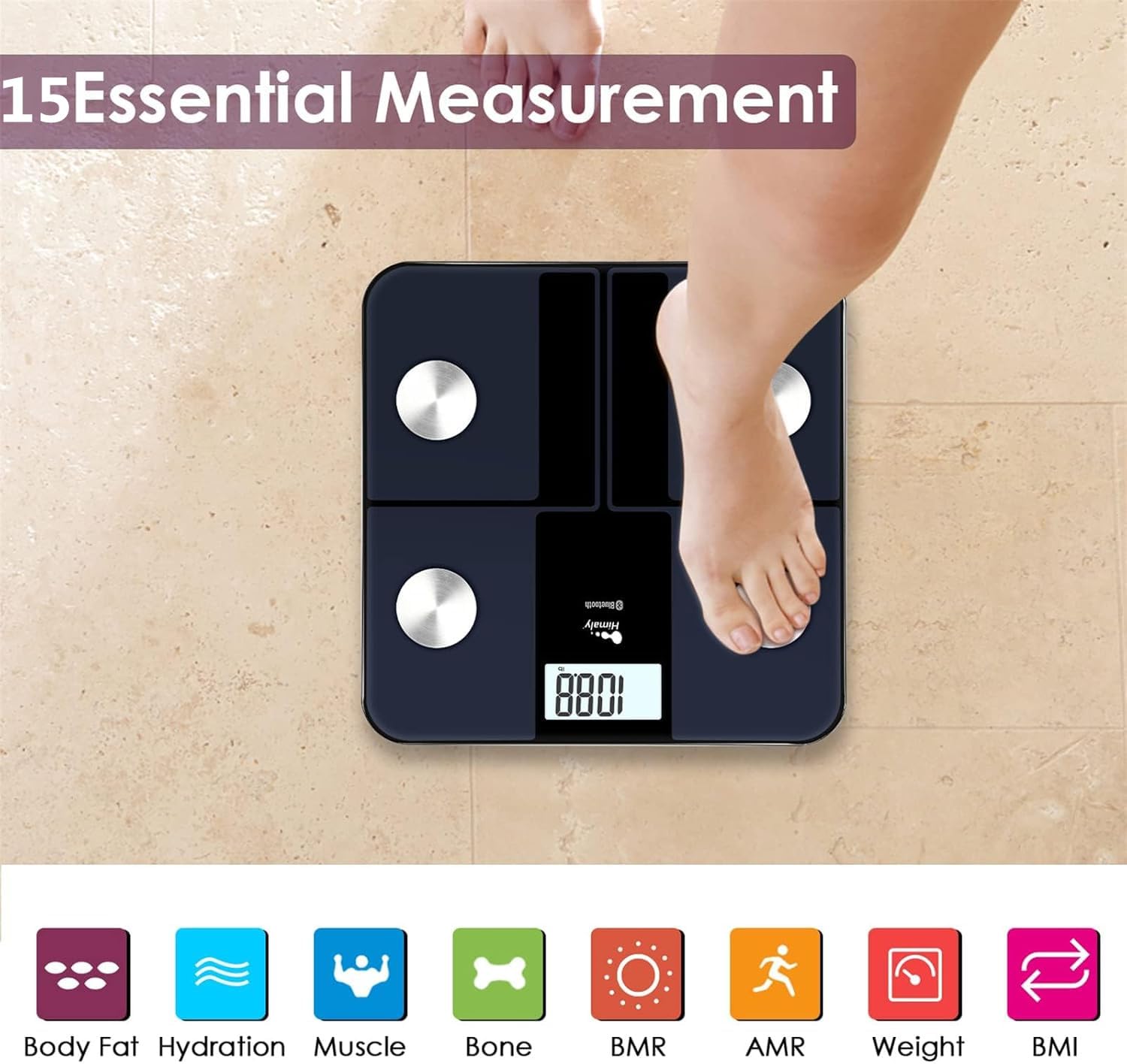
Figure 5.1: A person standing barefoot on the himaly scale, demonstrating the correct posture for obtaining 15 essential body composition measurements.
5.2 Oye Ifihan naa
The scale's LCD displays your weight. The app provides a more comprehensive breakdown of your body composition.

Figure 5.2: The scale's LCD display illustrating how different weight ranges (Thin, Slim, Normal, Heavy, Overweight) are visually represented, providing a quick reference for body type.
5.3 Multiple User Profiles
The "Moving Life" app supports multiple user profiles, allowing each family member to track their individual health data.
- Within the app, navigate to the user management section.
- Add new users by entering their details (age, height, gender).
- Ensure the correct user profile is selected in the app before taking a measurement to ensure data is assigned correctly.
6. Understanding Your Measurements
The "Moving Life" app provides detailed insights into various body composition metrics. Here's a brief explanation of some key indicators:
- Ìwọ̀n Ara: Gbogbo ara rẹ.
- BMI (Atọka Iwọn Ara): Ìwọ̀n ọ̀rá ara tí a gbé karí gíga àti ìwúwo.
- Ara Ọra Ogoruntage: Ìpín ọ̀rá sí gbogbo ìwọ̀n ara.
- Ibi isan: Àpapọ̀ ìwọ̀n iṣan ara nínú ara rẹ.
- Hydration (Water Percentage): Iye omi ninu ara rẹ.
- Ibi Egungun: Àpapọ̀ ìwọ̀n egungun nínú ara rẹ.
- BMR (Oṣuwọn Metabolic Basal): The number of calories your body burns at rest.
- AMR (Active Metabolic Rate): The total calories your body burns in a day, including activity.

Figure 6.1: An illustrative graph from the app demonstrating how weight and body fat trends can be tracked over time, providing visual progress monitoring.
7. Itọju
7.1 Ninu
- Pa oju iwọn rẹ nu pẹlu ipolowoamp asọ ati ìwọnba detergent.
- Má ṣe lo àwọn ohun ìfọṣọ tàbí kí o fi omi tẹ ìwọ̀n náà mọ́lẹ̀.
- Rii daju pe iwọn naa ti gbẹ patapata ṣaaju ibi ipamọ tabi lilo atẹle.
7.2 Ibi ipamọ
- Tọju iwọn naa ni itura, ibi gbigbẹ.
- Yago fun orun taara tabi awọn iwọn otutu to gaju.
8. Laasigbotitusita
| Isoro | Owun to le Fa | Ojutu |
|---|---|---|
| "Lo" ti han | Batiri kekere. | Recharge the scale using the provided USB cable. |
| "Aṣiṣe" ti han | Apọju tabi aṣiṣe wiwọn. | Step off the scale. Ensure weight is within the 400 lbs (181 kg) limit. Recalibrate if necessary. |
| Awọn kika ti ko pe | Scale on uneven surface, not calibrated, or feet not properly placed. | Place scale on a hard, flat surface. Perform initial calibration. Ensure bare feet are centered on electrode pads. |
| Ko si asopọ Bluetooth | Bluetooth off, app not open, or scale not activated. | Ensure Bluetooth is enabled on your phone. Open the "Moving Life" app. Step on the scale to activate it. Try restarting both the app and your phone. |
| Body composition data not showing in app | Not standing barefoot, or feet not making proper contact with electrodes. | Ensure you are standing barefoot with clean, dry feet making full contact with all four electrode pads. |
9. Awọn pato
| Ẹya ara ẹrọ | Ẹ̀kúnrẹ́rẹ́ |
|---|---|
| Nọmba awoṣe | IF1010AR |
| Brand | himaly |
| Agbara iwuwo | 400 lbs (181 kg) |
| Awọn iwọn wiwọn | kg / lb / st |
| Ifihan Iru | LCD oni -nọmba |
| Asopọmọra | Bluetooth 4.0 |
| Orisun agbara | Built-in Rechargeable Battery (USB charged) |
| Ohun elo | Gilasi tempered, Ṣiṣu |
| Awọn iwọn | Isunmọ 33.7 x 32.8 x 4.3 cm |
| Iwọn Nkan | Isunmọ. 1.77 kg |
| Ibamu App | iOS and Android (Moving Life App) |
10. Atilẹyin ọja ati Support
10.1 atilẹyin ọja Alaye
The himaly IF1010AR Digital Bluetooth Body Weight Scale comes with a standard manufacturer's warranty. Please refer to the warranty card included in your package or contact himaly customer support for specific warranty terms and conditions. This warranty typically covers defects in materials and workmanship under normal use.
10.2 Onibara Support
If you encounter any issues or have questions regarding your himaly scale, please contact our customer support team. For the most up-to-date contact information, please visit the official himaly webaaye ayelujara tabi tọka si apoti ọja rẹ.
Note: Specific contact details are not provided in this manual. Please check the product packaging or manufacturer's webojula fun support alaye olubasọrọ.


