1. Ifihan
Thank you for choosing the SUNPOW Metal Detector MD14 and Metal Detector Pinpointer GD01. This comprehensive combo is designed for both adults and kids, offering high accuracy and ease of use for all your treasure hunting adventures. This manual provides detailed instructions for the proper assembly, operation, maintenance, and troubleshooting of your new devices.
Please read this manual carefully before using the products to ensure safe and optimal performance. Keep this manual for future reference.
Awọn iṣọra Aabo
- Gba igbanilaaye nigbagbogbo ṣaaju ki o to wa lori ohun-ini ikọkọ.
- Avoid searching in areas where underground cables or pipes may be present.
- Exercise caution when digging to avoid injury or damage to property.
- Do not operate the devices near live electrical wires or in thunderstorms.
- Jeki awọn batiri kuro ni arọwọto awọn ọmọde.
2. Ọja Ipariview
The SUNPOW MD14 Metal Detector and GD01 Pinpointer are engineered to provide an exceptional metal detecting experience. The MD14 features a large backlit LCD, multiple detection modes, and a robust design, while the GD01 offers precise pinpointing with its 360° detection and rechargeable battery.
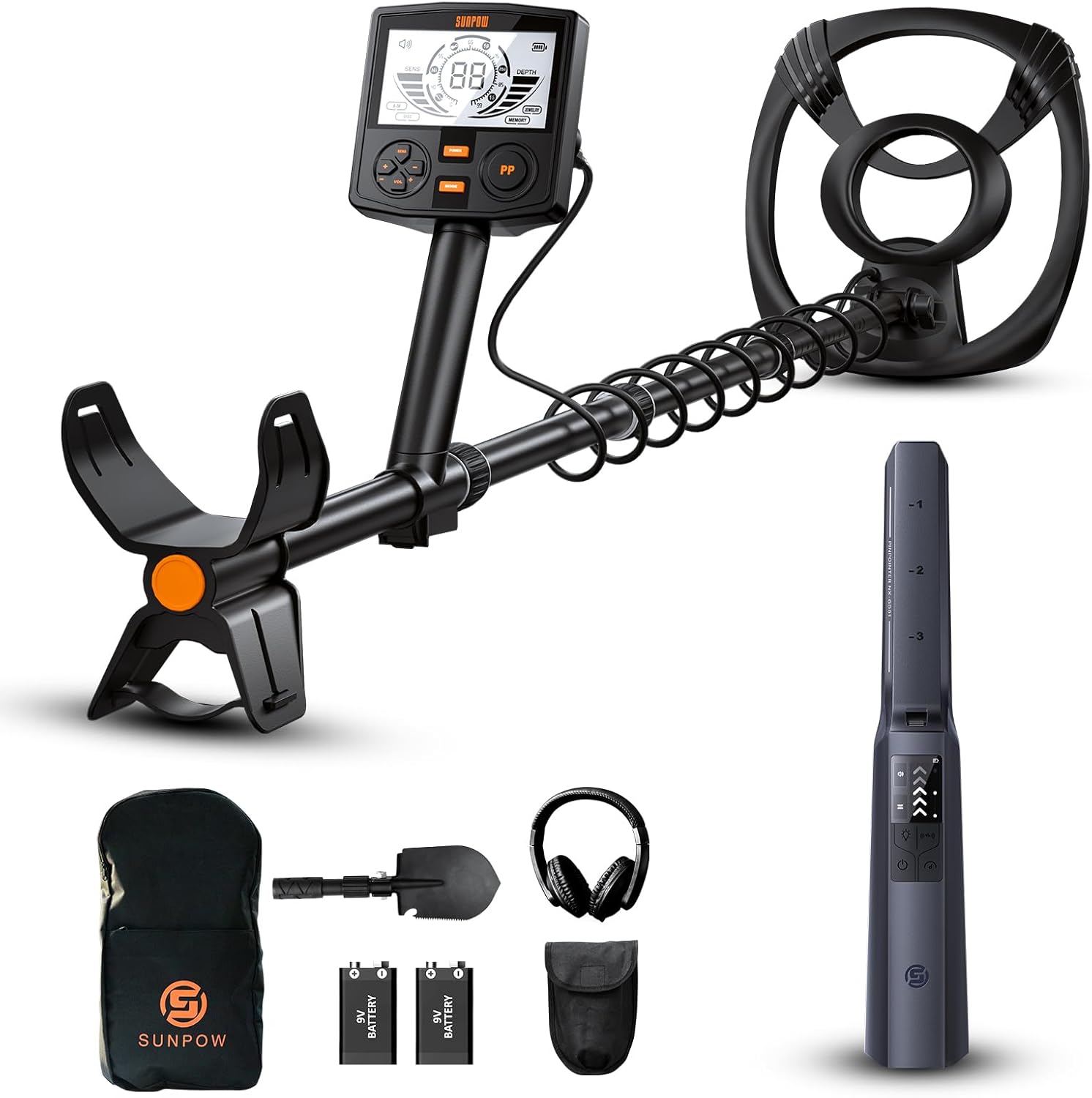
Figure 2.1: Complete SUNPOW MD14 and GD01 Combo with included accessories.
Key Awọn ẹya ara ẹrọ
- MD14 Metal Detector: 12-inch waterproof coil, 2x backlit LCD display, advanced DSP chip, 5 detection modes, adjustable length (19-59 inches), sturdy spiral structure.
- GD01 Pinpointer: IP68 waterproof rating, 360° detection, 4 operating modes (Audio, Vibrate, Audio + Vibrate, Mute), handheld design with LCD screen, rechargeable lithium battery.
3. Eto ati Apejọ
3.1 MD14 Metal Detector Assembly
- Attach the search coil to the lower stem using the provided bolt and nut. Ensure it is securely fastened but do not overtighten.
- Connect the lower stem to the middle stem.
- Slide the control box onto the upper stem and secure it.
- Insert the assembled stem into the control box unit. The quick-lock design allows for fast installation and easy adjustments.
- Wrap the coil cable around the stem, ensuring it is not too tight, and plug the connector into the port on the control box.
- Adjust the stem length to a comfortable position using the quick-lock mechanism. The MD14 features a durable helical structure for enhanced stability.

Figure 3.1: MD14 Metal Detector's durable helical structure and convenient quick-lock design for easy assembly and adjustment.
3.2 GD01 Pinpointer Charging
The GD01 Pinpointer comes with a rechargeable lithium battery. Before first use, fully charge the device.
- Locate the charging port on the GD01 pinpointer.
- Connect the provided USB charging cable to the pinpointer and a suitable USB power source (e.g., computer USB port, wall adapter).
- The charging indicator will illuminate. Once fully charged, the indicator will change or turn off. A full charge provides up to 12 hours of continuous detection.

Figure 3.2: The GD01 Pinpointer features an 800mAh rechargeable lithium battery for extended use.
4. Awọn ilana Iṣiṣẹ
4.1 MD14 Metal Detector Operation

Figure 4.1: The MD14's control panel with a large 2X backlit LCD screen for ultimate control and visibility.
- Titan/Apapa: Press and hold the POWER button to turn the detector on or off. The backlit LCD display will illuminate.
- Awọn ọna Iwari: Press the MODE button to cycle through the available detection modes. The MD14 offers 5 distinct modes:
- ALL METAL Mode: Detects all types of metals without discrimination. Signals on every occasion it detects any metal.
- Ipo DISC: Allows you to eliminate unwanted metal targets in sequence.
- Ipo Ohun Ọṣọ́: Specifically focused on finding jewelry.
- Ipò ÌRÁNTÍ: Explores only the remembered metals.
- PP Mode (Pinpoint): Enables you to pinpoint the exact location of the detected target.
- Atunse ifamọ: Use the SENS +/- buttons to adjust the detector's sensitivity. Higher sensitivity increases detection depth but may also increase false signals.
- Iṣakoso iwọn didun: Use the VOL +/- buttons to adjust the audio output volume.
- Idanimọ ibi-afẹde: The LCD screen provides visual cues for target identification, including target depth and probable metal type.

Figure 4.2: Understanding the MD14's five detection modes for various treasure hunting scenarios.
4.2 GD01 Pinpointer Operation

Figure 4.3: The GD01 Pinpointer's intuitive screen display provides clear feedback on its status and detection.
- Titan/Apapa: Press and hold the power button to turn the pinpointer on or off.
- Iwari: The GD01 offers high sensitivity and 360° side-scan capability, detecting all types of metals including gold, platinum, nickel, copper, and iron, with up to 6 inches detection depth.
- Awọn ọna ṣiṣe: Press the mode button to switch between the 4 available modes:
- Ipo Ohun: Provides audible alerts when metal is detected.
- Ipo gbigbọn: Provides tactile vibration alerts.
- Audio + Vibrate Mode: Combines both audio and vibration alerts.
- Ipo Mute: Disables audio alerts, relying solely on vibration.
- Ipele ifamọ: The display indicates the current sensitivity level. Adjust as needed for precise pinpointing.

Figure 4.4: The GD01 Pinpointer's precise detection capabilities for various metal types.
5. Itọju
Proper maintenance ensures the longevity and optimal performance of your SUNPOW metal detector and pinpointer.
- Ninu: After each use, especially in sandy or muddy conditions, wipe down the devices with a damp cloth. Do not use abrasive cleaners or solvents. The MD14's 12-inch coil and GD01's IP68 rating allow for easy cleaning of the waterproof parts.
- Ibi ipamọ: Store the devices in a cool, dry place away from direct sunlight and extreme temperatures. If storing for an extended period, remove batteries from the MD14.
- Battery Care (GD01): To prolong the life of the GD01's rechargeable lithium battery, avoid fully discharging it frequently. Charge it regularly, even if not in use for a long time.
- Idaabobo okun: Avoid striking the search coil against hard objects.
6. Laasigbotitusita
If you encounter issues with your SUNPOW metal detector or pinpointer, refer to the following common problems and solutions:
| Isoro | Owun to le Fa | Ojutu |
|---|---|---|
| MD14 does not power on. | Awọn batiri kekere tabi okú; fifi sori batiri ti ko tọ. | Rọpo awọn batiri; rii daju pe o tọ polarity. |
| MD14 gives false signals. | High sensitivity setting; electromagnetic interference; mineralized ground. | Reduce sensitivity; move away from power lines/electronics; use DISC mode. |
| GD01 does not detect metals. | Low battery; incorrect mode; device malfunction. | Recharge GD01; cycle through modes; contact support if issue persists. |
| GD01 vibrates but no audio. | Mute mode selected. | Switch to Audio or Audio + Vibrate mode. |
7. Awọn pato
Detailed technical specifications for the SUNPOW MD14 Metal Detector and GD01 Pinpointer:
| Ẹya ara ẹrọ | Sipesifikesonu |
|---|---|
| Brand | OWURO |
| MD14 Power Source | Agbara Batiri (Awọn batiri ti a beere: Bẹẹni) |
| GD01 Power Source | Batiri Litiumu gbigba agbara (800mAh) |
| Ohun elo | Aluminiomu |
| MD14 Extended Length | 59 Inches (Adjustable Length: Yes) |
| MD14 Search Coil Size | 12 inches |
| MD14 Operating Frequency | 7 kHz |
| GD01 International Protection Rating | IP68 |
| GD01 Detection Depth | Titi di 6 inches |
| Niyanju Lilo | Irin erin |
| Olupese | OWURO |
| Item Model Numbers | MD14, GD01 |
8. Atilẹyin ọja ati Support
SUNPOW is committed to providing high-quality products and customer satisfaction. While specific warranty details are not provided in this manual, please retain your proof of purchase for any warranty claims.
For technical support, troubleshooting assistance, or warranty inquiries, please contact SUNPOW customer service through the retailer where you purchased the product or visit the official SUNPOW webojula fun alaye olubasọrọ.
We value your feedback and are here to help you make the most of your SUNPOW Metal Detector MD14 and Pinpointer GD01.


