1. Ifihan
Thank you for choosing the KAISER KXB-3008 8-inch Studio Speaker. This manual provides essential information for the safe and efficient operation of your new portable speaker. Please read this manual thoroughly before use and retain it for future reference.
2. Ọja Ipariview
2.1 Key Awọn ẹya ara ẹrọ
- Bluetooth Connectivity: Seamlessly connect your devices wirelessly.
- LED Lights: Enhance your audio experience with dynamic LED lighting.
- Karaoke Function: Enjoy singing along with built-in karaoke features.
- Voice Effects: Experiment with various voice effects for entertainment.
- Rechargeable Battery: Portable design with a long-lasting rechargeable battery.
- KSR-Link Technology: Connect with another compatible KAISER speaker for enhanced stereo sound.
2.2 to wa irinše
- 1 x KAISER KXB-3008 Speaker
- 1 x Gbohungbo ti a firanṣẹ
- 1 x Itọsọna olumulo
- 1 x Okun Agbara

olusin 1: Iwaju view of the KAISER KXB-3008 speaker, showcasing its grille and dynamic LED lighting.

Figure 2: The wired microphone provided with the speaker, featuring an on/off switch.
3. Eto
3.1 Gbigba agbara akọkọ
Before first use, fully charge the speaker for at least 4 hours. Connect the power cable to the speaker's power input and a suitable power outlet. The charging indicator light will show the charging status.
3.2 Titan / Pa a
- To turn on the speaker, locate the ON/OFF switch on the control panel and slide it to the "ON" position.
- To turn off the speaker, slide the ON/OFF switch to the "OFF" position.

Figure 3: Top control panel showing the power switch and other function buttons.
4. Isẹ
4.1 Bluetooth Asopọ
- Tan agbohunsoke.
- Press the "MODE" button until "BLUE" appears on the display, indicating Bluetooth mode.
- Mu Bluetooth ṣiṣẹ lori ẹrọ rẹ (foonuiyara, tabulẹti, ati bẹbẹ lọ).
- Wa fun "KXB-3008" in your device's Bluetooth list and select it to pair.
- Ohun ìmúdájú yoo tọkasi sisopọ aṣeyọri.
4.2 KSR-Link Technology (True Wireless Stereo)
KSR-Link allows you to connect two KAISER KXB-3008 speakers wirelessly for a stereo sound experience.
- Ensure both KXB-3008 speakers are powered on and in Bluetooth mode.
- On one speaker (this will be the master speaker), press and hold the "MODE" button for a few seconds until you hear a pairing tone.
- Awọn agbohunsoke meji yoo sopọ laifọwọyi si ara wọn.
- Once connected, pair your device to the master speaker via Bluetooth as described in section 4.1.
4.3 Using USB/Micro SD
Insert a USB flash drive or Micro SD card into the respective port on the control panel. The speaker will automatically switch to USB/SD mode and begin playing compatible audio files (fun apẹẹrẹ, MP3).
4.4 Redio FM
Press the "MODE" button to switch to FM radio mode. Use the playback control buttons (previous/next track) to scan for stations. The display will show the current frequency.
4.5 Karaoke Išė
Connect the wired microphone to the "MIC" input. Adjust the microphone volume and echo effects using the dedicated knobs on the control panel. Play your music and sing along.
Video 1: Demonstration of a Kaiser 8-inch speaker, highlighting its features and controls. Note: This video features a similar 8-inch Kaiser speaker model.
5. Awọn iṣakoso ati Awọn isopọ
5.1 Iṣakoso igbimo Loriview
The top panel of the speaker features various buttons and knobs for controlling playback, volume, and other functions.
Nọmba 4: Alaye view of the top control panel, including volume, mode, playback, and bass controls.
- VOL (Volume Knob): Adjusts the master volume of the speaker.
- MIC VOL (Microphone Volume Knob): Ṣe atunṣe iwọn didun gbohungbohun ti a ti sopọ.
- ECHO (Echo Knob): Ṣe atunṣe ipa iwoyi fun gbohungbohun.
- BASS (Bass Button): Activates or adjusts the bass boost.
- Bọtini MODE: Switches between input modes (Bluetooth, FM Radio, USB, Micro SD, AUX).
- Bọtini Imọlẹ: Toggles or changes the LED light patterns.
- Awọn idari Sisisẹsẹhin: Mu ṣiṣẹ/Duro, Orin ti tẹlẹ, Orin atẹle.
5.2 Input / o wu Ports
The rear panel of the speaker provides various ports for connectivity.
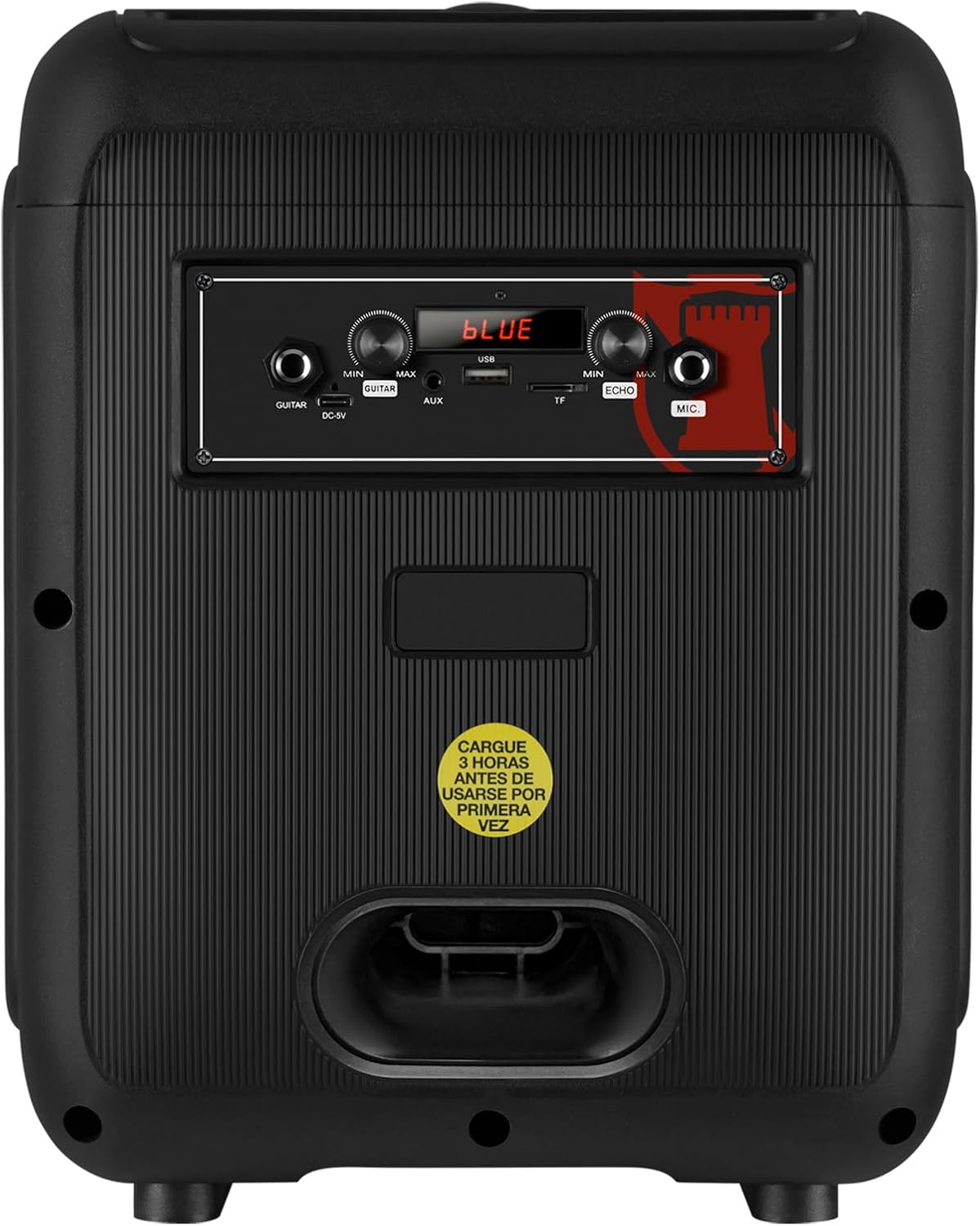
Figure 5: Rear panel showing the AUX, USB, Micro SD, and Microphone input ports, along with the power input.
- Iṣawọle AUX: So awọn ẹrọ ohun afetigbọ ita ni lilo okun ohun 3.5mm kan.
- Ibudo USB: Fi awakọ filasi USB sii fun ṣiṣiṣẹsẹhin MP3.
- Micro SD Iho: Fi kaadi Micro SD sii fun ṣiṣiṣẹsẹhin MP3.
- Iṣawọle MIC: Connect a wired microphone for karaoke or announcements.
- Iṣawọle DC-9V: Iṣagbewọle agbara fun gbigba agbara si agbọrọsọ.
6. Awọn pato
| Ẹya ara ẹrọ | Apejuwe |
|---|---|
| Orukọ awoṣe | KXB-3008 |
| Agbọrọsọ Iru | Agbọrọsọ Gbigbe |
| Pataki Awọn ẹya ara ẹrọ | Lightweight, LED Light, Karaoke Function |
| Niyanju Lilo | Gaming Consoles, Laptops, Smartphones, Tablets |
| Awọn ẹrọ ibaramu | Foonu alagbeka, Tabulẹti, Kọǹpútà alágbèéká, Eré ìdárayá |
| Subwoofer Opin | 8 inches |
| Àwọ̀ | Dudu |
| Ọja Mefa | 31cm (Depth) x 29cm (Width) x 42cm (Height) |
| Iwọn Ọja | 5 kilo |
| Mabomire | Eke |
| Ọna Iṣakoso | Isakoṣo latọna jijin |
| Alailowaya Technology | Bluetooth |
| Orisun agbara | Batiri |
| Ìjáde Agbọrọsọ Tó Pọ̀ Jùlọ | 30 Wattis |
| Apapọ batiri Life | Awọn wakati 6 |
| Ipo Ijade Ohun | Sitẹrio, Agbegbe |
| Iṣagbesori Iru | Floor Mount, Table Mount |
7. Itọju
- Ninu: Lo asọ ti o rọ, ti o gbẹ lati nu ita ti agbọrọsọ. Ma ṣe lo abrasive ose tabi epo.
- Ibi ipamọ: Tọju agbohunsoke ni itura, aye gbigbẹ kuro lati orun taara ati awọn iwọn otutu to gaju.
- Itọju Batiri: Lati pẹ aye batiri, yago fun gbigba agbara si batiri ni kikun nigbagbogbo. Gba agbara si agbọrọsọ nigbagbogbo, paapaa ti ko ba wa ni lilo fun awọn akoko gigun.
- Yago fun Omi: This speaker is not waterproof. Keep it away from liquids to prevent damage.
8. Laasigbotitusita
| Isoro | Owun to le Solusan |
|---|---|
| Agbọrọsọ ko ni tan. | Ensure the battery is charged. Connect the power cable and try again. Check the power switch position. |
| Ko si ohun. | Check the volume level on both the speaker and your connected device. Ensure the correct input mode is selected (Bluetooth, AUX, USB/SD). |
| Asopọ Bluetooth kuna. | Ensure the speaker is in Bluetooth mode. Make sure your device's Bluetooth is enabled and within range. Forget previous pairings on your device and try pairing again. |
| Gbohungbohun ko ṣiṣẹ. | Ensure the microphone is properly connected to the MIC input. Check the microphone's ON/OFF switch and adjust the MIC VOL knob. |
| KSR-Link connection issues. | Ensure both speakers are KXB-3008 models and are in Bluetooth mode. Try re-initiating the KSR-Link pairing process. |
9. Atilẹyin ọja ati Support
This product comes with a Limited Warranty. Please refer to the warranty card included in the packaging for detailed terms and conditions.
For technical support or customer service, please visit the official Kaiser webojula tabi kan si ti agbegbe rẹ onisowo.


