1. Ifihan
This manual provides detailed instructions for the setup, operation, maintenance, and troubleshooting of your Deli ET521 Digital Safe Box. Please read this manual thoroughly before using the safe to ensure proper function and security. Keep this manual for future reference.
2. Alaye Aabo
- Do not store the emergency override keys inside the safe. Keep them in a secure location outside the safe.
- Keep your personal access code confidential and do not share it with unauthorized individuals.
- Ensure the safe is securely mounted or placed to prevent unauthorized removal.
- Replace batteries promptly when the 'LO-BAT' indicator appears to avoid being locked out.
- This safe is designed for security and fire resistance. However, it is not completely fireproof or waterproof.
3. Package Awọn akoonu
Jẹrisi pe gbogbo awọn ohun kan wa ninu package:
- 1 x Deli ET521 Digital Safe Box
- Awọn bọtini ifagile pajawiri 2 x
- 1 x Itọsọna olumulo
- Mounting Hardware (bolts)
4. Ọja Ipariview
The Deli ET521 Digital Safe Box offers secure storage with a digital keypad and emergency key access. It features a reinforced solid steel body, felt interior, and LED lighting for convenience.

olusin 4.1: Iwaju view of the Deli ET521 Digital Safe Box, showcasing the keypad and overall design.
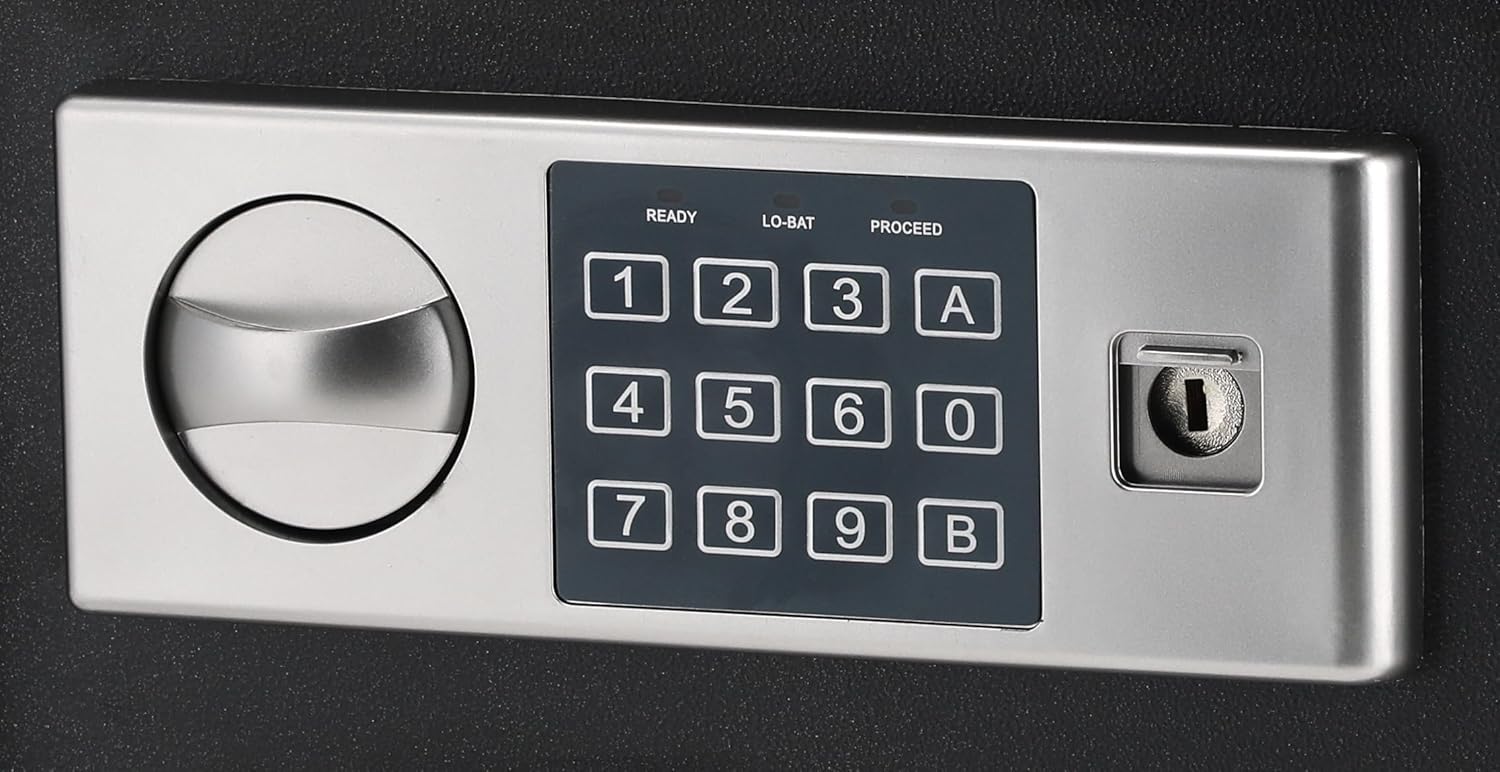
Figure 4.2: Close-up of the digital keypad with number buttons, 'A' and 'B' buttons, and the emergency keyhole.

olusin 4.3: inu ilohunsoke view of the safe, showing the felt lining and internal space.
5. Eto
5.1 Fifi sori batiri
The digital keypad requires 4 AA batteries (not included) for operation. The battery compartment is typically located on the inside of the safe door.
- Open the safe using the emergency override key (refer to Section 6.3 if needed).
- Wa ideri ibi ipamọ batiri naa ni inu ilẹkun.
- Remove the cover and insert 4 new AA batteries, ensuring correct polarity (+/-).
- Rọpo ideri iyẹwu batiri.
5.2 Initial Code Setting
Upon first use, you will need to set your personal access code.
- With the safe door open, press the red reset button located on the inside of the door (usually near the hinge). You will hear a beep.
- Within 5 seconds, enter a new 3-8 digit code on the keypad.
- Press the 'A' or 'B' button to confirm. The safe will beep twice, indicating the code is set.
- Ṣe idanwo koodu tuntun pẹlu ṣiṣi ilẹkun ṣaaju pipade rẹ.
5.3 Iṣagbesori Safe
The Deli ET521 is designed for floor-standing mounting. Securely mounting the safe is recommended to prevent theft.
- Choose a suitable location, preferably on a solid surface.
- Mark the drilling points through the pre-drilled holes at the bottom or back of the safe.
- Drill pilot holes into the floor or wall using an appropriate drill bit.
- Position the safe and secure it using the provided mounting bolts.
6. Awọn ilana Iṣiṣẹ
6.1 Ṣíṣí àpótí ààbò pẹ̀lú kóòdù rẹ
- Enter your 3-8 digit personal access code on the keypad.
- Press the 'A' or 'B' button.
- If the code is correct, the 'PROCEED' light will illuminate, and you will hear a beep.
- Laarin iṣẹju-aaya 5, tan koko naa si ọna aago lati ṣii ilẹkun.
6.2 Locking the Safe
Láti ti àpótí ààbò náà, ti ilẹ̀kùn náà kí o sì yí kókó náà padà sí òdìkejì. Àpótí ààbò náà yóò ti pa láìfọwọ́sí.
6.3 Using the Emergency Override Key
In case of forgotten code or dead batteries, the emergency override key can be used.
- Wa ideri bọtini bọtini lori nronu bọtini foonu.
- Yọ ideri kuro.
- Insert the emergency override key and turn it clockwise while simultaneously turning the knob clockwise to open the door.
- Once open, you can replace batteries or reset the code.
6.4 Changing Your Access Code
You can change your access code at any time with the door open.
- Ṣii ilẹkun ailewu.
- Press the red reset button on the inside of the door. You will hear a beep.
- Within 5 seconds, enter your new 3-8 digit code.
- Press the 'A' or 'B' button to confirm. The safe will beep twice.
- Ṣe idanwo koodu tuntun pẹlu ṣiṣi ilẹkun ṣaaju pipade rẹ.
7. Itọju
7.1 Ninu
Mu ese ita ti ailewu pẹlu asọ, damp cloth. Avoid using abrasive cleaners or solvents that could damage the finish or keypad.
7.2 Batiri Rirọpo
When the 'LO-BAT' indicator light illuminates on the keypad, it is time to replace the batteries. Follow the steps in Section 5.1 to replace the 4 AA batteries.
8. Laasigbotitusita
- Safe does not open with code:
- Ensure batteries are not low (check 'LO-BAT' indicator). Replace if necessary.
- Tún fi kọ́ọ̀dù náà sí i dáadáa.
- Use the emergency override key to open the safe and reset the code.
- Bọtini bọtini ko dahun:
- Check battery installation and replace batteries.
- Door does not lock:
- Ensure the door is fully closed before turning the knob.
- Ṣàyẹ̀wò bóyá ìdènà kan wà tí ó ń dí ilẹ̀kùn lọ́wọ́ láti ti gbogbo rẹ̀.
9. Awọn pato

Figure 9.1: Diagram illustrating the approximate dimensions of the Deli ET521 Digital Safe Box.
| Ẹya ara ẹrọ | Ẹ̀kúnrẹ́rẹ́ |
|---|---|
| Nọmba awoṣe | ET521 |
| Awọn iwọn ita (D x W x H) | 25 cm x 35 cm x 25 cm |
| Iwọn Nkan | 5.7 kilo |
| Titiipa Iru | Titiipa Apapo Itanna, Titiipa Bọtini |
| Ohun elo | Alloy Irin |
| Àwọ̀ | Dudu |
| Pataki Awọn ẹya ara ẹrọ | Fire Resistant, Digital Lock, LED Lighting |
| Iṣagbesori Iru | Ipakà |
| Awọn batiri ti a beere | 4 x AA (for keypad, not included) |
10. Atilẹyin ọja ati Support
For warranty information or technical support, please contact Deli customer service through their official webaaye tabi alagbata ti o ti ra ọja naa. Tọju iwe-ẹri rira rẹ bi ẹri rira.


