1. Ifihan
Thank you for choosing the ANSTEN Sleep Headphones My002UN. These earbuds are designed to provide a comfortable audio experience, especially for side sleepers, by offering passive noise reduction and a secure fit. This manual will guide you through the setup, operation, and maintenance of your new device.

Image: ANSTEN Sleep Headphones (My002UN) in their charging case, with a woman sleeping comfortably in the background, illustrating the product's primary use for peaceful sleep.
2. Ohun ti o wa ninu Apoti
Jọwọ ṣayẹwo awọn akoonu package lati rii daju pe gbogbo awọn ohun kan wa:
- ANSTEN Sleep Headphones My002UN (Earbuds) ×1 pair
- Ọran gbigba agbara ×1
- Ngba agbara USB ×1
- Ilana olumulo ×1
3. Eto
3.1. Ngba agbara ẹrọ
Before first use, fully charge the ANSTEN Sleep Headphones and their charging case.
- Fi àwọn agbekọri sínú àpótí ìgbóná. Rí i dájú pé wọ́n wà ní ipò tó tọ́ ní àwọn ihò wọn (L fún òsì, R fún ọ̀tún).
- Connect the charging cable to the charging port on the case and to a USB power source.
- The digital power display on the charging case will indicate the battery level. A full charge typically takes approximately 2 hours.

Image: The ANSTEN Sleep Headphones charging case displaying a full charge, highlighting the long battery life feature.
3.2. Sisopọ Bluetooth
To connect your ANSTEN Sleep Headphones to your device:
- Ṣí àpótí ìgbara. Àwọn agbekọri náà yóò wọ inú ipò ìsopọ̀ láìfọwọ́sí, ìmọ́lẹ̀ ìtọ́kasí (tí ó bá wà) yóò sì tàn.
- Lori foonuiyara rẹ, tabulẹti, tabi ẹrọ miiran ti o ni Bluetooth, lọ si awọn eto Bluetooth.
- Wa fun available devices and select "ANSTEN My002UN" (or similar name) from the list.
- Once connected, a voice prompt will confirm successful pairing, and the indicator light on the earbuds will turn off or change color.
Note: The earbuds utilize Bluetooth 5.3 for a fast and stable connection.
3.3. Wọ awọn Earbuds
The ANSTEN Sleep Headphones are designed for comfort, especially for side sleepers, with an ergonomic and small form factor.
- Fi rọra fi agbekọri kọọkan sinu odo eti rẹ.
- Rotate the earbud slightly to ensure a snug and comfortable fit. The soft silicone earplugs should create a seal for optimal passive noise reduction.
- The small, invisible design minimizes pressure, even when lying on your side.
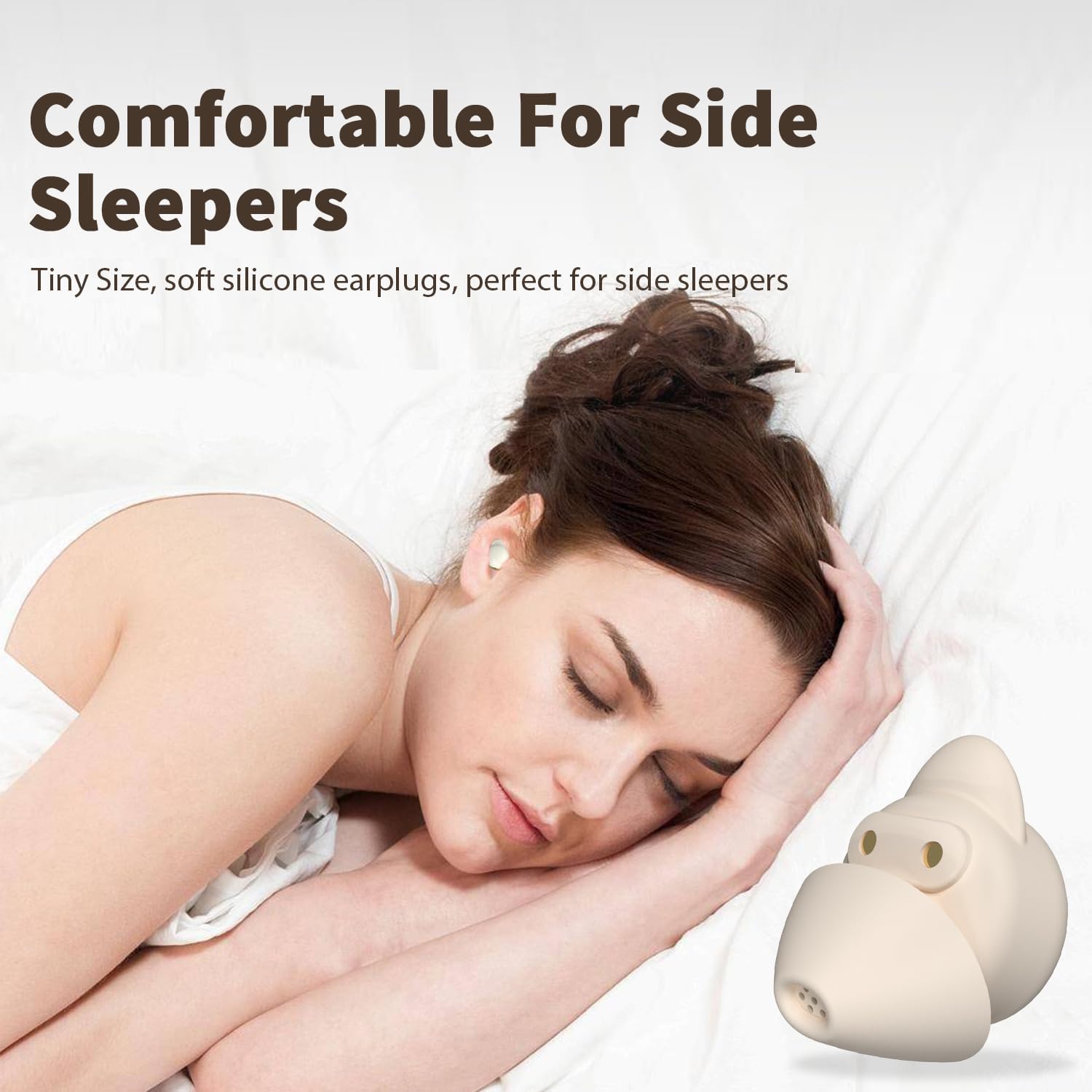
Image: A woman sleeping on her side, wearing the ANSTEN Sleep Earbuds, illustrating their comfortable design for side sleepers.

Image: A visual guide demonstrating the correct method to insert and tuck the earbuds into the ear for a secure and comfortable fit.
4. Awọn ilana Iṣiṣẹ
4.1. Awọn iṣakoso ifọwọkan
The earbuds feature intuitive touch controls for easy management of audio playback and calls:
- Ṣiṣẹ/Daduro: Touch twice on either earbud.
- Orin t’okan: Touch three times on the right earbud.
- Tẹlẹ Orin: Touch three times on the left earbud.
- Iwọn didun Up: Touch four times on the right earbud.
- Iwọn didun isalẹ: Touch four times on the left earbud.
- Idahun/Ipe Ipari: Press and hold for 1 second on either earbud.
- Kọ Ipe: Tẹ mọlẹ fun iṣẹju-aaya 2 lori boya agbekọri.
- Mu Oluranlọwọ Ohun ṣiṣẹ: (If supported by your device) Consult your device's manual for specific activation methods, as this may vary.

Image: A visual representation of the touch control gestures for the ANSTEN Sleep Earbuds, detailing actions like play/pause, track skipping, and call management.
4.2. Noise Masking System
The ANSTEN Sleep Headphones incorporate a noise masking system combined with passive noise reduction through their seal ear tips. This system is designed to help block out unwanted ambient noise, allowing you to focus on your audio or achieve a more peaceful environment.
- The ergonomic design and soft silicone earplugs create a physical barrier against external sounds.
- The earbuds are equipped to produce noise masking sounds, which can help to cover up disruptive noises.
Note: These earbuds utilize passive noise reduction and a noise masking system; they do not feature Active Noise Cancellation (ANC).

Image: A woman relaxing with the earbuds in, demonstrating the effectiveness of the seal ear tips for noise blocking in various environments.

Aworan: Ohun exploded view diagram illustrating the internal components of the ANSTEN Sleep Earbud, highlighting the seal ear tips and drivers responsible for the noise-masking system.
5. Itọju
5.1. Ninu
Mimọ deede ṣe iranlọwọ lati ṣetọju iṣẹ to dara julọ ati mimọ:
- Awọn afetigbọ: Fi aṣọ rírọrùn, gbígbẹ, tí kò ní àwọ̀ rẹ́rẹ́ nu àwọn ètí etí rẹ pẹ̀lú ìrọ̀rùn. Má ṣe lo àwọn kẹ́míkà líle tàbí àwọn ohun èlò ìfọ́.
- Silikoni Earplugs: The silicone earplugs can be carefully removed and washed with mild soap and water. Ensure they are completely dry before reattaching them to the earbuds.
- Ngba agbara: Fi aṣọ rírọrùn, gbígbẹ, nu àpótí ìgbara. Jẹ́ kí àwọn ohun tí ó ń gbé agbára ìgbara náà mọ́ tónítóní, kí ó má sì sí ìdọ̀tí kankan.
5.2. Ibi ipamọ
Nigbati ko ba si ni lilo, fi awọn afikọti naa pamọ sinu apoti gbigba agbara wọn lati daabobo wọn lati eruku, ibajẹ, ati lati jẹ ki wọn gba agbara.
- Tọju ẹrọ naa ni itura, aye gbigbẹ, kuro lati orun taara ati awọn iwọn otutu to gaju.
- Avoid exposing the earbuds or case to water or excessive moisture, as they are not water-resistant.
6. Laasigbotitusita
If you encounter any issues with your ANSTEN Sleep Headphones, please refer to the following common solutions:
| Isoro | Owun to le Solusan |
|---|---|
| Earbuds ko so pọ/so pọ |
|
| Kò sí ohùn láti inú earbuds kan tàbí méjèèjì |
|
| Ngba agbara ko gba agbara |
|
| Earbuds korọrun tabi ja bo jade |
|
7. Awọn pato
| Ẹya ara ẹrọ | Ẹ̀kúnrẹ́rẹ́ |
|---|---|
| Orukọ awoṣe | My002UN |
| Asopọmọra Technology | Ailokun |
| Imọ-ẹrọ Ibaraẹnisọrọ Alailowaya | Bluetooth 5.3 |
| Bluetooth Ibiti | 15 Mita |
| Ariwo Iṣakoso | Passive Noise Cancellation (Noise Masking System) |
| Gbigbe Eti | Ninu Eti |
| Fọọmù ifosiwewe | Ninu Eti |
| Apẹrẹ Akọti | Àwọn Ìmọ̀ràn Tí Ó Yípo |
| Iṣakoso Iru | Iṣakoso ifọwọkan |
| Igbesi aye batiri (Earbuds) | Titi di awọn wakati 4 |
| Lapapọ akoko ere (pẹlu Ọran Gbigba agbara) | Titi di awọn wakati 40 |
| Akoko gbigba agbara | Isunmọ. Awọn wakati 2 |
| Iwọn Igbohunsafẹfẹ | 20 Hz - 20,000 Hz |
| Ipalara | 140 ohm |
| Iwọn Nkan | 1.01 iwon (28.5 Giramu) |
| Ohun elo | Ṣiṣu, Silikoni |
| Omi Resistance Ipele | Ko Omi Resistant |
| Awọn ẹrọ ibaramu | Foonu alagbeka, Awọn tabili kọmputa, Awọn kọǹpútà alágbèéká, Awọn tabulẹti |
| Niyanju Lilo | Sleeping, Listening to music, Travel |

Image: A detailed diagram illustrating the 12mm driver within the ANSTEN Sleep Earbud, responsible for delivering clear audio quality.
8. Atilẹyin ọja ati Support
ANSTEN products are designed and manufactured to high-quality standards. For warranty information, technical support, or any inquiries regarding your ANSTEN Sleep Headphones My002UN, please contact ANSTEN customer service directly.
- Olupese: ANSTEN
- Awọn orisun Ayelujara: ANSTEN provides clear video user guides for many of its products. These can often be found on official ANSTEN video channels or their support webojula.
- Olubasọrọ: Refer to the packaging or the official ANSTEN website for the most current customer support contact information.

Image: The ANSTEN brand logo along with text indicating product certifications and the availability of online video user guides.


